

First task is to download the ELMAH project from following link
http://code.google.com/p/elmah/
Once download is complete, create one website and add the elmah.dll reference from bin folder under the downloaded folder. All versions dll are available starting from .Net fx 1.1 to .Net fx 3.5.
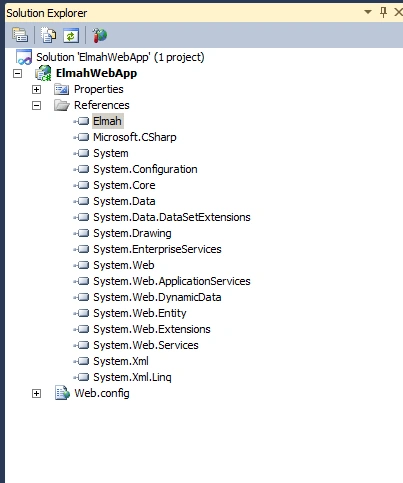
Next, make the appropriate ELMAH entries in Web.config. In ConfigSections, add the following:
<sectionGroup name="elmah">
<section name="security" requirePermission="false" type="Elmah.SecuritySectionHandler, Elmah"/>
<section name="errorLog" requirePermission="false" type="Elmah.ErrorLogSectionHandler, Elmah"/>
<section name="errorMail" requirePermission="false" type="Elmah.ErrorMailSectionHandler, Elmah"/>
<section name="errorFilter" requirePermission="false" type="Elmah.ErrorFilterSectionHandler, Elmah"/>
</sectionGroup>
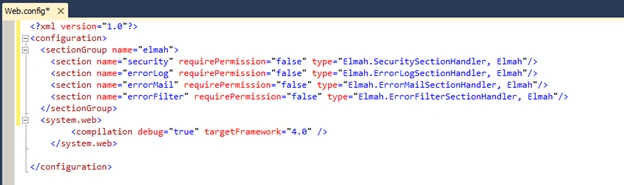
Add this top level element:
<elmah>
<security allowRemoteAccess="yes"/>
</elmah>
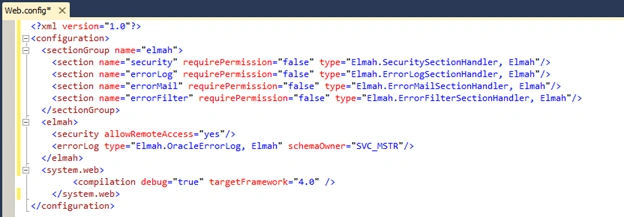
Under httpModules add this line:
<add name="ErrorLog" type="Elmah.ErrorLogModule, Elmah"/>
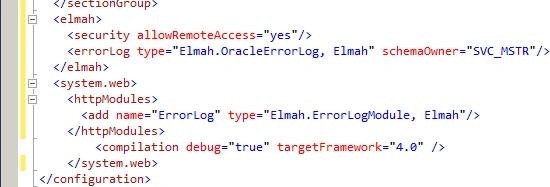
Under httpHandlers, add:
<add verb="POST,GET,HEAD" path="elmah.axd" type="Elmah.ErrorLogPageFactory, Elmah"/>
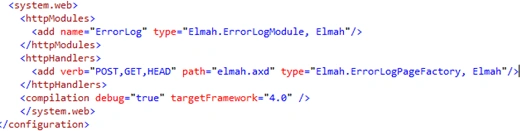
Finally, add this top level element:
<location path="elmah.axd">
<system.web>
<authorization>
<deny users="?"/>
</authorization>
</system.web>
</location>
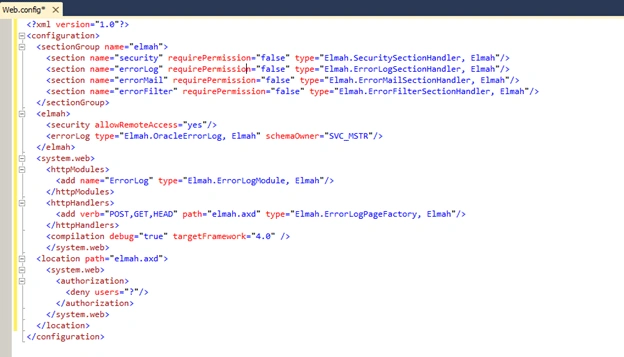
That's all. You completed the configuration to start the ELMAH.
You can now see the elmah.axd file. Open your browser and type http://localhost:%3Cport%3E/elmah.axd
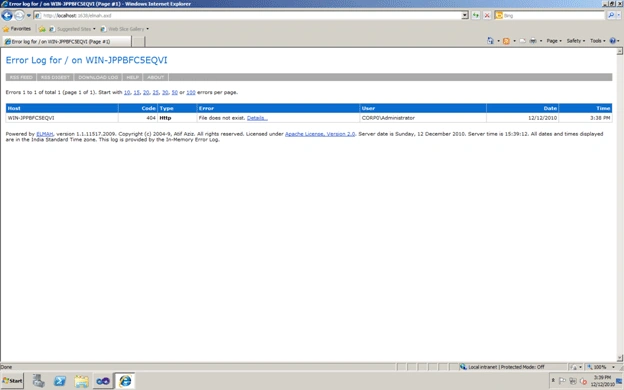
You will now create some exception intentionally like divide by zero, calling the page which does not exist etc.
Create a webform and put the following code in page_load section.
int temp = 0;
Response.Write(Convert.ToString(125 / temp));
Run the page and you will see the "yellow death screen" page.
Again run the elmah.axd page and you will find the exception details logged in the page. Try to access the page which doesn't exist in application and the exception logged in elmah.axd page. So any application exception will log and display in elmah.axd file.
Untill this point, I did not change any application specific code. I wrote some configuration in web.config and used the elmah.dll and my exception logging starts. That is the main beauty of ELMAH.
Moving next, I will show you how to log this exception details in SQL Server database. The first task is to create the tables in the database. Open the downloaded ELMAH folder and locate the SQLServer scripts under db folder and run against your database. The ELMAH_Error table and stored procedures will be created.
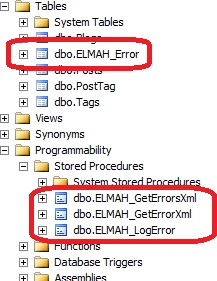
Add a connection string element in web.config to point to the database.
<connectionStrings>
<add name="ElmahConnectionString" connectionString="Data Source=.\sqlexpress;Initial Catalog=EFBlogs;Integrated Security=True;Pooling=False"/>
</connectionStrings>
Add following code in web.config under top level <elmah> tag.
<errorLog type="Elmah.SqlErrorLog, Elmah" connectionStringName="ElmahConnectionString"/>
That's it. Run the pages that will raise exception and you will see the exception details starts logging in ELMAH_Error table.
Tridip BhattacharjeePosted Dec 22, 2017, 11:33 AM
How to integrate elmah in class library project. if possible then we can call elmah api from any layer to log error manually. share if u know.
Bhuvanesh MohankumarPosted May 13, 2016, 10:36 AM
Good one
Asfend YarPosted Feb 29, 2016, 1:44 PM
accept the request kindly
Asfend YarPosted Feb 29, 2016, 1:43 PM
thanks
ahsan sadequePosted Sep 22, 2011, 3:27 AM
hi this information is really useful. From what i understand the ELMAH only records runtime errors what if you want to record compile time errors. Can u give some hints like class or API that could help me. My task is to build a .DLL that could be referenced in any application(for now only c#) to record compile errors in debug mode to a database. It would be really helpful
Sam HobbsPosted Jan 10, 2011, 2:44 AM
Is it possible to log exceptions to the Application Events log? One of them that the Event Viewer shows? Perhaps there is a good reason to not do that, such as too much data, but it seems to be a useful option. I looked in the ELMAH page and did not see a mention of use of the Application Events log. Regardless, ELMAH does look useful; thank you for tellling us about it.
Manikavelu VelayuthamPosted Jan 10, 2011, 12:46 AM
Really its a cool plugin, In one of my project, I have integrated this plugin. Very simple to integrate in any projects, It can be plugged into any of the existing projects also. Very Few Steps to Plug In. User Interface of displaying the error reports is also good.