

The ASP.NET login controls provide a robust login solution for ASP.NET Web applications without requiring programming. By default, login controls integrate with ASP.NET membership and forms authentication to help automate user authentication for a Web site. It provides you with a ready-to-use user interface that queries the user name and password from the user and offers a Log In button for login. It validates user credentials against the membership API and encapsulates the basic forms authentication functionality like redirecting back to the original requested page in a restricted area of your application after the successful login.
The Login control displays a user interface for user authentication. The Login control contains text boxes for the user name and password and a check box that allows users to indicate whether they want the server to store their identity using ASP.NET membership and automatically be authenticated the next time they visit the site.
The Login control has properties for customized display, customized messages, and links to other pages where users can change their password or recover a forgotten password. The Login control can be used as a standalone control on a main or home page, or you can use it on a dedicated login page. If you use the Login control with ASP.NET membership, you do not need to write code to perform authentication. However, if you want to create your authentication logic, you can handle the Login control's Authenticate event and add a custom authentication code.
Note. Login controls might not function correctly if the Method of the ASP.NET Web page is changed from POST (the default) to GET.
- Start Microsoft Visual Studio 2008
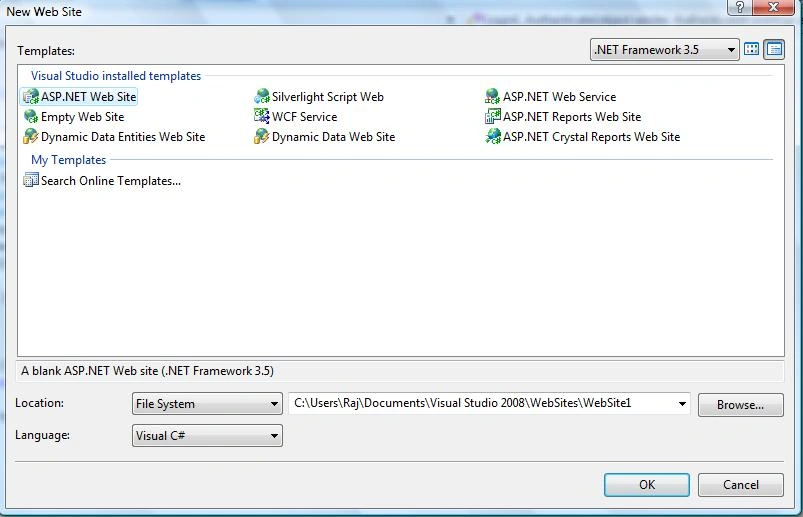
- Create a new ASP.NET WebSite, Like this.
- Drag and drop the login control on pa age from ToolBox.
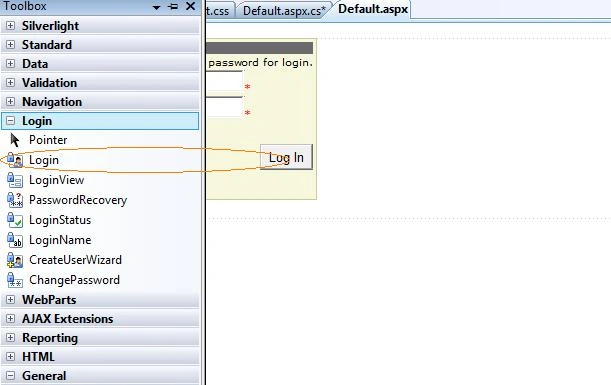
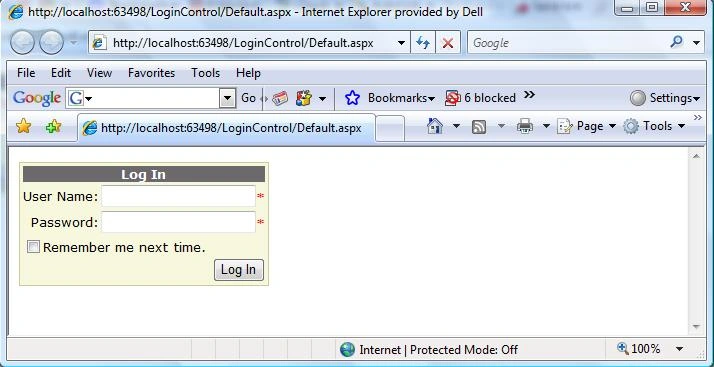
Figure 1.
Whenever the ser hits the login button, the control automatically validates the user name and password using the membership API function Membership.ValidateUse() and then ccallFormAuthentication.redirectFromLoginPage() if the validation was successful. All options on the UI of the LoginControl affect the input delivered by the control to these methods. For Example, if you click the "Remember me next time" check box, it passes the value true to the createPresistentCookie parameter of the RedirectFromLoginPage() method. Therefore, the FormAuthenticateModule creates a persistent cookie.
There are three Login Tasks by default.
- Auto Format: you can select default schemes.
- Convert To Template: You can edit the content of Login Control.
- Administer Website: You can configure Web Site Administration Tools, Like Security, Application, Provider.
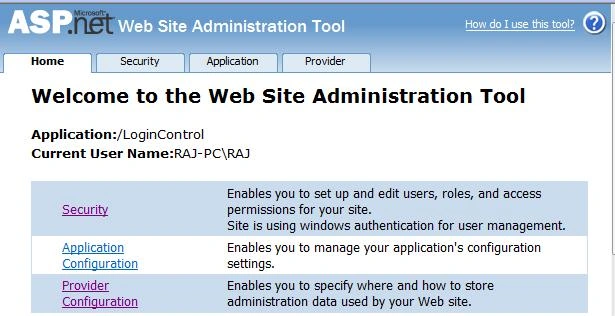
Figure 2<form id="form1" runat="server"> <div> <asp:Login ID="Login1" runat="server" BackColor="#F7F7DE" BorderColor="#CCCC99" BorderStyle="Solid" BorderWidth="1px" Font-Names="Verdana" Font-Size="10pt"> <TitleTextStyle BackColor="#6B696B" Font-Bold="True" ForeColor="#FFFFFF" /> </asp:Login> </div> </form>
You can change the styles of LoginControl using css too, Like this.
.LoginControl
{
background-color:#F7F7DE;
border-color:#CCCC99;
border-style:solid;
border-width:1px;
font-family:Verdana;
font-size:10px;
}
And now apply CSS to control.
<html xmlns="http://www.w3.org/1999/xhtml">
<head runat="server">
<title>Login Control</title>
<link href="StyleSheet.css" type="text/css" rel="Stylesheet" />
</head>
<body>
<form id="form1" runat="server">
<div>
<asp:Login ID="Login1" runat="server" CssClass="LoginControl">
<TitleTextStyle BackColor="#6B696B" Font-Bold="True" ForeColor="#FFFFFF" />
</asp:Login>
</div>
</form>
</body>
</html>
If you running the page and if the CSS file is placed in a directory where anonymous access is denied, add the following configuration for the CSS file to your web.config file.
<location path="StyleSheet.css">
  <system.web>
    <authorization>
      <allow users="*"/>
    </authorization>
  </system.web>
</location>
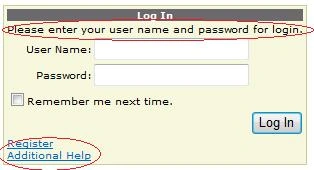
You can add several hyperlinks to your Login control, such as a hyperlink to a help text page, or a hyperlink to to a registration page.
<asp:Login ID="Login1" runat="server" CssClass="LoginControl"
           CreateUserText="Register"
           CreateUserUrl="~/Register.aspx"
           HelpPageText="Additional Help"
           HelpPageUrl="~/Help.aspx"
           InstructionText="Please enter your user name and password for login.">
  <TitleTextStyle BackColor="#6B696B" Font-Bold="True" ForeColor="#FFFFFF" />
</asp:Login>
Looks like this
Here is.CS Code
using System;
using System.Collections.Generic;
using System.Linq;
using System.Web;
using System.Web.UI;
using System.Web.UI.WebControls;
using System.Data.SqlClient;
public partial class _Default : System.Web.UI.Page
{
    protected void Page_Load(object sender, EventArgs e)
    {
        if (!this.IsPostBack)
            ViewState["LoginErrors"] = 0;
    }
    protected void Login1_Authenticate(object sender, AuthenticateEventArgs e)
    {
        if (YourValidationFunction(Login1.UserName, Login1.Password))
        {
            // e.Authenticated = true;
            Login1.Visible = false;
            MessageLabel.Text = "Successfully Logged In";
        }
        else
        {
            e.Authenticated = false;
        }
    }
    protected void Login1_LoginError(object sender, EventArgs e)
    {
        if (ViewState["LoginErrors"] == null)
            ViewState["LoginErrors"] = 0;
        int ErrorCount = (int)ViewState["LoginErrors"] + 1;
        ViewState["LoginErrors"] = ErrorCount;
        if ((ErrorCount > 3) && (Login1.PasswordRecoveryUrl != string.Empty))
            Response.Redirect(Login1.PasswordRecoveryUrl);
    }
    private bool YourValidationFunction(string UserName, string Password)
    {
        bool boolReturnValue = false;
        string strConnection = "server=.;database=Vendor;uid=sa;pwd=wintellect;";
        SqlConnection sqlConnection = new SqlConnection(strConnection);
        String SQLQuery = "SELECT UserName, Password FROM Login";
        SqlCommand command = new SqlCommand(SQLQuery, sqlConnection);
        SqlDataReader Dr;
        sqlConnection.Open();
        Dr = command.ExecuteReader();
        while (Dr.Read())
        {
            if ((UserName == Dr["UserName"].ToString()) & (Password == Dr["Password"].ToString()))
            {
                boolReturnValue = true;
            }
        }
        Dr.Close();
        return boolReturnValue;
    }
}
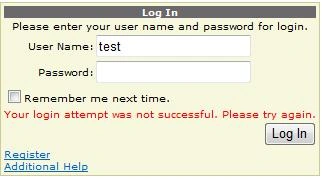
If you insert the wrong username and password then the message will show like this.
If you insert the right username, and password then redirect your page wherever you want or you can show ma message in ErrorLabel, Like this.

I am attaching my database with the application in the pp_Data folder, if u want to use my database then attach my MDF file.
Any questions or queries ask me any time.
Miguel SanchezPosted Feb 26, 2020, 10:41 AM
Hi. Where can i find the connectionstring that the control uses to access the aspnetdb database?. By default VS creates the App_data folder that contains the aspnetdb database. This is because my project runs well in Visual Studio, i can autenticate my users, manage them with then ASP net configuration tool but when i publish my site i can't authenticate my users i get "Your Login attemp was not successful. Please try again." message. i checked all the permissions to the folder and did all the suggestions that i found in some forums, but i can't get authenticate my users. Thank you in advence.
kumari PatilPosted Apr 23, 2015, 1:16 PM
please instruct me, I am new to asp.net
kumari PatilPosted Apr 23, 2015, 1:15 PM
I am getting an error like "A network-related or instance-specific error occurred while establishing a connection to SQL Server. The server was not found or was not accessible. Verify that the instance name is correct and that SQL Server is configured to allow remote connections. (provider: Named Pipes Provider, error: 40 - Could not open a connection to SQL Server)"
hothorasman panjaitanPosted Nov 28, 2014, 11:04 AM
how to logout after login succes
RS PrajapatiPosted Sep 17, 2014, 1:17 AM
Good.example
PunitaPosted Oct 2, 2012, 8:18 AM
I want to develop a site--Online Examination system. For this How can i develop the admin panel??plz explain in detail i am new to asp.net.
Yogesh UpretiPosted Aug 9, 2011, 4:30 AM
Hello My dear i have implemented in my local server but still there is a problem with my Login1.PasswordRecoveryUrl not working well while i have typed password wrong more than three times. . . Please revert me back Thanks in advance Yogesh chandra upreti
Hassan ShaqhanPosted Jul 11, 2011, 11:52 AM
How to deploy ASPNETDB.mdf to remote server (from local PC to Internet) and what changes that required to be done on web.config file? Thank you - Hassan Shaqhan - [email protected]
sathya vcsPosted Jul 10, 2011, 9:25 AM
This working only in the current page. How to make to work login status and login name for all the page. Regards, Sathya
jasbir singhPosted May 12, 2011, 3:43 AM
how to make admin panel in asp.net with .cs
rajeev ranjanPosted Mar 25, 2011, 1:08 AM
sir can you please instruct me to design logout page using master page I'm a fresher to .net so please help me out
SunitaPosted Feb 17, 2011, 6:22 AM
Information is worhit.
MalekPosted Feb 13, 2011, 7:21 PM
the while loop should be like this -------------------------------------------------- while (Dr.Read()) { if ((username == Dr["username"].ToString()) & (password == Dr["password"].ToString())) { boolReturnValue = true; break; } } Dr.Close(); return boolReturnValue; -------------------------------------------------- other wise, it's just going to check the first username in the database.
Rajendra SalokhePosted Feb 7, 2011, 9:59 PM
All articles of Raj Kumar are greate.
satish morePosted Jan 20, 2011, 10:00 AM
best of luck in future.....
ghafran abbasPosted Dec 25, 2010, 6:20 AM
"A network-related or instance-specific error occurred while establishing a connection to SQL Server. The server was not found or was not accessible. Verify that the instance name is correct and that SQL Server is configured to allow remote connections. (provider: Named Pipes Provider, error: 40 - Could not open a connection to SQL Server)" waiting for yours reply
Durga SekaraneditedPosted Sep 15, 2010, 3:21 AMEdited Sep 15, 2010, 3:22 AM
hi Raj, This example is not working. i am trying to solve that problem. but no answer. If i gave username,password ,then brower running without answer like "login successfully". It showed time expired error.
saeedPosted Jun 10, 2010, 4:05 AM
At first thanks for this topic and how can i use oracle provider in web sit administration tool(Figure 2.) because i have one provider (AspNetSqlMembershipProvider) i want (OracleProvider ) how can it be apear ?<?xml:namespace prefix = o ns = "urn:schemas-microsoft-com:office:office" /><o:p> </o:p>
ankit mahendruPosted Feb 24, 2010, 6:45 AM
Hey thanks alot ..you saved me alot of time...this was awesome..thanks alot !!
doam minh tamPosted Dec 12, 2009, 8:35 AM
thanks you
Pubudini PrasannaPosted Oct 26, 2009, 2:46 AM
Your article is very clear to understand. Thank you so much.
mohamed anisPosted Sep 9, 2009, 6:40 AM
thanks
MONIAPosted Jul 8, 2009, 11:45 AM
Hi Thank u for the post. I am new to .NET and ur post really helped me a lot. can u please post the code for remember me next time option? Thanks in Advance Viki
PedroPosted Apr 14, 2009, 11:30 PM
I am trying to set up a login page and have to use the ASP.NET Web Site Administration Tool in the process. I am running Visual Studio as an administrator. I got the following error message when I clicked to the Security tab in the Administration Tool: There is a problem with your selected data store. This can be caused by an invalid server name or credentials, or by insufficient permission. It can also be caused by the role manager feature not being enabled. Click the button below to be redirected to a page where you can choose a new data store. The following message may help in diagnosing the problem: Unable to connect to SQL Server database. Any ideas what is going on? Peter
Qais AkhtareditedPosted Oct 6, 2008, 5:38 PMEdited Feb 20, 2011, 11:11 PM
Your example is not working.............
Ambika kandasamyPosted Sep 23, 2008, 6:56 AM
Hi, Nice example. Could you please explain detail on asp.net website administration tool? which options to be clicked how to get asp_net.mdf db? Regards, Ambika