
This is the DDL trigger for security purposes as determined by company polices. Basically a logon trigger fires Stored Procedures in response to a LOGON event. When a user session is established with an instance of SQL Server the event is raised, that was introduced in SQL Server 2005 SP2.
It can be used for audit and control server sessions. You can also track the login activity, restricting logins to SQL Server, or limiting or denying the number of login sessions for a specific user. You can define more than one Logon trigger on the server.
It works when the user has access to the instance, then the trigger fires.
For example:
- USE DBATest
- GO
- -- Creating audit table for login details
- CREATE TABLE Auditing
- (
- SessionId INT,
- LogonTime DATETIME,
- HostName VARCHAR(50),
- ProgramName VARCHAR(500),
- LoginName VARCHAR(50),
- ClientHost VARCHAR(50))
- GO
- USE [MASTER]
- GO
- -- Creating Audit trigger for logon
- CREATE TRIGGER Audit_TR
- ON ALL SERVER WITH EXECUTE AS 'sa'
- FOR LOGON
- AS
- BEGIN
- DECLARE @LogonTRData XML,
- @EventTime datetime,
- @LoginName varchar(50),
- @ClientHost varchar(50),
- @LoginType varchar(50),
- @HostName varchar(50),
- @AppName varchar(500)
- SET @LogonTRData = EVENTDATA()
- SET @EventTime = @LogonTRData.value('(/EVENT_INSTANCE/PostTime)[1]', 'datetime')
- SET @LoginName = @LogonTRData.value('(/EVENT_INSTANCE/LoginName)[1]', 'varchar(50)')
- SET @ClientHost = @LogonTRData.value('(/EVENT_INSTANCE/ClientHost)[1]', 'varchar(50)')
- SET @HostName = HOST_NAME()
- SET @AppName = APP_NAME()--,program_name()
- INSERT INTO DBATest.dbo.Auditing
- (
- SessionId,
- LogonTime,
- HostName,
- ProgramName,
- LoginName,
- ClientHost
- )
- SELECT
- @@SPID,
- @EventTime,
- @HostName,
- @AppName,
- @LoginName,
- @ClientHost
- END
- GO
The EVENTDATA() is an XML document that is only available within the context of the DDL Trigger. It has the following schema:
- <EVENT_INSTANCE>
- <EventType>event_type</EventType>
- <PostTime>post_time</PostTime>
- <SPID>spid</SPID>
- <ServerName>server_name</ServerName>
- <LoginName>login_name</LoginName>
- <LoginType>login_type</LoginType>
- <SID>sid</SID>
- <ClientHost>client_host</ClientHost>
- <IsPooled>is_pooled</IsPooled>
- </EVENT_INSTANCE>
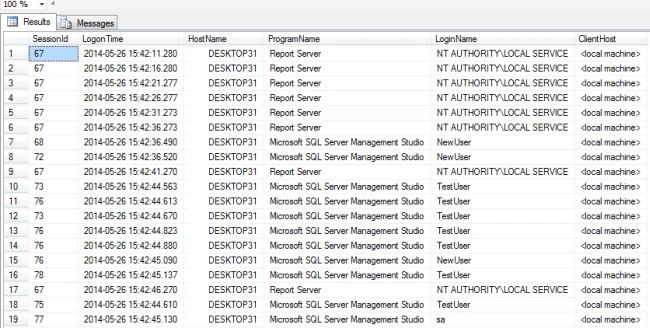
In the following screen you can see the audit table details:
You can restrict a user from opening more than 5 connections with the server at the same time.
For example:
- CREATE TRIGGER Connection_Limit_tr
- ON ALL SERVER WITH EXECUTE AS 'sa'
- FOR LOGON
- AS
- BEGIN
- IF ORIGINAL_LOGIN() <> 'sa'
- AND
- ( SELECT COUNT(*)
- FROM sys.dm_exec_sessions
- WHERE Is_User_Process = 1 AND
- Original_Login_Name = ORIGINAL_LOGIN()
- ) > 1
- ROLLBACK
- END
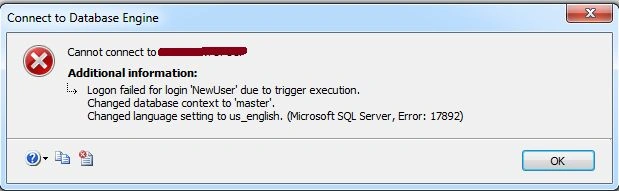
"When" limits the connections for all Logins except 'sa'. Once the connection limit is reached the user will not be able to create a new connection. Then an error message will be issued like this:
You can place restrictions on a user outside of office hours.
For example:
- CREATE TRIGGER Connnection_TimeLimit_TR
- ON ALL SERVER WITH EXECUTE AS 'sa'
- FOR LOGON
- AS
- BEGIN
- IF ( (ORIGINAL_LOGIN() <> 'sa')
- AND
- (DATEPART(HOUR, GETDATE()) BETWEEN 16 AND 17)
- )
- ROLLBACK
- END
I have defined here the out-of-office hours are 8 AM to 6 PM.
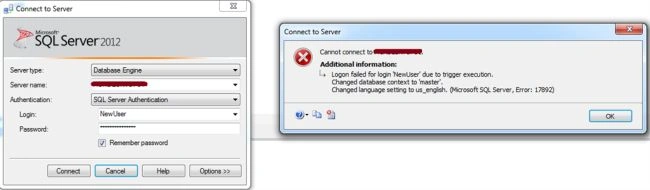
If you want to connect during out of office hours, then the following error will be shown.
You can DROP a LOGON Trigger using the following script:
- DROP TRIGGER triggerName ON ALL SERVER
Shivom AgarwalPosted May 27, 2014, 3:30 AM
thanks Anupam your blog is also nice one
Anupam SinghPosted May 27, 2014, 1:46 AM
hi Shivom , I have also posted the same but few days back that was in short. you have nicely explained it. nice. my blog is here http://www.c-sharpcorner.com/Blogs/15520/auditing-sql-server-using-logon-trigger.aspx