

Dear friend, in this article I will take you from the backdoor of C# code execution and show you the step-by-step operation of code execution in C#. You might think that "I do not bother at all with an execution plan or I don't want to poke my nose into it". Yes, you are right to a certain point, because code execution may not help you to increase your CTC. (Yes I am talking about salary , the first thing that comes to mind after getting an interview call... Ha Ha.) It will however make you a better programmer from a good programmer or increase your peace of mind when you see the same output produced by the computer after executing the same program in your mind.
And us developer people generally ignore it because the .NET framework is trained enough to execute code properly to get the desired output.
Here we will start our journey by observing a very small example and gradually we will proceed to complex ones and in our journey we will try to concentrate on a few things that we have studied in our college days but not seen practically.
Let me ask you one question. Do you still remember assembly language programming? If you are not a chip level programmer then it's a blur in your mind and most probably you are trying to recap a few instructions of the 8085 or 8086 microprocessor from your good old college days. I am talking about low-level programming because the IL code produced by the .NET Framework is very similar to assembly level programming. And if you have a good idea of that then this tutorial will be a piece of cake for you.
Understanding a few instructions at first
Let's learn a few IL code instructions produced by .NET. Before beginnig that, a quick review is nevcessary for a better understanding. Actually the number of instruction sets depends on the computer architecture. If you use an 8-bit computer (what the hell, man; people are using 64-bit and still now you are in 8 bits!! Ha Ha) then the total number of instructions will be 256. For your 64-bit system calculation remains for you . Obviously our interest will be those instructions that we need to understand to read this article completely.
- ldstr : load string constant onto stack
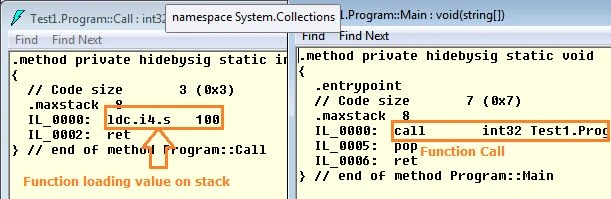
- ldc.i4.s : load 32 bit numeric constant onto stack
- ldlco : load local variable data onto stack (top of the stack obviously)
- call : call to static function
With those instructions let's clear up a few basic theoretical concepts, as in the following:
- All data (value types) are first created on the stack and then moved to a local variable.
- For arithmetic or any data manipulation purposes a stack is used.
- Before calling a function the function argument / parameter loads one stack and then during execution it is popped from the stack.
- The return value from the function does not get to the caller function (what we generally think) it is just put onto the stack
That is however too much theory. Let's see it in action.
How does it get the result in your day 1 program?
Yes, I am talking about the "Hello World" program. Let's print one hello world message in a program and see the execution steps. In the following my simple name print program is:
using System;
using System.Collections.Generic;
using System.Linq;
using System.Text;
using System.Diagnostics;
using System.IO;
using System.Net;
using System.Net.NetworkInformation;
namespace Test1
{
    class Program
    {
        static void Main(string[] args)
        {
            Console.WriteLine("Sourav Kayal");
        }
    }
}
And here is the IL code:
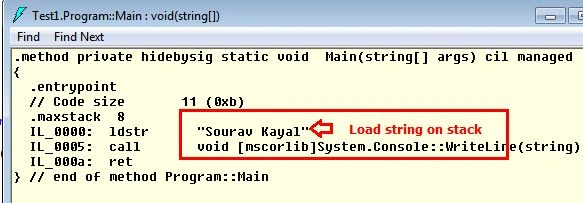
Start to discuss the step-by-step of code execution.
-
IL_0000 : ldstr "sourav Kayal" : Load string constant onto stack
-
IL_0005: call: Call to WriteLine() function with value of top of stack
-
IL_000a: ret: Return from the function.
Here we are seeing the printing of a simple string in the console output window. At first the string is loaded into the stack (because this is the argument of the WriteLine function) then the WriteLine function is called and the argument value is taken from the top of the stack.
Note: The point is clear here; before calling a function it is necessary for the argument to be loaded onto the stack. If you don't believe that then wait for the next few examples.
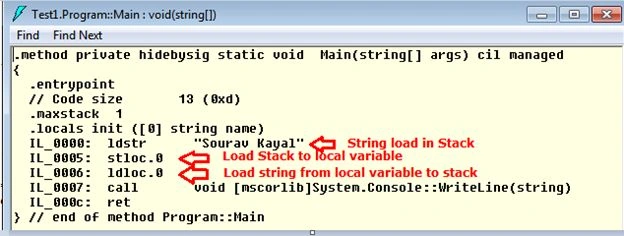
The following prints a string by declaring it first.
using System;
using System.Collections.Generic;
using System.Linq;
using System.Text;
using System.Diagnostics;
using System.IO;
using System.Net;
using System.Net.NetworkInformation;
namespace Test1
{
    class Program
    {
        static void Main(string[] args)
        {
            string name = "Sourav Kayal";
            Console.WriteLine(name);
        }
    }
}
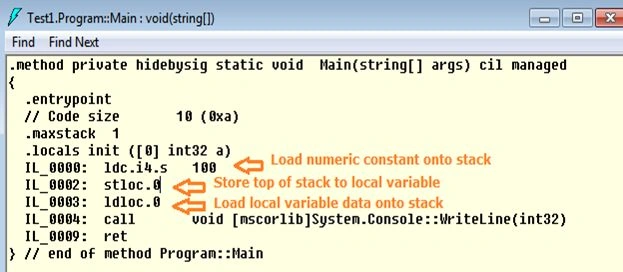
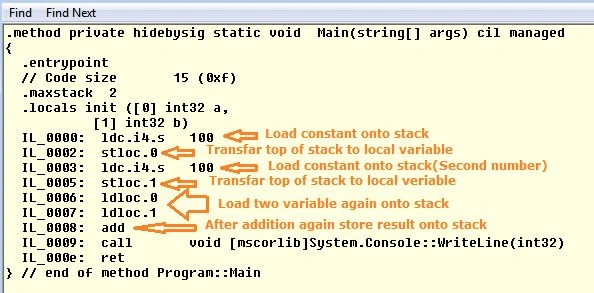
This is the corresponding IL code.
frank frankPosted Jul 11, 2022, 10:43 PM
What program did you use to view the IL code ?
ankur goyalPosted Feb 15, 2016, 11:49 AM
very nicely explain
Shiva LordPosted Sep 18, 2014, 7:06 PM
Nice Article Sourav
Sourav KayalPosted Jun 29, 2013, 5:53 AM
Thanks dear Sandeep , for your valuable command. Actually programming is nothing but a fun. And when we will represent it it should be with fun.
Sandeep Singh ShekhawatPosted Jun 28, 2013, 10:09 PM
Again good one!! Thanks to share it with fun(ha ha..)!! I really enjoy it during reading. I like your way of explaining. Its clear Value ---> Variable Location ---> Load value to Variable ---> Operation..Keep it up.