

Introduction
Apple’s latest operating system, macOS Tahoe (version 26), debuts a visually stunning redesign and deep AI-powered improvements. With the launch of the public beta in July 2025, macOS Tahoe ushers in the Liquid Glass design language and reimagines productivity on Mac.
Apple has rolled out the first public beta of iOS 26, introducing its sleek new “Liquid Glass” interface and enhanced AI capabilities. This early release gives users a chance to explore the latest features ahead of the official launch expected later this fall.
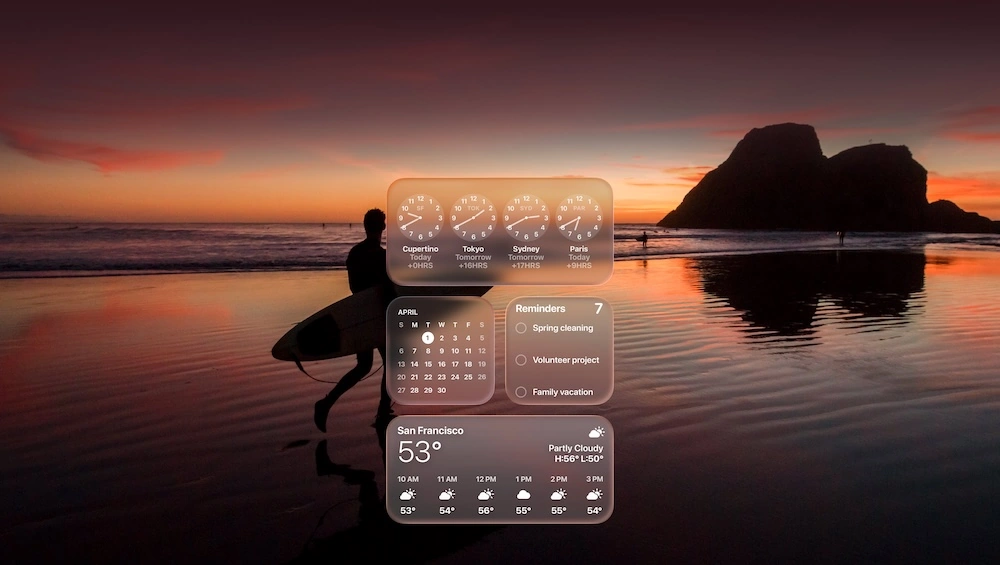
1. Liquid Glass – The New Visual Identity
-
Emphasizes translucency and real-time visual interaction, with refractions, adaptive controls, and dynamic Dock/app icons.
-
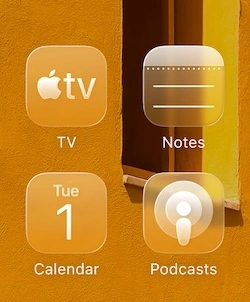
Updated app icons now support light/dark appearances, personalized color tints, and a clear look aligned with users’ wallpapers.


2. Apple Intelligence: Smarter, On‑Device AI
-
Integrated across macOS, iOS, and iPadOS, Apple Intelligence enables:
-
Live translation in Messages and FaceTime

-
Clipboard history, chat summarization, and intelligent shortcut automation.

-
-
macOS Tahoe 26 introduces exciting new ways to express yourself with visuals using tools like Genmoji and Image Playground. With Genmoji, you can create personalized emojis by mixing emoji and text descriptions

3. New Apps
-
A dedicated Phone app on Mac now handles calls, live translation, and messaging without needing to touch the iPhone.

 .
. 
-
Journal app debuts on macOS, making note-taking easier on a full keyboard and integrated with multimedia support.
-
Spotlight enhancements include clipboard history and smarter search capabilities.
-
Shortcuts are enhanced with Apple Intelligence, enabling richer workflows and automations on the Mac.
4. Productivity Features
-
Perform hundreds of actions directly from Spotlight without lifting your hands off the keyboard. New quick keys let you trigger common tasks even faster

-
Access your apps and frequently used files instantly. Get smart suggestions based on your daily usage patterns.

-
Run shortcuts automatically at specific times or when triggered by action

5. First Impressions: Reception & Criticism
-
While the visual overhaul is bold, many users feel Liquid Glass offers only modest enhancements compared to the clean look of macOS Sequoia.
-
Functional changes like the Phone app, Spotlight, and clipboard features are praised for their practicality.
-
Overall, Tahoe is seen as a solid incremental update, setting the stage for future refinements before its full release in fall 2025.
✅ Feature Highlights
| Area | Highlights |
|---|---|
| Design | Liquid Glass UI: translucency, tinted icons, dynamic Dock and menus |
| AI Integration | Apple Intelligence: writing tools, visual search, live translation |
| Native Apps | New Mac Phone and Journal apps, enriched Shortcuts and Spotlight |
| Productivity Tools | Clipboard history, window tiling, Focus Control, seamless Continuity |
| Early Feedback | Mixed design reviews; functional improvements appreciated |
🖥️ macOS Tahoe 26 vs macOS Sequoia: Feature Comparison
| Feature Area | macOS Sequoia (25) | macOS Tahoe (26) | What’s New in Tahoe? |
|---|---|---|---|
| Design | Clean, glassy Big Sur-style UI with minor tweaks | Liquid Glass UI: Fully translucent menus, tinted icons, dynamic Dock | Major visual overhaul with light/dark blending |
| App Icons & Dock | Standard adaptive icons | Icons adapt to wallpaper tint; Dock has liquid-glass transparency | Personalized icons and Dock based on your setup |
| Spotlight | Search suggestions, file access | Clipboard history, on-device actions, richer UI | Smarter Spotlight with memory & automation |
| Control Center & Widgets | Minimal customization, fixed layout | Tinted widgets, resizable panels, customizable controls | More expressive UI and customization options |
| Siri & AI | Basic Siri commands | Apple Intelligence: AI-based writing, summarizing, image tools | Major upgrade with system-wide AI tools |
| Writing Tools | Manual editing in Notes/Mail | Built-in proofreading, tone changes, ChatGPT-assisted replies | First time AI is integrated in writing across apps |
| Shortcuts & Automations | Manual Shortcuts setup | Enhanced with AI suggestions and natural language actions | AI-assisted automation builder |
| Phone App on Mac | None | All-new Phone app: Make/receive calls, live translations | Major addition, connects Mac and iPhone deeper |
| Continuity Features | Universal Clipboard, AirDrop, Sidecar | iPhone Mirroring, Call Screening, Hold Assist | Mac-iPhone interactions become seamless |
| Journal App | Only on iPhone in Sequoia | Available on Mac, syncs with iPhone/iPad | Native journaling app for macOS |
| Multitasking & Tiling | Manual window snapping | Smart window tiling, keyboard shortcuts, new layout hints | More intuitive multitasking support |
| Gaming & Graphics | Game Mode, MetalFX | Games app, Game Overlay, AI-based performance suggestions | Game management and overlay integration |
| Accessibility | Standard Apple accessibility tools | AI-powered voice input, advanced Magnifier, smart screen reader | Smarter and more customizable accessibility options |
| Beta Availability | Public Beta mid-2024 | Public Beta July 2025 | Available now as beta for testing |
| System Requirements | Intel & Apple Silicon Macs | Intel support ends after Tahoe; Optimized for Apple Silicon | Last macOS to support Intel Macs |
✅ Supported Devices
| Device Type | Models Supported |
|---|---|
| MacBook Air | Apple Silicon models (M1 or later, 2020 and newer) |
| MacBook Pro | Apple Silicon models (2020 and newer) |
| MacBook Pro 16″ (2019 – Intel) | |
| MacBook Pro 13″ (2020 – Four Thunderbolt 3 ports) | |
| iMac | 2020 and later |
| Mac mini | 2020 and later |
| Mac Studio | 2022 and later |
| Mac Pro | 2019 and later |
📅 Timeline & Availability
-
Public beta released yesterday; full release expected in Fall 2025.
-
Liquid Glass design spans all Apple platforms under a year‑based version naming system (iOS, iPadOS, macOS all labeled “26”).
-
AI features, localized for India (including Writing Tools, Image Playground, and Genmoji), are available widely on supported hardware.
💬 Conclusion
macOS Tahoe 26 marks a new chapter for Apple, blending aesthetic reinvention with powerful, on-device intelligence. While early user feedback favors practicality over fashion, the underlying AI innovations and continuity tools hint at a more capable and connected Mac experience. As users explore Tahoe through its public beta this summer, Apple will fine-tune the system ahead of its polished release in autumn.
Join the conversation! Your thoughts help the community grow.