
We can drag and drop selected code of a block as needed.
We will learn this step-by-step.
Step 1: First open your Visual Studio application. Select a line of code and drag and drop this selected code to the Toolbox general section like the following: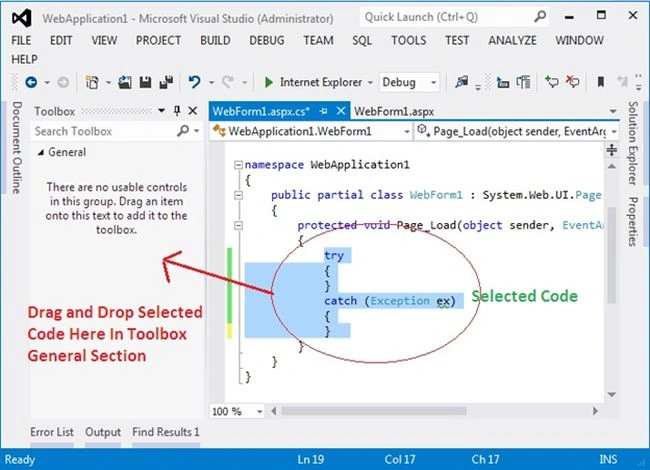
Image 1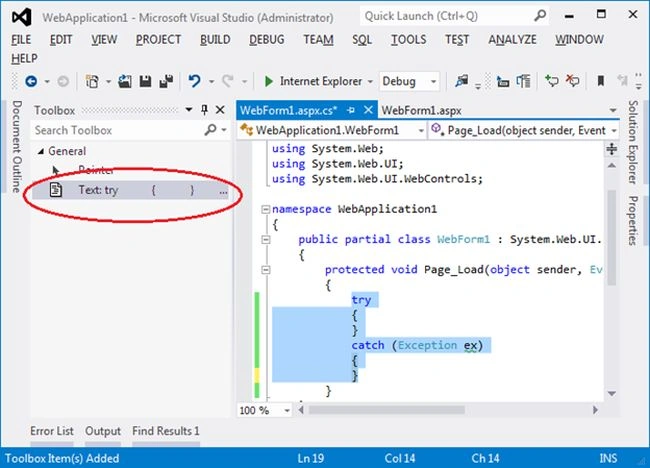
Image 2
Step 2: If you want to rename this block in the Toolbox then right-click on your item and select "Rename Item".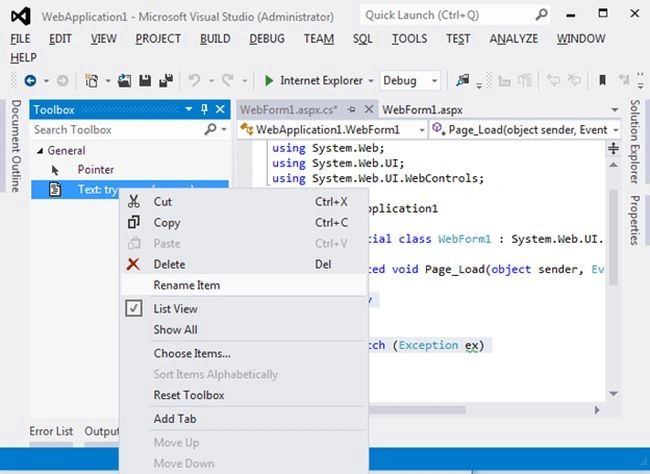
Image 3
Image 4
Now you can use this code of block anywhere in your application by dragging and dropping it.

Custom Option in Tool Box in Visual Studio
Join the conversation! Your thoughts help the community grow.
Sign in to leave a comment
It is the same account you read, post and publish with — and you will come straight back to this page.
Faizal HussainPosted Nov 9, 2014, 4:26 AM
Rahul sir, Thanks for sharing..
Chandradev PrasadPosted Nov 9, 2014, 3:28 AM
Nice trick Rahul.