

Introduction
If you are running wild with AngularJS, then you may know you can implement business logic in your controllers and use them in different parts of your application just by calling them. But as we all know, too much code in one place is never a good idea. And it is considered to be a good habit not to write complete business logic in a controller because you may have to use those same logics again in another controller. So doing the same thing over and over again is an overkill and also error prone.
Background
So in this article, I’m going to show you how AngularJS providers can make your coding life cycle easier by separating these business logic from your controllers and prevent from injecting bugs in your application.
Getting Started
So let’s start by creating a simple object in JavaScript. There are many ways of creating an object in JavaScript but I’m going to show you the easiest and most granted way. And that is known as creating an object by object literals. Firstly, I want to create an arnoldSchwarzenegger (A Hollywood Actor) object. The object will have a property for holding the first name of the actor, a property for the last name, a property for the catch phrase and lastly a property which will make a string with all those previous properties and show it to the application users.
Using the Code
Creating an object literal is as easy as pie. It is just some key value pairs. All you have to do is to define a key [a string representing the property name] and a value associated with it. So from that concept, our Arnold Schwarzenegger object literal will look like the following code snippet:
- var arnoldSchwarzenegger = {
- firstName: "Arnold",
- lastName: "Schwarzenegger",
- catchPhrase: "Hasta la vista, baby",
- sayCatchPhrase: function () {
- return this.firstName + " " + this.lastName + " says " + this.catchPhrase;
- }
- };
- arnoldSchwarzenegger.sayCatchPhrase();
"Arnold Schwarzenegger says Hasta la vista, baby"
Remember to add those first brackets when you call sayCatchPhrase. Since JavaScript don’t have methods for an object, you can bypass this rule by encapsulating a function within a property.
Now it’s time to create the clintEastwood object. All is same as before.
- var clintEastwood = {
- firstName: "Clint",
- lastName: "Eastwood",
- catchPhrase: "Go ahead. Make my day",
- sayCatchPhrase: function () {
- return this.firstName + " " + this.lastName + " says " + this.catchPhrase;
- }
- };
- clintEastwood.sayCatchPhrase();
Factory Pattern
Now let’s create another one. Wait a second!!! You may ask yourself why am I doing the same thing over and over again. Why don’t I just define a class and declare those properties in that class. Then when the time comes, I just instantiate an object of that class and use those properties. Well you are right about the fact that we are doing the same thing over and over again but to our utter luck we don’t have the concept of class in JavaScript.
But don’t worry because where there is a will there is a way. Functions are like the first class citizen in JavaScript language. We can do almost anything with functions. And we can also create an object within a function and return that object. Functions like these are called factory functions.
So creating and returning an actor object with a factory function looks like this:
- var actor = function (firstName, lastName, catchPhrase) {
- return {
- firstName: firstName,
- lastName: lastName,
- catchPhrase: catchPhrase,
- sayCatchPhrase: function () {
- return this.firstName + " " + this.lastName + " says " + this.catchPhrase;
- }
- };
- };
- var clint = actor("Client", "Eastwood", "Go ahead. Make my day");
- lint.sayCatchPhrase();
I hope you like the way I create an object with factory function to restrict myself from doing the same thing again and again. There is another way we can create an object.
Constructor Pattern
Okay, I've shown you how to create an object using JavaScript factory functions. So far so good. Now let me show you another way of creating an object in JavaScript. This workaround includes creating an object using constructor functions. Following this pattern, you would create an object like below:
- var Actor = function (firstName, lastName, catchPhrase) {
- this.firstName = firstName;
- this.lastName = lastName;
- this.catchPhrase = catchPhrase;
- this.sayCatchPhrase = function() {
- return this.firstName + " " + this.lastName + " says " + this.catchPhrase;
- };
- }
- var clint = new Actor("Client", "Eastwood", "Go ahead. Make my day");
- clint.sayCatchPhrase();
"Clint Eastwood says Go ahead. Make my day”
So what is the main difference between these two patterns for creating a JavaScript object? If we create an object with constructor function, the object is born with a type. Means our clint is an Actor type. You can check it in browsers developer console by simply writing clint instanceof Actor which will return true. But creating an object with a factory function doesn't have a type. Also you would use the constructor function pattern when creating an object of a type is too frequent.
AngularJS Providers
Finally, we are ready to talk about AngularJS providers. To be precise, there are five types of providers by which you can provide services or information as data [don’t mix up services with Angular’s own service provider] throughout your application. All you have to do is to define a service type in your application once and use that for lifetime anywhere in your app. Service Types are the following:
- Factory
- Service
- Provider
- Value
- Constant
Objects are main delivery vehicles to ride through different parts of your application and deliver information or services. Angular service providers are ways of creating service objects in some different ways.
Factory
First in the list is the factory. As its’ name goes, creating services with it follows factory function pattern. We discussed about factory function as a way of creating an object in Factory Pattern section.
Nothing new here except for some syntactical sugar on top of the factory function. So if you have an Angular module defined in your app, creating a service using the factory service in that module is something like this:
- var app = angular.module('app', []);
- app.factory('movieFactory',function() {
- return {
- movies: [
- { title: "Die Hard", role: "Officer John McClane", released: "1988" },
- { title: "Unbreakable", role: "David Dunn", released: "2000" },
- { title: "The Sixth Sense", role: "Dr. Malcolm Crowe", released: "1999" },
- { title: "Armageddon", role: "Harry Stamper", released: "1998" },
- { title: "Twelve Monkeys", role: "James Cole", released: "1995" }
- ]
- };
- });
- app.controller('movieController', function ($scope, movieFactory) {
- $scope.movies = movieFactory.movies;
- });
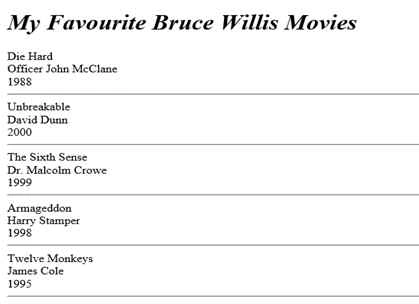
Now if any controller want to use our movies service, it will have to inject the movieFactory first into the controller [see the movieController function parameter], then we bind the movies acquired from our movieFactory's movies array into our $scope.movies model. That’s it we are good to go, if we write our HTML as follows:
- <div ng-controller="movieController">
- <h1><em>My Favourite Bruce Willis Movies</em></h1>
- <div ng-repeat="movie in movies">
- <div>{{movie.title}}</div>
- <div>{{movie.role}}</div>
- <div>{{movie.released}}</div>
- <hr/>
- </div>
- </div>
Service
So factory service provider is a good way of exposing a service. But you may not want to use the factory pattern as a way of exposing a service. Rather, you may want to take advantage of the constructor function pattern as a way of creating a service, which is simply called service.
If you use constructor function pattern, your service provider will look like:
- var app = angular.module('app', []);
- app.service('movieService',function() {
- this.movies = [
- { title: "Die Hard", role: "Officer John McClane", released: "1988" },
- { title: "Unbreakable", role: "David Dunn", released: "2000" },
- { title: "The Sixth Sense", role: "Dr. Malcolm Crowe", released: "1999" },
- { title: "Armageddon", role: "Harry Stamper", released: "1998" },
- { title: "Twelve Monkeys", role: "James Cole", released: "1995" }
- ];
- });
- app.controller('movieController', function ($scope, movieService) {
- $scope.movies = movieService.movies;
- });
- var app = angular.module('app', []);
- function movieService() {
- this.movies = [
- { title: "Die Hard", role: "Officer John McClane", released: "1988" },
- { title: "Unbreakable", role: "David Dunn", released: "2000" },
- { title: "The Sixth Sense", role: "Dr. Malcolm Crowe", released: "1999" },
- { title: "Armageddon", role: "Harry Stamper", released: "1998" },
- { title: "Twelve Monkeys", role: "James Cole", released: "1995" }
- ];
- }
- app.factory('movieFatory', function () {
- return new movieService();
- });
- app.controller('movieController', function ($scope, movieFatory) {
- $scope.movies = movieFatory.movies;
- });
We have a skeleton way of creating a service which is called provider. Angular’s provider exposes a get function by which we can get a reference of our service. Using provider for building the movies service will look like:
- var app = angular.module('app', []);
- function movieService() {
- this.movies = [
- { title: "Die Hard", role: "Officer John McClane", released: "1988" },
- { title: "Unbreakable", role: "David Dunn", released: "2000" },
- { title: "The Sixth Sense", role: "Dr. Malcolm Crowe", released: "1999" },
- { title: "Armageddon", role: "Harry Stamper", released: "1998" },
- { title: "Twelve Monkeys", role: "James Cole", released: "1995" }
- ];
- }
- app.provider('movieProvider', function() {
- this.$get = function getMovieService () {
- return new movieService();
- };
- });
- app.controller('movieController', function ($scope, movieProvider) {
- $scope.movies = movieProvider.movies;
- });
Finally, we’ve our two providers. They are value and constant providers. They are almost the same except for the fact that constants cannot be changed once it is set and values cannot be injected in any configurations [we will discuss about how to inject constants in Angular configuration later].
So let me finish by giving you two simple examples of these two. For declaring a constant service, we will write:
- app.value('actorName', 'Bruce Willis');
- app.controller('movieController', function ($scope, movieProvider, actorName) {
- $scope.movies = movieProvider.movies;
- $scope.actor = actorName;
- });
- <div ng-controller="movieController">
- <h1><em>My Favourite {{actor}} Movies</em></h1>
- <div ng-repeat="movie in movies">
- <div>{{movie.title}}</div>
- <div>{{movie.role}}</div>
- <div>{{movie.released}}</div>
- <hr/>
- </div>
- </div>
- app.constant('actorName', 'Bruce Willis');
- app.controller('movieController', function ($scope, movieProvider, actorName) {
- $scope.movies = movieProvider.movies;
- $scope.actor = actorName;
- });
Former memberPosted Nov 22, 2015, 2:43 AM
nice one
Gowtham KPosted Oct 18, 2015, 6:13 AM
Good one
Santhakumar MunuswamyPosted Oct 18, 2015, 2:13 AM
Good Article
Priyaranjan K SPosted Oct 17, 2015, 1:20 PM
Thanks for the share ...
Mukesh KumarPosted Oct 17, 2015, 9:10 AM
Very helpful. . Thanks for sharing
Nilesh JadavPosted Oct 17, 2015, 9:01 AM
Good one sir !!