

This example can be used in Get records from DB, or to call a long running task and more.
Create our Windows Form
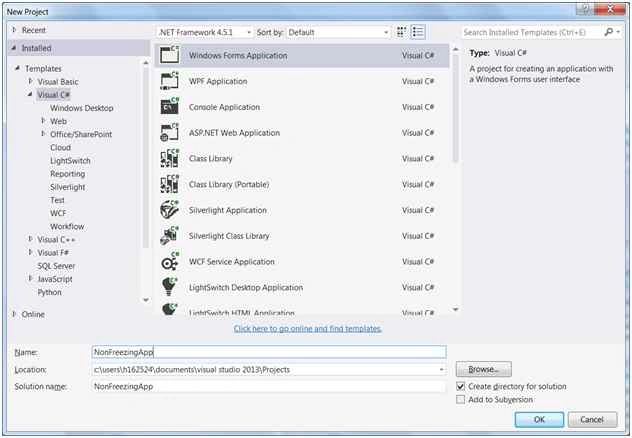
Create a Simple Windows Forms Application in Visual Studio.

Now put a click event at button, and write the following code,
- private void button1_Click(object sender, EventArgs e)
- {
- for (var i = 0; i <= 1000000; i++)
- {
- label1.Text = @"Count : " + i;
- }
- }

How can we get around this
Let’s put another button in our form and add a click event.
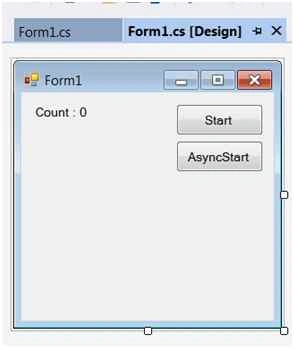
At click event method, write the following code,
- //attributes used to refresh UI
- private readonly SynchronizationContext synchronizationContext;
- private DateTime previousTime = DateTime.Now;
- public Form1()
- {
- InitializeComponent();
- synchronizationContext = SynchronizationContext.Current; //context from UI thread
- }
- private async void button2_Click(object sender, EventArgs e)
- {
- button1.Enabled = false;
- button2.Enabled = false;
- var count = 0;
- await Task.Run(() =>
- {
- for (var i = 0; i <= 1000000; i++)
- {
- UpdateUI(i);
- count = i;
- }
- });
- label1.Text = @"Count : " + count;
- button1.Enabled = true;
- button1.Enabled = false;
- }
- public void UpdateUI(int value)
- {
- var timeNow = DateTime.Now;
- //Here we only refresh our UI each 50 ms
- if ((DateTime.Now - previousTime).Milliseconds <= 50) return;
- //Send the update to our UI thread
- synchronizationContext.Post(new SendOrPostCallback(o =>
- {
- label1.Text = @"Count : " + (int)o;
- }), value);
- previousTime = timeNow;
- }
I placed the word ASYNC at click event method to avoid our UI to freeze. At our event look to TASK that make our count. Inside it you will see the method UpdateUI, that refresh the label 50ms each.
Run the application and see the result.
The code is available at https://github.com/mfandre/NonFreezingApp
I hope with this tutorial you learned a little about how we can avoid Freezes at our Desktop Applications. You can use the target idea from this tutorial to improve scenarios like Db Queries, a long running task, read an external file and much more.
Maathangi BaskaranPosted Dec 22, 2021, 11:31 AM
Very use full. Thanks a lot
Santhakumar MunuswamyPosted Dec 26, 2015, 2:14 AM
Thanks for nice article
Sibeesh VenuPosted Dec 22, 2015, 12:09 AM
Nice Share
Raja TPosted Dec 21, 2015, 9:41 AM
Nice, Thanks for sharing
Gowtham KPosted Dec 12, 2015, 6:41 AM
Good One, Thanks for sharing
Harshad PansuriyaPosted Dec 12, 2015, 12:56 AM
Nice one
Manas MohapatraPosted Dec 12, 2015, 12:54 AM
Goo one ..
Ankur MistryPosted Dec 11, 2015, 1:19 PM
nice share