

In this article, I will guide how to Make API calls in the React.js application.
Prerequisites of React
- Familiarity with HTML and JavaScript.
- node.js installed
Create React Project
To create a React app, use the following command in the terminal.
npx create-react-app matui
Install Bootstrap
Now install Bootstrap by using the following command.
npm install bootstrap
Now, open the index.js file and add the import Bootstrap.
import 'bootstrap/dist/css/bootstrap.min.css';
Install axios
Now install Axios by running the following command in your terminal.
npm install axios
Axios is a JavaScript library for making HTTP requests.
Now right-click on the src folder, create a new component named 'webapicalldemo.js', and follow the code.
import React, { useState, useEffect } from 'react';

import axios from 'axios';

function Webapicalldemo() {
  const [Data, setPosts] = useState([]);
  useEffect(() => {
    axios.get('https://jsonplaceholder.typicode.com/users')
      .then(response => {
        setPosts(response.data);
      })
      .catch(error => {
        console.error(error);
      });
  }, []);

  return (

  <div>
      <table class="table" >
        <thead class="thead-dark">
          <tr>
            <th scope="col">Name</th>
            <th scope="col">Email</th>
            <th scope="col">Phone</th>
            <th scope="col">Website</th>
          </tr>
        </thead>

        <tbody>
          {Data.map(item => {
            return <tr key={item.id}>
              <td>{item.name}</td>
              <td>{item.email}</td>
              <td>{item.phone}</td>
              <td>{item.website}</td>
            </tr>
          })}
        </tbody>
      </table>
    </div>
  );
}
export default Webapicalldemo;
Now, import the webapicalldemo component in the src/App.js file.
import './App.css';
import Webapicalldemo from './webapicalldemo
function App() {
  return (
    <div className="App">
      <Webapicalldemo/>
    </div>
  );
}

export default App;
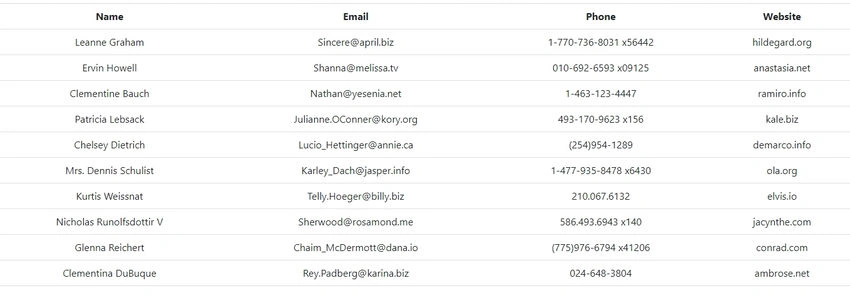
Now, run the project using the 'npm start' command and check the result.
Summary
In this article, we learned how to make API calls in the React.js application.
Join the conversation! Your thoughts help the community grow.