Introduction
Hey guys how are you? Today I will show you how to make an alert dialog box in Android. In this tutorial, I am using the class reference here
Android. Builder. Let's start.
Figure 1
Figure 2
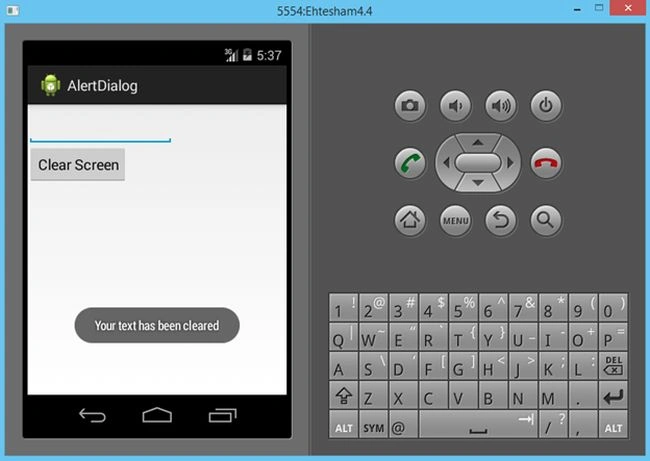
Figure 3
AndroidManifest.xml File
This is your AndroidManifest File; replace it with your own:
- <?xml version="1.0" encoding="utf-8"?>
- <manifest xmlns:android="http://schemas.android.com/apk/res/android"
- package="com.example.alertdialog"
- android:versionCode="1"
- android:versionName="1.0" >
-
- <uses-sdk
- android:minSdkVersion="8"
- android:targetSdkVersion="19" />
-
- <application
- android:allowBackup="true"
- android:icon="@drawable/ic_launcher"
- android:label="@string/app_name"
- android:theme="@style/AppTheme" >
- <activity
- android:name="com.example.alertdialog.MainActivity"
- android:label="@string/app_name" >
- <intent-filter>
- <action android:name="android.intent.action.MAIN" />
-
- <category android:name="android.intent.category.LAUNCHER" />
- </intent-filter>
- </activity>
- </application>
-
- </manifest>
Main.xml(Layout File)
This is your layout file:
- <?xml version="1.0" encoding="utf-8"?>
- <RelativeLayout xmlns:android="http://schemas.android.com/apk/res/android"
- android:layout_width="match_parent"
- android:layout_height="match_parent" >
-
- <EditText
- android:id="@+id/EditText01"
- android:text="I Love Android"
- android:layout_height="50dip"
- android:layout_width="180dip">
-
- </EditText>
-
- <Button
- android:id="@+id/Button01"
- android:layout_width="wrap_content"
- android:layout_height="wrap_content"
- android:layout_below="@+id/EditText01"
- android:text="Clear Screen">
-
- </Button>
- </RelativeLayout>
MainActivity.java File
This is your main Java file in which you will code it:
package com.example.alertdialog;
- package com.example.alertdialog;
-
- import android.support.v7.app.ActionBarActivity;
- import android.support.v7.app.ActionBar;
- import android.support.v4.app.Fragment;
- import android.app.AlertDialog;
- import android.app.Dialog;
- import android.content.DialogInterface;
- import android.os.Bundle;
- import android.view.LayoutInflater;
- import android.view.Menu;
- import android.view.MenuItem;
- import android.view.View;
- import android.view.ViewGroup;
- import android.widget.Button;
- import android.widget.EditText;
- import android.widget.Toast;
- import android.os.Build;
-
- public class MainActivity extends ActionBarActivity
- {
- Button Clear;
- EditText edit_data;
-
- @Override
- public void onCreate(Bundle savedInstanceState)
- {
- super.onCreate(savedInstanceState);
- setContentView(R.layout.main);
-
- Clear=(Button)findViewById(R.id.Button01);
- edit_data=(EditText)findViewById(R.id.EditText01);
-
- Clear.setOnClickListener(new View.OnClickListener()
- {
-
- @Override
- public void onClick(View v)
- {
-
- AlertDialog.Builder builder=new AlertDialog.Builder(v.getContext());
-
- builder.setTitle("Confirm");
-
- builder.setMessage("Do you want to Clear?");
-
- builder.setPositiveButton("OK",new DialogInterface.OnClickListener()
- {
-
- @Override
- public void onClick(DialogInterface dialog, int which)
- {
-
-
- edit_data.setText("");
-
- Toast.makeText(getApplicationContext(), "Your text has been cleared", Toast.LENGTH_LONG).show();
- }
- });
-
- builder.setNegativeButton("Cancel",new DialogInterface.OnClickListener()
- {
-
- @Override
- public void onClick(DialogInterface dialog, int which)
- {
-
- dialog.cancel();
- }
- });
-
-
- AlertDialog alertdialog=builder.create();
-
-
- alertdialog.show();
-
- }
- });
- }
-
- }
Summary
For any queries please comment. I hope you guys will like this article and share this article with the world for sharing knowledge.


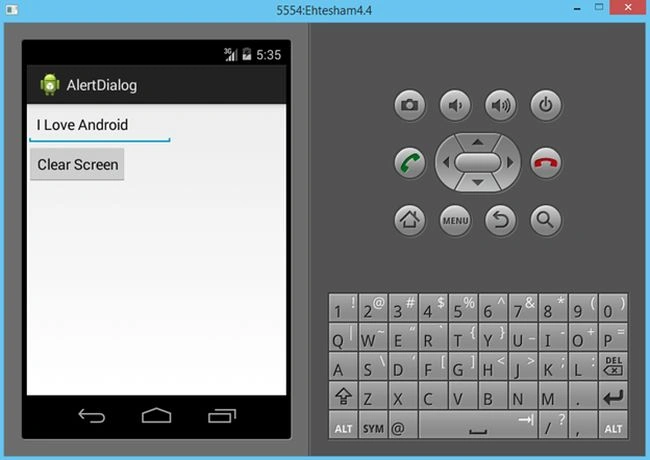 Figure 2
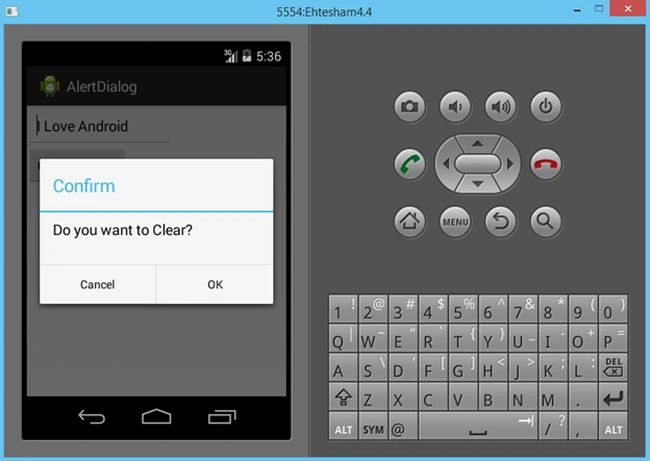 Figure 3
 AndroidManifest.xml File
This is your AndroidManifest File; replace it with your own:
AndroidManifest.xml File
This is your AndroidManifest File; replace it with your own:
Ehtesham MehmoodPosted Oct 2, 2014, 7:21 AM
Behzad Babaei Thanx :)
Behzad BabaeiPosted Oct 2, 2014, 2:22 AM
Nice