

CORS – Cross-Origin Resource Sharing
Cross-Origin Resource Sharing (CORS) is a mechanism that uses additional HTTP headers to tell a browser to let a web application running at one origin (domain) have permission to access selected resources from a server at a different origin.
If you are not that familiar with CORS read about CORS first then continue with this article.
Angular runs on its own server (by default localhost:4200) and webAPI runs on a different port so we get the Cors issue.

So, from the above screen, it is clear that WebAPI is running on port 57263 and our application is running on 4599 (it's not running in 4200 as I have changed the port in package.json).
http://localhost:4599 - http://localhost:57263 (here domain is same but the port number is different - one of the rules to satisfy CORS)
So, the solution for the above issue is,
- Angular proxy (client-side solution)
- Enable CORS on the webAPI (Server Side)
In this article, we will see a detailed explanation on how to use Angular Proxy only. This example is created using Angular CLI version 6.
Step 0
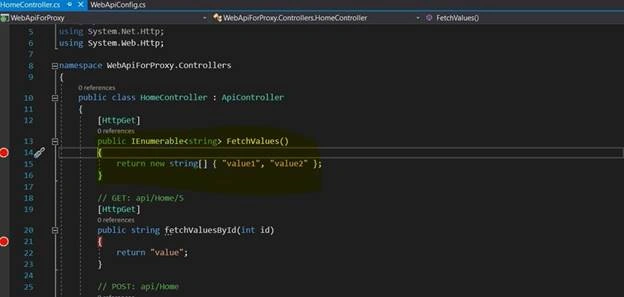
Step 2
Step 3
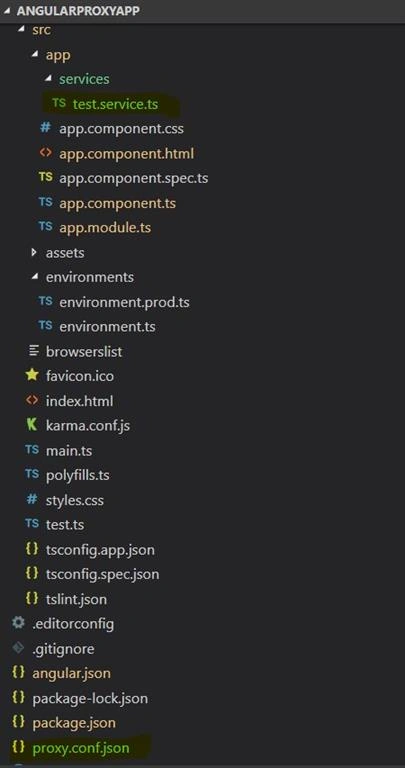
Here, only the structure and code snippets are shown, you can put it together for a proxy shows.
Project structure
- import { Injectable } from '@angular/core';
- import { HttpClient, HttpHeaders, HttpParams, HttpResponse } from '@angular/common/http';
- import { Observable } from 'rxjs';
- @Injectable()
- export class TestService {
- constructor(private http: HttpClient) { }
- getBaseUrl() {
- return 'http://localhost:57263/';
- }
- getTestMessage(): Observable<string> {
- const headers = new HttpHeaders({ 'Content-Type': 'text/plain'});
- return this.http.get(this.getBaseUrl() + 'api/Home/FetchValues', {responseType: 'text', headers});
- }
- }
- import { Component, OnInit } from '@angular/core';
- import { TestService } from './services/test.service';
- import { Observable } from 'rxjs';
- @Component({
- selector: 'app-root',
- templateUrl: './app.component.html',
- styleUrls: ['./app.component.css']
- })
- export class AppComponent implements OnInit {
- title = 'app';
- testMessage$: Observable<string>;
- constructor(private testService: TestService) { }
- ngOnInit() {
- this.getTestMessage();
- }
- getTestMessage () {
- this.testService.getTestMessage().subscribe(data => console.log(data));
- }
- }
- import { BrowserModule } from '@angular/platform-browser';
- import { NgModule } from '@angular/core';
- import { HttpClientModule } from '@angular/common/http';
- import { TestService } from './services/test.service';
- import { AppComponent } from './app.component';
- @NgModule({
- declarations: [
- AppComponent
- ],
- imports: [
- BrowserModule,
- HttpClientModule
- ],
- providers: [TestService],
- bootstrap: [AppComponent]
- })
- export class AppModule { }
Now, with the above setup if you run the app using npm start it will give CORS issue as explained above,

Step 4
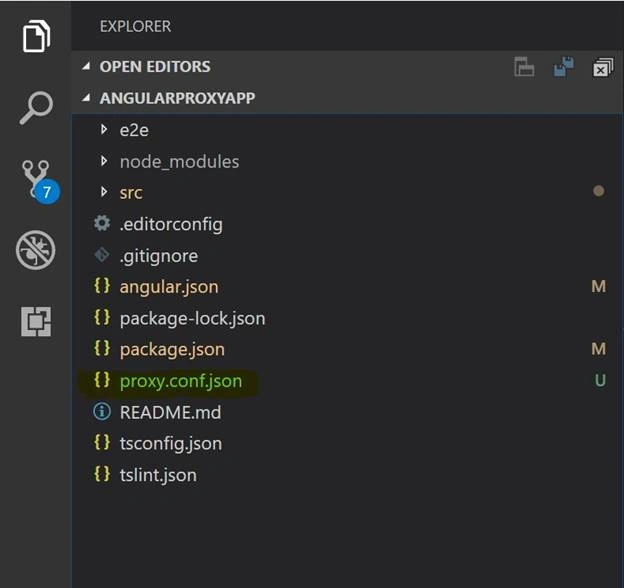
- {
- "/api/*": {
- "target": "http://localhost:57263",
- "secure": false,
- "logLevel": "debug"
- }
- }
- "serve": {
- "builder": "@angular-devkit/build-angular:dev-server",
- "options": {
- "browserTarget": "AngularProxyApp:build",
- "proxyConfig": "proxy.conf.json"
- },
- "scripts": {
- "ng": "ng",
- "start": "ng serve --port 4599 --proxy-config proxy.conf.json",
- "build": "ng build",
- "test": "ng test",
- "lint": "ng lint",
- "e2e": "ng e2e"
- },
- import { Injectable } from '@angular/core';
- import { HttpClient, HttpHeaders, HttpParams, HttpResponse } from '@angular/common/http';
- import { Observable } from 'rxjs';
- @Injectable()
- export class TestService {
- constructor(private http: HttpClient) { }
- getBaseUrl() {
- return 'http://localhost:57263/';
- }
- getTestMessage(): Observable<string> {
- const headers = new HttpHeaders({ 'Content-Type': 'text/plain'});
- return this.http.get('api/Home/FetchValues', {responseType: 'text', headers});
- }
- }
Now, all the setup is done for making a proxy request. Now, when we run the Application using npm start:
- It runs ng serve --port 4599 --proxy-config proxy.conf.json command
- Our Angular App runs on port 4599 and calls the proxy.conf.json so any API request having api/* takes the target from proxy.conf.json
Below when we run npm start we can see that a proxy is created.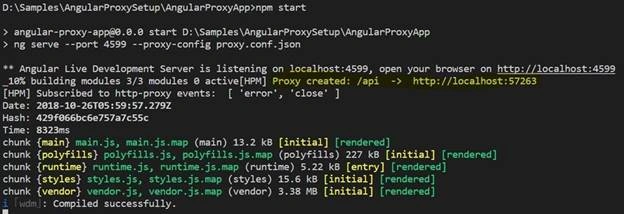
- There is no CORS issue and if we check the network the original Web request is hidden with the URL of the Angular server.
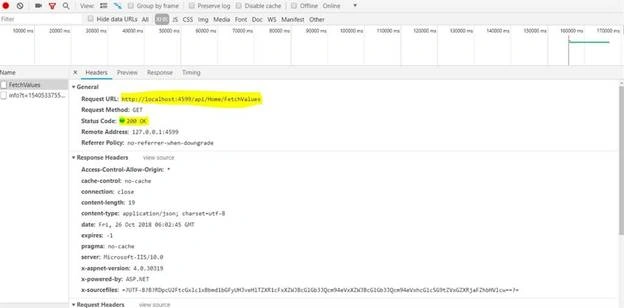
- Fixes the CORS issue
- Proxy.conf.json can be used to redirect the request to different servers.
- Hide the wepi URLs from the Network
tejaswi pandavaPosted Mar 29, 2021, 8:58 AM
Can you please attach the source code for this project it would be a really great.
venkatesh cPosted Jun 22, 2020, 5:18 AM
Thanks, its working for me
Adel TabarehPosted Dec 24, 2019, 3:03 AM
Thanks. a little point for those who cannot make it working for the url outside localhost is to add "changeOrigin": true according to https://github.com/angular/angular-cli/blob/master/docs/documentation/stories/proxy.md
mehmet dilmenPosted Aug 22, 2019, 4:00 AM
When I refresh the page, page leading to beckend API link. How can i fix it. Thanks
GWEN ZHOUPosted Jul 26, 2019, 9:49 AM
Super helpful, thanks
veera kallamPosted Jun 11, 2019, 2:35 AM
Thanks.It worked for localhost.How to do for production?
Kate CatalenaPosted Jun 10, 2019, 3:37 PM
This is a very helpful tutorial. I was wondering about when you are trying to use this with an external API. I tried following all the steps and just using the external api, but I had no luck I get a connection refused error. The external api I am trying to access is an https site and requires some headers which I have also incorporated. Any ideas what I might could try?
shiva kumarPosted May 3, 2019, 1:32 AM
Really Ur superb solved cors issue