

Overview
Azure SQL Database is a managed cloud database service that allows you to build secure, scalable applications on a fully managed SQL database.
Often, database administrators need to view and manage user roles and permissions. For this, you might have used SSMS which shows in the UI itself for SQL Server. Unfortunately, SSMS doesn’t show the same for Azure SQL Database.
In this article, we are going to learn how to view the list of roles assigned to Users and Groups using Azure Data Studio.
Azure Data Studio, a free and cross-platform database tool from Microsoft, offers capabilities for database management, with preview features enabling additional functionalities.
In this article, we’ll explore how to view roles and users in an Azure SQL Database using Azure Data Studio and how to enable the necessary preview features.
Steps
1. Install and Open Azure Data Studio
- If you haven’t installed Azure Data Studio, you can download it from the Azure Data Studio download page.
- Once installed, open Azure Data Studio and connect to your Azure SQL Database by clicking on New Connection and entering your database credentials.
2. Enable Preview Features
- During Installation: Immediately, after installation, you can enable Preview features by clicking on Yes as shown below.
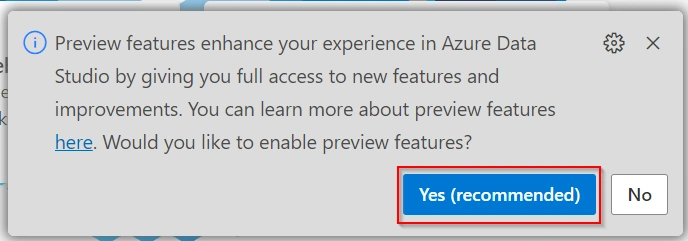
- In case you missed clicking Yes in the above step, you can also enable it later by going to Settings, Search for Enable Preview Features and then enable the Preview features by clicking on the Checkbox as shown below.
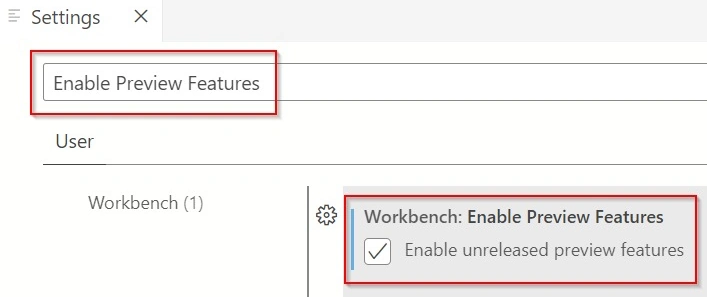
- This will allow you to access and use preview functionalities, including viewing roles and users in the Azure SQL Database.
3. View Roles and Users
- After enabling preview features, you can access role and user information within your Azure SQL Database.
- Steps
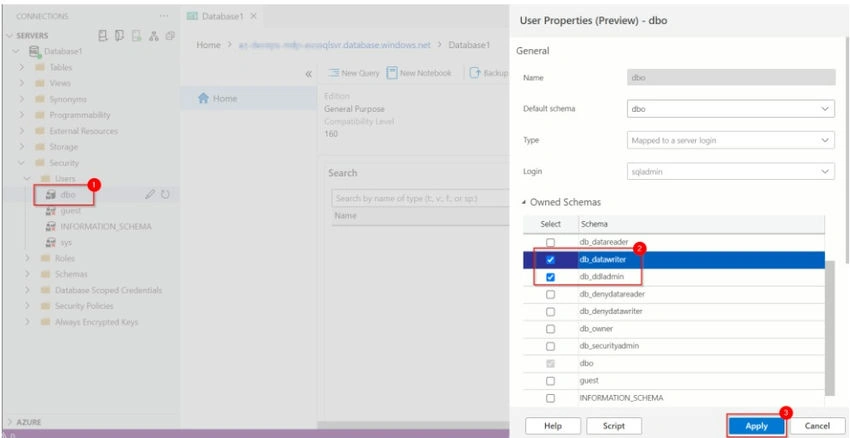
- In the left pane, expand your connected server and then the Security node.
- Under Security, locate the Roles and Users nodes. Expanding these will list all roles and users available within the database.
- You can not just view the assigned roles to the user but can also update them as shown in the below screenshot.
Summary
Azure Data Studio, with its preview features, makes it easier for database administrators to view & Update roles of users in Azure SQL Database, streamlining the management of permissions and security settings.
Join the conversation! Your thoughts help the community grow.