

This article shows how to show files from a folder in a Grid View in ASP.NET C#. I am also showing how to download and delete a file from a folder.
The following is my aspx code:
- <%@ Page Language="C#" AutoEventWireup="true" CodeFile="Default.aspx.cs" Inherits="_Default" %>
- <!DOCTYPE html PUBLIC "-//W3C//DTD XHTML 1.0 Transitional//EN" "http://www.w3.org/TR/xhtml1/DTD/xhtml1-transitional.dtd">
- <html xmlns="http://www.w3.org/1999/xhtml">
- <head runat="server">
- <title>Manage Files (Show, Download & Delete)</title>
- </head>
- <body>
- <form id="form1" runat="server">
- <table cellpadding="10" cellspacing="10" style="border: solid 10px red; background-color: Skyblue;"
- width="90%" align="center">
- <tr>
- <td style="height: 35px; background-color: Yellow; font-weight: bold; font-size: 16pt;
- font-family: Times New Roman; color: Red" align="center">
- Manage Files (Show, Download & Delete) of A Folder
- </td>
- </tr>
- <tr>
- <td>
- <asp:GridView ID="GridViewShowFiles" runat="server" AutoGenerateColumns="False" EmptyDataText="No files uploaded"
- CellPadding="4" ForeColor="#333333" GridLines="None" Width="100%" HeaderStyle-HorizontalAlign="Left">
- <RowStyle BackColor="#F7F6F3" ForeColor="#333333" />
- <Columns>
- <asp:BoundField DataField="Text" HeaderText="File Name" />
- <asp:TemplateField>
- <ItemTemplate>
- <asp:LinkButton ID="lnkDownload" Text="Download" CommandArgument='<%# Eval("Value") %>'
- runat="server" OnClick="DownloadFile"></asp:LinkButton>
- </ItemTemplate>
- </asp:TemplateField>
- <asp:TemplateField>
- <ItemTemplate>
- <asp:LinkButton ID="lnkDelete" Text="Delete" CommandArgument='<%# Eval("Value") %>'
- runat="server" OnClick="DeleteFile" />
- </ItemTemplate>
- </asp:TemplateField>
- </Columns>
- <FooterStyle BackColor="#5D7B9D" Font-Bold="True" ForeColor="White" />
- <PagerStyle BackColor="#284775" ForeColor="White" HorizontalAlign="Center" />
- <SelectedRowStyle BackColor="#E2DED6" Font-Bold="True" ForeColor="#333333" />
- <HeaderStyle BackColor="#5D7B9D" Font-Bold="True" ForeColor="White" />
- <EditRowStyle BackColor="#999999" />
- <AlternatingRowStyle BackColor="White" ForeColor="#284775" />
- </asp:GridView>
- </td>
- </tr>
- </table>
- </form>
- </body>
- </html>
- using System;
- using System.Configuration;
- using System.Data;
- using System.Linq;
- using System.Web;
- using System.Web.Security;
- using System.Web.UI;
- using System.Web.UI.HtmlControls;
- using System.Web.UI.WebControls;
- using System.Web.UI.WebControls.WebParts;
- using System.Xml.Linq;
- using System.IO;
- using System.Collections.Generic;
- public partial class _Default : System.Web.UI.Page
- {
- protected void Page_Load(object sender, EventArgs e)
- {
- if (!IsPostBack)
- {
- GettAllFiles();
- }
- }
- protected void GettAllFiles()
- {
- if (System.IO.Directory.Exists(Server.MapPath("~/MyDirectory/")))
- {
- string[] filePaths = Directory.GetFiles(Server.MapPath("~/MyDirectory/"));
- List<ListItem> files = new List<ListItem>();
- foreach (string filePath in filePaths)
- {
- files.Add(new ListItem(Path.GetFileName(filePath), filePath));
- }
- GridViewShowFiles.DataSource = files;
- GridViewShowFiles.DataBind();
- }
- else
- {
- GridViewShowFiles.DataSource = null;
- GridViewShowFiles.DataBind();
- }
- }
- protected void DownloadFile(object sender, EventArgs e)
- {
- string filePath = (sender as LinkButton).CommandArgument;
- Response.ContentType = ContentType;
- Response.AppendHeader("Content-Disposition", "attachment; filename=" + Path.GetFileName(filePath));
- Response.WriteFile(filePath);
- Response.End();
- }
- protected void DeleteFile(object sender, EventArgs e)
- {
- string filePath = (sender as LinkButton).CommandArgument;
- File.Delete(filePath);
- Response.Redirect(Request.Url.AbsoluteUri);
- }
- }
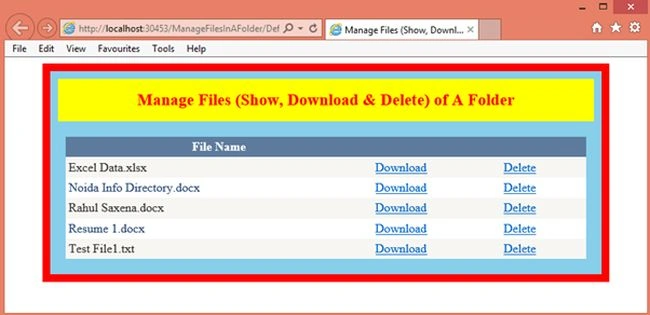
Image 1
Now download a file:
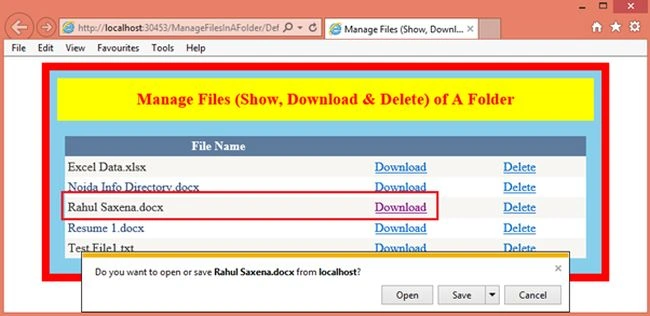
Image 2
You can delete any file by clicking the Delete button:
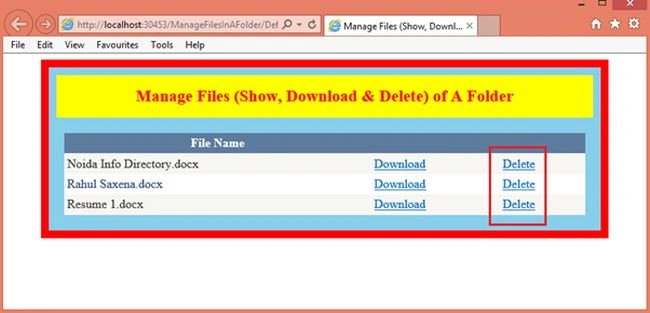
Image 3
Imila MadushanPosted Apr 28, 2020, 5:35 AM
Hi please tell me how to give server.map path after hosting this to IIS it is not working
Tarun SaraswatPosted Mar 4, 2016, 5:18 AM
Save,open and cancel option will not work in Google chrome :)
Vithal WadjePosted Oct 31, 2014, 5:31 AM
good one keep it up
Atul GuptaPosted Oct 30, 2014, 11:35 PM
Good Article Rahul, you r doing good keep it up !
Sam HobbsPosted Oct 30, 2014, 5:42 PM
Ooooh, another acronym (3D) with multiple meanings. Programmers love acronyms.
Dinesh BeniwalPosted Oct 30, 2014, 4:14 AM
Good work rahul.
Chandradev PrasadPosted Oct 30, 2014, 2:12 AM
Nice article.