

Welcome to an article on how to manage Query Client Types of Search Administration at the SharePoint Admin Center on Office 365. Here in this article, we will see our options available to Search at the SharePoint Admin Center.
Here we will see how to manage Query client types as it identifies an application where a search query is sent from in the search service
To configure you need to be a tenant admin. If you are, let’s see how we can do it,
- Click on the left corner of your SharePoint site to view the apps.
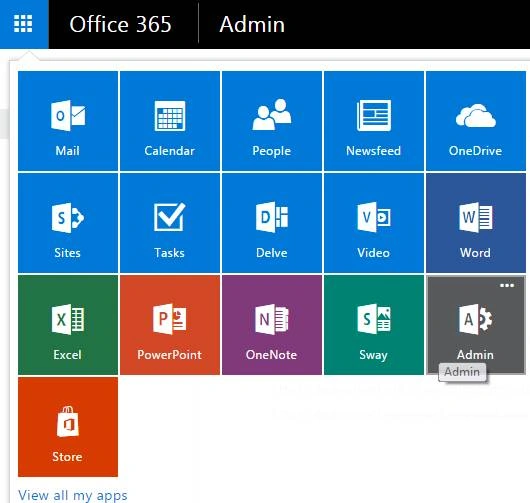
- Click on Admin.
- You will come to the “SharePoint admin center”.
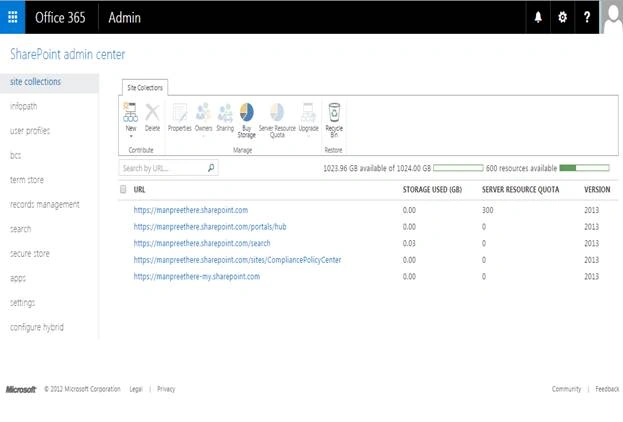
- Select search on the left navigation. You will come here.

- Click on ‘Manage Query Client Types’.
- You will be directed to the screen below where you can configure the queries.
- Let’s see how.
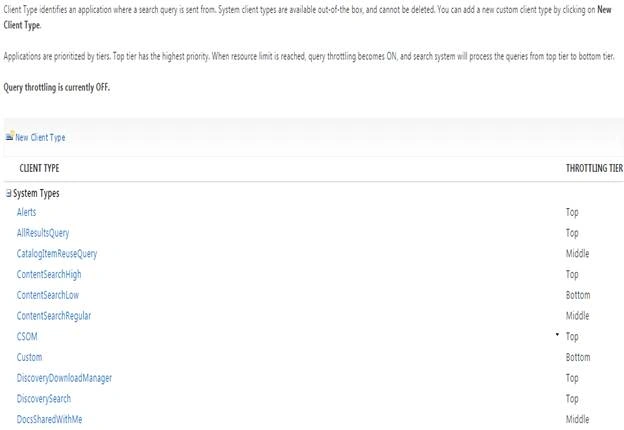
- The screen above shows you all the default client types and their throttling tier according to the priorities.
- Now you will ask me, how do I create a custom client type or why do we need to prioritize?
- Let’s see the answer.
- Click on New Client Type to create a new one.
- You will see the configuration form as below.
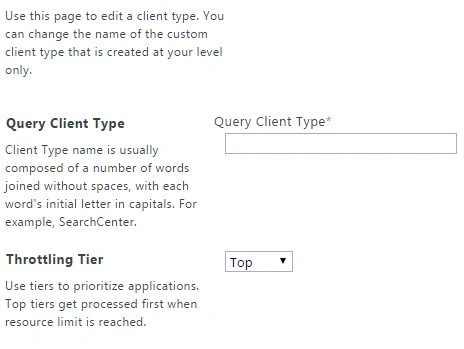
- Query Client Type:
Provide a name to your client type based on the multiple words as to prevent clash and with Capital first letter of each word.
- Throttling Tier:
Now you need to choose how important is your client type as in when the resource quota of your site is full, that time it will choose from your throttling tier information as in which one to pick up first while doing the search.
You can choose Top, Middle or Bottom.
Once created, you will see it under the Custom Types along with the throttling tier information.
In this article we saw how to manage Query Client Types on Search Administration at the SharePoint Admin Center on Office 365. We will see more in my other articles until then, keel reading and keep learning.
Read more articles on SharePoint:
Amit DavePosted May 3, 2016, 10:33 AM
Keep up the Good work!
Sonu ChaudharyPosted May 2, 2016, 5:55 AM
Thanks for sharing
Debasis SahaPosted May 1, 2016, 1:49 PM
Good One..
NitinPosted May 1, 2016, 1:44 PM
Good one
Kuppurasu NagarajPosted Apr 30, 2016, 2:11 PM
Nice Sharing..