
Steps to Edit:
Step 1: Go to SharePoint online admin center.
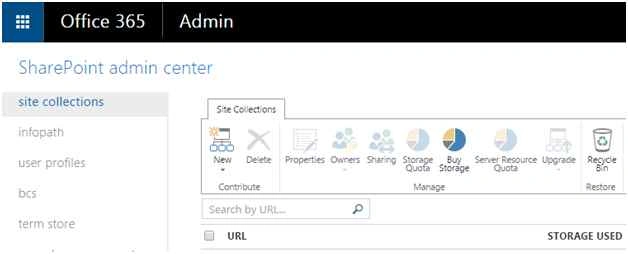
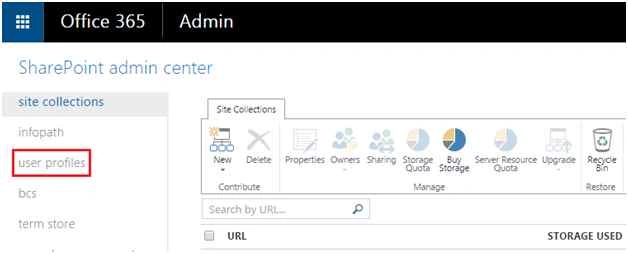
Step 2: Then click on the “user profiles” from the left navigation.
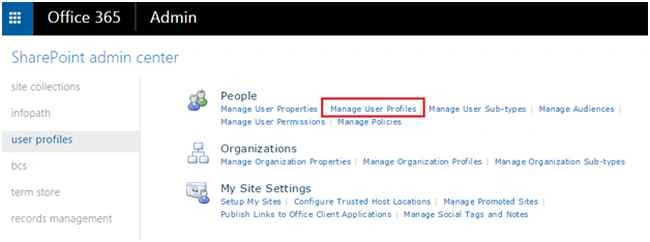
Step 3: On User profile settings page, select Manage User Profiles as in the following screenshot:
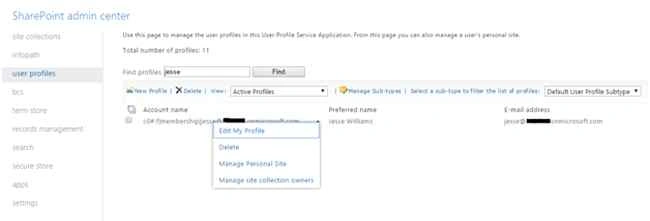
Step 4: On manage the user profile page, you can find the user using search box, which user you want to change the Property values,
Enter the User name on the Text box and click on the Find button.
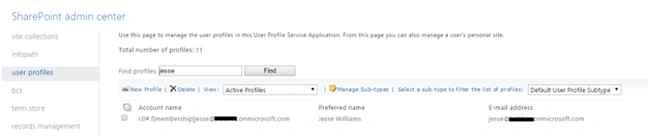
Step 5: Then click the drop down from user name and select Edit my profile as in the following screenshot:
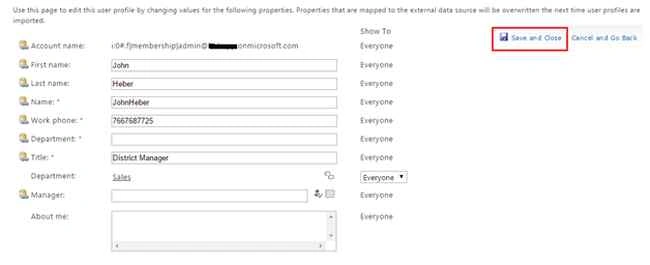
Step 6: On the Edit my profile page, change the value of the properties then click on the save for the changes.
Summary
In this article we explored how to manage the user profile for user in SharePoint online. Happy Learning!

Manage User Profiles In SharePoint Online
Join the conversation! Your thoughts help the community grow.
Sign in to leave a comment
It is the same account you read, post and publish with — and you will come straight back to this page.
Kaviya BalasubramanianPosted Sep 18, 2015, 1:32 AM
Thank you all :)
Santhakumar MunuswamyPosted Sep 17, 2015, 10:31 AM
Thanks for nice article:)
Prasham SabadraPosted Sep 15, 2015, 7:23 AM
Thanks for Sharing :)
Sibeesh VenuPosted Sep 15, 2015, 4:46 AM
Nice Share
Harshad PansuriyaPosted Sep 15, 2015, 12:12 AM
Nice one
Karthikeyan KPosted Sep 14, 2015, 11:24 PM
Good one :)
Pankaj Kumar ChoudharyPosted Sep 14, 2015, 9:39 PM
Nice Explain...........
Vinodh NarayananPosted Sep 14, 2015, 1:13 PM
nice
Mohammed IbrahimPosted Sep 14, 2015, 1:05 PM
nice information