

This configuration assists the admins to manage the user solutions and configure or retract the solutions on central admin for all the Web Applications.
How to configure it?
Let’s open central admin of SharePoint on your machine. On your Windows desktop screen, click Start >> Administrative Tools >> SharePoint 2013 Central Administration.
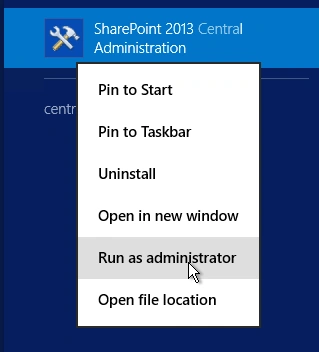
- Run it as an administrator to have the elevated privileges.
- You will see the screenshot given below.
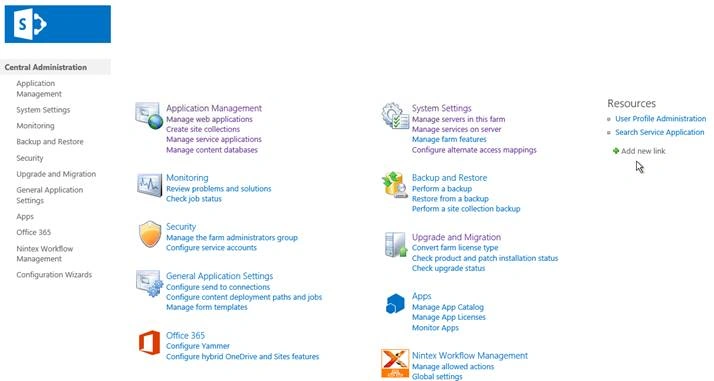
- Central admin is configured under the categories given below.
- Click System Settings.
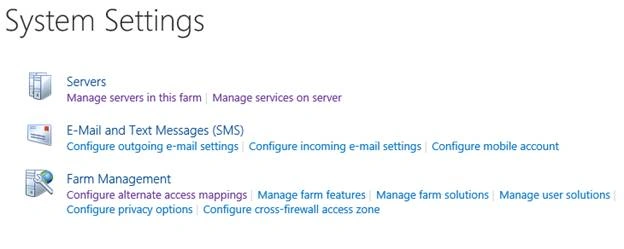
- Go to Farm Management.

- Click Manage user solutions.
- You will see the screen given below.
Configure


Here, you will see all the solutions under this view. As for example, we can see two user solutions of Nintex, which is deployed globally.
To view the properties of the solution, click on it. You will see the screen given below.
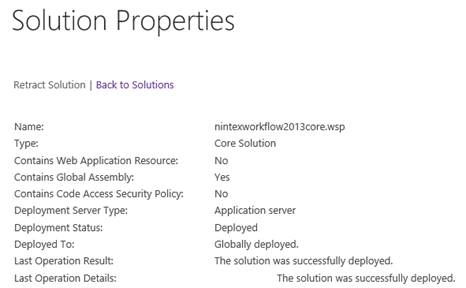
The properties will have the following values.
- Name
- Type
- Contains Web Application resource
- Contains global assembly
- Contains code access security policy
- Deployment Server type.
- Deployment status
- Deployed to
- Last operation result
- Last operation details
You can click on the solution and click on “Retract Solution”, which will remove the solution from the farm in the central administration.
This is the best way to configure the solutions or to retract without using any code or PowerShell script to do it.
In this article, we saw how to manage user solutions in SharePoint 2013 central administration. There are more articles to come on central administration. Until then, keep reading and keep learning.
Juned KhanPosted Oct 7, 2019, 1:07 AM
Click Manage user solutions is wrong option. Click on Manage Farm Solution