

Introduction
Data is the foundation of any machine learning project. Whether training models, performing exploratory data analysis, or running large-scale experiments, efficiently managing data in Azure Machine Learning (Azure ML) is crucial.
Azure ML provides multiple ways to upload, store, and access datasets, ensuring seamless integration between data and ML workflows. In this guide, we'll walk through:
- ✔ Uploading datasets into Azure ML
- ✔ Registering datasets for reuse
- ✔ Accessing and manipulating data in ML experiments
- ✔ Exploring data for insights before training
- ✔ Best practices for efficient dataset management
1️⃣ Uploading Data to Azure ML
Azure ML supports structured and unstructured data, allowing you to store datasets in Azure Blob Storage, Azure Data Lake, or directly in the workspace as a registered dataset.
Uploading Data via Python SDK
For programmatic access, use the Azure ML SDK to upload local datasets into Azure ML:
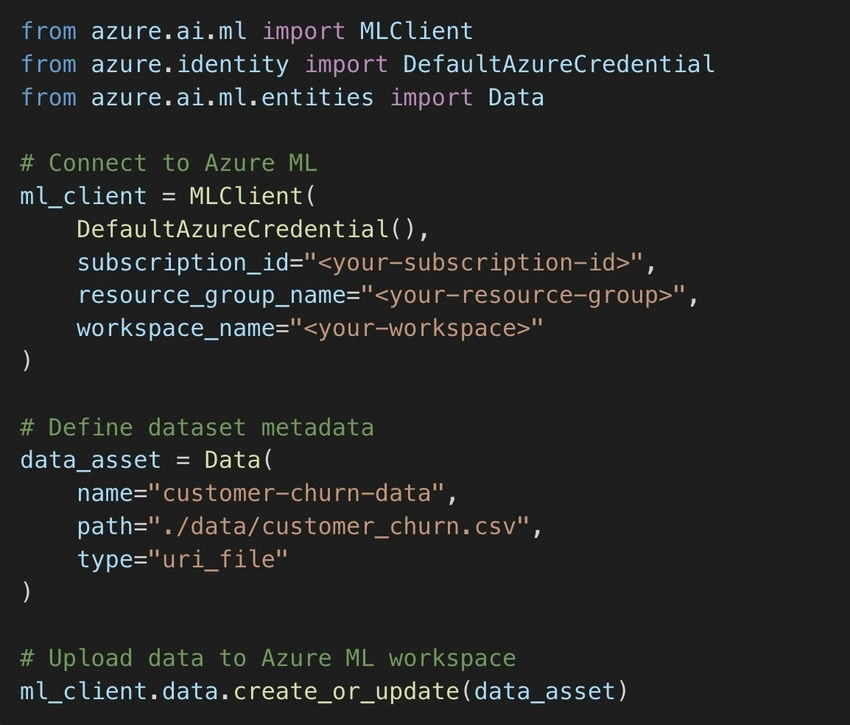
📌 Now, your dataset is available in Azure ML and can be used across multiple experiments.
Additionally, when uploading large datasets, consider using Azure Data Factory or Azure Storage Explorer for seamless and faster uploads. These tools offer better control over large-scale data movement and reduce potential upload failures due to timeouts or network issues.
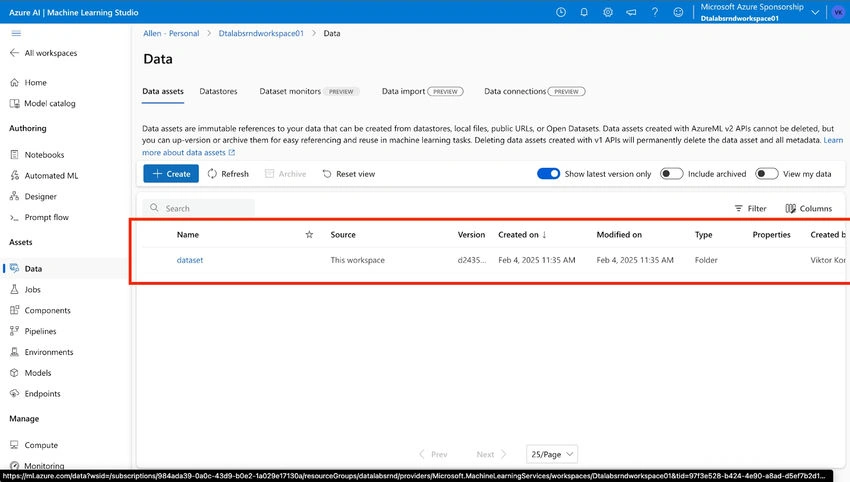
2️⃣ Registering and Managing Data in Azure ML
After uploading, it’s best to register datasets so they can be reused across different experiments without re-uploading.
Register a Dataset via Python
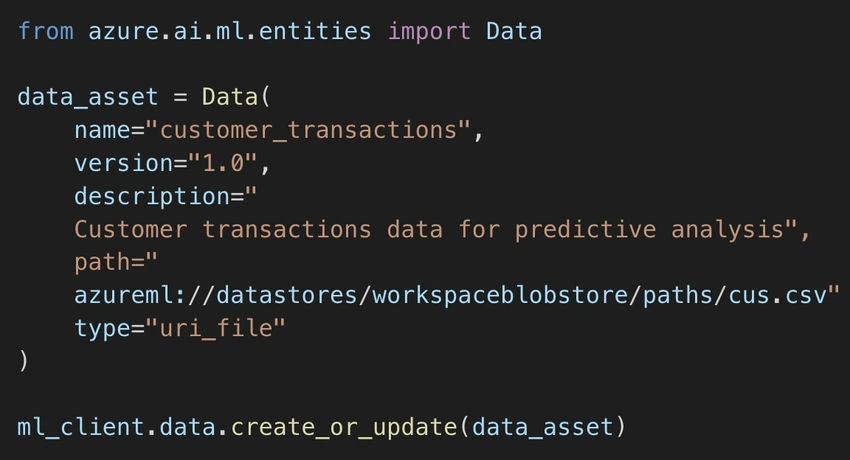
📌 Why Register?
- Ensures version control for datasets.
- Reduces redundant uploads, saving storage costs.
- Simplifies dataset access for multiple team members.
Additionally, dataset registration allows for better governance and security control, as access permissions can be set at the dataset level. This ensures that only authorized users and workflows can interact with specific datasets, reducing the risk of unauthorized modifications.
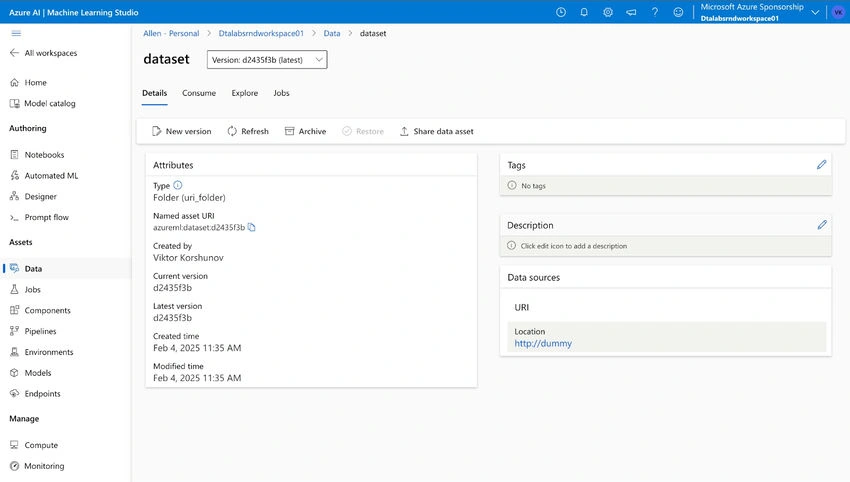
3️⃣ Accessing Data in Training Pipelines
Once registered, datasets can be directly loaded into training scripts.
Loading Data in a Training Script
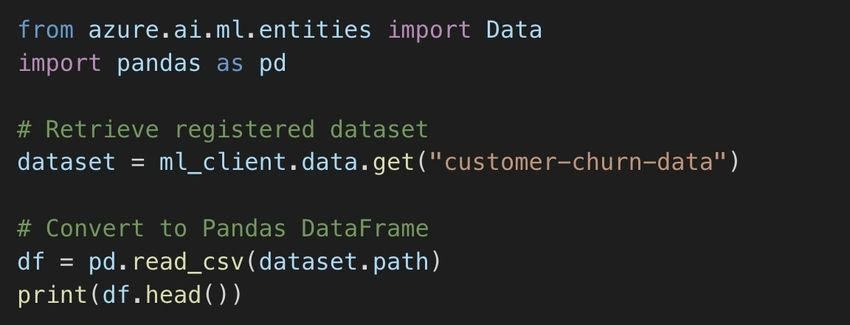
📌 Why This Matters?
- Ensures consistent access to datasets across all experiments.
- Allows easy switching between different dataset versions.
- Simplifies dataset usage in Azure ML Pipelines.
For larger datasets, consider using Dask or Spark within Azure ML to distribute data processing efficiently. This is particularly useful when working with big data pipelines that exceed traditional Pandas capabilities.
4️⃣ Exploring Data Before Model Training
Before training, it’s critical to analyze the dataset—checking for missing values, distributions, and correlations.
Basic Data Exploration with Pandas
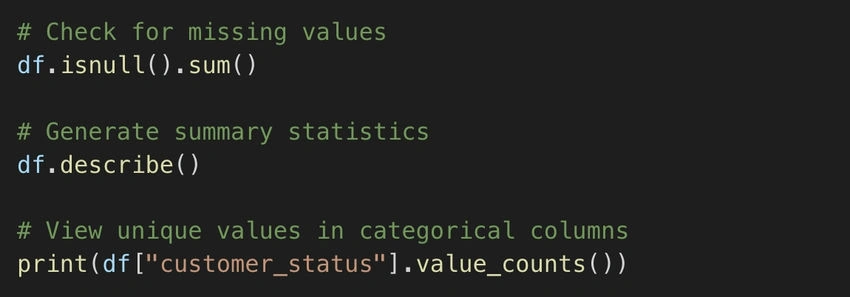
📌 Why Explore Data?
- Detects potential data quality issues.
- Identifies features that may need transformation.
- Helps in feature engineering decisions.
Exploring data also allows for outlier detection, which is crucial for improving model accuracy. Tools like seaborn or matplotlib can be used for visualizing feature distributions and identifying anomalies.
Final Thoughts: Best Practices for Managing Data in Azure ML
- ✔ Use Azure Blob Storage for large-scale datasets.
- ✔ Register datasets to enable versioning and collaboration.
- ✔ Automate data ingestion using pipelines for continuous ML workflows.
- ✔ Leverage data exploration tools before training models.
- ✔ Utilize data versioning to track changes and improvements over time.
🔗 Further Learning
Join the conversation! Your thoughts help the community grow.