

Enable printing in your .net windows applications:
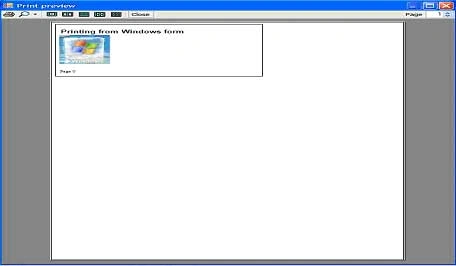
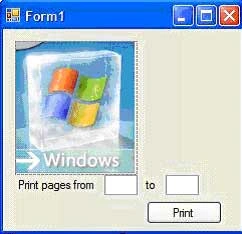
Supporting printing in your .net application is a simple process. In this article I'll show you of printing in your .net 2.0, how you can configure page setup, print multiple pages, and preview a document before being printed, as well as let users select a printer to which to print.
Creating the sample application:
Open Visual Studio; create a new Windows application project using C#: 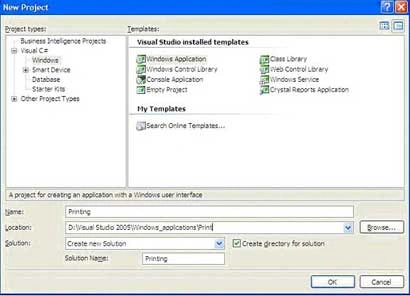
Figure 1.
In .NET, all the printing functionality is encapsulated within the PrintDocument control which can be found in the ToolBox. The PrintDocument control defines various methods that allow you to send output to the printer.
To incorporate printing functionality into you Windows application, you can simply drag and drop the PrintDocument control on to your form (see Figure 2), or create an instance of the PrintDocument class during runtime. 
Figure 2
There are generally three events that you need to get acquainted with. They are:
-
BeginPrint Occurs when the Print() method is called and before the first page of the document prints. Typically, you make use of the BeginPrint event to initialize fonts, file streams, and other resources used during the print process.
-
PrintPage Occurs when the output to print current page is needed. This is the main event to code the logic required for sending the output to the printer.
-
EndPrint Occurs when the last page of the document has printed. Typically, you use the EndPrint event to release fonts, file streams, and other resources that can be used during the print process.
Now to the default Form1, populate a PictureBox and a Button control. Set the PictureBox to display an image. Here I have displayed a logo which I took from the internet! 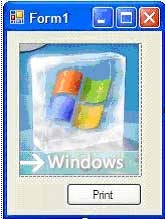
Figure 3.
Switch to code view and import the following namespace:
- using System.Drawing.Printing;
Declare the following member variables:
- private Font f_title;
- private Font f_body;
- private int intPageCounter;
- private PrintDocument printDoc;
When the form is loaded create a new instance of the PrintDocument and wire up the three events described earlier:
- private void Form1_Load(object sender, EventArgs e)
- {
- printDoc = new PrintDocument();
- printDoc.DocumentName = "Printing from Windows forms";
- printDoc.BeginPrint += new PrintEventHandler(printDoc_BeginPrint);
- printDoc.EndPrint += new PrintEventHandler(printDoc_EndPrint);
- printDoc.PrintPage += new PrintPageEventHandler(printDoc_PrintPage);
- }
- void printDoc_BeginPrint(object sender, PrintEventArgs e)
- {
- f_title = new Font("Arial", 16, FontStyle.Bold);
- f_body = new Font("Times New Roman", 10);
- }
- void printDoc_EndPrint(object sender, PrintEventArgs e)
- {
- f_title = null;
- f_body = null;
- }
Iqbal AnsariPosted Jan 14, 2020, 7:29 PM
I m unable to print Text Field like name, address etc, Please Help
Iqbal AnsariPosted Jan 14, 2020, 7:28 PM
How to print Text field
Ectoras EctoridisPosted Jun 2, 2009, 5:53 PM
really nice but what about if we work on visual studio c++ windows application? found millions articles about c# but not even one for c++
Former memberPosted May 6, 2009, 2:58 PM
hollo; I have a prbleme for printing my form; I have a large Form which exceeds screen size, and I would like print it in A4 format of paper can you help me please Best regard
SharebPosted Sep 10, 2007, 8:10 AM
This article was really useful. it's pretty straight forward and it did solve my problem.
Estee TanPosted Aug 7, 2007, 12:54 AM
Do you know if we can use PrintDocument to print a text file to a dot matrix printer?