

Introduction
Welcome to the “Advanced JavaScript” article series. As the name suggests, we are talking about a few object-oriented features of JavaScript. We have covered many more important topics; you can read them by visiting the following links.
- Advanced JavaScript: History and role of JavaScript behind modern web
- Advanced JavaScript: play with object in JavaScript
- Advanced JavaScript: Function Definition Style in JavaScript
- Advanced JavaScript: Understand undefined in JavaScript
- Advanced JavaScript: Understand "class"-ical concept of JavaScript
- Advanced JavaScript: Implement inheritance in JavaScript
- Advanced JavaScript: Callback design pattern and callback function in JavaScript
- Advanced JavaScript : Exception handling in JavaScript
- Advanced JavaScript : Scope of Variable in JavaScript
- Advanced JavaScript: closure in JavaScript
- Advanced JavaScript: Immediately Invoke Function in JavaScript
You may find another article in this series that is exculsively written about objects in the JavaScript language and later I learnd that a few more important features need to be explained in the same context. This is the reason for writing another article that shows a few more interesting facts of JavaScript objects. Earlier articles have explained objects in JavaScript so there is no need to repeat that explanation. We will reach our target topic directly. How to use JavaScript objects like a Dictionary in C#. (Is there a Dictionary concept in any other language? I don’t know.) That’s fine so let’s implement our first example.
Oh, do you want a small explanation? Ok, a JavaScript Object is very similar to a Dictionary<string,Object> in the sense that we can associate any arbitrary piece of data (any object) to any arbitrary string. If you are familiar with JSON notation then you know how to access objects using the dot (.) operator but the beauty of a JavaScript object is that we can access a property like a dictionary using the [] operator. Here is a sample representation of our explanation.
JavaScript Objects are Dictionaries
Please don’t consider jQuery functions (document.ready) in this example, we have done it to make life easy. (Ha..Ha..) We have declared a “name” object in this example and initialized a property of the name object using the [] operator. The [] operator is taking one string as the key and the value as data.
- <%@ Page Language="C#" AutoEventWireup="true" CodeBehind="JavaScript.aspx.cs"
- Inherits="JavaScript.JavaScript" %>
- <!DOCTYPE html>
- <html xmlns="http://www.w3.org/1999/xhtml">
- <head runat="server">
- <script type="text/javascript" src="Jquery.js"></script>
- </head>
- <body>
- <form id="form1" runat="server">
- <script>
- $(document).ready(function () {
- var name = new Object();
- name["firstName"] = "Sourav";
- name["lastName"] = "Kayal";
- console.log(name["firstName"] + name["lastName"]);
- });
- </script>
- </form>
- </body>
- </html>
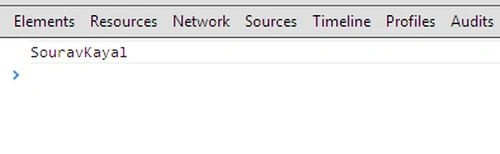
And please note that we are accessing the properties of the name object in the same way, using the [] operator. Is it not like Dictionary access in C# ? Here is the output of this example.
 Is it possible to update a Dictionary (read object) after creation?
Yes, it’s possible to update an object after creation. In this example, we will update the same object that we created in our previous example. Have a look at the following code.
Is it possible to update a Dictionary (read object) after creation?
Yes, it’s possible to update an object after creation. In this example, we will update the same object that we created in our previous example. Have a look at the following code.
- <%@ Page Language="C#" AutoEventWireup="true" CodeBehind="JavaScript.aspx.cs"
- Inherits="JavaScript.JavaScript" %>
- <head runat="server">
- <script type="text/javascript" src="Jquery.js"></script>
- </head>
- <body>
- <form id="form1" runat="server">
- <script>
- $(document).ready(function () {
- var name = new Object();
- name["firstName"] = "Sourav";
- name["lastName"] = "Kayal";
- name["showName"] = function () {
- console.log(name["firstName"] + name["lastName"]);
- };
- //Update name here
- name["firstName"] = "Manish";
- name["lastName"] = "Khanra";
- name.showName();
- });
- </script>
- </form>
- </body>
- </html>
Here are the output and we see that the value has been updated with a new value that we set after object creation.
 Is it possible to set an anonymous function to an object property?
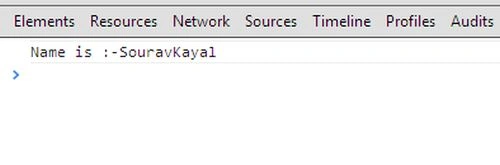
You might think, what is this silly question? By using the dot (.) operator we can set an anonymous method in an object’s property so why not in this way? Yes, it’s just similar to the dot (.) operator to attach an anonymous function to a property. In this case, instead of the dot (.), we will use the [] operator. Here is a sample implementation.
Is it possible to set an anonymous function to an object property?
You might think, what is this silly question? By using the dot (.) operator we can set an anonymous method in an object’s property so why not in this way? Yes, it’s just similar to the dot (.) operator to attach an anonymous function to a property. In this case, instead of the dot (.), we will use the [] operator. Here is a sample implementation.
- <%@ Page Language="C#" AutoEventWireup="true" CodeBehind="JavaScript.aspx.cs"
- Inherits="JavaScript.JavaScript" %>
- <head runat="server">
- <script type="text/javascript" src="backbone/Jquery.js"></script>
- </head>
- <body>
- <form id="form1" runat="server">
- <script>
- $(document).ready(function () {
- var name = new Object();
- name["firstName"] = "Sourav";
- name["lastName"] = "Kayal";
- name["showName"] = function () {
- console.log('Name is :-'+ name["firstName"] + name["lastName"]);
- };
- name.showName();
- });
- </script>
- </form>
- </body>
- </html>
- <%@ Page Language="C#" AutoEventWireup="true" CodeBehind="JavaScript.aspx.cs"
- Inherits="JavaScript.JavaScript" %>
- <head runat="server">
- <script type="text/javascript" src="backbone/Jquery.js"></script>
- </head>
- <body>
- <form id="form1" runat="server">
- <script>
- $(document).ready(function () {
- var name = new Object
- {
- name["firstName"] = "Sourav";
- name["lastName"] = "Kayal";
- name["showName"] = function () {
- console.log(name["firstName"] + ' '+ name["miffleName"] + ' ' + name["lastName"]);
- };
- }
- //Update name here
- name["miffleName"] = "Kumar";
- name.showName();
- });
- </script>
- </form>
- </body>
- </html>

Sam HobbsPosted Dec 21, 2013, 1:43 PM
Yes many other languages have the equivalent of dictionaries but most of them are called something else, such as map in cpp. Many other languages call them associative arrays. The Lisp language is more than 50 years old and associative arrays exist in many variations of the language. SNOBOL is about 50 years old ad it has associative arrays. See: https://en.wikipedia.org/wiki/Comparison_of_programming_languages_(mapping)