

Introduction
React, with its declarative and component-based architecture, provides developers with powerful tools for manipulating data. One such tool is the map() function, a versatile method that simplifies the process of iterating over arrays. In this comprehensive guide, we will explore the map() function in-depth, using practical examples to enhance your understanding.
Map Function in React
At its core, the map() function is a fundamental JavaScript method used to create a new array based on an existing one. It iterates over each element in the original array, applies a provided function, and collects the results into a new array. This concise and powerful utility is particularly handy when working with React components and rendering dynamic content.
Sample Array Object: EmployeeDetails
Before delving into React-specific applications, let's introduce a sample array object named EmployeeDetails. Each element in this array represents an employee and includes properties such as ID, name, age, and salary.
const EmployeeDetails=[
{id:1, name:"Mayooran", age:23, salary:25000},
{id:2, name:"Peter", age:22, salary:28000},
{id:3, name:"Anna",age:23, salary:27000},
{id:4, name:"Suren", age:24, salary:28000},
{id:5, name:"Nimmi", age:28, salary:38000}
];
This array will serve as the basis for our practical examples.
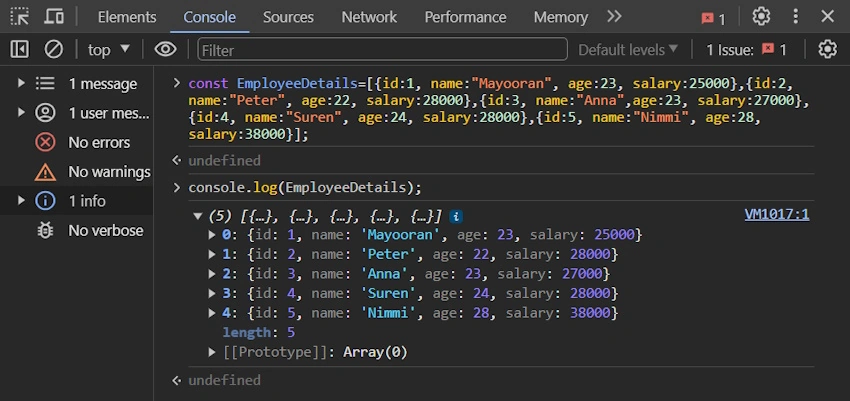
Picture 1. In this image, you can see the EmployeeDetails in the Console output. It is an array object 5 elements are there.
Utilizing map() with a Basic Example
Let's start with a simple example to grasp the basic functionality of the map() function. We'll extract the names of the employees from EmployeeDetails using a map().
const EmployeeName = EmployeeDetails.map(employee => employee.name);
In this example, EmployeeName will be an array containing only the names of the employees. This straightforward application of map() showcases its ability to streamline data extraction.
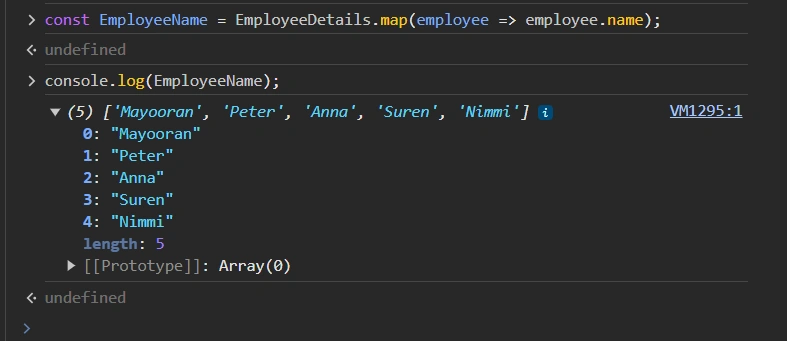
Picture 2. EmployeeName will be an array containing only the names of the employees.
Applying map() in a React Component
Now, let's integrate the map() function into a React component named Details. In this component, we will render a list of employee names using the map() function.
import React from 'react';
import './App.css';

function App() {

  const EmployeeDetails=[
    {id:1, name:"Mayooran", age:23, salary:25000},
    {id:2, name:"Peter", age:22, salary:28000},
    {id:3, name:"Anna",age:23, salary:27000},
    {id:4, name:"Suren", age:24, salary:28000},
    {id:5, name:"Nimmi", age:28, salary:38000}];

   const EmployeeName = EmployeeDetails.map(employee => <li key={employee.id}>{employee.name}</li>)
   return(
      <div>
        <h1> Employees Name </h1>
         <ul>{EmployeeName }</ul>
      </div>
   )
}
export default App;
This React component uses map() to transform the EmployeeDetails array into a list of <li> elements, each displaying a employee's name. The key attribute is crucial for React to efficiently manage dynamic lists.


Join the conversation! Your thoughts help the community grow.