
Introduction
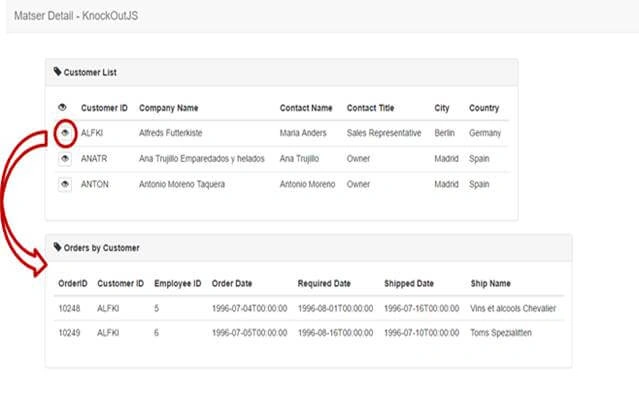
In this post, I will show you how to create master details, which are based on knockout.js library, using ASP.NET Web API 2 and Entity Framework.
Prerequisites
As I said before, to achieve our requirement, we must have Visual Studio 2015 (.NET Framework 4.5.2) and SQL Server.
In this article, we are going to:
- Create a database.
- Create Web API Application.
- Configuring Entity Framework ORM.
- Implementing http Services, which should be used.
- Using knockout.js library for calling Services.
SQL database part
Here, you will find the scripts to create database and tables.
Create database
- USE [master]
- GO
- /****** Object: Database [CompanyDB] Script Date: 3/11/2017 8:18:51 AM ******/
- CREATE DATABASE [CompanyDB]
- CONTAINMENT = NONE
- ON PRIMARY
- ( NAME = N'CompanyDB', FILENAME = N'c:\Program Files (x86)\Microsoft SQL Server\MSSQL11.MSSQLSERVER\MSSQL\DATA\CompanyDB.mdf' , SIZE = 3072KB , MAXSIZE = UNLIMITED, FILEGROWTH = 1024KB )
- LOG ON
- ( NAME = N'CompanyDB_log', FILENAME = N'c:\Program Files (x86)\Microsoft SQL Server\MSSQL11.MSSQLSERVER\MSSQL\DATA\CompanyDB_log.ldf' , SIZE = 1024KB , MAXSIZE = 2048GB , FILEGROWTH = 10%)
- GO
- ALTER DATABASE [CompanyDB] SET COMPATIBILITY_LEVEL = 110
- GO
- IF (1 = FULLTEXTSERVICEPROPERTY('IsFullTextInstalled'))
- begin
- EXEC [CompanyDB].[dbo].[sp_fulltext_database] @action = 'enable'
- end
- GO
- ALTER DATABASE [CompanyDB] SET ANSI_NULL_DEFAULT OFF
- GO
- ALTER DATABASE [CompanyDB] SET ANSI_NULLS OFF
- GO
- ALTER DATABASE [CompanyDB] SET ANSI_PADDING OFF
- GO
- ALTER DATABASE [CompanyDB] SET ANSI_WARNINGS OFF
- GO
- ALTER DATABASE [CompanyDB] SET ARITHABORT OFF
- GO
- ALTER DATABASE [CompanyDB] SET AUTO_CLOSE OFF
- GO
- ALTER DATABASE [CompanyDB] SET AUTO_CREATE_STATISTICS ON
- GO
- ALTER DATABASE [CompanyDB] SET AUTO_SHRINK OFF
- GO
- ALTER DATABASE [CompanyDB] SET AUTO_UPDATE_STATISTICS ON
- GO
- ALTER DATABASE [CompanyDB] SET CURSOR_CLOSE_ON_COMMIT OFF
- GO
- ALTER DATABASE [CompanyDB] SET CURSOR_DEFAULT GLOBAL
- GO
- ALTER DATABASE [CompanyDB] SET CONCAT_NULL_YIELDS_NULL OFF
- GO
- ALTER DATABASE [CompanyDB] SET NUMERIC_ROUNDABORT OFF
- GO
- ALTER DATABASE [CompanyDB] SET QUOTED_IDENTIFIER OFF
- GO
- ALTER DATABASE [CompanyDB] SET RECURSIVE_TRIGGERS OFF
- GO
- ALTER DATABASE [CompanyDB] SET DISABLE_BROKER
- GO
- ALTER DATABASE [CompanyDB] SET AUTO_UPDATE_STATISTICS_ASYNC OFF
- GO
- ALTER DATABASE [CompanyDB] SET DATE_CORRELATION_OPTIMIZATION OFF
- GO
- ALTER DATABASE [CompanyDB] SET TRUSTWORTHY OFF
- GO
- ALTER DATABASE [CompanyDB] SET ALLOW_SNAPSHOT_ISOLATION OFF
- GO
- ALTER DATABASE [CompanyDB] SET PARAMETERIZATION SIMPLE
- GO
- ALTER DATABASE [CompanyDB] SET READ_COMMITTED_SNAPSHOT OFF
- GO
- ALTER DATABASE [CompanyDB] SET HONOR_BROKER_PRIORITY OFF
- GO
- ALTER DATABASE [CompanyDB] SET RECOVERY SIMPLE
- GO
- ALTER DATABASE [CompanyDB] SET MULTI_USER
- GO
- ALTER DATABASE [CompanyDB] SET PAGE_VERIFY CHECKSUM
- GO
- ALTER DATABASE [CompanyDB] SET DB_CHAINING OFF
- GO
- ALTER DATABASE [CompanyDB] SET FILESTREAM( NON_TRANSACTED_ACCESS = OFF )
- GO
- ALTER DATABASE [CompanyDB] SET TARGET_RECOVERY_TIME = 0 SECONDS
- GO
- ALTER DATABASE [CompanyDB] SET READ_WRITE
- GO
Create tables
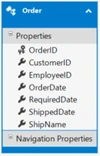
Here, we need to create 2 tables respectively, namely Customers and Orders.
- USE [CompanyDB]
- GO
- /****** Object: Table [dbo].[Customers] Script Date: 3/11/2017 8:19:22 AM ******/
- SET ANSI_NULLS ON
- GO
- SET QUOTED_IDENTIFIER ON
- GO
- SET ANSI_PADDING ON
- GO
- CREATE TABLE [dbo].[Customers](
- [CustomerID] [varchar](50) NOT NULL,
- [CompanyName] [varchar](50) NULL,
- [ContactName] [varchar](50) NULL,
- [ContactTitle] [varchar](50) NULL,
- [City] [varchar](50) NULL,
- [Country] [varchar](50) NULL,
- CONSTRAINT [PK_Customers] PRIMARY KEY CLUSTERED
- (
- [CustomerID] ASC
- )WITH (PAD_INDEX = OFF, STATISTICS_NORECOMPUTE = OFF, IGNORE_DUP_KEY = OFF, ALLOW_ROW_LOCKS = ON, ALLOW_PAGE_LOCKS = ON) ON [PRIMARY]
- ) ON [PRIMARY]
- GO
- SET ANSI_PADDING OFF
- GO
- USE [CompanyDB]
- GO
- /****** Object: Table [dbo].[Orders] Script Date: 3/11/2017 8:19:38 AM ******/
- SET ANSI_NULLS ON
- GO
- SET QUOTED_IDENTIFIER ON
- GO
- SET ANSI_PADDING ON
- GO
- CREATE TABLE [dbo].[Orders](
- [OrderID] [int] NOT NULL,
- [CustomerID] [varchar](50) NOT NULL,
- [EmployeeID] [int] NULL,
- [OrderDate] [date] NULL,
- [RequiredDate] [date] NULL,
- [ShippedDate] [date] NULL,
- [ShipName] [varchar](50) NULL,
- CONSTRAINT [PK_Orders] PRIMARY KEY CLUSTERED
- (
- [OrderID] ASC
- )WITH (PAD_INDEX = OFF, STATISTICS_NORECOMPUTE = OFF, IGNORE_DUP_KEY = OFF, ALLOW_ROW_LOCKS = ON, ALLOW_PAGE_LOCKS = ON) ON [PRIMARY]
- ) ON [PRIMARY]
- GO
- SET ANSI_PADDING OFF
- GO
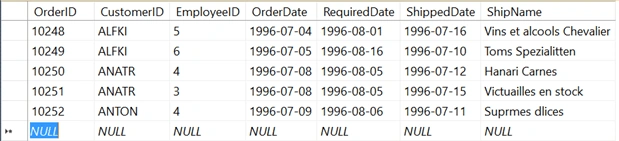
After creating the tables, you can add some records, as shown below for the demo.
Customer table

Order table
Create your MVC Application
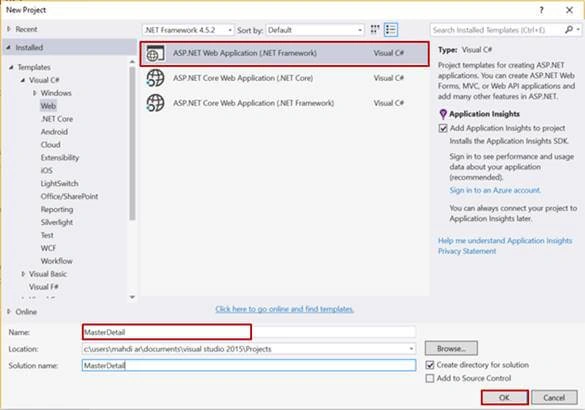
Open Visual Studio and select File >> New Project.
The New Project Window will pop up. Select ASP.NET Web Application (.NET Framework), name your project and click OK.
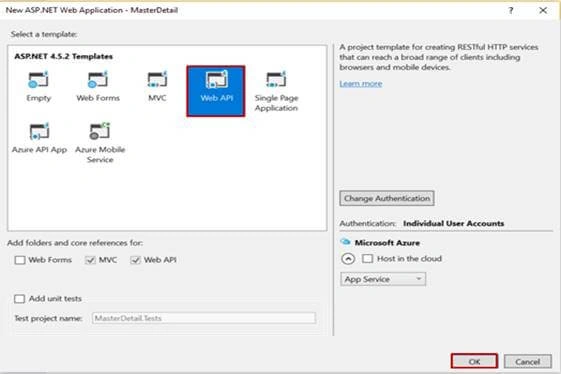
Now, a new dialog will pop up to select the template. We are going to choose Web API template and click OK button.
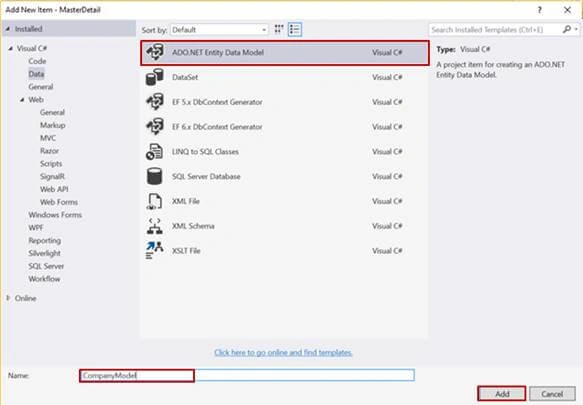
After creating our project, we are going to add ADO.NET Entity Data Model.
Adding ADO.NET Entity Data Model
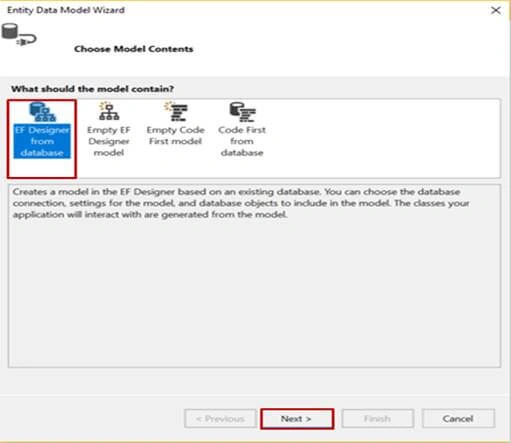
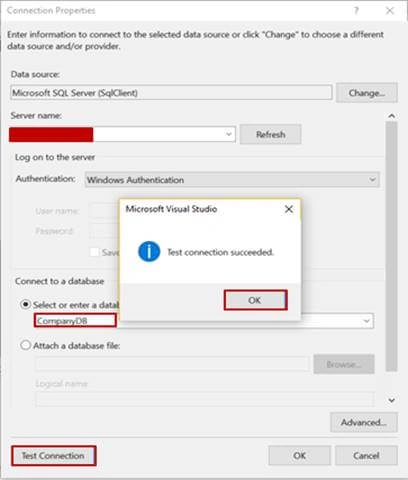
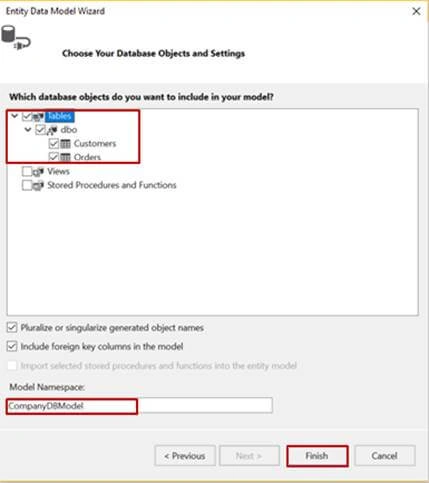
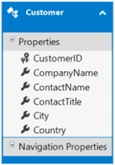
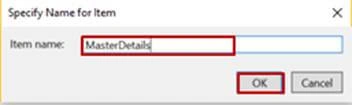
For this, right click on the project name, click Add > Add New Item. Dialog box will pop up, inside Visual C#, select Data, followed by ADO.NET Entity Data Model and enter name for your Dbcontext model as CompanyModel and finally click Add.
Thiruppathi RPosted Mar 12, 2017, 10:52 PM
Nice Article For Knockout.js..