In high-concurrency Machine Learning inference services, sequential execution is a bottleneck that kills user experience and wastes expensive GPU/API compute. When building Enterprise Multi-Agent LangGraph RAG systems, we frequently need to dispatch multiple sub-agents, query multiple vector stores, or call multiple external tools simultaneously. Python’s asyncio library provides three primary tools for concurrent execution: asyncio.gather, asyncio.as_completed, and asyncio.TaskGroup (introduced in Python 3.11). Choosing the wrong one can lead to orphaned tasks consuming GPU memory, out-of-order data corrupting your RAG context, or unhandled exceptions crashing your entire LangGraph state machine. In this end-to-end guide, we will demystify these three primitives. We will then implement a Real-Time Enterprise IT Resolution Agent using LangGraph, demonstrating exactly when and how to use each async pattern to manage state, memory, and multi-agent concurrency.
The Core Concepts: Which Tool for Which ML Task?
Before writing code, we must understand the semantic differences between these tools in the context of ML inference.
asyncio.gather: "The Ordered Aggregator"
How it works: Takes multiple awaitables, runs them concurrently, and returns a single list of results in the exact order the awaitables were passed.
ML Inference Use Case: You are sending 10 text chunks to an embedding model. You need the resulting vectors back in the exact same order to map them back to the original chunks.
Gotcha: If one task fails, gather cancels the rest (by default) and raises the exception. It does not provide structured lifecycle management.
asyncio.as_completed: "The First-Response Streamer"
How it works: Takes multiple awaitables and returns an iterator that yields tasks as they finish. The order is non-deterministic (based purely on execution time).
ML Inference Use Case: You have a slow RAG retrieval (taking 4 seconds) and a fast SQL database lookup (taking 0.5 seconds). You want to stream the SQL results to the frontend immediately via WebSockets without waiting for the RAG retrieval to finish.
Gotcha: You lose the original ordering. You must manually map the completed task back to its original input.
asyncio.TaskGroup: "The Strict Lifecycle Manager" (Python 3.11+)
How it works: Provides Structured Concurrency. It ensures that all tasks within the group complete (or are cancelled) before the async with block exits. If one task raises an unhandled exception, the TaskGroup automatically cancels all sibling tasks.
ML Inference Use Case: You spawn 5 background sub-agents to research a topic. If the main orchestration agent times out or the user cancels the request, you need a guarantee that all 5 background LLM calls are immediately killed to prevent runaway API bills and orphaned GPU processes.
Gotcha: Requires Python 3.11+. Exception handling is grouped; you must catch ExceptionGroup if multiple tasks fail simultaneously.
The Real-World Use Case: Enterprise IT Resolution Agent
Imagine an enterprise IT helpdesk where an employee submits a complex, multi-part ticket: "My cloud dashboard is showing a $5,000 spike, and I also need my production database password reset."
The Multi-Agent Architecture:
Router Agent: Splits the ticket into three parallel sub-tasks:
Sub-Agent A: Query Billing Vector DB (RAG) - Slow (LLM Embedding + Search)
Sub-Agent B: Query IT Knowledge Base (RAG) - Medium
Sub-Agent C: Execute DB Password Reset (Tool/API) - Fast
Concurrency Challenge: We need to manage these three concurrent sub-agents. We must stream partial updates to the user as they finish, ensure strict cleanup if the user cancels, and finally synthesize the results in a predictable format.
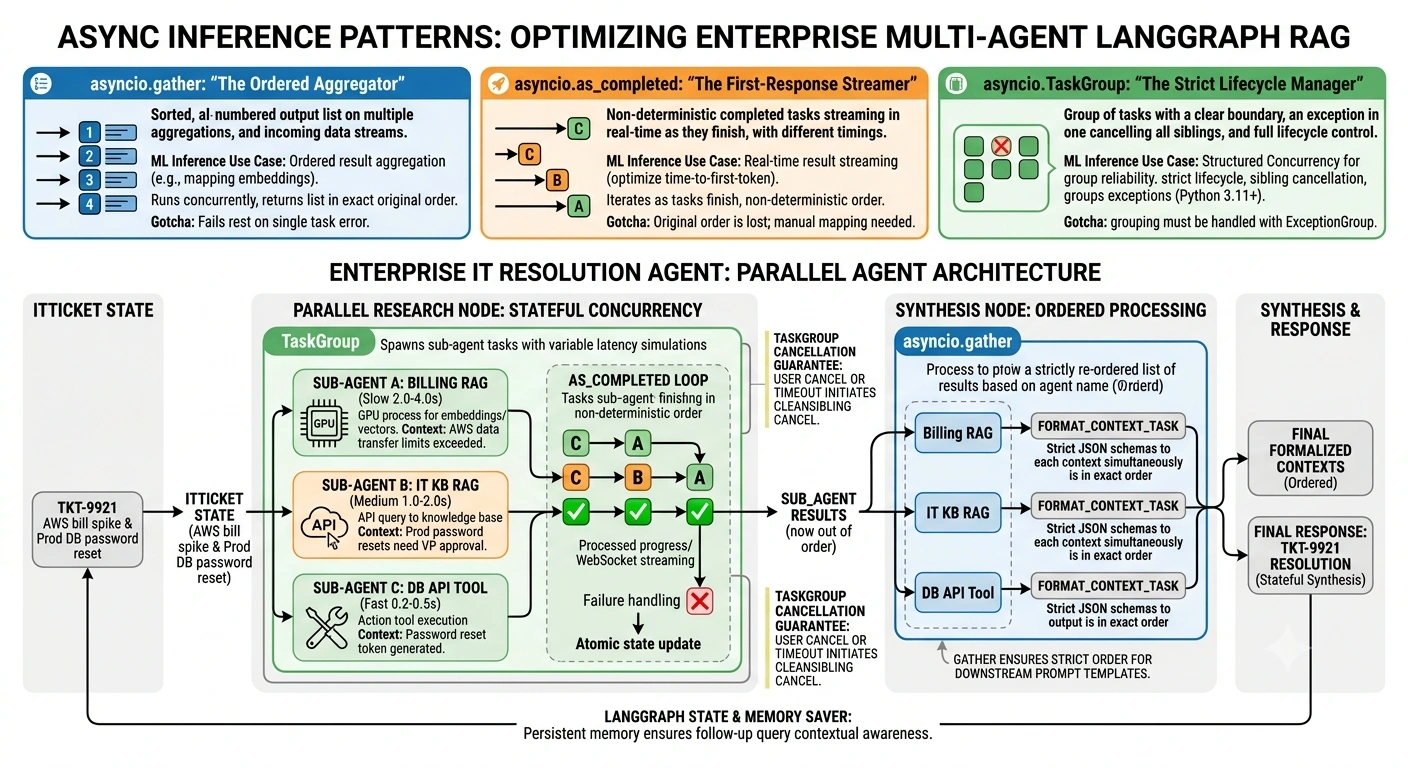
End-to-End Python Implementation
Prerequisites
pip install langgraph langchain-openai langchain-core
Step 1: Define the LangGraph State and Memory
We define a state that tracks the incoming ticket, the progressive results from our sub-agents, and the final synthesized output.
import asyncio
import random
from typing import TypedDict, List, Dict, Any, Optional
from langgraph.checkpoint.memory import MemorySaver

class ITTicketState(TypedDict):
    ticket_id: str
    user_query: str

    # Progressive state updates from parallel sub-agents
    sub_agent_results: List[Dict[str, Any]]

    # Final structured data for synthesis
    formatted_contexts: List[str]
    final_response: str
Step 2: Simulate the ML Inference Sub-Agents
We create three mock sub-agents with highly variable latencies to simulate real-world ML inference and API calls.
async def billing_rag_agent(query: str) -> Dict[str, Any]:
    """Simulates a slow RAG retrieval (Embedding + Vector Search)."""
    await asyncio.sleep(random.uniform(2.0, 4.0)) # Slow
    return {"agent": "Billing RAG", "context": "User exceeded AWS data transfer limits by 400%."}

async def it_knowledge_rag_agent(query: str) -> Dict[str, Any]:
    """Simulates a medium-speed RAG retrieval."""
    await asyncio.sleep(random.uniform(1.0, 2.0)) # Medium
    return {"agent": "IT KB RAG", "context": "DB password resets require VP approval for prod environments."}

async def db_reset_api_agent(query: str) -> Dict[str, Any]:
    """Simulates a fast external API tool call."""
    await asyncio.sleep(random.uniform(0.2, 0.5)) # Fast
    return {"agent": "DB API Tool", "context": "Password reset token generated: tkn_88392."}
Step 3: The Parallel Execution Node (TaskGroup + as_completed)
This is the core of the article. We use TaskGroup to manage the lifecycle, and as_completed to process results the millisecond they finish, updating the LangGraph state progressively.
async def parallel_research_node(state: ITTicketState) -> Dict[str, Any]:
    """
    Executes sub-agents concurrently.
    Uses TaskGroup for strict lifecycle management.
    Uses as_completed to update state progressively.
    """
    query = state["user_query"]
    results = []

    # 1. Initialize the TaskGroup for Structured Concurrency
    async with asyncio.TaskGroup() as tg:
        # Spawn the tasks
        task1 = tg.create_task(billing_rag_agent(query))
        task2 = tg.create_task(it_knowledge_rag_agent(query))
        task3 = tg.create_task(db_reset_api_agent(query))

        tasks = [task1, task2, task3]

        # 2. Use as_completed to process results as they finish
        # This allows us to update state/log progressively without waiting for the slowest task
        for completed_task in asyncio.as_completed(tasks):
            try:
                result = await completed_task
                results.append(result)
                # In a real app, you might stream this to a WebSocket here
                print(f"✅ [{result['agent']}] Finished early! Context: {result['context'][:30]}...")
            except Exception as e:
                # Handle individual task failures without crashing the whole group
                print(f"❌ A sub-agent failed: {e}")

    # The TaskGroup block only exits when ALL tasks are done (or cancelled).
    # We now return the accumulated results to update the LangGraph state.
    return {"sub_agent_results": results}
Step 4: The Synthesis Node (gather)
Now that we have our raw contexts, we need to format them into strict JSON schemas before passing them to the final LLM. We use gather here because order matters for our downstream prompt template.
async def format_context_task(context: str, schema_type: str) -> str:
    """Simulates an LLM call to format text into a strict schema."""
    await asyncio.sleep(0.5) # Simulate LLM latency
    return f"[{schema_type.upper()}] {context}"

async def synthesis_node(state: ITTicketState) -> Dict[str, Any]:
    """
    Formats the sub-agent results.
    Uses asyncio.gather to ensure the formatted outputs
    map 1:1 in the exact order of the input list.
    """
    raw_results = state["sub_agent_results"]

    # We want to map specific schemas to specific agents.
    # Because raw_results came from as_completed, they are OUT OF ORDER.
    # We must map them back to a known order before using gather.
    ordered_inputs = []
    schema_map = {
        "Billing RAG": "financial_schema",
        "IT KB RAG": "it_policy_schema",
        "DB API Tool": "action_token_schema"
    }

    for agent_name in ["Billing RAG", "IT KB RAG", "DB API Tool"]:
        for res in raw_results:
            if res["agent"] == agent_name:
                ordered_inputs.append((res["context"], schema_map[agent_name]))
                break

    # Extract just the contexts and schemas for the gather call
    contexts = [item[0] for item in ordered_inputs]
    schemas = [item[1] for item in ordered_inputs]

    # 3. Use asyncio.gather for ORDERED concurrent execution
    # We pass the tasks in a specific order, and gather guarantees
    # the returned list matches that exact order.
    formatted_contexts = await asyncio.gather(*(
        format_context_task(ctx, schema)
        for ctx, schema in zip(contexts, schemas)
    ))

    # Simulate final LLM synthesis
    final_response = f"Resolved ticket using {len(formatted_contexts)} ordered contexts."

    return {
        "formatted_contexts": formatted_contexts,
        "final_response": final_response
    }
Step 5: Compile the Graph with Memory
We wire the nodes together. We use MemorySaver so that if the user asks a follow-up question ("Can you explain the AWS spike?"), the agent remembers the exact sub-agent contexts retrieved in the previous turn.
from langgraph.graph import StateGraph, START, END

def build_it_graph():
    workflow = StateGraph(ITTicketState)

    workflow.add_node("parallel_research", parallel_research_node)
    workflow.add_node("synthesis", synthesis_node)

    workflow.add_edge(START, "parallel_research")
    workflow.add_edge("parallel_research", "synthesis")
    workflow.add_edge("synthesis", END)

    # Attach persistent memory
    memory = MemorySaver()
    return workflow.compile(checkpointer=memory)

app = build_it_graph()
Step 6: Execution and Verification
Let's run the graph and observe the concurrency patterns in action.
async def run_ticket_resolution():
    thread_id = "ticket_9921"
    config = {"configurable": {"thread_id": thread_id}}

    initial_state = {
        "ticket_id": "TKT-9921",
        "user_query": "AWS bill is huge and I need my prod DB password reset.",
        "sub_agent_results": [],
        "formatted_contexts": [],
        "final_response": ""
    }

    print("🚀 Starting Multi-Agent IT Resolution...\n")

    # Use astream to see node transitions
    async for event in app.astream(initial_state, config=config):
        for node_name, state_update in event.items():
            print(f"\n--- Completed Node: {node_name} ---")
            if node_name == "synthesis":
                print("Final Formatted Contexts (Notice the strict order from gather):")
                for ctx in state_update["formatted_contexts"]:
                    print(f"  - {ctx}")
                print(f"\nFinal Response: {state_update['final_response']}")

if __name__ == "__main__":
    asyncio.run(run_ticket_resolution())
Enterprise Deployment Considerations
When moving this from a notebook to a production Kubernetes cluster, keep these rules in mind:
The TaskGroup Cancellation Guarantee: In a high-concurrency ML service, users will abandon requests. If a user disconnects, LangGraph/your API layer will cancel the main coroutine. Because we used asyncio.TaskGroup(), Python guarantees that task1, task2, and task3 are immediately cancelled. If we had used gather without careful exception handling, we might have left orphaned LLM calls running on your GPU, burning money.
State Mutability with as_completed: Notice how we accumulated results into a local results list inside the as_completed loop, and only returned the final list to LangGraph at the end of the node. LangGraph state updates are atomic per node. If you try to yield state updates inside an as_completed loop, it won't work as expected. Use as_completed for internal progressive processing (like streaming to a client), but return the aggregated state to LangGraph.
ExceptionGroups in Python 3.11+: If multiple sub-agents fail simultaneously inside a TaskGroup, Python raises an ExceptionGroup. In enterprise code, you must wrap your TaskGroup blocks in try...except* ExceptionGroup to handle partial failures gracefully without crashing the entire LangGraph execution.
gather vs TaskGroup for simple lists: If you just need to run 10 embedding calls and don't care about structured cancellation or complex lifecycle management, asyncio.gather is still perfectly valid and slightly less verbose than TaskGroup. Use TaskGroup when the tasks are conceptually a "group" that must succeed or fail together.
Conclusion
Mastering Python's async primitives is non-negotiable for building high-performance enterprise AI.
Use asyncio.gather when you need ordered results from concurrent ML inference (like mapping embeddings back to chunks).
Use asyncio.as_completed when you want to process and stream results the millisecond they finish, optimizing for time-to-first-token.
Use asyncio.TaskGroup to enforce strict lifecycle management, ensuring that when a user cancels a request or a timeout occurs, all background sub-agents and GPU processes are cleanly terminated.
By integrating these patterns into a LangGraph Multi-Agent architecture with persistent memory, you build systems that are not only blazing fast but also financially responsible, resilient, and fully observable.


Join the conversation! Your thoughts help the community grow.