

Image source: online
Assalamualikum!!! Welcome to an exhilarating journey into the heart of SQL Server error handling and transaction management, where precision meets resilience in the high-stakes world of enterprise database systems.
Since 2009, I’ve architected mission-critical solutions for complex ERP systems, powering business functions like Sales, Purchase, Production, Supply Chain Management (SCM), Accounts, and HR. In this comprehensive 15,000+ word guide, I’ll unveil the art and science of building bulletproof database systems, with a special focus on transaction savepoints, an often underutilized yet powerful tool for fine-grained control in complex workflows.
Whether you’re a novice developer crafting your first stored procedure or a seasoned architect designing a global ERP platform, this blog post is your roadmap to mastering SQL Server’s error handling and transaction management. Expect a blend of theoretical depth, practical code examples, real-world business scenarios, and actionable best practices. From basic error handling to advanced savepoint strategies in high-concurrency systems, I’ll guide you through every layer, ensuring your databases are robust, efficient, and ready for enterprise-scale challenges.
Buckle up, and let’s dive into the world of SQL Server, where data integrity reigns supreme, and every transaction tells a story of reliability and precision!
Table of Contents
- Introduction to Error Handling and Transaction Management
- Why These Mechanisms Are the Backbone of ERP Systems
- The Power of Savepoints in Complex Workflows
- Theoretical Foundations
- Understanding Errors in SQL Server
- Transaction Concepts and ACID Properties
- Concurrency and Isolation Levels
- SQL Server Error Handling Mechanisms
- Legacy Error Handling with @
- @ERROR
- Modern Error Handling with TRY…CATCH
- Error Information Functions
- Custom Error Handling with RAISERROR and THROW
- Legacy Error Handling with @
- Transaction Management in SQL Server
- Transaction Types: Implicit, Explicit, and Auto-Commit
- Transaction Control Statements
- Deep Dive into Transaction Savepoints
- Nested Transactions
- Distributed Transactions
- Best Practices for Error Handling and Transaction Management
- Structuring Robust Code
- Logging and Auditing
- Performance Optimization
- Handling Deadlocks and Timeouts
- In-Depth Exploration of Transaction Savepoints
- What Are Savepoints?
- Use Cases in ERP Systems
- Detailed Examples with Data
- Best Practices for Savepoints
- Limitations and Considerations
- Real-World Business Scenarios in ERP Systems
- Scenario 1: Sales Order Processing
- Scenario 2: Purchase Order and Inventory Update
- Scenario 3: Production Batch Processing
- Scenario 4: Accounts Ledger Posting
- Scenario 5: HR Payroll Processing
- Scenario 6: SCM Shipment Tracking
- Advanced Techniques
- Error Handling in Stored Procedures and Triggers
- Transaction Management in High-Concurrency Systems
- Using XACT_STATE and XACT_ABORT
- Distributed Transactions with MS DTC
- Pros and Cons of SQL Server Error Handling and Transaction Management
- Alternatives to Native SQL Server Mechanisms
- Application-Level Error Handling
- ORM Frameworks (Entity Framework)
- NoSQL Databases
- Performance Considerations and Optimization
- Impact of Transactions on Performance
- Indexing and Locking Strategies
- Monitoring and Tuning
- Case Study: Building a Robust ERP Transaction Framework
- Designing a Scalable Framework
- Implementation with Savepoints
- Common Pitfalls and How to Avoid Them
- Conclusion: Crafting Resilient Systems for the Future
- References and Further Reading
- About the Author
1. Introduction to Error Handling and Transaction Management
Why These Mechanisms Are the Backbone of ERP Systems?
Imagine a global enterprise where a single misstep in a sales order, inventory update, or financial posting could ripple across departments, costing millions or eroding customer trust. In the high-pressure world of enterprise resource planning (ERP) systems, error handling and transaction management are the unsung heroes that ensure data integrity, reliability, and consistency. These mechanisms are not just technical tools; they’re the foundation of trust in systems that manage Sales, Purchase, Production, SCM, Accounts, and HR. As a SQL Server developer since 2009, I’ve witnessed the chaos of poorly handled errors and the elegance of well-orchestrated transactions. From preventing stock discrepancies in a retail giant to ensuring accurate payroll for thousands of employees, these techniques are critical for success. In complex ERP systems, where multiple modules interact with shared data, a single failure can cascade into disaster. Robust error handling catches issues before they escalate, while transaction management guarantees that operations are executed as an all-or-nothing unit, the Power of Savepoints in Complex Workflows. Among SQL Server’s arsenal, transaction savepoints stand out as a game-changer for complex workflows. Savepoints allow you to mark points within a transaction, enabling partial rollbacks without discarding the entire operation. In ERP systems, where a single process might involve dozens of steps such as updating inventory, posting financial entries, and logging audit trails, savepoints provide surgical precision, ensuring flexibility and resilience. In this 15,000+ word guide, I’ll take you from the basics of error handling to the advanced intricacies of savepoints, with real-world examples drawn from my experience in large-scale ERP systems. You’ll find detailed code, business scenarios, performance tips, and a case study to tie it all together. Let’s embark on this journey to build systems that stand the test of time!
2. Theoretical Foundations
Understanding Errors in SQL Server. Errors in SQL Server can disrupt even the most carefully designed systems. They fall into several categories.
- Syntax Errors: Incorrect SQL code (e.g., missing semicolon).
- Constraint Violations: Breaching primary key, foreign key, or check constraints.
- Runtime Errors: Division by zero, data type mismatches, or deadlocks.
- System Errors: Resource exhaustion, server crashes, or network failures.
SQL Server classifies errors by severity levels (0–25).
- 0–10: Informational messages or warnings.
- 11–16: User-correctable errors (e.g., constraint violations).
- 17–19: Resource or software issues (e.g., out of memory).
- 20–25: Fatal errors that terminate the connection or process.
Understanding these categories and their implications is essential for designing effective error-handling strategies, particularly in relation to transaction Concepts and ACID Properties. A transaction is a logical unit of work that must be executed as a whole. SQL Server transactions adhere to the ACID properties.
- Atomicity: Ensures all operations complete successfully, or none are applied.
- Consistency: Maintains the database in a valid state before and after the transaction.
- Isolation: Ensures transactions are independent of one another.
- Durability: Guarantees that committed changes are permanently saved, even in a system failure.
In ERP systems, ACID compliance is non-negotiable. For example, a sales order must update inventory, generate an invoice, and log an audit trail as a single atomic unit concurrency and Isolation Levels. In multi-user ERP systems, concurrent transactions can lead to issues like.
- Dirty Reads: Reading uncommitted data.
- Non-Repeatable Reads: Data changes between reads within a transaction.
- Phantom Reads: New rows appear during a transaction.
SQL Server offers isolation levels to manage concurrency.
- Read Uncommitted: Allows dirty reads (lowest isolation).
- Read Committed: Prevents dirty reads (SQL Server default).
- Repeatable Read: Prevents dirty and non-repeatable reads.
- Serializable: Prevents all concurrency issues (highest isolation).
- Snapshot: Uses row versioning for consistent reads without locking.
Choosing the correct isolation level is a balancing act between data consistency and performance, especially in high-concurrency ERP environments.
3. SQL Server Error Handling Mechanisms
Legacy Error Handling with @
@ERROR
Before SQL Server 2005, error handling relied on the @@ERROR system function, which returns the error number of the last executed statement (0 if no error).Example: Basic Error Handling with @.
BEGIN TRANSACTION;

INSERT INTO Sales.Orders (OrderID, CustomerID, OrderDate)
VALUES (1, 100, GETDATE());

IF @@ERROR <> 0
BEGIN
    ROLLBACK TRANSACTION;
    PRINT 'Error occurred during order insertion. Transaction rolled back.';
END
ELSE
BEGIN
    COMMIT TRANSACTION;
    PRINT 'Order inserted successfully.';
END
Limitations
- @@ERROR resets after each statement, requiring immediate checks.
- Limited error details (only error number).
- Clunky for complex procedures.
Modern Error Handling with TRY CATCH. Introduced in SQL Server 2005, TRY…CATCH provides structured error handling, similar to C# or Java.
Syntax
BEGIN TRY
    -- Code that might cause an error
END TRY
BEGIN CATCH
    -- Handle the error
END CATCH
Example: TRY…CATCH with Transaction.
BEGIN TRY
    BEGIN TRANSACTION;

    INSERT INTO Sales.Orders (OrderID, CustomerID, OrderDate)
    VALUES (1, 100, GETDATE());

    -- Simulate an error (foreign key violation)
    INSERT INTO Sales.OrderDetails (OrderID, ProductID, Quantity)
    VALUES (1, 999, 10); -- ProductID 999 does not exist

    COMMIT TRANSACTION;
END TRY
BEGIN CATCH
    IF @@TRANCOUNT > 0
        ROLLBACK TRANSACTION;

    SELECT
        ERROR_NUMBER()    AS ErrorNumber,
        ERROR_MESSAGE()   AS ErrorMessage,
        ERROR_LINE()      AS ErrorLine,
        ERROR_PROCEDURE() AS ErrorProcedure;
END CATCH;
Benefits
- Captures all errors in the TRY block.
- Provides detailed error information via functions.
- Simplifies transaction rollback logic.
Error Information Functions Within a CATCH block, use these functions to retrieve error details.
- ERROR_NUMBER(): Error number.
- ERROR_MESSAGE(): Error description.
- ERROR_LINE(): Line number where the error occurred.
- ERROR_PROCEDURE(): Name of the stored procedure or trigger.
- ERROR_SEVERITY(): Severity level.
- ERROR_STATE(): Error state number.
Custom Error Handling with RAISERROR and THROW. For business-specific errors, use RAISERROR (pre-SQL Server 2012) or THROW (SQL Server 2012+).
Example: Custom Error with THROW.
BEGIN TRY
    DECLARE @CustomerID INT = 999;

    IF NOT EXISTS (
        SELECT 1
        FROM Sales.Customers
        WHERE CustomerID = @CustomerID
    )
        THROW 50001, 'Invalid CustomerID provided.', 1;
END TRY
BEGIN CATCH
    SELECT
        ERROR_NUMBER() AS ErrorNumber,
        ERROR_MESSAGE() AS ErrorMessage;
END CATCH
THROW vs. RAISERROR
- THROW is simpler, integrates with TRY…CATCH, and re-throws the original error.
- RAISERROR supports custom severity but is less flexible.
4. Transaction Management in SQL Server
Transaction Types. SQL Server supports three transaction types.
- Auto-Commit: Each statement is a transaction (default).
- Implicit: Transactions start automatically for certain statements but require explicit COMMIT or ROLLBACK.
- Explicit: Defined with BEGIN TRANSACTION, COMMIT, and ROLLBACK.
Transaction Control Statements
- BEGIN TRANSACTION: Starts a transaction.
- COMMIT TRANSACTION: Saves changes.
- ROLLBACK TRANSACTION: Undoes changes.
Example: Explicit Transaction.
BEGIN TRANSACTION;

UPDATE Sales.Orders
SET OrderStatus = 'Processed'
WHERE OrderID = 100;

INSERT INTO Sales.OrderHistory (OrderID, Status, ChangeDate)
VALUES (100, 'Processed', GETDATE());

COMMIT TRANSACTION;
Nested Transactions SQL Server supports nested transactions, but only the outermost COMMIT or ROLLBACK affects the database. The @@TRANCOUNT function tracks nesting levels.
Example: Nested Transactions.
BEGIN TRANSACTION;

INSERT INTO Sales.Orders (OrderID, CustomerID, OrderDate)
VALUES (2, 101, GETDATE());

BEGIN TRANSACTION; -- Nested
    INSERT INTO Sales.OrderDetails (OrderID, ProductID, Quantity)
    VALUES (2, 100, 5);
COMMIT TRANSACTION; -- Inner commit

COMMIT TRANSACTION; -- Outer commit
Distributed Transactions. For operations across multiple databases or servers, use the Microsoft Distributed Transaction Coordinator (MS DTC).
Example: Distributed Transaction.
BEGIN DISTRIBUTED TRANSACTION;

UPDATE Server1.ERP.dbo.Orders
SET Status = 'Shipped'
WHERE OrderID = 100;

UPDATE Server2.ERP.dbo.Inventory
SET Quantity = Quantity - 10
WHERE ProductID = 100;

COMMIT TRANSACTION;
5. Best Practices for Error Handling and Transaction Management
- Use TRY…CATCH: More robust than @@ERROR.
- Check @
- @TRANCOUNT
- Ensure transactions are committed or rolled back.
- Log Errors: Store errors in a dedicated table for auditing.
- Minimize Transaction Scope: Reduce locking and improve concurrency.
- Choose Appropriate Isolation Levels: Balance consistency and performance.
- Handle Deadlocks: Retry on error 1205.
- Test Edge Cases: Simulate failures like constraint violations or timeouts.
- Document Error Codes: Maintain a reference for system and custom errors.
Example: Error Logging Table.
CREATE TABLE dbo.ErrorLog
(
    ErrorID         INT IDENTITY (1, 1) PRIMARY KEY,
    ErrorNumber     INT,
    ErrorMessage    NVARCHAR(4000),
    ErrorLine       INT,
    ErrorProcedure  NVARCHAR(128),
    ErrorDateTime   DATETIME DEFAULT GETDATE(),
    UserName        NVARCHAR(128) DEFAULT SUSER_SNAME()
);
Example: Logging Errors.
BEGIN TRY
    BEGIN TRANSACTION;

    -- Business logic

    COMMIT TRANSACTION;
END TRY
BEGIN CATCH
    IF @@TRANCOUNT > 0
        ROLLBACK TRANSACTION;

    INSERT INTO dbo.ErrorLog (
        ErrorNumber,
        ErrorMessage,
        ErrorLine,
        ErrorProcedure
    )
    VALUES (
        ERROR_NUMBER(),
        ERROR_MESSAGE(),
        ERROR_LINE(),
        ERROR_PROCEDURE()
    );

    THROW;
END CATCH;
6. In-Depth Exploration of Transaction Savepoints
What Are Savepoints?
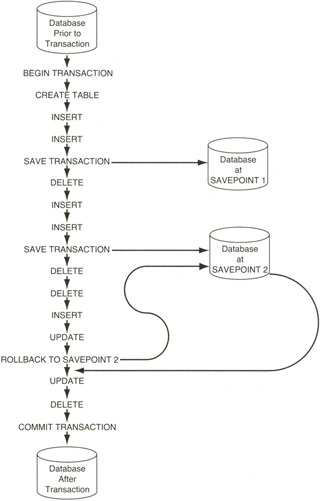
Transaction savepoints allow you to mark specific points within a transaction, enabling partial rollbacks without undoing the entire transaction. This is particularly useful in complex ERP workflows where some operations can succeed even if others fail.
Syntax
SAVE TRANSACTION SavepointName;
ROLLBACK TRANSACTION SavepointName;
- SAVE TRANSACTION: Creates a savepoint.
- ROLLBACK TRANSACTION SavepointName: Rolls back to the specified savepoint, preserving earlier operations.
- Savepoints are scoped to the current transaction and are cleared when the transaction is committed or rolled back.
Use Cases in ERP Systems
Savepoints are ideal for.
- Multi-Step Workflows: E.g., processing a sales order with optional steps like discount application.
- Error Recovery: Allowing partial success in batch processing (e.g., production or payroll).
- Audit Trails: Logging intermediate steps without committing the entire transaction.
- Complex Validation: Rolling back specific steps if validations fail.
Detailed Examples with Data Let’s explore savepoints with a comprehensive example in an ERP system, complete with sample data and business context.
Scenario: A manufacturing company processes a production batch, consuming raw materials, producing finished goods, and updating quality control records. If the quality control step fails, only that step should be rolled back, preserving the raw material consumption and production updates.
Sample Data Setup
-- Create tables
CREATE TABLE Production.RawMaterials (
    MaterialID INT PRIMARY KEY,
    MaterialName NVARCHAR(100),
    Quantity INT
);

CREATE TABLE Production.FinishedGoods (
    ProductID INT PRIMARY KEY,
    ProductName NVARCHAR(100),
    Quantity INT
);

CREATE TABLE Production.QualityControl (
    QCID INT IDENTITY(1,1) PRIMARY KEY,
    BatchID INT,
    ProductID INT,
    Status NVARCHAR(20),
    QCDate DATETIME
);

-- Insert sample data
INSERT INTO Production.RawMaterials (MaterialID, MaterialName, Quantity)
VALUES
    (1, 'Steel', 1000),
    (2, 'Plastic', 500);

INSERT INTO Production.FinishedGoods (ProductID, ProductName, Quantity)
VALUES
    (101, 'Widget A', 200),
    (102, 'Widget B', 150);
Stored Procedure with Savepoints.
CREATE PROCEDURE Production.usp_ProcessBatchWithSavepoints
    @BatchID INT,
    @ProductID INT,
    @MaterialID INT,
    @QuantityProduced INT,
    @RawMaterialConsumed INT,
    @QCStatus NVARCHAR(20)
AS
BEGIN
    SET NOCOUNT ON;

    BEGIN TRY
        BEGIN TRANSACTION;

        -- Validate inputs
        IF NOT EXISTS (
            SELECT 1
            FROM Production.RawMaterials
            WHERE MaterialID = @MaterialID
              AND Quantity >= @RawMaterialConsumed
        )
            THROW 50010, 'Insufficient raw material quantity.', 1;

        IF NOT EXISTS (
            SELECT 1
            FROM Production.FinishedGoods
            WHERE ProductID = @ProductID
        )
            THROW 50011, 'Invalid ProductID.', 1;

        -- Step 1: Consume raw material
        SAVE TRANSACTION RawMaterialUpdate;
        UPDATE Production.RawMaterials
        SET Quantity = Quantity - @RawMaterialConsumed
        WHERE MaterialID = @MaterialID;

        -- Step 2: Produce finished goods
        SAVE TRANSACTION ProductionUpdate;
        UPDATE Production.FinishedGoods
        SET Quantity = Quantity + @QuantityProduced
        WHERE ProductID = @ProductID;

        -- Step 3: Perform quality control (simulate potential failure)
        SAVE TRANSACTION QualityControl;
        IF @QCStatus = 'Failed'
            THROW 50012, 'Quality control check failed.', 1;

        INSERT INTO Production.QualityControl (BatchID, ProductID, Status, QCDate)
        VALUES (@BatchID, @ProductID, @QCStatus, GETDATE());

        COMMIT TRANSACTION;
        SELECT 'Batch processed successfully.' AS Result;
    END TRY

    BEGIN CATCH
        IF @@TRANCOUNT > 0
        BEGIN
            IF ERROR_NUMBER() = 50012 -- QC failure
            BEGIN
                ROLLBACK TRANSACTION QualityControl; -- Roll back only QC step
                COMMIT TRANSACTION; -- Commit raw material and production updates
                SELECT 'Quality control failed, but raw material and production updates committed.' AS Result;
            END
            ELSE
            BEGIN
                ROLLBACK TRANSACTION; -- Full rollback for other errors

                INSERT INTO dbo.ErrorLog (ErrorNumber, ErrorMessage, ErrorLine, ErrorProcedure)
                VALUES (
                    ERROR_NUMBER(),
                    ERROR_MESSAGE(),
                    ERROR_LINE(),
                    ERROR_PROCEDURE()
                );

                THROW;
            END
        END
    END CATCH
END;
Execution Example 1: Successful Batch Processing.
-- Initial data state
SELECT *
FROM Production.RawMaterials;

SELECT *
FROM Production.FinishedGoods;

SELECT *
FROM Production.QualityControl;

-- Execute procedure (successful QC)
EXEC Production.usp_ProcessBatchWithSavepoints
    @BatchID = 1,
    @ProductID = 101,
    @MaterialID = 1,
    @QuantityProduced = 50,
    @RawMaterialConsumed = 200,
    @QCStatus = 'Passed';

-- Verify results
SELECT *
FROM Production.RawMaterials;       -- Steel: 800

SELECT *
FROM Production.FinishedGoods;      -- Widget A: 250

SELECT *
FROM Production.QualityControl;     -- QC record added
Execution Example 2: QC Failure with Partial Rollback.
-- Execute procedure (QC fails)
EXEC Production.usp_ProcessBatchWithSavepoints
    @BatchID = 2,
    @ProductID = 102,
    @MaterialID = 2,
    @QuantityProduced = 30,
    @RawMaterialConsumed = 100,
    @QCStatus = 'Failed';

-- Verify results
SELECT *
FROM Production.RawMaterials; -- Plastic: 400

SELECT *
FROM Production.FinishedGoods; -- Widget B: 180

SELECT *
FROM Production.QualityControl; -- No QC record added
Explanation
- The procedure uses three savepoints: RawMaterialUpdate, ProductionUpdate, and QualityControl.
- If the quality control step fails (error 50012), only the QC step is rolled back, preserving the raw material consumption and production updates.
- Other errors trigger a complete rollback, ensuring data consistency.
- The ErrorLog table captures any non-QC errors for auditing.
Best Practices for Savepoints
- Use Descriptive Savepoint Names: E.g., RawMaterialUpdate instead of SP1.
- Limit Savepoint Scope: Use savepoints only for critical steps to avoid complexity.
- Check @
- @TRANCOUNT
- Ensure a transaction is active before creating savepoints.
- Handle Errors Carefully: Differentiate between errors requiring partial vs. full rollback.
- Test Savepoint Logic: Simulate failures to verify rollback behavior.
- Avoid Overuse: Too many savepoints can complicate code and reduce readability.
Limitations and Considerations
- No Nested Savepoints: Savepoints are linear within a transaction; rolling back to an earlier savepoint clears later ones.
- Performance Overhead: Savepoints increase transaction log writes, impacting performance in high-volume systems.
- Scope Limitation: Savepoints are only valid within the current transaction.
- Error Handling Complexity: Requires careful logic to manage partial rollbacks.
Example: Savepoint Overuse Pitfall.
BEGIN TRANSACTION;

SAVE TRANSACTION SP1;
INSERT INTO Sales.Orders (OrderID, CustomerID)
VALUES (3, 103);

SAVE TRANSACTION SP2;
UPDATE Sales.Orders
SET OrderStatus = 'Processed'
WHERE OrderID = 3;

SAVE TRANSACTION SP3;
-- ... (many more savepoints)

ROLLBACK TRANSACTION SP1;  -- Clears SP2 and SP3
COMMIT TRANSACTION;
Join the conversation! Your thoughts help the community grow.