

If you are building AI agents or complex workflows, you have likely encountered LangGraph. At the heart of LangGraph is the concept of State—the shared memory that passes between different steps (nodes) of your application.
In Python, the most natural and common way to represent this state is using a dictionary (dict).
This end-to-end guide will first ground you in Python dictionary fundamentals, then seamlessly transition into how to leverage typed dictionaries (TypedDict) to build robust, stateful applications in LangGraph.
Part 1: Python dict Fundamentals (A Quick Refresher)
A dictionary in Python is a collection of key-value pairs. It is unordered (in older Python versions) but maintains insertion order (Python 3.7+), is mutable, and does not allow duplicate keys.
1. Creation and Access
# Creating a dictionary
user_profile = {
    "name": "Alice",
    "role": "Developer",
    "skills": ["Python", "LangGraph"]
}

# Accessing values
print(user_profile["name"])       # Output: Alice
print(user_profile.get("age", 0)) # Output: 0 (Safe access with default value)
2. Modification and Updates
# Adding or updating a key
user_profile["role"] = "Senior Developer"
user_profile["location"] = "Remote"

# Merging dictionaries (Python 3.9+)
extra_info = {"experience_years": 5}
user_profile |= extra_info
3. Type Hinting with TypedDict
While standard dictionaries are flexible, large codebases (and frameworks like LangGraph) require schema enforcement. This is where TypedDict from the typing module shines. It allows you to define the exact keys and value types a dictionary must have, giving you IDE autocompletion and static type checking (via mypy).
from typing import TypedDict, List

class UserProfile(TypedDict):
    name: str
    role: str
    skills: List[str]

# The type checker will warn you if you miss a key or use the wrong type
valid_profile: UserProfile = {"name": "Bob", "role": "Designer", "skills": ["Figma"]}
Part 2: Why dict is the Heart of LangGraph
LangGraph is a library for building stateful, multi-actor applications with LLMs. It models workflows as a graph consisting of:
State: The shared memory (almost always a
TypedDict).Nodes: Python functions that read the state, perform work, and return an update to the state.
Edges: The logic that determines which node executes next.
The Golden Rule of LangGraph State
When a node returns a dictionary, LangGraph does not replace the entire state. Instead, it merges (updates) the returned dictionary with the existing state.
If your state has 10 keys, and a node returns {"status": "complete"}, only the status key is updated. The other 9 keys remain untouched.
Part 3: End-to-End LangGraph Example
Let’s build a Multi-Step Data Enrichment Agent.
Goal: Take a raw company name, extract its industry, generate a summary, and store all intermediate steps in a dictionary state.
Step 1: Installation
pip install langgraph typing-extensionsStep 2: Define the State (TypedDict)
We define the schema of our memory. Every node will read from and write to this structure.
from typing import TypedDict, List, Optional

class EnrichmentState(TypedDict):
    company_name: str
    industry: Optional[str]      # Will be filled by Node 1
    summary: Optional[str]       # Will be filled by Node 2
    tags: List[str]              # Will be appended to by Node 3
    is_complete: bool
Step 3: Define the Nodes (Functions)
Each node takes the EnrichmentState as input and returns a dictionary containing only the keys it wants to update.
# Node 1: Extract Industry
def extract_industry(state: EnrichmentState) -> dict:
    print(f"--- Extracting industry for {state['company_name']} ---")
    # In a real app, this would be an LLM call
    industry = "Technology" if "tech" in state['company_name'].lower() else "General"

    # Return ONLY the update
    return {
        "industry": industry,
        "tags": ["industry_extracted"] # We will see how this behaves shortly
    }

# Node 2: Generate Summary
def generate_summary(state: EnrichmentState) -> dict:
    print(f"--- Generating summary for {state['company_name']} in {state['industry']} ---")
    summary = f"{state['company_name']} is a leading player in the {state['industry']} sector."

    return {
        "summary": summary,
        "tags": ["summary_generated"]
    }

# Node 3: Finalize
def finalize(state: EnrichmentState) -> dict:
    print("--- Finalizing enrichment ---")
    return {"is_complete": True, "tags": ["process_complete"]}
Step 4: Build and Compile the Graph
We use StateGraph, passing our TypedDict to tell LangGraph what the state looks like.
from langgraph.graph import StateGraph, START, END

# 1. Initialize the graph with the State schema
workflow = StateGraph(EnrichmentState)

# 2. Add nodes
workflow.add_node("extract", extract_industry)
workflow.add_node("summarize", generate_summary)
workflow.add_node("finalize", finalize)

# 3. Add edges (control flow)
workflow.add_edge(START, "extract")
workflow.add_edge("extract", "summarize")
workflow.add_edge("summarize", "finalize")
workflow.add_edge("finalize", END)

# 4. Compile the graph
app = workflow.compile()
Step 5: Execute the Graph
We invoke the graph by providing the initial state. Notice we only need to provide the required fields; Optional fields can be omitted or set to None.
initial_state = {
    "company_name": "Quantum Tech Solutions",
    "industry": None,
    "summary": None,
    "tags": ["initialized"],
    "is_complete": False
}

# Run the graph
final_state = app.invoke(initial_state)

import json
print("\n--- Final State ---")
print(json.dumps(final_state, indent=2))
If you run the code above, look at the tags list in the final output. It will likely just be ["process_complete"].
Why? Because by default, when a node returns {"tags": ["new_tag"]}, LangGraph overwrites the entire tags key with the new list. It does not automatically append.
To fix this, we need an advanced LangGraph pattern.
Part 4: Advanced State Management (The Annotated Pattern)
In real-world LangGraph applications (especially chatbots), you rarely want to overwrite state; you want to append to it (e.g., adding new messages to a chat history, or accumulating tags).
LangGraph solves this using typing.Annotated combined with a reducer function like operator.add.
Updating Our State Definition
Let's modify the tags field to use Annotated. This tells LangGraph: "When a node returns a value for this key, don't overwrite it; use operator.add to combine the old value with the new value."
from typing import TypedDict, List, Optional, Annotated
import operator

class EnrichmentState(TypedDict):
    company_name: str
    industry: Optional[str]
    summary: Optional[str]
    # Tell LangGraph to append to this list, not overwrite it!
    tags: Annotated[List[str], operator.add]
    is_complete: bool
Now, if Node 1 returns {"tags": ["industry_extracted"]} and Node 2 returns {"tags": ["summary_generated"]}, the final state will correctly contain:["initialized", "industry_extracted", "summary_generated", "process_complete"].
(Note: For lists, operator.add concatenates them. For chat messages, LangGraph provides a built-in add_messages reducer).
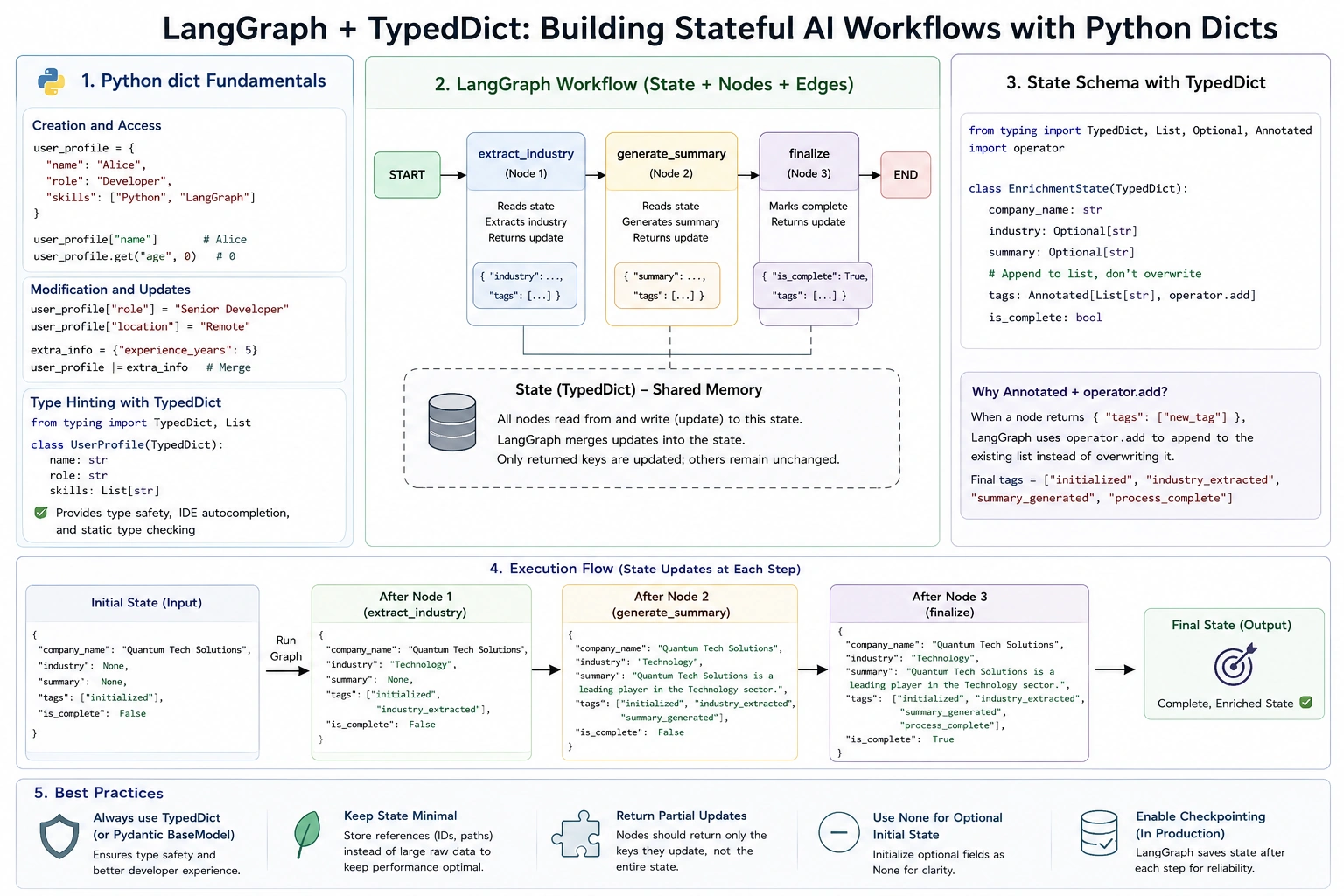
Part 5: Best Practices for Using dict in LangGraph
Always use
TypedDictor PydanticBaseModel: Never use a raw, untypeddictfor your LangGraph state. You will lose IDE autocompletion, and debugging state mismatches becomes a nightmare.Keep State Minimal: LangGraph saves the state to a checkpoint database after every step (if checkpointing is enabled). Large dictionaries (e.g., storing raw PDF text or massive DataFrames) will slow down your app and bloat your database. Store references (like file paths or IDs) instead of raw data.
Return Partial Updates: Nodes should only return the keys they are responsible for updating. Returning the entire state dictionary from every node is redundant and can cause race conditions in complex graphs.
Use
Nonefor Optional Initial State: If a node will generate a value, initialize it asOptional[Type] = Nonein yourTypedDict. This makes the initial invocation clean and explicit.
The Python dict is a simple, versatile data structure, but when combined with TypedDict and LangGraph's reduction mechanics, it becomes a powerful engine for stateful AI applications.
By defining a clear TypedDict schema, writing nodes that return partial dictionary updates, and leveraging Annotated with operator.add for accumulation, you can build complex, multi-step agents that are both highly readable and robust.
Join the conversation! Your thoughts help the community grow.