

Python is the undisputed lingua franca of Artificial Intelligence. However, as enterprise AI systems scale—moving from simple chatbots to complex, multi-agent Retrieval-Augmented Generation (RAG) pipelines—developers inevitably hit a notorious bottleneck: The Global Interpreter Lock (GIL). When building enterprise-grade systems using frameworks like LangGraph, understanding the GIL is not just an academic exercise; it is the difference between a system that scales horizontally and one that chokes under its own CPU-bound data processing. In this comprehensive guide, we will demystify the GIL, explore how it impacts multi-threading versus multi-processing, and detail strategies to bypass it. Finally, we will build an end-to-end enterprise multi-agent RAG system using LangGraph, complete with state management and memory, explicitly demonstrating how to architect around the GIL for maximum performance.
Part 1: Demystifying the Global Interpreter Lock (GIL)
The GIL is a mutex (Mutual Exclusion Lock) that protects access to Python objects, preventing multiple native threads from executing Python bytecodes at once.
Why does Python have a GIL?
Python’s memory management relies heavily on reference counting. Every object in Python keeps a count of how many references point to it. When the count drops to zero, the memory is immediately deallocated. If multiple threads could execute Python code simultaneously, they could modify these reference counts concurrently, leading to race conditions and premature memory deallocation (or memory leaks). The GIL was introduced as a simple, elegant solution: only one thread can execute Python bytecode at a time, making reference counting thread-safe without requiring fine-grained locks on every single object.
Part 2: Multi-Threading vs. Multi-Processing under the GIL
The GIL fundamentally dictates how we approach concurrency in Python.
1. Multi-Threading (I/O-Bound Tasks)
In a multi-threaded Python program, threads take turns executing. However, the GIL is released during I/O operations (like network requests, reading from disk, or waiting for a database).
Impact: If your task is I/O-bound (e.g., calling an LLM API, querying a Vector DB), multi-threading works beautifully. While Thread A waits for the LLM response, the GIL is released, allowing Thread B to process data.
The Catch: If your task is CPU-bound (e.g., heavy math, text parsing, local embedding generation), threads will constantly context-switch, fighting for the GIL. This results in no performance gain, and sometimes even a performance degradation due to the overhead of context switching.
2. Multi-Processing (CPU-Bound Tasks)
Multi-processing bypasses the GIL entirely. When you spawn multiple processes, the OS allocates separate memory space for each. Each process gets its own Python interpreter and its own independent GIL.
Impact: Processes can run truly in parallel across multiple CPU cores. For CPU-bound tasks, multi-processing provides linear speedup relative to the number of cores.
The Catch: Processes do not share memory. Inter-Process Communication (IPC) via serialization (pickling) is required to share data, which adds overhead.
Part 3: Strategies to Bypass the GIL for CPU-Bound Tasks
When building data-heavy AI pipelines, you must identify CPU-bound bottlenecks and bypass the GIL. Here are the primary strategies:
Multiprocessing (
ProcessPoolExecutor): The most common approach. Offload CPU-bound tasks to separate processes.C-Extensions that Release the GIL: Libraries like
NumPy,Pandas,PyArrow, andFAISSare written in C. When they perform heavy computations, they explicitly release the GIL, allowing other Python threads to run concurrently.Alternative Interpreters / Free-Threaded Python: As of Python 3.13 (and maturing in 3.14), Python introduced an experimental free-threaded (NoGIL) build (PEP 703). This removes the GIL entirely, allowing true multi-threading for CPU-bound tasks. Note: In enterprise environments,
ProcessPoolExecutorremains the most stable and widely supported bypass today.
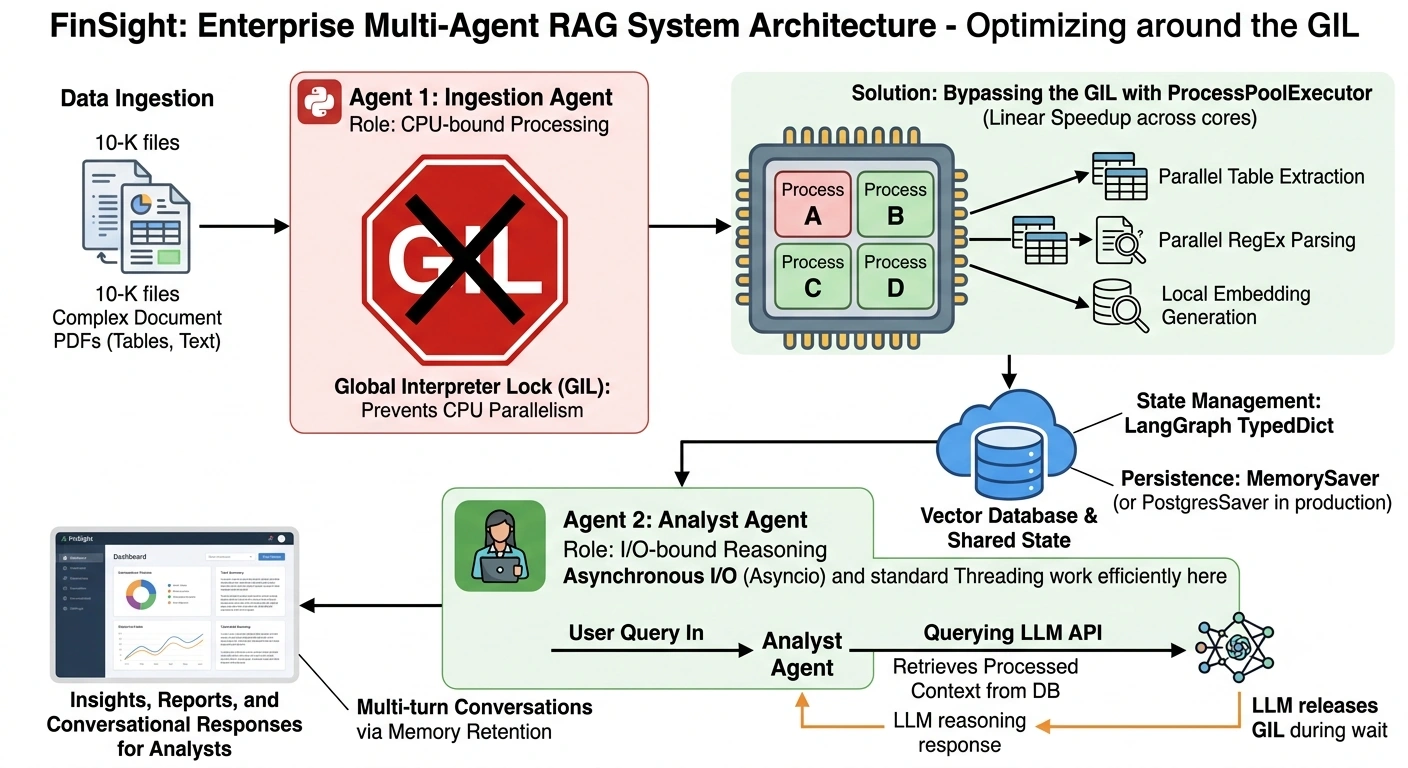
Part 4: The Enterprise Use Case - "FinSight" Multi-Agent RAG
Let’s apply this to a real-world enterprise scenario.
The Scenario: You are building "FinSight," an enterprise multi-agent RAG system for financial analysts. The system ingests massive, complex 10-K financial reports (PDFs), extracts tabular data, generates embeddings, and allows analysts to query the data using natural language.
The Hybrid Workload Problem:
CPU-Bound (The Bottleneck): Parsing complex PDF tables, running custom regex for financial entity extraction, and generating local embeddings. If done in standard threads, the GIL will freeze the application.
I/O-Bound: Querying the LLM for reasoning, retrieving context from the Vector Database, and saving state to memory.
The Architecture:
We will use LangGraph to orchestrate a multi-agent system.
Agent 1 (Ingestion Agent): Handles the CPU-bound document processing. We will use
ProcessPoolExecutorinside this node to bypass the GIL.Agent 2 (Analyst Agent): Handles the I/O-bound LLM reasoning and vector retrieval.
State & Memory: We will use LangGraph’s
StateGraphto manage shared state andMemorySaverto persist conversation history across sessions.
Part 5: End-to-End Code Implementation
Prerequisites
pip install langgraph langchain-openai langchain-core pydantic1. Define the State and Memory
First, we define the shared state that will flow through our graph, and initialize our memory checkpointer.
import asyncio
import time
from typing import Annotated, Any, Dict, List
from typing_extensions import TypedDict

from langchain_core.messages import BaseMessage, HumanMessage, AIMessage
from langchain_openai import ChatOpenAI
from langgraph.graph import StateGraph, START, END
from langgraph.graph.message import add_messages
from langgraph.checkpoint.memory import MemorySaver
from concurrent.futures import ProcessPoolExecutor

# 1. Define the Shared State
class FinSightState(TypedDict):
    # The add_messages annotation ensures messages are appended, not overwritten
    messages: Annotated[List[BaseMessage], add_messages]
    raw_document_text: str
    processed_chunks: List[str]
    analysis_result: str

# 2. Initialize Memory (In production, use PostgresSaver)
memory = MemorySaver()
2. The CPU-Bound Node (Bypassing the GIL)
This node simulates heavy document processing. To bypass the GIL, we use a ProcessPoolExecutor. Because LangGraph nodes can be async, we will run the process pool in a way that doesn't block the main event loop.
# A heavy CPU-bound function (Runs in a separate process, bypassing the GIL)
def heavy_cpu_processing(text_chunk: str) -> str:
    """Simulates heavy CPU work: complex regex, table parsing, local embedding."""
    # Simulating CPU-bound work (e.g., local model inference or complex parsing)
    # If this were in a thread, the GIL would block the entire app.
    start = time.time()
    result = 0
    for i in range(10**7):
        result += i
    time.sleep(0.5) # Simulating I/O wait after CPU work
    return f"Processed chunk: {text_chunk[:50]}... [CPU Work Done in {time.time()-start:.2f}s]"

# The LangGraph Node
async def ingestion_agent_node(state: FinSightState) -> Dict[str, Any]:
    print("--- Ingestion Agent: Processing Documents (Bypassing GIL) ---")
    raw_text = state.get("raw_document_text", "No document provided.")

    # Split text into chunks
    chunks = [raw_text[i:i+100] for i in range(0, len(raw_text), 100)]

    # BYPASS THE GIL: Use ProcessPoolExecutor for CPU-bound tasks
    loop = asyncio.get_running_loop()

    # We use a ProcessPoolExecutor to spawn separate OS processes.
    # Each process gets its own GIL, allowing true parallel CPU execution.
    with ProcessPoolExecutor(max_workers=4) as executor:
        # map the heavy function across chunks
        futures = [loop.run_in_executor(executor, heavy_cpu_processing, chunk) for chunk in chunks]
        processed_chunks = await asyncio.gather(*futures)

    print("--- Ingestion Agent: Document Processing Complete ---")

    # Update state
    return {
        "processed_chunks": processed_chunks,
        "messages": [AIMessage(content="Documents have been ingested and processed successfully.")]
    }
3. The I/O-Bound Node (Standard Async)
This node handles the LLM reasoning. Since LLM API calls are I/O bound, we don't need multiprocessing; standard async/await is perfect and highly efficient here.
llm = ChatOpenAI(model="gpt-4o", temperature=0)

async def analyst_agent_node(state: FinSightState) -> Dict[str, Any]:
    print("--- Analyst Agent: Reasoning over Processed Data (I/O Bound) ---")

    chunks = state.get("processed_chunks", [])
    context = "\n".join(chunks)

    # Formulate prompt
    prompt = f"""You are an expert financial analyst.
    Based on the following processed document chunks, provide a brief summary:

    {context}

    User Query: {state['messages'][-1].content if state['messages'] else 'Summarize the document.'}
    """

    # I/O Bound: LLM API call. The GIL is released during this network wait.
    response = await llm.ainvoke(prompt)

    return {
        "analysis_result": response.content,
        "messages": [AIMessage(content=response.content)]
    }
4. Building and Compiling the LangGraph
Now, we wire the nodes together, define the flow, and compile the graph with our memory checkpointer.
def build_finsight_graph():
    # Initialize the StateGraph
    workflow = StateGraph(FinSightState)

    # Add Nodes
    workflow.add_node("ingestion_agent", ingestion_agent_node)
    workflow.add_node("analyst_agent", analyst_agent_node)

    # Define Edges (The Flow)
    workflow.add_edge(START, "ingestion_agent")
    workflow.add_edge("ingestion_agent", "analyst_agent")
    workflow.add_edge("analyst_agent", END)

    # Compile the graph with Memory (Checkpointer)
    # The thread_id in the config will allow us to persist state across invocations
    app = workflow.compile(checkpointer=memory)
    return app

app = build_finsight_graph()
5. Execution and Memory Demonstration
Let's run the graph. We will use a thread_id to demonstrate how LangGraph's memory retains the state of previous interactions.
async def run_finsight():
    # Simulated massive 10-K document text
    fake_10k_text = "Net income rose by 15% in Q3. EBITDA margins expanded to 22%. " * 50

    config = {"configurable": {"thread_id": "financial_session_001"}}

    print("\n=== RUN 1: Initial Ingestion and Analysis ===")
    initial_state = {
        "messages": [HumanMessage(content="Analyze the Q3 financial performance.")],
        "raw_document_text": fake_10k_text
    }

    # Stream the execution
    async for event in app.astream(initial_state, config, stream_mode="values"):
        if "messages" in event and event["messages"]:
            print(f"Message: {event['messages'][-1].content[:100]}...")

    print("\n=== RUN 2: Follow-up Query (Demonstrating Memory & State) ===")
    # Notice we don't pass the raw_document_text again.
    # The MemorySaver retains the state (processed_chunks) from Run 1!
    followup_state = {
        "messages": [HumanMessage(content="What was the EBITDA margin mentioned in the previous document?")]
    }

    async for event in app.astream(followup_state, config, stream_mode="values"):
        if "messages" in event and event["messages"]:
            print(f"Message: {event['messages'][-1].content[:100]}...")

# Execute
if __name__ == "__main__":
    # Ensure you have OPENAI_API_KEY set in your environment
    asyncio.run(run_finsight())
Part 6: Architectural Takeaways for Enterprise AI
By examining the code above, we can extract critical architectural patterns for enterprise AI:
Hybrid Concurrency is Mandatory: Enterprise RAG is never purely I/O bound or purely CPU bound. The Ingestion Agent uses
ProcessPoolExecutorto shatter the GIL for heavy data transformation, while the Analyst Agent uses standardasync/awaitfor efficient LLM orchestration.State is the Source of Truth: LangGraph’s
TypedDictstate ensures that the heavy work done by the CPU-bound ingestion node is cleanly passed to the I/O-bound analysis node without redundant processing.Memory Enables Multi-Turn Agency: By attaching a
Checkpointer(likeMemorySaverorPostgresSaverin production), the graph remembers theprocessed_chunks. In Run 2, the Analyst Agent answers the follow-up question without re-ingesting the document, saving massive compute costs.Look to the Future (Python 3.13+): While
ProcessPoolExecutoris the gold standard today, keep an eye on Python’s free-threaded (NoGIL) builds. As they mature, you may be able to replace theProcessPoolExecutorin the ingestion node with standardasyncio.to_thread, simplifying the code while maintaining true parallel CPU execution.
Conclusion
The Global Interpreter Lock is a relic of Python’s early design, but it remains a critical factor in modern system architecture. By understanding the distinction between I/O-bound and CPU-bound workloads, and knowing when to deploy multi-processing to bypass the GIL, you can build highly performant, scalable AI systems. Frameworks like LangGraph provide the perfect orchestration layer to manage these complex, hybrid workloads, allowing you to build enterprise multi-agent RAG systems that are not just intelligent, but ruthlessly efficient.
Join the conversation! Your thoughts help the community grow.