

In the world of LangGraph, Nodes are the workers—they perform tasks like calling an LLM or querying a database. But who is responsible for managing the results? Who decides how new data merges with old data?
That is the role of the Reducer. A Reducer is a function that defines how to update a specific field in your graph's state when a node returns a new value. By default, LangGraph uses a simple "overwrite" reducer. But in enterprise applications, overwriting is dangerous. It leads to lost context, broken memory, and fragmented RAG pipelines. In this guide, we will explore how to use custom Reducers to build a resilient Enterprise Multi-Agent RAG System that maintains perfect memory and state consistency.
What is a Reducer?
Think of your Graph State as a shared whiteboard.
Without a Reducer: Every time an agent writes on the board, they erase everything that was there before.
With a Reducer: You define rules. For example, "If Agent A writes a message, append it to the list. If Agent B updates the status, overwrite the old status."
LangGraph provides built-in reducers like operator.add (for appending lists), but you can also write custom reducers for complex logic like deduplication or priority-based updates.
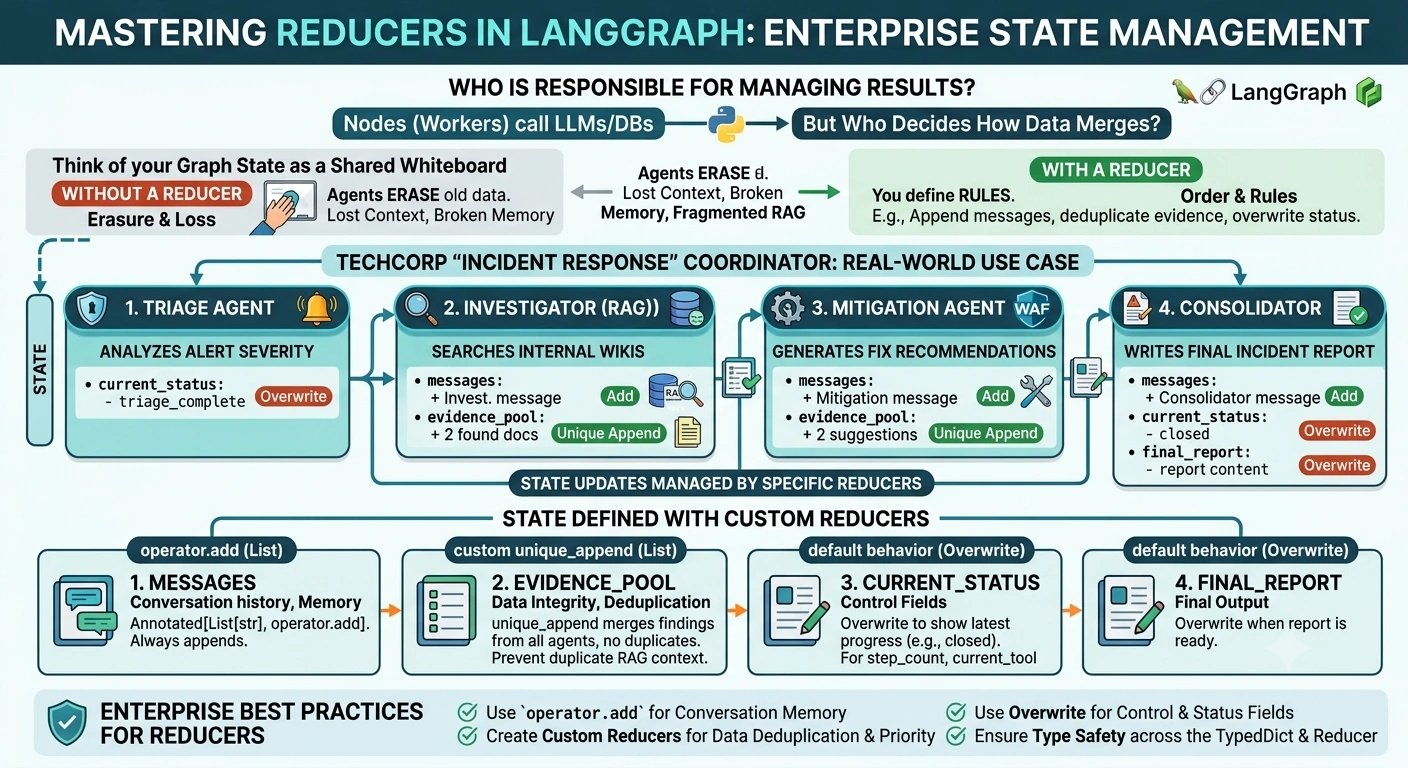
The Real-World Use Case: TechCorp "Incident Response" Coordinator
Imagine you are building an AI system for TechCorp’s Security Operations Center (SOC). When a security alert fires, multiple agents spring into action:
The Triage Agent: Identifies the severity.
The Investigator (RAG): Searches internal wikis for similar past incidents.
The Mitigation Agent: Suggests code fixes or firewall rules.
The Problem
If we use default overwriting:
The Investigator finds 3 relevant documents.
The Mitigation Agent then runs and returns its suggestions.
Result: The 3 documents found by the Investigator are deleted because the Mitigation Agent's state update overwrote the
contextfield.
The Solution
We will use Reducers to ensure that:
Messages are always appended (Memory).
Evidence is accumulated from all agents (Deduplication).
Status is updated to reflect the current stage (Overwrite).
End-to-End Implementation
We will use langgraph, pydantic, and Python’s operator module.
Step 1: Define the State with Custom Reducers
This is where the magic happens. We define our TypedDict and assign specific reducers to each field.
from typing import TypedDict, List, Annotated, Optional
import operator
from langgraph.graph import StateGraph, END

# Custom Reducer: Append only unique items to a list (Deduplication)
def unique_append(existing: List[str], new: List[str]) -> List[str]:
    if not new:
        return existing
    combined = existing + [item for item in new if item not in existing]
    return combined

class IncidentState(TypedDict):
    # 1. Memory Reducer: Always append messages to keep conversation history
    messages: Annotated[List[str], operator.add]

    # 2. Evidence Reducer: Accumulate findings from different agents without duplicates
    evidence_pool: Annotated[List[str], unique_append]

    # 3. Status Reducer: Overwrite the status to show current progress
    current_status: str

    # 4. Final Output: Overwrite when the final report is ready
    final_report: str
Step 2: Build the Agent Nodes
Node 1: The Triage Agent
This agent sets the initial status and adds a message.
def triage_agent(state: IncidentState) -> IncidentState:
    print("🚨 [Triage] Analyzing alert severity...")
    return {
        "messages": ["Triage: Alert identified as Critical SQL Injection."],
        "current_status": "triage_complete",
        "evidence_pool": [] # Initialize empty
    }
Node 2: The Investigator (RAG)
This agent searches for context. Notice how it returns a list of evidence. The unique_append reducer will handle merging this with any existing evidence.
def investigator_agent(state: IncidentState) -> IncidentState:
    print("🔍 [Investigator] Searching knowledge base...")
    # Simulating RAG retrieval
    found_docs = [
        "Incident #402: Similar SQL pattern detected in 2024.",
        "Wiki: Standard procedure for DB isolation."
    ]
    return {
        "messages": ["Investigator: Found 2 relevant historical incidents."],
        "evidence_pool": found_docs,
        "current_status": "investigation_complete"
    }
Node 3: The Mitigation Agent
This agent suggests fixes. It also adds to the evidence pool.
def mitigation_agent(state: IncidentState) -> IncidentState:
    print("🛡️ [Mitigation] Generating fix recommendations...")
    suggestions = [
        "Recommendation: Patch Apache Struts to v2.5.30.",
        "Recommendation: Enable WAF rule ID 942100."
    ]
    return {
        "messages": ["Mitigation: Generated 2 fix recommendations."],
        "evidence_pool": suggestions,
        "current_status": "mitigation_ready"
    }
Node 4: The Consolidator
This agent reads the evidence_pool (which now contains docs from both Investigator and Mitigation) and writes the final report.
def consolidator_agent(state: IncidentState) -> IncidentState:
    print("📝 [Consolidator] Writing final incident report...")

    report = f"""
    INCIDENT REPORT
    ---------------
    Status: {state['current_status']}

    Evidence Collected:
    {chr(10).join(state['evidence_pool'])}

    Action Plan: Immediate patching required.
    """

    return {
        "final_report": report,
        "messages": ["Consolidator: Report finalized."],
        "current_status": "closed"
    }
Step 3: Compile the Graph
def build_incident_graph():
    workflow = StateGraph(IncidentState)

    workflow.add_node("triage", triage_agent)
    workflow.add_node("investigator", investigator_agent)
    workflow.add_node("mitigation", mitigation_agent)
    workflow.add_node("consolidator", consolidator_agent)

    workflow.set_entry_point("triage")
    workflow.add_edge("triage", "investigator")
    workflow.add_edge("investigator", "mitigation")
    workflow.add_edge("mitigation", "consolidator")
    workflow.add_edge("consolidator", END)

    return workflow.compile()

app = build_incident_graph()
Running the System
Let's see how the Reducers manage the state behind the scenes.
initial_state = {
    "messages": [],
    "evidence_pool": [],
    "current_status": "started",
    "final_report": ""
}

result = app.invoke(initial_state)

print("\n--- Final Evidence Pool (Managed by Unique Append Reducer) ---")
for item in result["evidence_pool"]:
    print(f"- {item}")

print("\n--- Message History (Managed by Add Reducer) ---")
for msg in result["messages"]:
    print(f"> {msg}")
Output Trace:
Triage: Sets status to "triage_complete".
Investigator: Adds 2 docs to
evidence_pool.Mitigation: Adds 2 suggestions to
evidence_pool.Reducer Action: The
unique_appendfunction merges these with the previous 2 docs, resulting in a list of 4 items.
Consolidator: Reads all 4 items and generates the report.
Enterprise Best Practices for Reducers
Use
operator.addfor Memory: Never overwrite your message history. UsingAnnotated[List[...], operator.add]is the standard way to maintain conversational memory in LangGraph.Custom Reducers for Data Integrity: As shown in the
unique_appendexample, use custom functions to prevent duplicate data in your RAG context. This saves tokens and improves answer quality.Overwrite for Control Fields: For fields like
status,step_count, orcurrent_tool, always use the default overwrite behavior. You only want the latest truth.Type Safety: Ensure your reducer's input and output types match the type defined in your
TypedDict. Mismatches here are a common source of runtime errors in large graphs.
Conclusion
In enterprise AI, state is everything. A Reducer is not just a technical detail; it is the governance layer of your multi-agent system.
By carefully choosing between appending, merging, and overwriting, you ensure that your RAG application doesn't just "work"—it remembers, it learns, and it maintains a consistent view of the world across multiple agents. In the high-stakes environment of TechCorp’s SOC, that consistency is the difference between a resolved incident and a security breach.
Join the conversation! Your thoughts help the community grow.