

Hello Techies, Copilot Studio ships changes every wave. The architecture and decision logic below are stable, but verify UI paths, transport support and preview labels against the current documentation before you rely on them.
In the world of low-code agents, a "tool" is anything the agent can call to reach outside its own reasoning. In Copilot Studio you have two ways to register one: build a custom connector , or connect an MCP server .
Most teams pick one and standardise on it. That is the mistake.
The answer here is the same "No Free Lunch" answer we hit in retrieval. No single integration method is correct for every API in an enterprise. The two mechanisms have genuinely different failure modes:
Custom connectors give you total control over the contract, but the tool surface is frozen at design time. Every new capability needs a maker to edit and re-publish.
MCP servers discover tools at runtime, so the owning team ships changes without touching your agent. But you accept whatever shape they expose, and you inherit their release cadence whether you want it or not.
By deliberately splitting your tool inventory across both, based on who owns the API and how fast it changes , you get a tool layer that is stable where it needs to be stable and fast-moving where it needs to be fast-moving.
In this end-to-end guide we will build that hybrid tool layer for a real-shaped enterprise scenario.
The Real-World Use Case: Meridian Power's "Field Ops Copilot"
Imagine you are building an agent for Meridian Power, a utility with 4,000 field engineers. The agent runs in Teams and on mobile. Engineers ask it things like "what is the health score on transformer TX-4471 and do I have leave approved for Thursday?"
To answer, the agent needs to reach three completely different backends:
| Backend | Owner | Change frequency | Also needed in Power Automate? |
|---|---|---|---|
| SAP HR (leave, shifts, certifications) | Central SAP team, change board approval | Twice a year | Yes, three existing flows use it |
| Asset Intelligence Platform | Internal data science team | New tools most sprints | No, agent-only |
| ServiceNow ticketing | Vendor-managed, ships its own MCP server | Vendor's cadence | No |
The Failure of Standardising on One Method
If you build custom connectors for everything: the Asset Intelligence team ships a new predict_failure_window tool in sprint 14. It sits unused for three weeks because you are the bottleneck, editing an OpenAPI definition for a system you do not own. By sprint 20 you are maintaining eleven connector versions and your backlog is entirely other teams' changes.
If you use MCP for everything: you write an MCP server in front of SAP HR. Now the same SAP logic exists twice, once in your MCP server and once in the connector that three Power Automate flows already depend on. Two codebases, two auth configurations, two places for the leave-balance calculation to drift. And you cannot use your MCP server from a Power App.
The Hybrid Solution
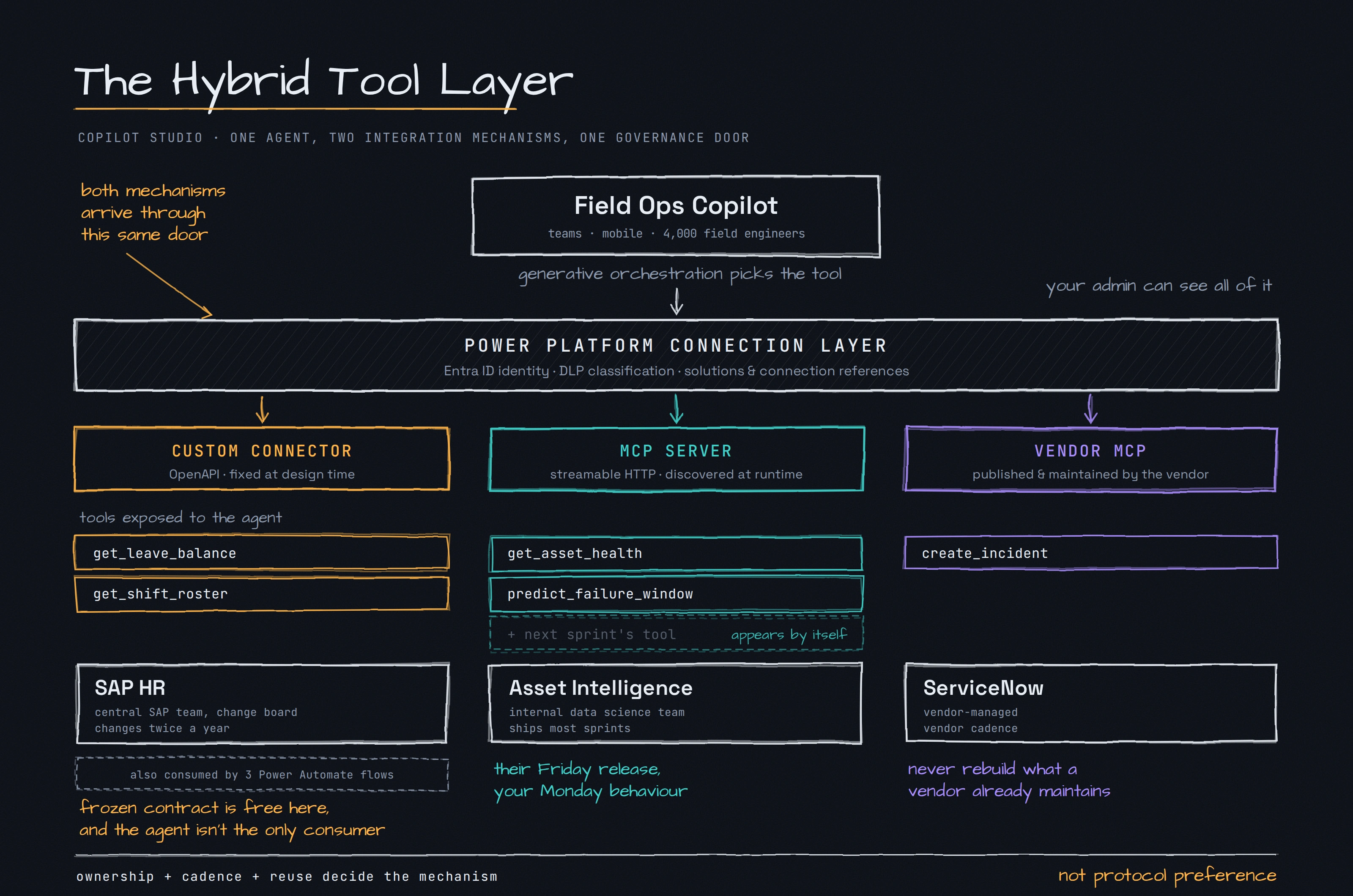
We assign each backend by ownership and reuse, not by preference:
SAP HR → custom connector. Stable, needed outside the agent, and we need to reshape a forty-field response down to four.
Asset Intelligence → MCP server. Owned by another team, changes weekly, agent-only. Dynamic discovery is a feature here, not a risk.
ServiceNow → vendor MCP server. Never hand-roll a connector for something a vendor maintains.
Technology Stack
| Component | Technology | Role in the hybrid tool layer |
|---|---|---|
| Orchestration | Copilot Studio (generative orchestration) | Selects which tool to call per turn |
| Fast-moving tools | Python MCP SDK, streamable HTTP | Self-describing tool surface owned by the data science team |
| Stable tools | Power Platform custom connector | Reshaped, versioned contract over SAP HR |
| Vendor tools | ServiceNow MCP server | Vendor-maintained, no build effort |
| Identity | Microsoft Entra ID, OAuth 2.0 | User-delegated calls so row-level security actually applies |
| Governance | Power Platform DLP, connector classification | Both paths land as connections an admin can see and block |
| ALM | Solutions and connection references | Moves the whole tool layer between environments |
End-to-End Implementation
Step 0: Build the Tool Inventory First
Before you open Copilot Studio, fill this table in. Every column has a decision attached to it.
| Tool | Owner | Cadence | Reuse outside agent | Needs reshaping | Verdict |
|---|---|---|---|---|---|
get_leave_balance | SAP team | Low | Yes | Yes, 40 fields to 4 | Connector |
get_shift_roster | SAP team | Low | Yes | Yes | Connector |
get_asset_health | Data science | High | No | No | MCP |
predict_failure_window | Data science | High | No | No | MCP |
create_incident | Vendor | Vendor | No | No | Vendor MCP |
If you skip this step, you will make the decision per tool, in a hurry, based on whichever blog post someone read last week.
Step 1: Build the MCP Server (Fast-Moving Tools)
The data science team owns this file. Copilot Studio talks to remote servers, so a local stdio server will not work. Use streamable HTTP.
python
    # asset_intelligence_server.pyfrom typing import Annotated
from pydantic import Field
from mcp.server.fastmcp import FastMCP
mcp = FastMCP("Meridian Asset Intelligence", stateless_http=True)@mcp.tool()def get_asset_health(    asset_id: Annotated[str, Field(description="Asset tag, for example TX-4471")]) -> dict:    """Returns the current health score and last inspection date for a single    grid asset. Use this when an engineer asks about the condition, health,    or reliability of a specific transformer, breaker or feeder."""    return {        "asset_id": asset_id,        "health_score": 62,        "band": "degraded",        "last_inspection": "2026-06-14",        "open_defects": 2,    }@mcp.tool()def predict_failure_window(    asset_id: Annotated[str, Field(description="Asset tag, for example TX-4471")],    horizon_days: Annotated[int, Field(description="Forecast horizon, 30 to 365")] = 90,) -> dict:    """Returns the predicted failure probability for an asset over a horizon.    Use this only for forward-looking risk questions, not for current condition."""    return {        "asset_id": asset_id,        "horizon_days": horizon_days,        "failure_probability": 0.18,        "primary_driver": "oil_temperature_trend",    }if __name__ == "__main__":    mcp.run(transport="streamable-http")
Two things in that code matter more than the logic:
The docstrings are production code. They are what the orchestrator reads when it decides whether to call this tool. Notice predict_failure_window explicitly says "not for current condition". Without that line, the model will confuse the two tools maybe one time in five.
The return payloads are small. Six fields, not sixty. The data science team's internal API returns far more. They trim it at the MCP boundary.
Step 2: Register the MCP Server in Copilot Studio
Copilot Studio registers MCP servers through the Power Platform connector infrastructure. That is why your admin can still govern them. The declaration is an OpenAPI file that declares an agentic protocol instead of listing REST actions:
yaml
swagger: '2.0'info: title: Meridian Asset Intelligence description: > Grid asset health scores and failure predictions for field engineers. Covers transformers, breakers and feeders. version: 1.0.0host: mcp.meridian-internal.combasePath: /schemes: - httpspaths: /mcp: post: summary: Meridian Asset Intelligence operationId: InvokeMCP x-ms-agentic-protocol: mcp-streamable-1.0 responses: '200': description: SuccesssecurityDefinitions: oauth2-auth: type: oauth2 flow: accessCode authorizationUrl: https://login.microsoftonline.com/{tenantId}/oauth2/v2.0/authorize tokenUrl: https://login.microsoftonline.com/{tenantId}/oauth2/v2.0/token scopes: {}security: - oauth2-auth: []
Then in the maker experience:
Open your agent in Copilot Studio .
Go to Tools , then Add a tool , then Model Context Protocol .
Enter the server name, description and HTTPS URL. Choose OAuth 2.0 and point it at your Entra app registration.
Select Create , then create the connection . This connection is the object DLP will evaluate.
Copilot Studio now lists the tools the server advertises. Disable every tool the agent does not need. Every enabled tool consumes context and gives the orchestrator another way to choose wrong.
Add the agent and its connection references to a solution so the registration survives the move to production.
Step 3: Build the Custom Connector (Stable Tools)
For SAP HR you want the opposite properties: a frozen contract you control, and a response shaped for a model rather than for a developer.
yaml
swagger: '2.0'info: title: Meridian HR Services description: Leave balances and shift rosters for field engineers. version: 1.0.0host: hr-api.meridian.combasePath: /v2schemes: - httpspaths: /employees/{employeeId}/leave-balance: get: summary: Get leave balance description: > Returns remaining annual and sick leave days for an employee for the current calendar year. Use when an engineer asks how much leave they have left, or whether they can take a specific day off. operationId: GetLeaveBalance parameters: - name: employeeId in: path required: true type: string description: Employee number, for example 100472 responses: '200': description: Success schema: type: object properties: annual_days_remaining: type: number description: Remaining annual leave days this year sick_days_remaining: type: number description: Remaining paid sick leave days this year pending_requests: type: integer description: Count of leave requests awaiting approval policy_year_end: type: string description: Date the current leave year closes
Note that the underlying SAP response has around forty fields. We expose four. This is the highest-value hour of work in the whole build. An agent handed an untyped forty-field blob will hallucinate against it, and the failure looks like a model problem when it is a schema problem.
Then:
Go to make.powerapps.com , select the environment, open Custom connectors .
Choose New custom connector , then Import an OpenAPI file .
On the Security tab configure OAuth 2.0 with Entra ID. Copy the generated redirect URL into your app registration.
On the Definition tab confirm each operation has a clear summary, description and stable operation ID.
Select Create connector , then test on the Test tab with a live connection before touching the agent.
In Copilot Studio , go to Tools , Add a tool , pick your connector and select only the actions you need.
For each action, review the tool description and every input parameter inside Copilot Studio. You can override the connector text here, and you usually should. Then set explicitly how each input is filled: inferred by the model, fixed value, or ask the user.
Step 4: Add the Vendor MCP Server
Same flow as Step 2, using ServiceNow's published endpoint and their auth guidance. Zero build effort. If a vendor ships an MCP server, use it.
Running the System
Query: "Transformer TX-4471 is running hot. What's its condition, and can I take Thursday off to deal with the follow-up?"
    🧭 [Orchestrator] Query requires 2 capabilities: asset condition, leave availability.

🔧 [MCP: Asset Intelligence] get_asset_health(asset_id="TX-4471")
   → health_score: 62, band: "degraded", open_defects: 2
   ✓ Selected over predict_failure_window (query is present-tense condition)

🔧 [Connector: Meridian HR] GetLeaveBalance(employeeId="100472")
   → annual_days_remaining: 11, pending_requests: 0
   ✓ employeeId resolved from authenticated user identity, not model inference

✍️ [Synthesizer] Grounding answer in 2 tool results.
Final response:
TX-4471 is currently in the degraded band with a health score of 62 and 2 open defects, last inspected 14 June 2026. You have 11 annual leave days remaining and no pending requests, so Thursday is available to request. Want me to raise an incident for the temperature reading?
Look at the second tool call. employeeId came from the authenticated identity, not from the model guessing. If you let the orchestrator infer that parameter, an engineer can ask about someone else's leave balance and the platform will happily comply. This is the most common security hole I see in Copilot Studio agents, and it has nothing to do with which integration method you picked.
Why This Specific Split?
SAP HR as a connector. Three Power Automate flows already consume this API. MCP is an agent-facing surface, so wrapping SAP in MCP would mean maintaining the same logic twice. The API also changes twice a year, which means a frozen design-time contract costs us almost nothing. And we needed heavy response reshaping, which is exactly what connectors are good at.
Asset Intelligence as MCP. A different team owns it and ships most sprints. With a connector, every one of their releases becomes a ticket in our backlog. With MCP, predict_failure_window appeared in the agent's tool list on the day they shipped it, and we only had to review and enable it. The trade-off is real: their Friday release can change our Monday behaviour. We handled that with process, not technology. They notify us in a shared channel before adding or renaming a tool, and we review descriptions in their PR.
ServiceNow as vendor MCP. Never rebuild what a vendor maintains for you.
Why both paths are governable. Because MCP registers through connector infrastructure, DLP policies, connector classification and environment strategy apply to it exactly as they apply to custom connectors. Raise this with your security team in the first design session. It converts "MCP is shadow IT" into a normal policy conversation, which is a much shorter meeting.
The Decision Rule, Compressed
Work down this list. First clear answer wins.
Does a vendor already ship an MCP server for this system? Use it.
Is this capability also needed in Power Apps or Power Automate? Custom connector.
Does the API need heavy reshaping, or is it legacy and badly shaped? Custom connector.
Is the backend on-premises with no public HTTPS endpoint? Custom connector, and involve networking early. This is where most MCP proofs of concept stall.
Does another team own it and ship changes faster than monthly? MCP server.
More than roughly fifteen or twenty candidate tools total? Neither method saves you. Split into multiple focused agents, because orchestration accuracy degrades with tool count regardless of how the tools got there.
Gotchas Worth Knowing Before You Start
Dynamic discovery cuts both ways. Ask for a change-notification process in writing. It will not solve itself.
Transport mismatches waste hours. A server that only speaks SSE, or a slightly non-standard variant, will register cleanly and then list zero tools. Verify with a plain MCP client before blaming the platform.
Connections do not travel by themselves. Moving an agent between environments without properly configured connection references is the single most common reason a working agent breaks in production.
Latency stacks. One tool call is fine. Four chained calls with reasoning between each will feel slow in a chat window. Push deterministic sequences into an agent flow instead.
Tool descriptions need version control. They decide routing behaviour, so treat a description change like a code change.
Conclusion
In enterprise agent work, "we standardised on MCP" and "we standardised on connectors" are both architecture smells. They optimise for tidiness in a design document rather than for how the organisation actually ships software.
The useful question is never which protocol is better. It is: who owns this API, how fast does it change, and who else needs it? Answer that per tool, fill in the inventory table, and the split writes itself. For Meridian Power the result was a tool layer where the SAP contract has not moved in a year while the asset intelligence tools shipped eleven times, and the agent team was not the bottleneck for either.
Join the conversation! Your thoughts help the community grow.