

Today, let's see how to create a simple menu
control in MVC using Telerik Extensions.
Let's use Menu Extension of Telerik to create and specify some menus for our
App.
So let's create and modify the Site.Master Master Page with the necessary skins and
script files. So the Site.Master looks like this:
<%@ Master
Language="C#" Inherits="System.Web.Mvc.ViewMasterPage" %>
<!DOCTYPE html PUBLIC "-//W3C//DTD
XHTML 1.0 Strict//EN" "http://www.w3.org/TR/xhtml1/DTD/xhtml1-strict.dtd">
<html xmlns="http://www.w3.org/1999/xhtml">
<head runat="server">
<title><asp:ContentPlaceHolder ID="TitleContent" runat="server" /></title>
<link href="../../Content/Site.css" rel="stylesheet" type="text/css" />
<%: Html.Telerik().StyleSheetRegistrar().DefaultGroup(group
=> group.Add("telerik.common.css").Add("telerik.Windows7.css").Combined
(true).Compress(true))
></head>
<body>
<div class="page">
<div id="header">
<div id="title">
<h1>Hey
New Telerik App</h1>
</div>
<div id="menucontainer">
<ul id="menu">
<li><%: Html.ActionLink("Home", "Index", "Home")%></li>
</ul>
</div>
</div>
<div id="main">
<asp:ContentPlaceHolder ID="MainContent" runat="server" />
<div id="footer">
</div>
</div>
</div>
<%: Html.Telerik().ScriptRegistrar().Globalization(true).DefaultGroup(group
=> group.Combined(true).Compress(true)) %></body>
</html>
The Home Controller class looks like this:
using System;
using System.Collections.Generic;
using System.Linq;
using System.Web;
using System.Web.Mvc;
namespace TelerikMvcApplication1.Controllers
{
[HandleError]
public class HomeController : Controller
{
public ActionResult Index()
{
ViewData["Message"] = "Hey
It's Telerik Menu Control App";
return View();
}
}
}
Next step for us is to create Index.aspx, with basic menu controls and rendering
it on to our web browser. The Index.aspx looks like this:
<%@
Page Language="C#"
MasterPageFile="~/Views/Shared/Site.Master"
Inherits="System.Web.Mvc.ViewPage"
%>
<asp:Content ID="Content1" ContentPlaceHolderID="TitleContent" runat="server">
Home Page
</asp:Content>
<asp:Content ID="Content2" ContentPlaceHolderID="MainContent" runat="server">
<h2><%: ViewData["Message"] %></h2>
<br />
<br />
<%
Html.Telerik().Menu()
.Name("Sample")
.HighlightPath(true)
.Items(p =>
{
p.Add().Text("C#").Items(q
=>
{
q.Add().Text("MVC").Items(r
=>
{
r.Add().Text("Model");
r.Add().Text("View");
r.Add().Text("Controller");
});
q.Add().Text("WCF").Items(r
=>
{
r.Add().Text("Address");
r.Add().Text("Bindings");
r.Add().Text("Contract");
}); ;
q.Add().Text("WPF").Items(r
=>
{
r.Add().Text("XAML");
});
q.Add().Text("Delegates").Items(r
=>
{
r.Add().Text("Single
Method Delegates");
r.Add().Text("Multi
Cast Delegates");
});
q.Add().Text("Generics");
});
p.Add().Text("SQL
Server").Items(q =>
{
q.Add().Text("Stored
Procedures");
q.Add().Text("Indexes");
});
p.Add().Text("Styling").Items(q
=>
{
q.Add().Text("CSS");
q.Add().Text("HTML
5");
});
})
.Render();
%>
</asp:Content>
The output for this program looks like this: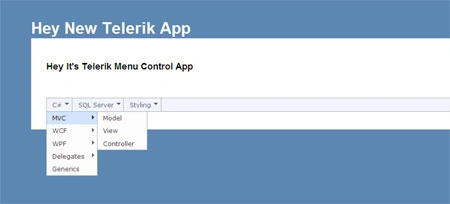
I hope this article is useful for you...I look forward for your comments and
feedback...Thanks Vijay Prativadi.
Beginner BobPosted Jan 28, 2012, 5:19 PM
How about making the Menu Item highlighted when selected?