

Introduction
When working with data in Power BI, combining tables is a common task that helps you build richer, more meaningful datasets. Two primary methods for doing this are Merging and Appending queries. While they may sound similar, they serve distinct purposes: merging brings in additional columns based on relationships between tables, whereas appending stacks rows to extend your dataset. Understanding the difference between these two techniques is essential for effective data modeling and accurate reporting
What is Merging?
Merging is like performing a lookup or a join in databases.
You combine columns from two tables based on a common field (like an ID or Name).
Example:
Table A has Customer IDs and Names.
Table B has Customer IDs and Orders.
By merging, you can bring the order details into Table A using the Customer ID as the link.
How to Merge in Power BI
Step 1: Go to Power Query Editor.
Step 2: Select a table → Click Merge Queries.
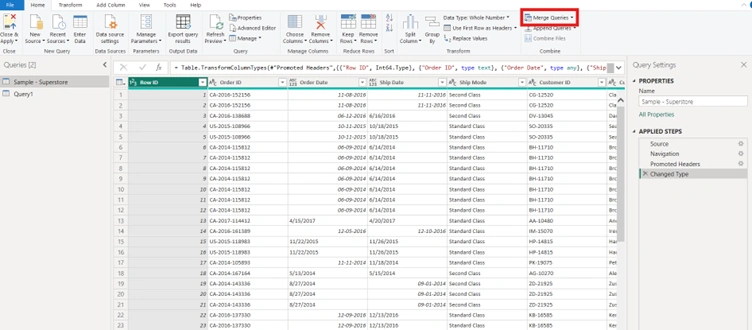
Step 3: Choose the second table and the matching column.
Step 4: Select the type of join (Left, Right, Inner, Full).
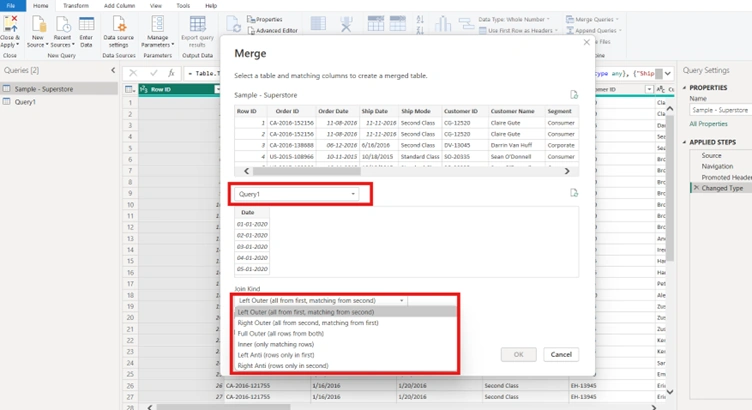
Step 5: Expand the merged column to bring in the fields you need.
Use merging when you want to add more columns to your table.
What is Appending?
Appending is like stacking tables on top of each other.
You add rows from one table to another.
Example:
Table A has Sales data for 2024.
Table B has Sales data for 2025.
By appending, you create one big table with both years’ data.
How to Append in Power BI
Step 1: Go to Power Query Editor.
Step 2: Select Append Queries.
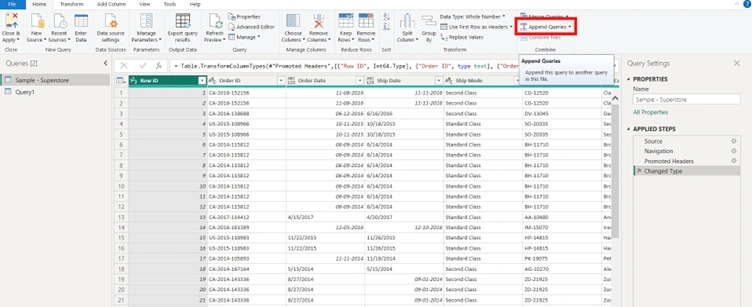
Step 3: Choose the tables you want to combine.
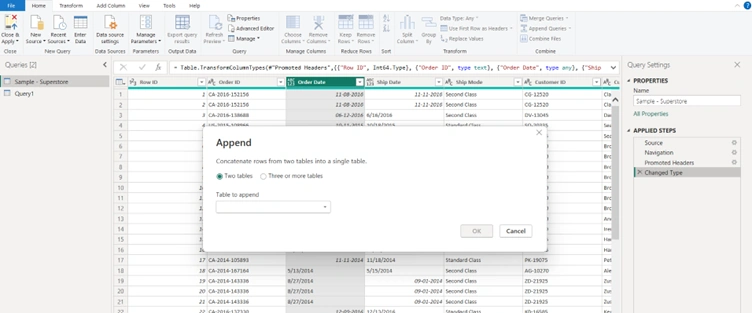
Step 4: Power BI will stack them into one table.
Use appending when you want to add more rows to your table.
Tips:
Make sure the column names and data types match when appending.
Always check for duplicate rows after merging.
Use joins carefully — a wrong join type can give unexpected results.
Keep transformations clean by renaming steps in Power Query.
Conclusion
In summary, merging and appending are powerful tools in Power BI that allow you to shape and expand your data. Use merging when you need to enrich a table with related information from another source and use appending when you want to consolidate datasets by adding rows. By choosing the right method and applying best practices—such as checking join types, aligning column names, and keeping transformations clean—you can ensure your reports remain accurate, efficient, and easy to maintain.
Join the conversation! Your thoughts help the community grow.