Picture a busy restaurant where every waiter, after taking an order, has to stand in the kitchen and wait until the dish is cooked before serving anyone else. Tables would sit ignored, the kitchen would be jammed with waiters, and one slow dish would stall the whole floor. Real restaurants avoid this with a simple trick: the waiter puts a ticket on the counter and moves on to the next table.
Software has exactly the same problem. When one service calls another directly and waits for the answer, a slow or broken service drags everyone else down with it. A message broker is the ticket counter that fixes this.
If you have ever wondered why big systems like online shops and food delivery apps keep working when thousands of people hit "order" at the same moment, message brokers are a big part of the answer. In this article we will go through what a message broker is, how it works, the different types you will run into (RabbitMQ, Kafka, Amazon SQS, Azure Service Bus and a few others), and how to choose between them. You don't need any background in distributed systems. If you know what a web API is, you are good to go.
So, what exactly is a message broker?
A message broker is a piece of software that sits between the parts of a system and passes messages from one to another. The sender hands a message to the broker. The broker keeps it safe, and delivers it to whoever needs it, when they are ready to receive it.
The easiest way to think about it is a post office. You don't walk to your friend's house and stand at the door until they answer. You drop the letter in a postbox and get on with your day. The post office worries about sorting, delivery, and trying again if nobody is home. Your friend reads the letter whenever they get back.
In technical words, this is called asynchronous communication: the sender does not wait for the receiver. Both sides only need to know about the broker. They never need to know about each other, how many of them there are, or whether they are online right now.
You will also hear the term message queue. A queue is one building block inside a broker, a waiting line where messages sit until someone picks them up. Many tools that people casually call "queues" are, in practice, full message brokers, and the two words are often used for the same thing. For this article, think of the broker as the whole post office and the queue as one of its counters.
A little vocabulary first
A handful of words show up in almost every conversation about brokers. Here they are in plain language, along with the everyday thing each one maps to.
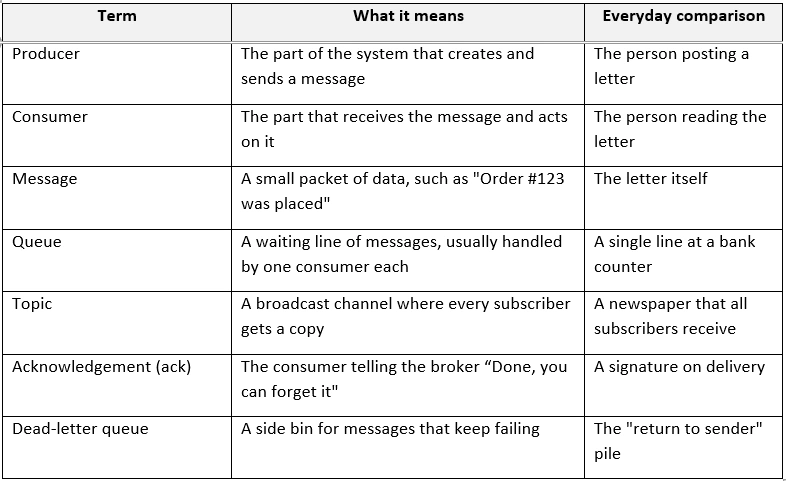
If no acknowledgement arrives, the broker assumes something went wrong and sends the message again. That one habit is the secret behind most of a broker's reliability.
How a message broker works
The flow is short. A producer sends a message to the broker. The broker stores it, decides who should get it, and delivers it. Consumers process it and send back an acknowledgement, which tells the broker it can let go.
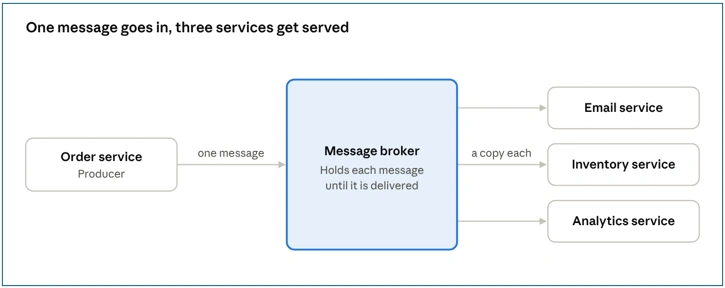
basic broker flow · 1 producer, 1 broker, 3 consumers
In our shop, the Order service publishes one message and walks away. The broker holds it and hands a copy to each service that cares. If one of them is busy or offline, its copy simply waits.
Under the hood the broker does a few jobs for you: it stores messages, so they survive a crash, routes them to the right place, filters what each consumer receives, and keeps track of what has and hasn't been acknowledged.
Why bother? What a broker gives you
Let's use a small online shop as our running example. A customer clicks "Place order", and three things need to happen: a confirmation email goes out, the stock count goes down, and the sales report gets updated.
Without a broker, the Order service calls the Email service, then the Inventory service, then the Analytics service, one after another, and waits for each to reply. This works fine on a quiet day. Then the problems start:
• If the Email service is down, the whole order can fail or hang, even though the payment already went through.
• Every new requirement, say loyalty points, means opening up and changing the Order service.
• On a sale day, thousands of orders arrive together and the slowest service sets the pace for everybody.
Now put a broker in the middle. The Order service publishes one message, "order placed", and its job is done. Here is what you get:
• Decoupling. Services don't depend on each other directly. You can add, remove or rewrite one without touching the rest.
• Reliability. If the Email service is down at that moment, the broker keeps the message and delivers it when the service is back.
• Speed. The Order service replies to the customer immediately instead of waiting for three other services.
• Handling traffic spikes. During a flash sale, messages pile up safely in the broker and the workers process them at their own pace.
• Easy scaling. If processing gets slow, you start more consumers and they share the work, with no change to the sender.
That is really the whole pitch. Brokers don't make your system faster by magic. They make it calmer under pressure, and that matters more than raw speed in most real systems.
Two ways to deliver: queues and topics
Most brokers deliver messages in one of two ways, and many support both.
A queue, also called point-to-point, is like a bank with one line and several tellers. Each customer is served by exactly one teller. Use it for jobs that must be done once, such as "resize this image" or "charge this card". If the line gets long, you add more workers, and each one simply takes the next message.
A topic, also called publish-subscribe or pub/sub, is like a news channel. One announcement reaches everyone who subscribed. Use it when several services each need to react to the same thing, such as "an order was placed".
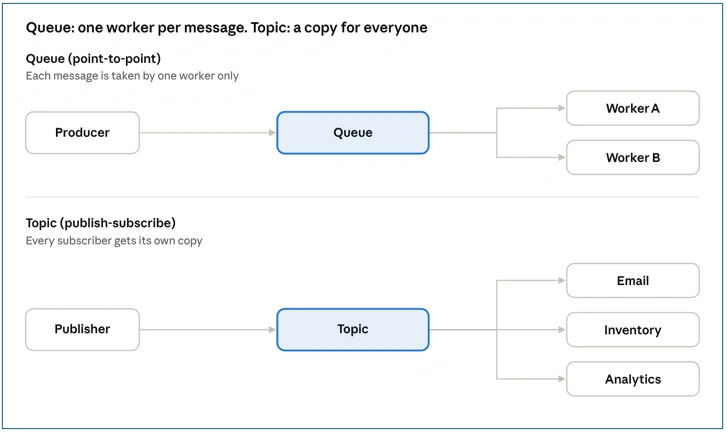
queue vs topic · two delivery models
Many real systems combine the two: publish an event to a topic and give each subscriber its own queue. That way every service gets a copy and can work through it at its own speed.
Queue-based vs log-based: the split that explains most brokers
If you remember only one idea from the types section, make it this one. Most brokers follow one of two designs.
A queue-based broker works like a to-do list. Once a task is done, it is crossed off and gone. The broker is the smart party: it decides who gets which message, tracks acknowledgements and handles retries. RabbitMQ, ActiveMQ, Amazon SQS and Azure Service Bus work this way.
A log-based broker works like a diary. Messages are written in order and kept for days or weeks. The broker mostly stores and serves data, and each reader remembers its own position, so Reader A can be fully up to date while Reader B replays older messages. Kafka and Pulsar are built around this idea.
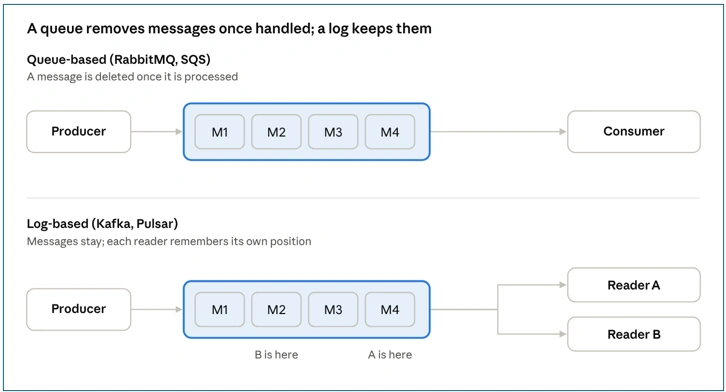
queue-based vs log-based brokers · two designs
Neither is better. Pick the to-do list when each message is a job to finish. Pick the diary when messages are facts you may want to read again later, or when several systems need to read the same stream independently.
Types of message brokers
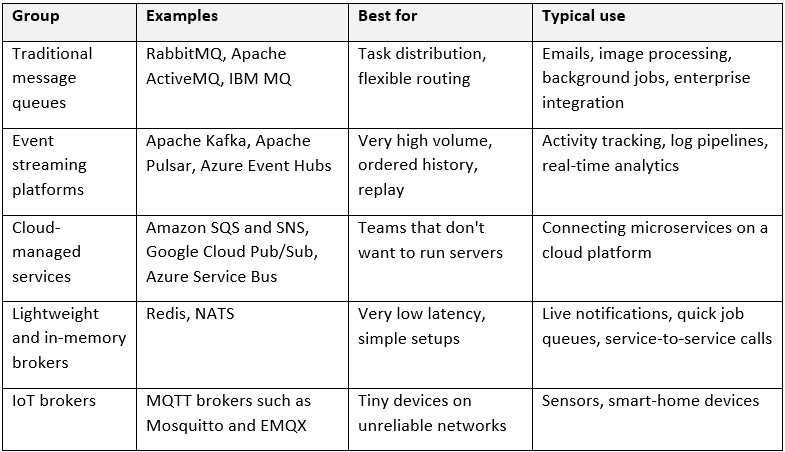
There is no single official list, but in practice brokers fall into five groups. The table gives you the map, and the sections below it walks through the ones you are most likely to meet.
RabbitMQ: the smart post office
RabbitMQ is an open-source broker that supports several protocols, including AMQP, MQTT and STOMP. Its strength is routing. A producer sends a message to an exchange, and rules decide which queue (or queues) it lands in. Consumers get messages pushed to them and acknowledge each one. Once a message is handled, it is removed. It is a great fit for background jobs and for systems where different messages need different destinations.
Apache Kafka: the diary that remembers everything
Kafka is a distributed event streaming platform. Instead of deleting a message after it is read, it appends it to a log and keeps it for a configured time. Each consumer remembers its own position in that log, so a new service can join later and read the history from the start. Topics are split into partitions so that many consumers can share the work. Kafka shines when you have huge volumes of events or when you want to replay the past, and it asks more of you operationally than a simple queue does.
Cloud-managed brokers: someone else runs it
Amazon SQS and SNS. SQS is a managed queue and SNS is a managed pub/sub service. A very common pattern is to publish to an SNS topic and let several SQS queues subscribe to it, so each service gets its own copy and its own waiting line.
Azure Service Bus. This is Microsoft's enterprise-grade broker and it sits in the traditional queue family, just run for you in the cloud. It supports queues and topics with subscriptions, dead-letter queues, ordered sessions, duplicate detection and transactions. Think of it as the Azure answer to RabbitMQ or SQS, with a few more business features included. It is not a log-based streaming platform, so it isn't meant for replaying history or for huge event firehoses.
Google Cloud Pub/Sub. A managed publish-subscribe service with push and pull subscriptions, often used for analytics pipelines and event-driven apps.
Redis and NATS: small, fast and simple
Redis Pub/Sub is extremely quick, but it is fire-and-forget: if nobody is listening at that moment, the message is gone. Redis Streams adds persistence if you need it. NATS is a very light and fast messaging system popular for service-to-service communication, and its JetStream feature adds storage and replay. These suit cases where speed and simplicity matter more than guaranteed delivery.
MQTT: built for tiny devices
MQTT is a lightweight protocol designed for sensors and gadgets with little battery, little memory and shaky connections. A broker such as Mosquitto or EMQX collects readings from thousands of devices and passes them on. If you are building anything with IoT in it, you will meet MQTT sooner or later.
Delivery guarantees: what happens when something fails?
This is one of the most important ideas in messaging, and it is easy to skip over. Networks drop, servers crash, and consumers die halfway through a job. So the real question is: how many times will a message be delivered when things go wrong?
• At most once. A message is delivered zero or one time. It is fast and simple, but a message can be lost. Fine for things like live sensor readings, where the next reading is coming anyway.
• At least once. A message is never lost, but it might arrive twice. This is the most common setting, because it is the safest default.
• Exactly once. A message is processed once and only once. It is the dream, but it is hard to achieve and only some systems support it, usually with extra setup and some performance cost.
Because "at least once" is so common, the practical advice is to make your consumers idempotent. That is a fancy word for a simple idea: handling the same message twice should give the same result as handling it once. For example, if a "charge this order" message arrives twice, your code should check whether order #123 was already charged before charging again.
Messages, events and event-driven systems
People often ask where "events" fit in. The short answer: an event is a particular kind of message, and building a system around events is called event-driven architecture. A broker used mainly to carry events is sometimes called an event broker, but it is the same technology.
Two common kinds of message are commands and events:
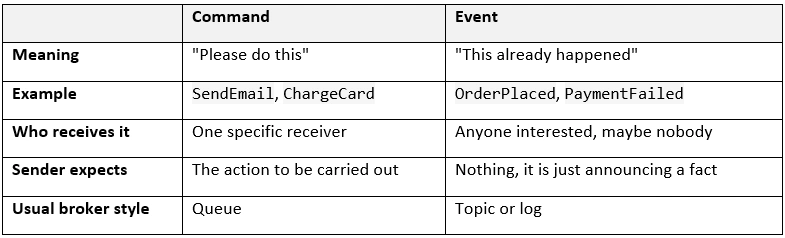
Notice that events are named in the past tense, because they record something that has already happened. Commands are named like orders.
In an event-driven system, each service announces what happened and leaves it to others to react. The Order service publishes OrderPlaced and has no idea who is listening. If you later add a Loyalty Points service, it just subscribes to the same event and nothing else changes. That is the real appeal.
Here is how the main brokers line up with this idea:
• Kafka, Pulsar and Azure Event Hubs are the classic event brokers. They keep events in a log, so new services can replay history.
• Topics in Azure Service Bus, Amazon SNS and Google Cloud Pub/Sub also carry events, giving each subscriber its own copy.
• Lightweight routers such as Azure Event Grid and Amazon EventBridge react to things like "a file was uploaded" and trigger an action.
• Queue-based brokers such as RabbitMQ and SQS lean towards commands and tasks, though they can carry events too.
A useful rule for the Azure family: use Service Bus when each message is an important instruction that must be processed reliably ("charge this order"), and Event Hubs when you are collecting a continuous stream of events to analyze (millions of app clicks).
A real-world example: ordering dinner
Let's follow one order through a food delivery app to see all these pieces working together.
1. You tap "Place order". The Order service saves the order and publishes an OrderPlaced event to the broker. This takes a few milliseconds, and you immediately see "Order received" on screen.
2. The broker delivers a copy of the event to every service that subscribed: Payment, Restaurant, Notifications and Analytics.
3. The Payment service charges your card. If the card is declined, it publishes PaymentFailed, and the Order service reacts by cancelling the order.
4. The Restaurant service shows the order on the kitchen tablet. When the food is ready, it publishes OrderReady.
5. A Driver Matching service picks up OrderReady and finds a nearby driver.
6. The Notification service sends you a message at each step, and the Analytics service quietly counts everything for tomorrow's dashboard.
Now imagine the Notification service crashes for ten minutes at dinner time. Without a broker, orders would start failing. With one, the messages simply wait. When the service restarts, it works through the backlog, and you get your notifications a little late instead of never.
The same idea shows up elsewhere. Banks use brokers to keep transaction processing, fraud checks and statements in sync. Streaming apps send every play, pause and search as an event for recommendations and analytics. Hospitals use them to pass patient monitoring data to record systems. The domain changes, but the pattern is the same: announce what happened and let others react.
How to choose the right broker
There is no best broker, only the best one for your situation. Start from what you need, not from what is popular.
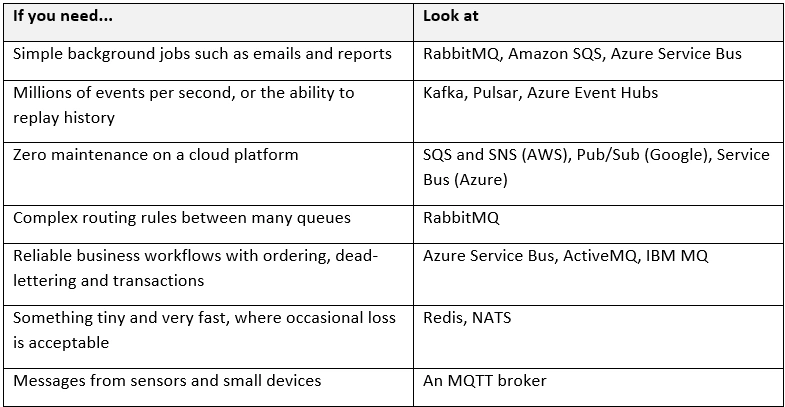
A few questions help narrow it down further. Can you afford to lose a message? Does order matter? Do new services need to read old messages? Do you have a team that can run and monitor a broker, or would you rather pay for a managed one? Answer those four honestly and the list usually shrinks to one or two options.
The catch: challenges and when not to use a broker
Brokers are useful, but they are not free. Before adding one, be honest about the trade-offs:
• More moving parts. The broker is now critical infrastructure. If it goes down and nothing is backing it up, many things stop at once.
• Duplicates and ordering. As we saw, "at least once" delivery means duplicates, and strict ordering is usually guaranteed only within one queue or partition, not across the whole system.
• Harder debugging. A request that used to be one clear call is now a chain of messages spread over several services. Tracing what happened takes better tooling.
• Eventual consistency. Services update at slightly different moments, so for a short time different parts of the system may disagree.
If your application is small and one service simply calls another, a broker may add complexity you don't need. Brokers pay off when you have several services, unpredictable traffic, or work that can happen in the background.
If you do decide to use one, these habits will save you pain:
• Make consumers idempotent so duplicates are harmless.
• Set up a dead-letter queue, so a single bad message cannot block the line forever.
• Retry failed messages with a growing delay instead of hammering the same failing service.
• Watch the queue length or consumer lag. A growing backlog is your earliest warning sign.
• Keep messages small and include a version so you can change their shape later without breaking old consumers.
• Use the right tool for the job. Don't force a task queue to behave like an event log, or the other way round.
Wrapping up
A message broker is, at heart, a simple idea: put a reliable middleman between your services so they can stop waiting on each other. That one change gives you looser coupling, better resilience and an easier way to handle busy periods. The rest, queues versus topics, RabbitMQ versus Kafka, delivery guarantees, is just choosing the right flavor of that idea for your problem.
If you are just starting out, don't try to learn every tool at once. Pick one queue-style broker such as RabbitMQ, and one log-style platform such as Kafka, and see how each behaves with a toy project: an "order placed" message that triggers an email. Seeing a message sit patiently in a queue while a consumer is switched off teaches more than any diagram.
If something here was unclear, or you want a deeper dive into Kafka internals or RabbitMQ exchanges, drop a comment and I will happily cover it in a follow-up.


Join the conversation! Your thoughts help the community grow.