Introduction
Of all the options panes, the easiest option pane to create is a message pane. And Confirm pane is slightly different from the message option pane. This type of pane is used to request a decision from the user.
Message Pane
A message pane is a pane that displays a message to the user with an icon based on the message type.
Methods Used
- public static void showMessageDialog(Component parentComponent, Object message): Displays a confirmation dialog – a model information message dialog titled "Confirm". based on parentComponent, the Frame in which the dialogue is displayed is chosen. If null, or if the parentComponent has no frame, a default frame is used. The message represents the Object to be displayed.
- public static void showMessageDialog(Component parentComponent, Object message, String title, int messageType): shows a dialogue with a message displayed using the messageType parameter's default icon. parentComponent chooses which Frame the dialogue will appear in. If null, or if the parentComponent has no frame, a default frame is used. The message represents the Object to be displayed. The title represents the title string for the dialog. messageType shows the type of message to be displayed: ERROR_MESSAGE, INFORMATION_MESSAGE, WARNING_MESSAGE, QUESTION_MESSAGE or PLAIN_MESSAGE
- public static void showMessageDialog(Component parentComponent, Object message, String title, int messageType, Icon icon): opens a dialogue with a message that includes all the required parameters. parentComponent chooses which Frame the dialogue will appear in. If null, or if the parentComponent has no frame, a default frame is used. The message represents the Object to be displayed. The title represents the title string for the dialog. messageType shows the type of message to be displayed: ERROR_MESSAGE, INFORMATION_MESSAGE, WARNING_MESSAGE, QUESTION_MESSAGE, or PLAIN_MESSAGE. Icon represents an Icon to display in the dialog that helps the user identify the kind of message that is being displayed.
Note. All the above methods will not return any value.
The source code below shows the creation of an informational message pane.
import javax.swing.*;
import java.awt.event.*;
import java.awt.*;
import java.lang.*;
public class messagePane extends JPanel implements ActionListener {
    public messagePane() {
        JButton b1 = new JButton("Click Here");
        b1.addActionListener(this);
        add(b1);
    }
    public void actionPerformed(ActionEvent e) {
        JOptionPane.showMessageDialog(this, "Hii, Look at my Message Dialog-- By Ashish Bhatnagar", "Informational Message Pane", JOptionPane.INFORMATION_MESSAGE);
    }
    public Dimension getPrefferedSize() {
        return new Dimension(100, 60);
    }
    public static void main(String args[]) {
        JFrame frame = new JFrame("Info");
        messagePane panel = new messagePane();
        frame.setForeground(Color.black);
        frame.setBackground(Color.lightGray);
        frame.addWindowListener(new WindowCloser());
        frame.getContentPane().add(panel, "Center");
        frame.setSize(panel.getPreferredSize());
        frame.setVisible(true);
    }
}
class WindowCloser extends WindowAdapter {
    public void windowClosing(WindowEvent e) {
        Window win = e.getWindow();
        win.setVisible(false);
        System.exit(0);
    }
}
Output
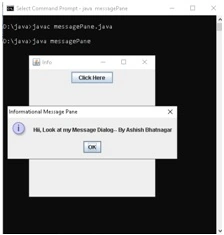
In the same way, we can create the remaining message panes. Replace the following code fragments in the above program at the appropriate place to get the appropriate message dialogs.
- JOptionPane.showMessageDialog(this, "Hii, Look at my Message Dialog— By Ashish Bhatnagar","Warning Message Pane",JOptionPane.WARNING_MESSAGE);
- JOptionPane.showMessageDialog(this, "Hii, Look at my Message Dialog— By Ashish Bhatnagar","Error Message Pane",JOptionPane.ERROR_MESSAGE);
- JOptionPane.showMessageDialog(this, "Hii, Look at my Message Dialog— By Ashish Bhatnagar","Question Message Pane",JOptionPane.QUESTION_MESSAGE);
- JOptionPane.showMessageDialog(this, "Hii, Look at my Message Dialog— By Ashish Bhatnagar","Plain Message Pane",JOptionPane.PLAIN_MESSAGE);
Confirm Panes
The confirm pane is slightly different from the message pane. This type of pane is used to request a decision from the user. For example, the user may want a confirmation panel that asks if the work has to be saved before the application quits. Based on the option type, the decision can be yes/no or yes/no/cancel. The methods for showing a confirm-style option pane as shown below. All these methods return an "int" to indicate the user's choice.
- public static int showConfirmDialog(Component parentComponent, Object message): Creates a confirm style option pane with the specified parent and message. The message type is QUESTION_MESSAGE; the title is "Click an Option"; the option type is YES_NO_CANCEL_OPTION.
- public static int showConfirmDialog(Component parentComponent, Object message, String title, int optionType): Creates a confirm style option pane with a specified parent, message, title, and option type. The message type is QUESTION_MESSAGE
- public static int showConfirmDialog(Component parentComponent, Object message, String title, int optionType, int messageType): Creates a confirm style option pane with the specified parent, message, title, option type, and message type.
The methods showing a confirm dialog each return an integer with code representing the user's action on that dialog. This integer has one of six values, depending on the user's action. These values are defined as class variables on JOptionPane.
- YES_OPTION returns when the user presses the Yes button.
- NO_OPTION returns when the user presses the No button.
- OK_OPTION returns when the user presses the OK button.
- CANCEL_OPTION returns when the user presses the Cancel button.
- CLOSE_OPTION returns when the user closed the dialog with the close box.
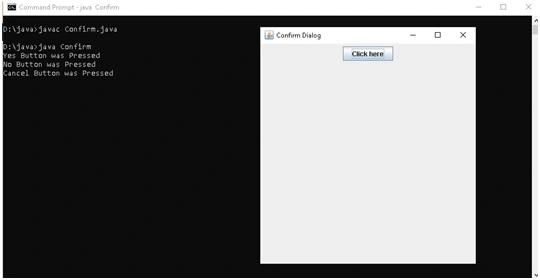
The below code displays a confirm dialog when the user presses the "Click here" button. The results are printed to the console when the user presses the appropriate button.
import javax.swing.*;
import java.awt.event.*;
import java.awt.*;
import java.lang.*;
public class Confirm extends JPanel implements ActionListener {
  public Confirm() {
    JButton b1 = new JButton("Click here");
    b1.addActionListener(this);
    add(b1);
  }
  public void actionPerformed(ActionEvent e) {
    int result;
    result = JOptionPane.showConfirmDialog(this, "Continue?");
    switch (result) {
    case JOptionPane.YES_OPTION:
      System.out.println("Yes Button was Pressed");
      break;

    case JOptionPane.NO_OPTION:
      System.out.println("No Button was Pressed");
      break;

    case JOptionPane.CANCEL_OPTION:
      System.out.println("Cancel Button was Pressed");
      break;

    case JOptionPane.CLOSED_OPTION:
      System.out.println("Dialog Closed");
      break;

    }
  }
  public Dimension getPreferredSize() {
    return new Dimension(100, 60);
  }
  public static void main(String args[]) {
    JFrame frame = new JFrame("Confirm Dialog");
    Confirm panel = new Confirm();
    frame.setForeground(Color.black);
    frame.setBackground(Color.lightGray);
    frame.addWindowListener(new WindowCloser());
    frame.getContentPane().add(panel, "Center");
    frame.setSize(panel.getPreferredSize());
    frame.setVisible(true);
  }
}
class WindowCloser extends WindowAdapter {
  public void windowClosing(WindowEvent e) {
    Window win = e.getWindow();
    win.setVisible(false);
    System.exit(0);
  }
}
Output
Summary
A message pane is a pane that displays a message to the user with an icon based on the message type. Confirm pane is slightly different from the message option pane. This type of pane is used to request a decision from the user.


Join the conversation! Your thoughts help the community grow.