

Introduction
In this article I will show you how to create a scientific calculator in Visual Studio 2012 with a Metro style. This scientific calculator can do the following operations.
Arithmetic Operations
- Addition
- Subtraction
- Multiplication
- Division
- Percentage
Power Operations
- Square Root
- Square
- Cube
- Power
Logarithmic Operations
- Log on base 10
- Natural Log
Trigonometry Operations
- Sin
- Cos
- Tan
- Inverse of Sine (sin-1)
- Inverse of Cos (cos-1)
- Inverse of Tan (tan-1)
- And you can also get Cosec, Sec and Cot value by using 1/X.
Permutations and Combinations
Factorial of any Number
Value of PI
Extra Features: Back Space Button, Auto Save History, Clear History, OFF Button, AC, CE
Use the following procedure to create it.
- Open Visual Studio
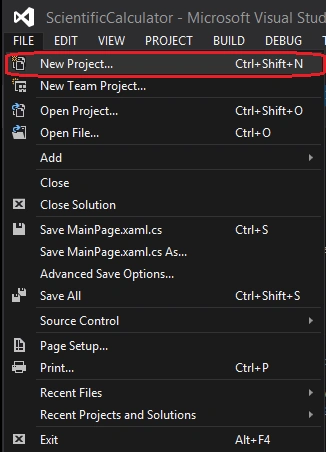
- Go to the menu and select "File" -> "New" -> "Project..." or simply press "Ctrl + Shift + N".
- Now select "Blank App" inside Visual C# Template and select "Blank App (XAML)".
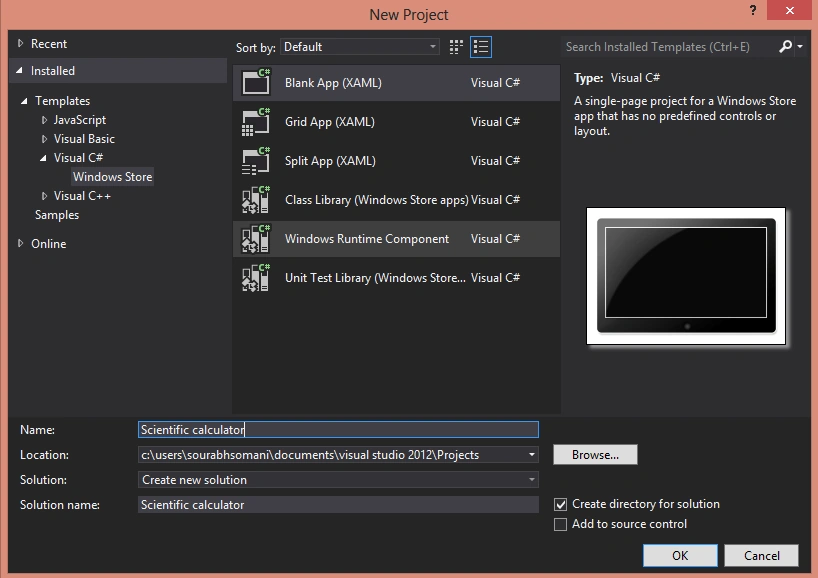
- Now provide the name of the application and location.
- Now go to the Solution Explorer and open MainPage.xaml Page and now start to make a calculator.
First of all make 11 buttons for 0-9 number buttons and one button for decimal (Dot(.)) using the following XAML code.
- <Button x:Name="BtnZero" Content="0" HorizontalAlignment="Left" Margin="406,643,0,0" VerticalAlignment="Top" Width="116" Background="Black" Height="74" BorderBrush="Red" FontSize="36"/>
- <Button x:Name="Btn1" Content="1" HorizontalAlignment="Left" Margin="290,568,0,0" VerticalAlignment="Top" Width="117" Background="Black" Height="76" BorderBrush="Red" FontSize="36" />
- <Button x:Name="Btn2" Content="2" HorizontalAlignment="Left" Margin="406,568,0,0" VerticalAlignment="Top" Width="116" Background="Black" Height="76" BorderBrush="Red" FontSize="36" />
- <Button x:Name="Btn3" Content="3" HorizontalAlignment="Left" Margin="523,568,0,0" VerticalAlignment="Top" Width="115" Background="Black" Height="76" BorderBrush="Red" FontSize="36" />
- <Button x:Name="Btn4" Content="4" HorizontalAlignment="Left" Margin="290,493,0,0" VerticalAlignment="Top" Width="117" Background="Black" Height="75" BorderBrush="Red" FontSize="36" />
- <Button x:Name="Btn5" Content="5" HorizontalAlignment="Left" Margin="406,493,0,0" VerticalAlignment="Top" Width="116" Background="Black" Height="75" BorderBrush="Red" FontSize="36" />
- <Button x:Name="Btn6" Content="6" HorizontalAlignment="Left" Margin="523,493,0,0" VerticalAlignment="Top" Width="115" Background="Black" Height="75" BorderBrush="Red" FontSize="36" />
- <Button x:Name="Btn7" Content="7" HorizontalAlignment="Left" Margin="290,418,0,0" VerticalAlignment="Top" Width="117" Background="Black" Height="76" BorderBrush="Red" FontSize="36" />
- <Button x:Name="Btn8" Content="8" HorizontalAlignment="Left" Margin="406,418,0,0" VerticalAlignment="Top" Width="116" Background="Black" Height="76" BorderBrush="Red" FontSize="36" />
- <Button x:Name="Btn9" Content="9" HorizontalAlignment="Left" Margin="523,418,0,0" VerticalAlignment="Top" Width="115" Background="Black" Height="76" BorderBrush="Red" FontSize="36" />
- <Button x:Name="BtnDot" Content="." HorizontalAlignment="Left" Margin="290,643,0,0" VerticalAlignment="Top" Width="117" Background="Black" Height="74" BorderBrush="Red" FontSize="36" />

- <TextBox x:Name="TxtBox" HorizontalAlignment="Left" Margin="10,118,0,0" TextWrapping="Wrap" VerticalAlignment="Top" Width="1346" Height="89" FontSize="48" FontWeight="Bold" FlowDirection="RightToLeft" BorderBrush="Black" BorderThickness="4" Text="" MaxLength="10"/>
- <Button x:Name="BtnAdd" Content="+" HorizontalAlignment="Left" Margin="637,568,0,0" VerticalAlignment="Top" Width="115" Background="Black" Height="149" BorderBrush="Red" FontSize="36" />
- <Button x:Name="BtnMul" Content="*" HorizontalAlignment="Left" Margin="637,418,0,0" VerticalAlignment="Top" Width="115" Background="Black" Height="75" BorderBrush="Red" FontSize="36"/>
- <Button x:Name="BtnSub" Content="-" HorizontalAlignment="Left" Margin="637,493,0,0" VerticalAlignment="Top" Width="115" Background="Black" Height="76" BorderBrush="Red" FontSize="36" />
- <Button x:Name="BtnDiv" Content="/" HorizontalAlignment="Left" Margin="752,643,0,0" VerticalAlignment="Top" Width="115" Background="Black" Height="76" BorderBrush="Red" FontSize="36"/>
- <Button x:Name="BtnEqual" Content="=" HorizontalAlignment="Left" Margin="523,643,0,0" VerticalAlignment="Top" Width="115" Background="Black" Height="74" BorderBrush="Red" FontSize="36"/>
- <Button x:Name="BtnPercent" Content="%" HorizontalAlignment="Left" Margin="752,493,0,0" VerticalAlignment="Top" Width="115" Background="Black" Height="75" BorderBrush="Red" FontSize="36"/>
Now create buttons for power operations using the following code:
- <Button x:Name="BtnSquare" Content="X^2" HorizontalAlignment="Left" Margin="867,493,0,0" VerticalAlignment="Top" Width="115" Background="Black" Height="76" BorderBrush="Red" FontSize="36" />
- <Button x:Name="BtnCube" Content="X^3" HorizontalAlignment="Left" Margin="867,418,0,0" VerticalAlignment="Top" Width="115" Background="Black" Height="76" BorderBrush="Red" FontSize="36"/>
- <Button x:Name="BtnRoot" Content="√" HorizontalAlignment="Left" Margin="752,418,0,0" VerticalAlignment="Top" Width="115" Background="Black" Height="74" BorderBrush="Red" FontSize="36"/>
- <Button x:Name="BtnPow" Content="X^Y" HorizontalAlignment="Left" Margin="982,418,0,0" VerticalAlignment="Top" Width="115" Background="Black" Height="76" BorderBrush="Red" FontSize="36"/>
- Open "Run" by pressing "Windows Key + R".
- And enter "charmap". This command will open the Character Map.
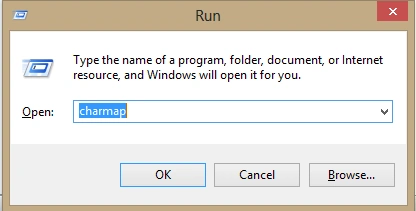
- After pressing "OK" you will see the following Dialog Box:
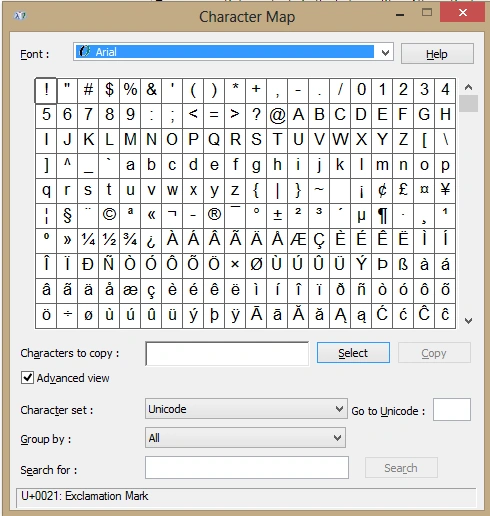
- Now search for the Square Root Symbol character then select that and copy that.

- Now paste the copied character into your program.
- <Button x:Name="BtnLog" Content="Log" HorizontalAlignment="Left" Margin="867,567,0,0" VerticalAlignment="Top" Width="115" Background="Black" Height="75" BorderBrush="Red" FontSize="36" />
- <Button x:Name="BtnLN" Content="ln" HorizontalAlignment="Left" Margin="867,643,0,0" VerticalAlignment="Top" Width="115" Background="Black" Height="76" BorderBrush="Red" FontSize="36" />
- <Button x:Name="BtnSin" Content="sin" HorizontalAlignment="Left" Margin="1094,418,0,0" VerticalAlignment="Top" Width="115" Background="Black" Height="76" BorderBrush="Red" FontSize="36" />
- <Button x:Name="BtnCos" Content="cos" HorizontalAlignment="Left" Margin="1094,493,0,0" VerticalAlignment="Top" Width="115" Background="Black" Height="75" BorderBrush="Red" FontSize="36" />
- <Button x:Name="BtnTan" Content="tan" HorizontalAlignment="Left" Margin="1094,568,0,0" VerticalAlignment="Top" Width="115" Background="Black" Height="76" BorderBrush="Red" FontSize="36" />
- <Button x:Name="BtnSinInv" Content="sin-1" HorizontalAlignment="Left" Margin="1209,418,0,0" VerticalAlignment="Top" Width="131" Background="Black" Height="76" BorderBrush="Red" FontSize="36" />
- <Button x:Name="BtnCosInv" Content="cos-1" HorizontalAlignment="Left" Margin="1209,493,0,0" VerticalAlignment="Top" Width="131" Background="Black" Height="75" BorderBrush="Red" FontSize="36" />
- <Button x:Name="BtnTanInv" Content="tan-1" HorizontalAlignment="Left" Margin="1209,568,0,0" VerticalAlignment="Top" Width="131" Background="Black" Height="76" BorderBrush="Red" FontSize="36" />
- <Button x:Name="BtnNCR" Content="nCr" HorizontalAlignment="Left" Margin="982,493,0,0" VerticalAlignment="Top" Width="115" Background="Black" Height="75" BorderBrush="Red" FontSize="36" />
- <Button x:Name="BtnNPR" Content="nPr" HorizontalAlignment="Left" Margin="982,568,0,0" VerticalAlignment="Top" Width="115" Background="Black" Height="76" BorderBrush="Red" FontSize="36" />
- <Button x:Name="BtnFact" Content="X!" HorizontalAlignment="Left" Margin="1094,643,0,0" VerticalAlignment="Top" Width="115" Background="Black" Height="74" BorderBrush="Red" FontSize="36" />
Now create buttons for +/-, PI and 1/X using the following code:
- <Button x:Name="BtnPlusMinus" Content="±" HorizontalAlignment="Left" Margin="752,568,0,0" VerticalAlignment="Top" Width="115" Background="Black" Height="76" BorderBrush="Red" FontSize="36" />
- <Button x:Name="Btn1byX" Content="1/X" HorizontalAlignment="Left" Margin="982,643,0,0" VerticalAlignment="Top" Width="115" Background="Black" Height="74" BorderBrush="Red" FontSize="36"/>
- <Button x:Name="BtnPI" Content="π" HorizontalAlignment="Left" Margin="1209,643,0,0" VerticalAlignment="Top" Width="131" Background="Black" Height="74" BorderBrush="Red" FontSize="36" />
Now create buttons for backspace, AC, CE, OFF and Clear History using the following code:
- <Button x:Name="BtnBackSpace" Content="BACK SPACE(←)" HorizontalAlignment="Left" Margin="982,342,0,0" VerticalAlignment="Top" Width="358" Background="Black" Height="76" BorderBrush="Red" FontSize="36" />
- <Button x:Name="BtnAc" Content="AC" HorizontalAlignment="Left" Margin="867,342,0,0" VerticalAlignment="Top" Width="115" Background="Black" Height="76" BorderBrush="Red" FontSize="36" />
- <Button x:Name="BtnCE" Content="CE" HorizontalAlignment="Left" Margin="752,342,0,0" VerticalAlignment="Top" Width="115" Background="Black" Height="76" BorderBrush="Red" FontSize="36" RenderTransformOrigin="0.682,0.527"/>
- <Button x:Name="BtnOff" Content="OFF" HorizontalAlignment="Left" Margin="637,342,0,0" VerticalAlignment="Top" Width="115" Background="Black" Height="76" BorderBrush="Red" FontSize="36" />
- <Button x:Name="BtnClearHistory" Content="Clear History" HorizontalAlignment="Left" Margin="291,342,0,0" VerticalAlignment="Top" Width="346" Background="Black" Height="76" BorderBrush="Red" FontSize="36"/>
- <ListBox x:Name="History" HorizontalAlignment="Left" Height="375" Margin="10,342,0,0" VerticalAlignment="Top" Width="275" FontSize="24" FontWeight="Bold" Background="#CCFFFFFF" Foreground="Black" ScrollViewer.HorizontalScrollBarVisibility="Hidden" Padding="0" />
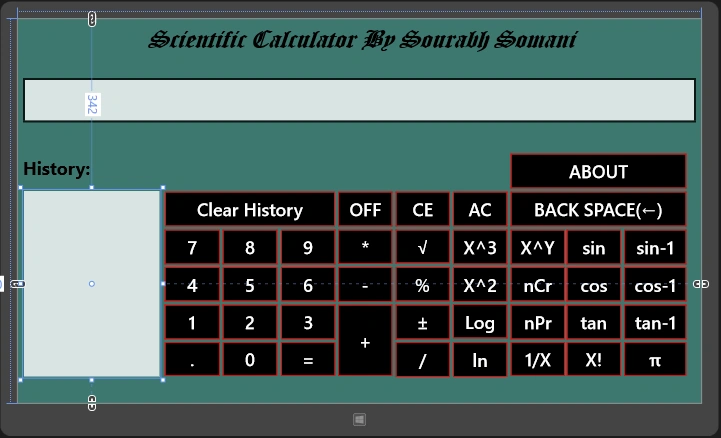
Now inside the code behind you need to write the following code:
- public sealed partial class MainPage : Page
- {
- public bool status;//It checks the status that what you want to append the string into the textbox or clear the textbox
- public bool Dot;// it checks that only one Dot You can put inside the textbox
- public double PreviousValue = 0.0;// by default previous value will be 0.0 and on performing any operation it will be change according to the textbox
- public char Operation;//this checks which operation you want to perform like add, subtract, etc...
- public bool FirstTime = true;
- public MainPage()
- {
- this.InitializeComponent();
- TxtBox.IsReadOnly = true;// textbox will be ready only no one can write inside the textbox
- TxtBox.Text = "0";// default value of the textbox
- }
- #region Number Buttons
- private void BtnZero_Click(object sender, RoutedEventArgs e)
- {
- if (status == true || BtnZero.Content.ToString() != "0")
- {
- TxtBox.Text += BtnZero.Content;
- }
- else
- {
- TxtBox.Text = BtnZero.Content.ToString();
- }
- }
- private void Btn1_Click(object sender, RoutedEventArgs e)
- {
- if (status == true)
- {
- TxtBox.Text += Btn1.Content;
- }
- else
- {
- TxtBox.Text = Btn1.Content.ToString();
- status = true;
- }
- }
- private void Btn2_Click(object sender, RoutedEventArgs e)
- {
- if (status == true)
- {
- TxtBox.Text += Btn2.Content;
- }
- else
- {
- TxtBox.Text = Btn2.Content.ToString();
- status = true;
- }
- }
- private void Btn3_Click(object sender, RoutedEventArgs e)
- {
- if (status == true)
- {
- TxtBox.Text += Btn3.Content;
- }
- else
- {
- TxtBox.Text = Btn3.Content.ToString();
- status = true;
- }
- }
- private void Btn4_Click(object sender, RoutedEventArgs e)
- {
- if (status == true)
- {
- TxtBox.Text += Btn4.Content;
- }
- else
- {
- TxtBox.Text = Btn4.Content.ToString();
- status = true;
- }
- }
- private void Btn5_Click(object sender, RoutedEventArgs e)
- {
- if (status == true)
- {
- TxtBox.Text += Btn5.Content;
- }
- else
- {
- TxtBox.Text = Btn5.Content.ToString();
- status = true;
- }
- }
- private void Btn6_Click(object sender, RoutedEventArgs e)
- {
- if (status == true)
- {
- TxtBox.Text += Btn6.Content;
- }
- else
- {
- TxtBox.Text = Btn6.Content.ToString();
- status = true;
- }
- }
- private void Btn7_Click(object sender, RoutedEventArgs e)
- {
- if (status == true)
- {
- TxtBox.Text += Btn7.Content;
- }
- else
- {
- TxtBox.Text = Btn7.Content.ToString();
- status = true;
- }
- }
- private void Btn8_Click(object sender, RoutedEventArgs e)
- {
- if (status == true)
- {
- TxtBox.Text += Btn8.Content;
- }
- else
- {
- TxtBox.Text = Btn8.Content.ToString();
- status = true;
- }
- }
- private void Btn9_Click(object sender, RoutedEventArgs e)
- {
- if (status == true)
- {
- TxtBox.Text += Btn9.Content;
- }
- else
- {
- TxtBox.Text = Btn9.Content.ToString();
- status = true;
- }
- }
- #endregion Number Buttons
- //For Dot(.) Button
- private void BtnDot_Click(object sender, RoutedEventArgs e)
- {
- if (Dot == false)
- {
- TxtBox.Text += BtnDot.Content.ToString();
- Dot = true;
- status = true;
- }
- }
- #region Arithmatic Operation
- private void BtnAdd_Click(object sender, RoutedEventArgs e)
- {
- if (!FirstTime)
- {
- OpreationMethod();
- Operation = '+';
- status = false;
- }
- else
- {
- PreviousValue = double.Parse(TxtBox.Text);
- Operation = '+';
- status = false;
- FirstTime = false;
- }
- TxtBox.Text = "0";
- }
- private void BtnSub_Click(object sender, RoutedEventArgs e)
- {
- if (!FirstTime)
- {
- OpreationMethod();
- Operation = '-';
- status = false;
- }
- else
- {
- PreviousValue = double.Parse(TxtBox.Text);
- Operation = '-';
- status = false;
- FirstTime = false;
- }
- TxtBox.Text = "0";
- }
- private void BtnMul_Click(object sender, RoutedEventArgs e)
- {
- if (!FirstTime)
- {
- OpreationMethod();
- Operation = '*';
- status = false;
- }
- else
- {
- PreviousValue = double.Parse(TxtBox.Text);
- Operation = '*';
- status = false;
- FirstTime = false;
- }
- TxtBox.Text = "0";
- }
- private void BtnDiv_Click(object sender, RoutedEventArgs e)
- {
- if (!FirstTime)
- {
- OpreationMethod();
- Operation = '/';
- status = false;
- }
- else
- {
- PreviousValue = double.Parse(TxtBox.Text);
- Operation = '/';
- status = false;
- FirstTime = false;
- }
- TxtBox.Text = "0";
- }
- //When User Will Click On Equal Button(=)
- private void BtnEqual_Click(object sender, RoutedEventArgs e)
- {
- if (Operation != '\0')
- {
- OpreationMethod();
- TxtBox.Text = PreviousValue.ToString();
- PreviousValue = 0.0;
- }
- status = false;
- FirstTime = true;
- Operation = '\0';
- }
- //Calulator Off
- private void BtnOff_Click(object sender, RoutedEventArgs e)
- {
- BtnZero.IsEnabled = false;
- Btn1.IsEnabled = false;
- Btn2.IsEnabled = false;
- Btn3.IsEnabled = false;
- Btn4.IsEnabled = false;
- Btn5.IsEnabled = false;
- Btn6.IsEnabled = false;
- Btn7.IsEnabled = false;
- Btn8.IsEnabled = false;
- Btn9.IsEnabled = false;
- Btn1byX.IsEnabled = false;
- BtnAdd.IsEnabled = false;
- BtnBackSpace.IsEnabled = false; ;
- BtnCE.IsEnabled = false;
- BtnCos.IsEnabled = false; ;
- BtnCosInv.IsEnabled = false;
- BtnCube.IsEnabled = false;
- BtnDiv.IsEnabled = false;
- BtnDot.IsEnabled = false;
- BtnEqual.IsEnabled = false;
- BtnFact.IsEnabled = false;
- BtnLN.IsEnabled = false;
- BtnLog.IsEnabled = false;
- BtnMul.IsEnabled = false;
- BtnNCR.IsEnabled = false; ;
- BtnNPR.IsEnabled = false;
- BtnPercent.IsEnabled = false;
- BtnPI.IsEnabled = false;
- BtnPlusMinus.IsEnabled = false;
- BtnPow.IsEnabled = false;
- BtnRoot.IsEnabled = false;
- BtnSin.IsEnabled = false;
- BtnSinInv.IsEnabled = false;
- BtnSquare.IsEnabled = false;
- BtnTan.IsEnabled = false;
- BtnTanInv.IsEnabled = false;
- BtnSub.IsEnabled = false;
- PreviousValue = 0.0;
- TxtBox.Text = string.Empty;
- Dot = false;
- FirstTime = true;
- }
- //Calculator ON or Reset all
- private void BtnAc_Click(object sender, RoutedEventArgs e)
- {
- BtnZero.IsEnabled = true;
- Btn1.IsEnabled = true;
- Btn2.IsEnabled = true;
- Btn3.IsEnabled = true;
- Btn4.IsEnabled = true;
- Btn5.IsEnabled = true;
- Btn6.IsEnabled = true;
- Btn7.IsEnabled = true;
- Btn8.IsEnabled = true;
- Btn9.IsEnabled = true;
- Btn1byX.IsEnabled = true;
- BtnAdd.IsEnabled = true;
- BtnBackSpace.IsEnabled = true;
- BtnCE.IsEnabled = true;
- BtnCos.IsEnabled = true; ;
- BtnCosInv.IsEnabled = true;
- BtnCube.IsEnabled = true;
- BtnDiv.IsEnabled = true;
- BtnDot.IsEnabled = true;
- BtnEqual.IsEnabled = true;
- BtnFact.IsEnabled = true;
- BtnLN.IsEnabled = true;
- BtnLog.IsEnabled = true;
- BtnMul.IsEnabled = true;
- BtnNCR.IsEnabled = true; ;
- BtnNPR.IsEnabled = true;
- BtnPercent.IsEnabled = true;
- BtnPI.IsEnabled = true;
- BtnPlusMinus.IsEnabled = true;
- BtnPow.IsEnabled = true;
- BtnRoot.IsEnabled = true;
- BtnSin.IsEnabled = true;
- BtnSinInv.IsEnabled = true;
- BtnSquare.IsEnabled = true;
- BtnTan.IsEnabled = true;
- BtnTanInv.IsEnabled = true;
- BtnSub.IsEnabled = true;
- PreviousValue = 0.0;
- TxtBox.Text = "0";
- Dot = false;
- FirstTime = true;
- }
- //Clear last
- private void BtnCE_Click(object sender, RoutedEventArgs e)
- {
- TxtBox.Text = "0";
- }
- //Delete History
- private void BtnClearHistory_Click(object sender, RoutedEventArgs e)
- {
- History.Items.Clear();
- }
- private void BtnBackSpace_Click(object sender, RoutedEventArgs e)
- {
- if (TxtBox.Text != "0")
- {
- string str = TxtBox.Text;
- int n = str.Length;
- TxtBox.Text = (str.Substring(0, n - 1));
- }
- if (TxtBox.Text.Length == 0)
- {
- TxtBox.Text = "0";
- status = false;
- }
- }
- //Log Based On 10
- private void BtnLog_Click(object sender, RoutedEventArgs e)
- {
- Operation = 'l';
- OpreationMethod();
- }
- //Natural Log
- private void BtnLN_Click(object sender, RoutedEventArgs e)
- {
- Operation = 'n';
- OpreationMethod();
- }
- //Power Funtion X^Y
- private void BtnPow_Click(object sender, RoutedEventArgs e)
- {
- if (!FirstTime)
- {
- OpreationMethod();
- Operation = '^';
- status = false;
- }
- else
- {
- PreviousValue = double.Parse(TxtBox.Text);
- Operation = '^';
- status = false;
- FirstTime = false;
- }
- TxtBox.Text = "0";
- }
- //Square Find
- private void BtnSquare_Click(object sender, RoutedEventArgs e)
- {
- Operation = '2';
- OpreationMethod();
- }
- //Cube Find
- private void BtnCube_Click(object sender, RoutedEventArgs e)
- {
- Operation = '3';
- OpreationMethod();
- }
- //Sin
- private void BtnSin_Click(object sender, RoutedEventArgs e)
- {
- Operation = 'S';
- OpreationMethod();
- }
- //Cos
- private void BtnCos_Click(object sender, RoutedEventArgs e)
- {
- Operation = 'C';
- OpreationMethod();
- }
- //Tan
- private void BtnTan_Click(object sender, RoutedEventArgs e)
- {
- Operation = 'T';
- OpreationMethod();
- }
- //Sine Inverse
- private void BtnSinInv_Click(object sender, RoutedEventArgs e)
- {
- Operation = 's';
- OpreationMethod();
- }
- //Cos Inverse
- private void BtnCosInv_Click(object sender, RoutedEventArgs e)
- {
- Operation = 'c';
- OpreationMethod();
- }
- //Tan Inverse
- private void BtnTanInv_Click(object sender, RoutedEventArgs e)
- {
- Operation = 't';
- OpreationMethod();
- }
- //Factorial
- private void BtnFact_Click(object sender, RoutedEventArgs e)
- {
- Operation = 'f';
- OpreationMethod();
- }
- //Find NCR (Combination)
- private void BtnNCR_Click(object sender, RoutedEventArgs e)
- {
- if (!FirstTime)
- {
- OpreationMethod();
- Operation = 'R';
- status = false;
- }
- else
- {
- PreviousValue = double.Parse(TxtBox.Text);
- Operation = 'R';
- status = false;
- FirstTime = false;
- }
- TxtBox.Text = "0";
- }
- //Find NPR (Permutation)
- private void BtnNPR_Click(object sender, RoutedEventArgs e)
- {
- if (!FirstTime)
- {
- OpreationMethod();
- Operation = 'r';
- status = false;
- }
- else
- {
- PreviousValue = double.Parse(TxtBox.Text);
- Operation = 'r';
- status = false;
- FirstTime = false;
- }
- TxtBox.Text = "0";
- }
- //value of PI
- private void BtnPI_Click(object sender, RoutedEventArgs e)
- {
- Operation = 'p';
- OpreationMethod();
- }
- //Plus and Minus
- private void BtnPlusMinus_Click(object sender, RoutedEventArgs e)
- {
- TxtBox.Text = (-1.0 * double.Parse(TxtBox.Text)).ToString();
- }
- //1/X
- private void Btn1byX_Click(object sender, RoutedEventArgs e)
- {
- Operation = 'o';
- OpreationMethod();
- }
- private void BtnRoot_Click(object sender, RoutedEventArgs e)
- {
- Operation = 'q';
- OpreationMethod();
- }
- //For finding percentage (%)
- private void BtnPercent_Click(object sender, RoutedEventArgs e)
- {
- TxtBox.Text = (PreviousValue * double.Parse(TxtBox.Text) / 100).ToString();
- }
- private void OpreationMethod()
- {
- switch (Operation)
- {
- case '+':
- {
- History.Items.Add(PreviousValue + " + " + TxtBox.Text + "=" + (PreviousValue + double.Parse(TxtBox.Text)));
- PreviousValue += double.Parse(TxtBox.Text);
- break;
- }
- case '-':
- {
- History.Items.Add(PreviousValue + " - " + TxtBox.Text + "=" + (PreviousValue - double.Parse(TxtBox.Text)));
- PreviousValue -= double.Parse(TxtBox.Text);
- break;
- }
- case '*':
- {
- History.Items.Add(PreviousValue + " * " + TxtBox.Text + "=" + (PreviousValue * double.Parse(TxtBox.Text)));
- PreviousValue *= double.Parse(TxtBox.Text);
- break;
- }
- case '/':
- {
- History.Items.Add(PreviousValue + " / " + TxtBox.Text + "=" + (PreviousValue / double.Parse(TxtBox.Text)));
- PreviousValue /= double.Parse(TxtBox.Text);
- break;
- }
- case 'q':
- {
- double sqrt = Math.Sqrt(double.Parse(TxtBox.Text));
- History.Items.Add("sqrt(" + TxtBox.Text + ") = " + sqrt);
- PreviousValue = sqrt;
- TxtBox.Text = PreviousValue.ToString();
- status = false;
- break;
- }
- case '3':
- {
- double cube = Math.Pow(double.Parse(TxtBox.Text), 3);
- History.Items.Add("cube(" + TxtBox.Text + ") = " + cube);
- PreviousValue = cube;
- TxtBox.Text = PreviousValue.ToString();
- status = false;
- break;
- }
- case '2':
- {
- double square = Math.Pow(double.Parse(TxtBox.Text), 2);
- History.Items.Add("square(" + TxtBox.Text + ") = " + square);
- PreviousValue = square;
- TxtBox.Text = PreviousValue.ToString();
- status = false;
- break;
- }
- case 'l':
- {
- double log10 = Math.Log10(double.Parse(TxtBox.Text));
- History.Items.Add("Log(" + TxtBox.Text + ") = " + log10);
- PreviousValue = log10;
- TxtBox.Text = PreviousValue.ToString();
- status = false;
- break;
- }
- case 'n':
- {
- double LN = Math.Log(double.Parse(TxtBox.Text));
- History.Items.Add("LN(" + TxtBox.Text + ") = " + LN);
- PreviousValue = LN;
- TxtBox.Text = PreviousValue.ToString();
- status = false;
- break;
- }
- case '^':
- {
- double Pow = Math.Pow(PreviousValue, double.Parse(TxtBox.Text));
- History.Items.Add(PreviousValue + " ^ " + TxtBox.Text + "=" + Pow);
- PreviousValue = Pow;
- break;
- }
- case 'o':
- {
- double inverse = 1.0 / double.Parse(TxtBox.Text);
- History.Items.Add("1/(" + TxtBox.Text + ") = " + inverse);
- PreviousValue = inverse;
- TxtBox.Text = PreviousValue.ToString();
- status = false;
- break;
- }
- case 'f':
- {
- double Fact = 1;
- for (int i = 1; i <= Convert.ToInt32(TxtBox.Text); i++)
- {
- Fact = Fact * i;
- }
- History.Items.Add(TxtBox.Text + "! = " + Fact);
- PreviousValue = Fact;
- TxtBox.Text = PreviousValue.ToString();
- status = false;
- break;
- }
- case 'p':
- {
- double PI = Math.PI;
- History.Items.Add("Value of π = " + PI);
- PreviousValue = PI;
- TxtBox.Text = PreviousValue.ToString();
- status = false;
- break;
- }
- case 'S':
- {
- double Sin = Math.Sin(double.Parse(TxtBox.Text));
- History.Items.Add("Sin(" + TxtBox.Text + ") = " + Sin);
- PreviousValue = Sin;
- TxtBox.Text = PreviousValue.ToString();
- status = false;
- break;
- }
- case 'C':
- {
- double Cos = Math.Cos(double.Parse(TxtBox.Text));
- History.Items.Add("Cos(" + TxtBox.Text + ") = " + Cos);
- PreviousValue = Cos;
- TxtBox.Text = PreviousValue.ToString();
- status = false;
- break;
- }
- case 'T':
- {
- double Tan = Math.Tan(double.Parse(TxtBox.Text));
- History.Items.Add("Tan(" + TxtBox.Text + ") = " + Tan);
- PreviousValue = Tan;
- TxtBox.Text = PreviousValue.ToString();
- status = false;
- break;
- }
- case 's':
- {
- double SinInv = Math.Asin(double.Parse(TxtBox.Text));
- History.Items.Add("sin-1(" + TxtBox.Text + ") = " + SinInv);
- PreviousValue = SinInv;
- TxtBox.Text = PreviousValue.ToString();
- status = false;
- break;
- }
- case 'c':
- {
- double CosInv = Math.Acos(double.Parse(TxtBox.Text));
- History.Items.Add("cos-1(" + TxtBox.Text + ") = " + CosInv);
- PreviousValue = CosInv;
- TxtBox.Text = PreviousValue.ToString();
- status = false;
- break;
- }
- case 't':
- {
- double TanInv = Math.Acos(double.Parse(TxtBox.Text));
- History.Items.Add("tan-1(" + TxtBox.Text + ") = " + TanInv);
- PreviousValue = TanInv;
- TxtBox.Text = PreviousValue.ToString();
- status = false;
- break;
- }
- case 'r':
- {
- int var1, var2;
- var1 = factorial(Convert.ToInt32(PreviousValue));
- var2 = factorial(Convert.ToInt32(PreviousValue) - Convert.ToInt32(TxtBox.Text));
- History.Items.Add(PreviousValue + "P" + TxtBox.Text + " = " + Convert.ToString(var1 / var2));
- PreviousValue = double.Parse(Convert.ToString(var1 / var2));
- TxtBox.Text = PreviousValue.ToString();
- status = false;
- break;
- }
- case 'R':
- {
- int var1, var2, var3;
- var1 = factorial(Convert.ToInt32(PreviousValue));
- var2 = factorial(Convert.ToInt32(PreviousValue) - Convert.ToInt32(TxtBox.Text));
- var3 = factorial(Convert.ToInt32(TxtBox.Text));
- History.Items.Add(PreviousValue + "C" + TxtBox.Text + " = " + Convert.ToString(var1 / (var3 * var2)));
- PreviousValue = double.Parse(Convert.ToString(var1 / (var3 * var2)));
- TxtBox.Text = PreviousValue.ToString();
- status = false;
- break;
- }
- default:
- {
- break;
- }
- }
- }
- private int factorial(int x)
- {
- int i = 1;
- for (int s = 1; s <= x; s++)
- {
- i = i * s;
- }
- return i;
- }
- Open Solution Explorer.
- Open the Package.appxmanifest file.
- Go to the logo tab and provide the logo such as the following:

- Output in Start Menu.

- Output after running the project.

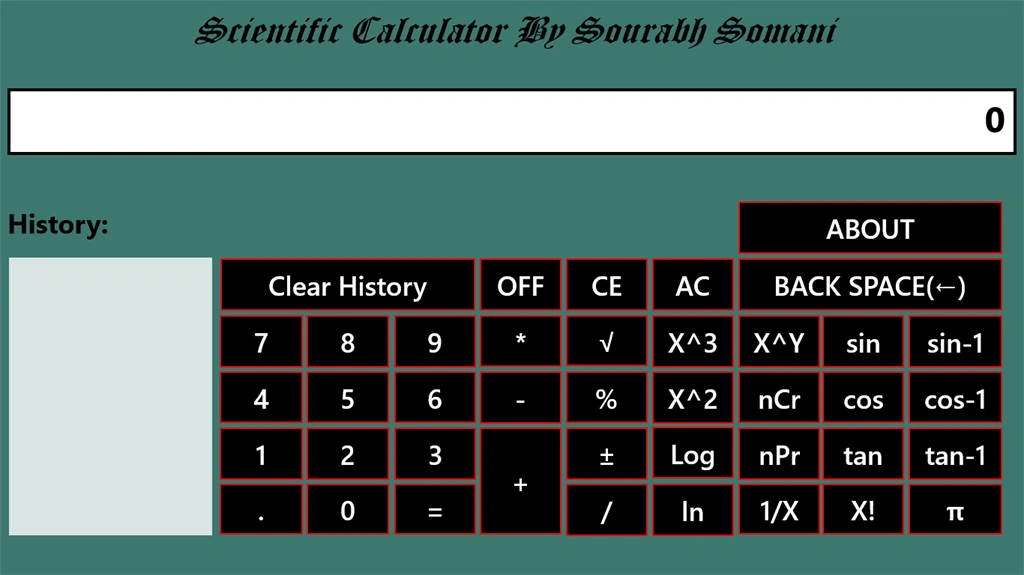
- Output of calculator:
Jasir ThasimPosted Feb 13, 2021, 6:05 AM
Thanks so much sir
Jasir ThasimPosted Feb 11, 2021, 6:21 PM
Sir, what is item" in the code.... and where should we use... pls describe or clear the word item mean in this code
Sourabh SomaniPosted Aug 6, 2014, 10:15 PM
:)
sss hhhPosted Aug 6, 2014, 2:20 PM
TnX
PRATICK zPosted Jul 11, 2014, 7:27 AM
Awesome work :)
Shaili DashoraPosted Feb 10, 2014, 6:19 AM
Nice Creativity...