

Microservices
The term microservices portrays a software development style that has grown from contemporary trends to set up practices that are meant to increase the speed and efficiency of developing and managing software solutions at scale. Microservices is more about applying a certain number of principles and architectural patterns as architecture. Each microservice lives independently, but on the other hand, also all rely on each other. All microservices in a project get deployed in production at their own pace, on-premise on the cloud, independently, living side by side.
In this article, we will learn the concept of Microservices, their architecture, and how to create microservices in .NET and C#. You will also learn steps to build, deploy, and test microservices in .NET using a docker container.
Microservices Architecture
The following picture from Microsoft Docs shows the microservices architecture style.
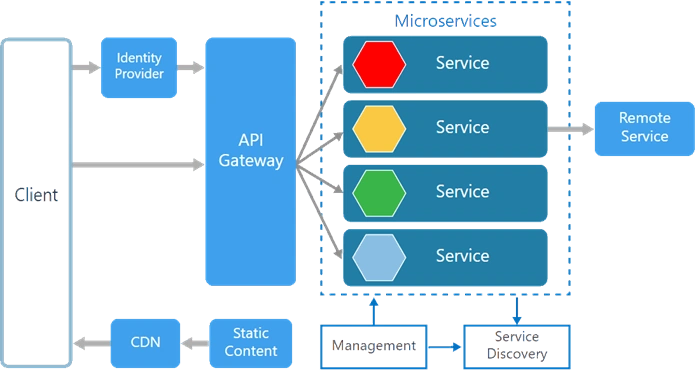
There are various components in a microservices architecture apart from microservices themselves.
Management. Maintains the nodes for the service.
Identity Provider. Manages the identity information and provides authentication services within a distributed network.
Service Discovery. Keeps track of services and service addresses and endpoints.
API Gateway. Serves as client’s entry point. Single point of contact from the client which in turn returns responses from underlying microservices and sometimes an aggregated response from multiple underlying microservices.
CDN. A content delivery network to serve static resources for e.g. pages and web content in a distributed network
Static Content The static resources like pages and web content
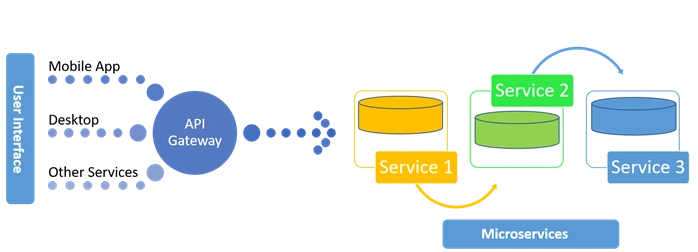
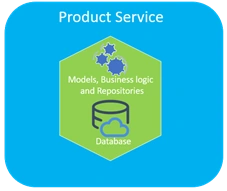
Microservices are deployed independently with their own database per service so the underlying microservices look as shown in the following picture.
Monolithic vs Microservices Architecture
Monolithic applications are more of a single complete package having all the related needed components and services encapsulated in one package.
Following is the diagrammatic representation of monolithic architecture being package completely or being service based.
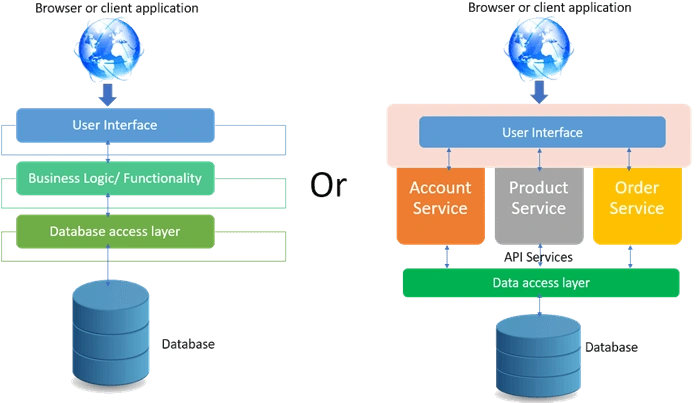
Microservice is an approach to create small services each running in their own space and can communicate via messaging. These are independent services directly calling their own database.
Following is the diagrammatic representation of microservices architecture.
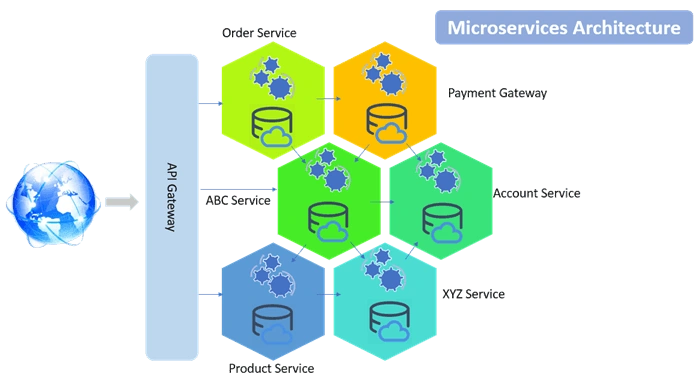
In monolithic architecture, the database remains the same for all the functionalities even if an approach of service-oriented architecture is followed, whereas in microservices each service will have its own database.
Docker Containers and Docker installation
Containers like Dockers and others slice the operating system resources, for e.g. the network stack, processes namespace, file system hierarchy and the storage stack. Dockers are more like virtualizing the operating system. Learn more about dockers here. Open this URL and click on Download from Docker hub. Once downloaded, login to the Docker and follow instructions to install Docker for Windows.
Microservice using ASP.NET Core
This section will demonstrate how to create a Product microservice using ASP.NET Core step by step with the help of pictures. The service would be built using ASP.NET Core 2.1 and Visual Studio 2017. Asp.NET Core comes integrated with VS 2017. This service will have its own DBcontext and database with the isolated repository so that the service could be deployed independently.
Creating an ASP.NET Core Application Solution
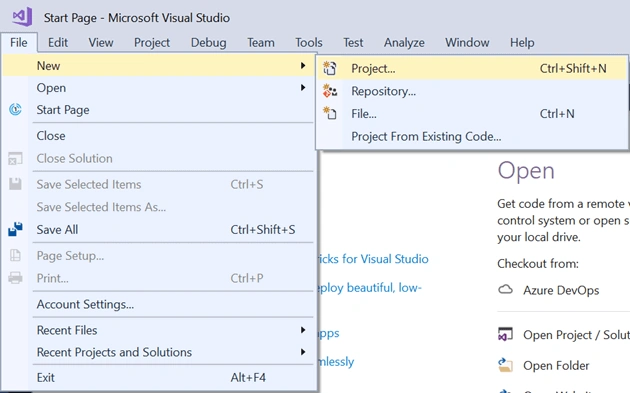
- Open the Visual Studio and add a new project.
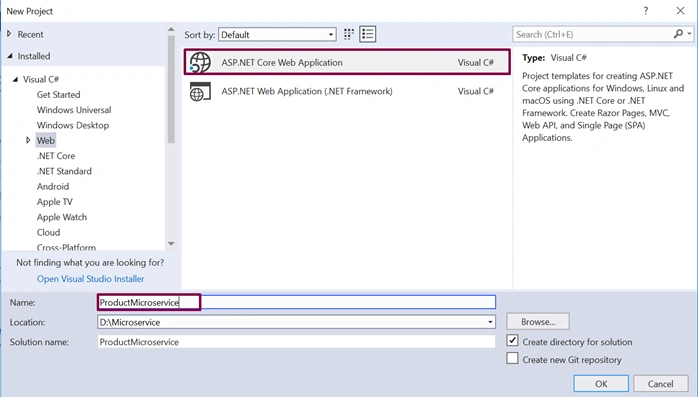
- Choose the application as ASP.NET Core Web Application and give it a meaningful name.
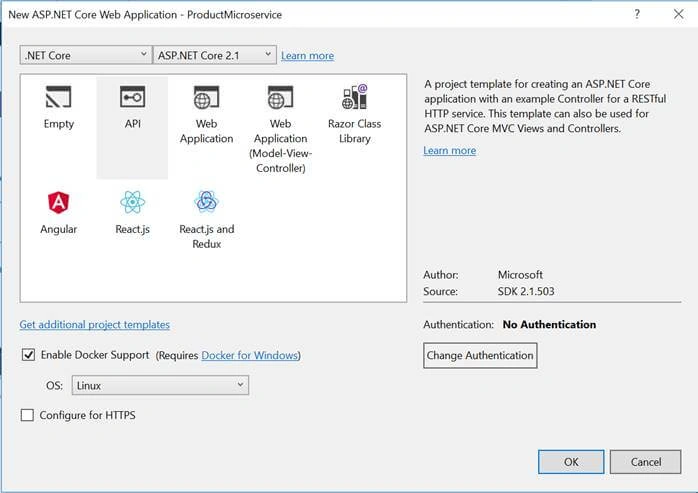
- Next, choose API as the type of the project and make sure that “Enable Docker Support” option is selected with OS type as Linux.
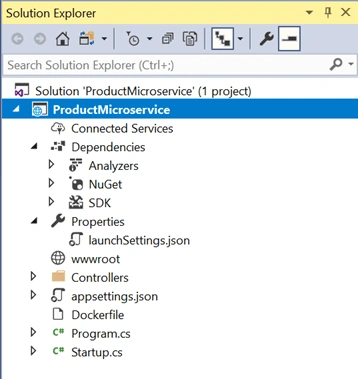
- The solution will look as shown below.
Adding Models
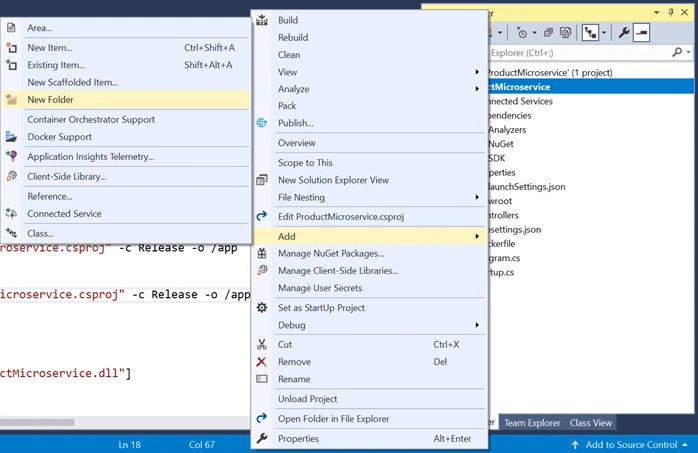
- Add a new folder named “Model” to the project.
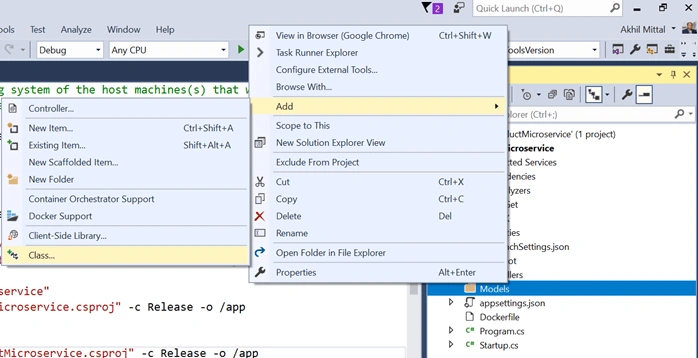
- In the Models folder, add a class named Product.
- Add a few properties like Id, Name, Description, Price to the product class. The product should also be of some kind and for that, a category model is defined and a CategoryId property is added to the product model.
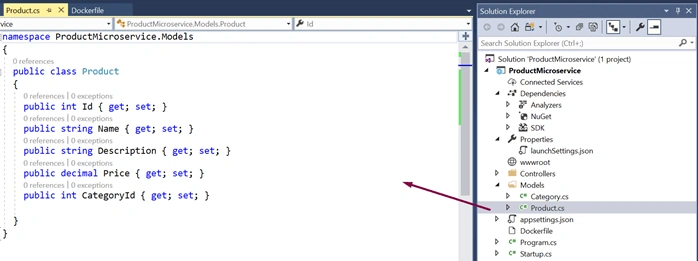
- Similarly, add Category model.
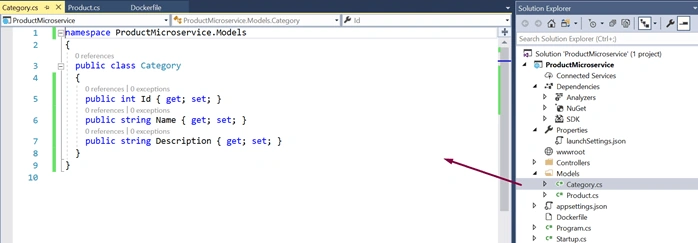
Enabling EF Core
Though .NET Core API project has inbuilt support for EF Core and all the related dependencies are downloaded at the time of project creation and compilation that could be found under SDK section in the project as shown below.
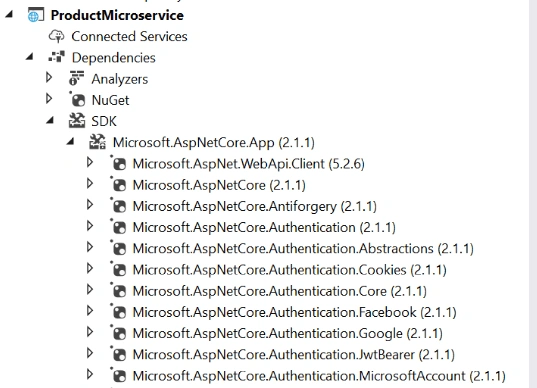
Microsoft.EntityFrameworkCore.SqlServer (2.1.1) should be the package inside the downloaded SDK’s. If it is not present, it could be explicitly added to the project via Nuget Packages.
Adding EF Core DbContext
A database context is needed so that the models could interact with the database.
- Add a new folder named DBContexts to the project.
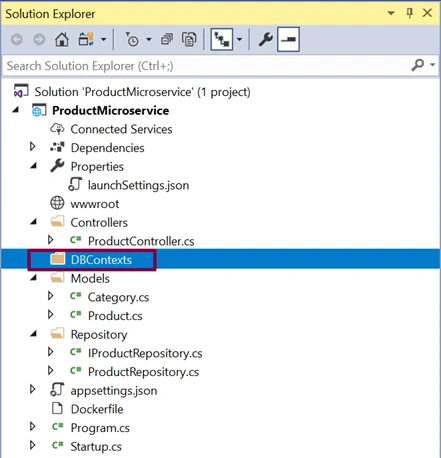
- Add a new class named ProductContext which includes the DbSet properties for Products and Categories. OnModelCreating is a method via which the master data could be seeded to the database. So, add the OnModelCreating method and add some sample categories that will be added to the database initially into the category table when the database is created.
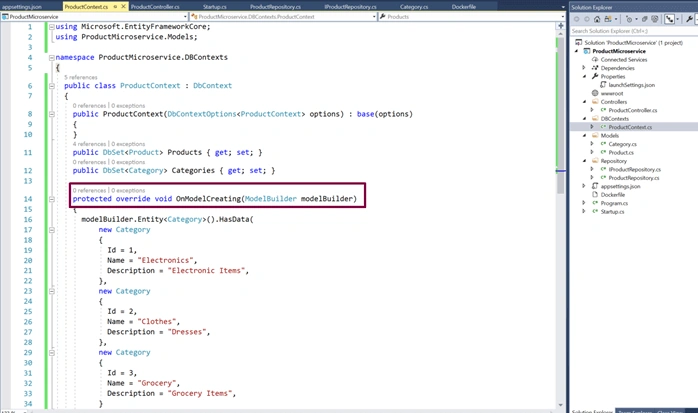
ProductContext codeusing Microsoft.EntityFrameworkCore; using ProductMicroservice.Models; namespace ProductMicroservice.DBContexts { public class ProductContext : DbContext { public ProductContext(DbContextOptions<ProductContext> options) : base(options) { } public DbSet<Product> Products { get; set; } public DbSet<Category> Categories { get; set; } protected override void OnModelCreating(ModelBuilder modelBuilder) { modelBuilder.Entity<Category>().HasData( new Category { Id = 1, Name = "Electronics", Description = "Electronic Items", }, new Category { Id = 2, Name = "Clothes", Description = "Dresses", }, new Category { Id = 3, Name = "Grocery", Description = "Grocery Items", } ); } } } - Add a connection string in the appsettings.json file.
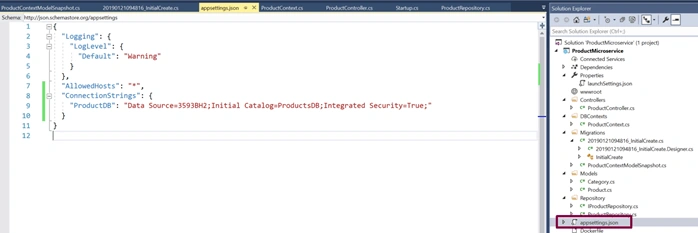
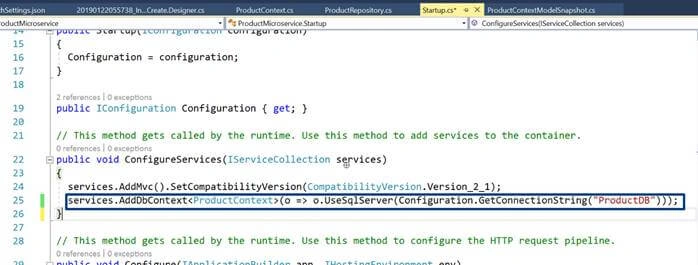
- Open the Startup.cs file to add the SQL server db provider for EF Core. Add the code services.AddDbContext<ProductContext>(o => o.UseSqlServer(Configuration.GetConnectionString("ProductDB"))); under ConfigureServices method. Note that in the GetConnectionString method the name of the key of the connection string is passed that was added in appsettings file.
Adding Repository
Repository works as a micro component of microservice that encapsulates the data access layer and helps in data persistence and testability as well.
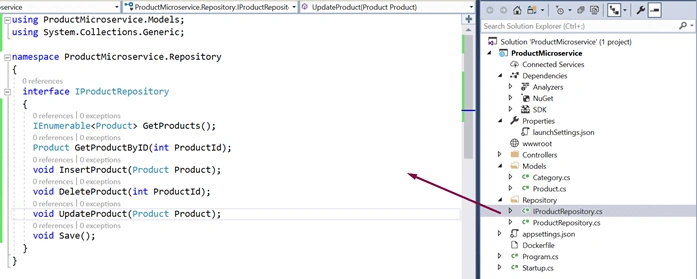
- Add a new folder named Repository in the project and add an Interface name IProductRepository in that folder. Add the methods in the interface that performs CRUD operations for Product microservice.
- Add a new concrete class named ProductRepository in the same Repository folder that implements IProductRepository. All these methods need:
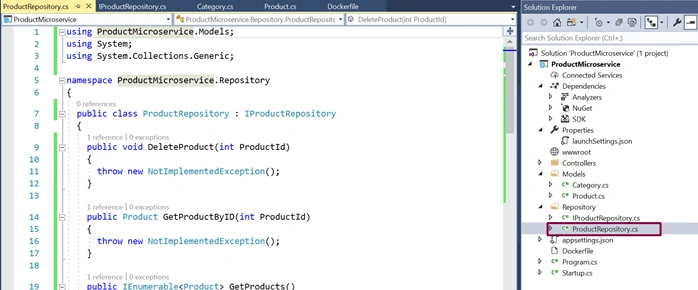
- Add the implementation for the methods via accessing context methods.
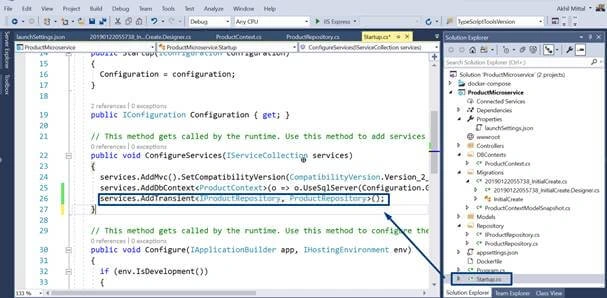
ProductRepository.csusing Microsoft.EntityFrameworkCore; using ProductMicroservice.DBContexts; using ProductMicroservice.Models; using System; using System.Collections.Generic; using System.Linq; namespace ProductMicroservice.Repository { public class ProductRepository: IProductRepository { private readonly ProductContext _dbContext; public ProductRepository(ProductContext dbContext) { _dbContext = dbContext; } public void DeleteProduct(int productId) { var product = _dbContext.Products.Find(productId); _dbContext.Products.Remove(product); Save(); } public Product GetProductByID(int productId) { return _dbContext.Products.Find(productId); } public IEnumerable<Product> GetProducts() { return _dbContext.Products.ToList(); } public void InsertProduct(Product product) { _dbContext.Add(product); Save(); } public void Save() { _dbContext.SaveChanges(); } public void UpdateProduct(Product product) { _dbContext.Entry(product).State = EntityState.Modified; Save(); } } } - Open the Startup class in the project and add the code as services.AddTransient<IProductRepository, ProductRepository>(); inside ConfigureServices method so that the repository’s dependency is resolved at a run time when needed.
Adding Controller
The microservice should have an endpoint for which a controller is needed which exposes the HTTP methods to the client as endpoints of the service methods.
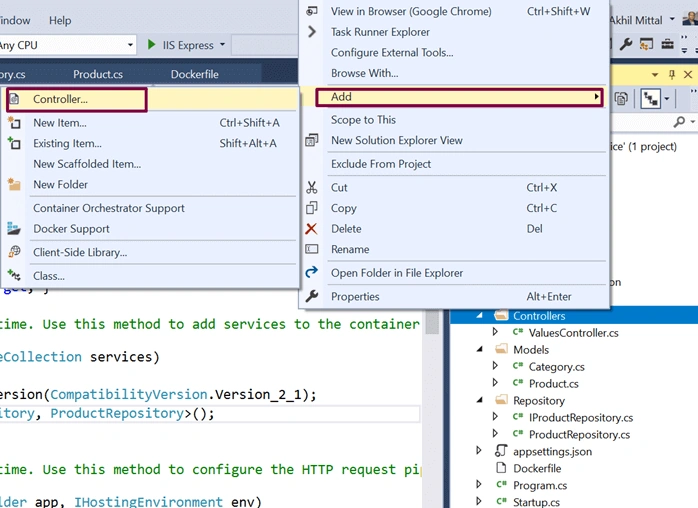
- Right click on the Controllers folder and add a new Controller as shown below.
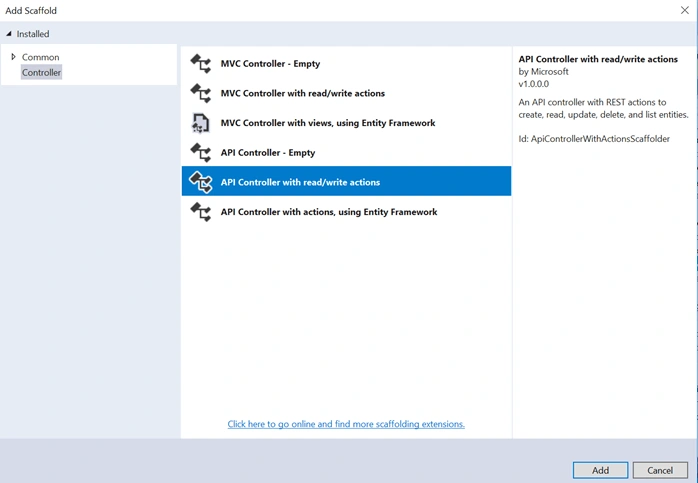
- Select the option “API Controller with read/write actions” to add the controller.
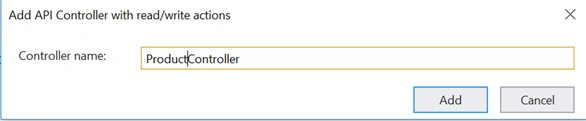
- Give the name of the controller as ProductController.
- A ProductController class will be added in the Controllers folder with default read/write actions that will be replaced later with product read/write actions and HTTP methods are created acting as an endpoint of the service.
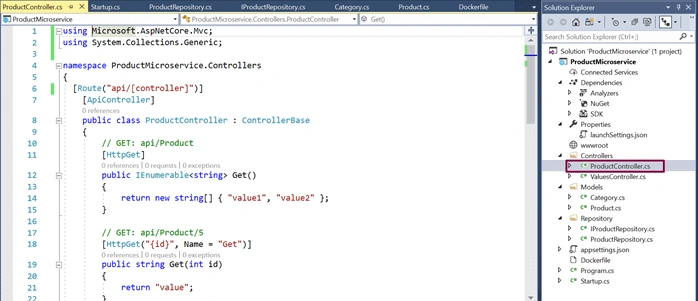
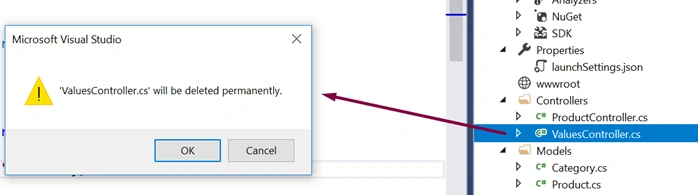
- ValuesController can be deleted as it is not needed.
- Add implementation to the methods by calling the repository methods as shown below. The basic implementation is shown here for the sake of understanding the concept. The methods could be attribute routed and could be decorated with more annotations as per need.
ProductController.csusing Microsoft.AspNetCore.Mvc; using ProductMicroservice.Models; using ProductMicroservice.Repository; using System; using System.Collections.Generic; using System.Transactions; namespace ProductMicroservice.Controllers { [Route("api/[controller]")] [ApiController] public class ProductController : ControllerBase { private readonly IProductRepository _productRepository; public ProductController(IProductRepository productRepository) { _productRepository = productRepository; } [HttpGet] public IActionResult Get() { var products = _productRepository.GetProducts(); return new OkObjectResult(products); } [HttpGet("{id}", Name = "Get")] public IActionResult Get(int id) { var product = _productRepository.GetProductByID(id); return new OkObjectResult(product); } [HttpPost] public IActionResult Post([FromBody] Product product) { using (var scope = new TransactionScope()) { _productRepository.InsertProduct(product); scope.Complete(); return CreatedAtAction(nameof(Get), new { id = product.Id }, product); } } [HttpPut] public IActionResult Put([FromBody] Product product) { if (product != null) { using (var scope = new TransactionScope()) { _productRepository.UpdateProduct(product); scope.Complete(); return new OkResult(); } } return new NoContentResult(); } [HttpDelete("{id}")] public IActionResult Delete(int id) { _productRepository.DeleteProduct(id); return new OkResult(); } } }
Entity Framework Core Migrations
Migrations allow us to provide code to change the database from one version to another.
- Open Package Manager Console.
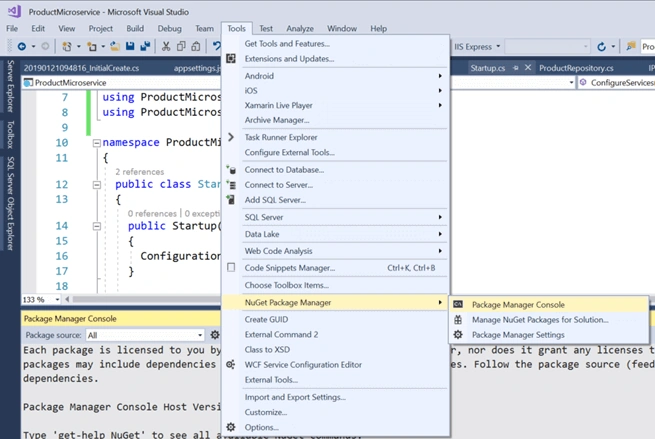
- To enable the migration, type the command, Add-Migration and give that a meaningful name for e.g. InitialCreate and press enter.
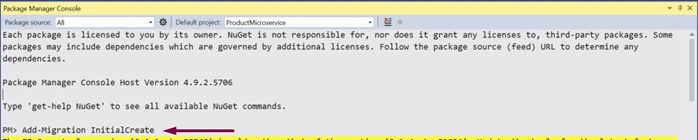
- Once the command is executed, if we look at our solution now, we see there's a new Migrations folder. And it contains two files. One, a snapshot of our current context model. Feel free to check the files. The files are very much self-explanatory.
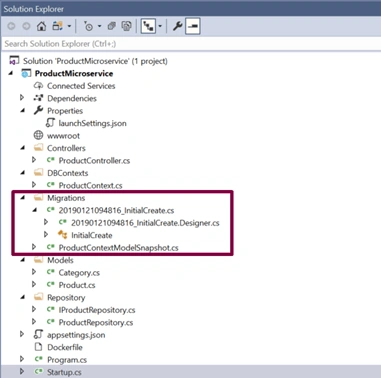
- To ensure that migrations are applied to the database there's another command for that. It's called the update-database If executed, the migrations will be applied to the current database.

- Check the SQL Server Management Studio to verify if the database got created.
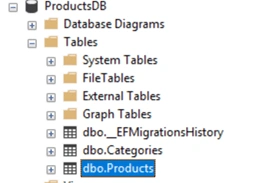
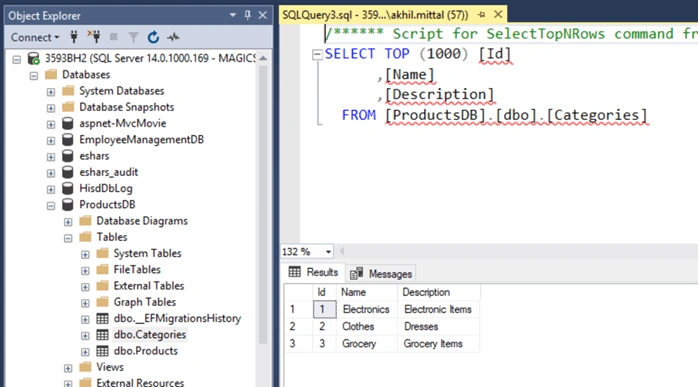
- When data of the Categories table is viewed the default master data of three categories is shown.
Run the Product Microservice
The service could be run via IIS Express i.e. Visual Studio default or via Docker container as well.
Via IIS Express
Choose IIS Express in the Visual Studio as shown below and press F5 or click that IIS Express button itself.

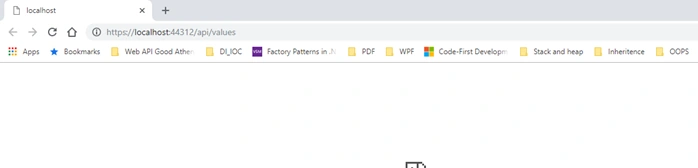
The application will be up once the browser page is launched. Since it has nothing to show, it will be blank, but the service could be tested via any API testing client. Here Postman is used to testing the service endpoints. Keep it opened and application running.
Install Postman if it is not on the machine and launch it.
POST
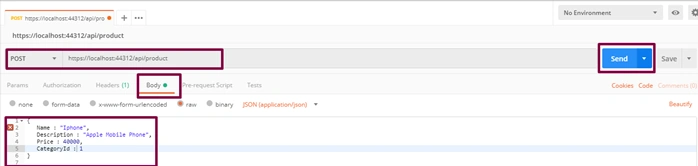
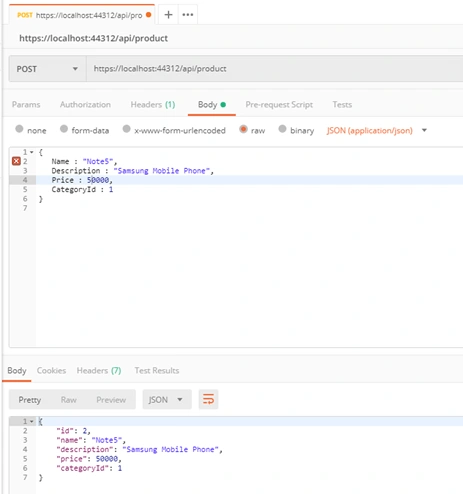
To test the POST method; i.e. create a new resource, select the method as POST in postman and provide the endpoint, i.e. https://localhost:44312/api/product and in the Body section, add a JSON similar to having properties of Product model as shown below and click on Send.
The response is returned with the Id of the product as well.
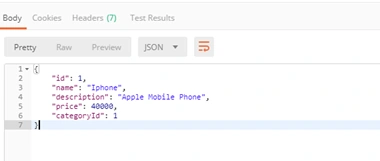
The “Post” method of the controller is responsible to create a resource in the database and send the response.
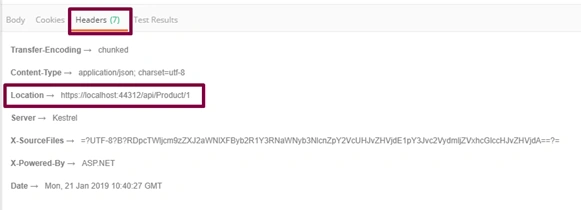
The line return CreatedAtAction(nameof(Get), new { id=product.Id }, product); returns the location of the created resource that could be checked in Location attribute in the response under Headers tab.
Perform a select query on the product table and an added row is shown for the newly created product.
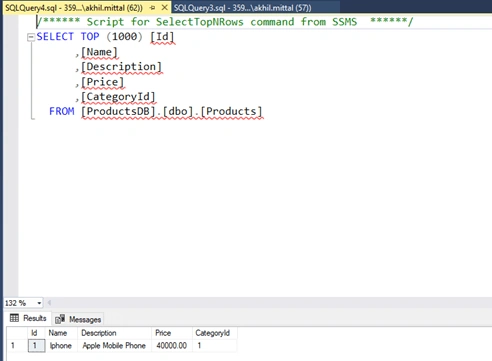
Create one more product in a similar way.
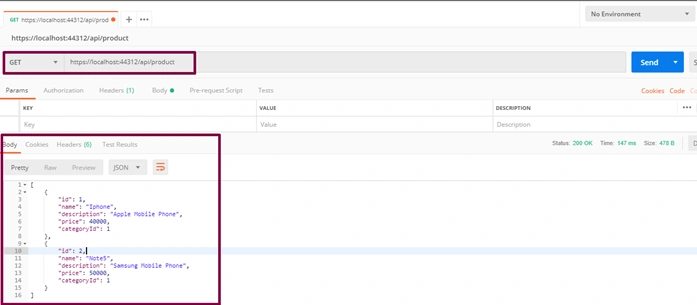
GET
Perform a GET request now with the same address and two records are shown as a JSON result response.
DELETE
Perform the delete request by selecting DELETE as the verb and appending id as 1 (if the product with id 1 needs to be deleted) and press Send.

In the database, one record with Id 1 gets deleted.

PUT
PUT verb is responsible for updating the resource. Select PUT verb, provide the API address and in the Body section, provide details of which product needs to be updated in JSON format. For example, update the product with Id 2 and update its name, description, and price from Samsung to iPhone specific. Press Send.

Check the database to see the updated product.

Via Docker Containers
Running the service could be done via docker commands to be run in docker command prompt and using visual studio as well. Since we added the docker support, it is easy to run the service in docker container using visual studio.
- Add container orchestrator support in the solution as shown below.

- This will ask for the orchestrator. Select Docker Compose and press OK.
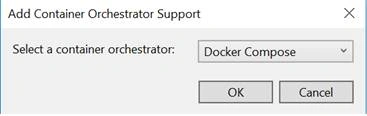
- Once added to the solution, the solution will look like shown below having docker-compose with dockerignore and docker-compose.yml and its override file.
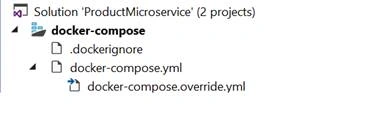
As soon as the solution is saved, it builds the project under the container and creates a docker image. All the commands execution can be seen in the output window when the solution is saved. - Open the command prompt in admin mode and navigate to the same folder where the project files are.
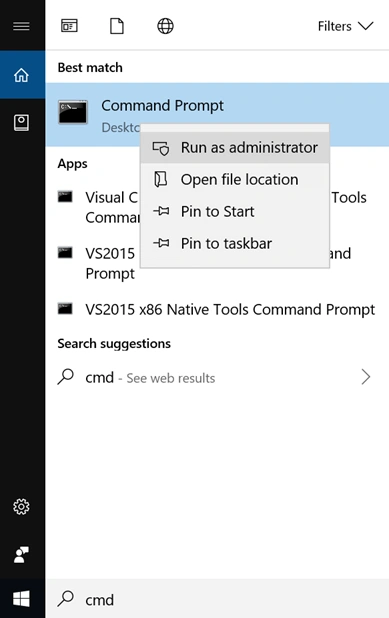
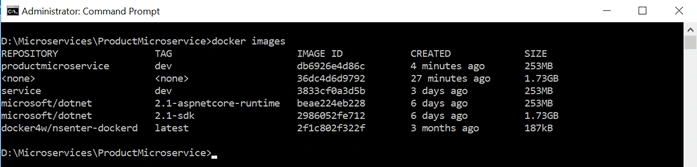
- Run the command docker images to see all the created images. We see the ProductMicroserviceimage the latest one.
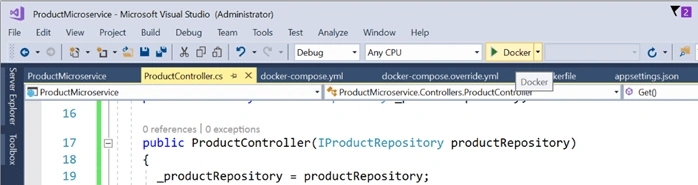
- Now run the application with Docker as an option as shown below.
- Now, run the command docker ps to see the running containers. It shows the container is running on 32773:80 port.

- Since the container is in running state, it is good to test the service now running under the container. To test the service, replace ”values” with “product” in the address as shown below. Ideally, it should get the product details. But it gives exception as shown below.
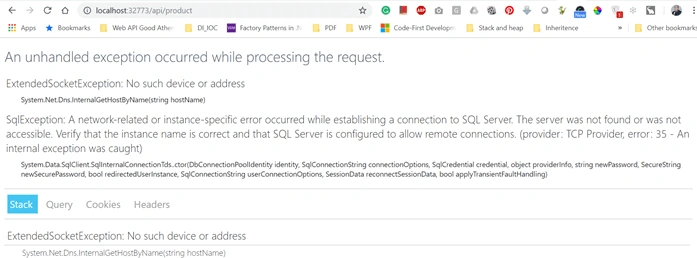
- Running the same thing under IIS Express works fine i.e. on port 44312. Replace “values” with the product to get the product details,
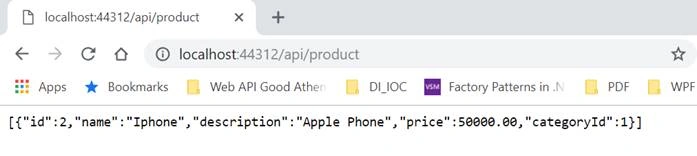
- Since in IIS Express application runs fine and not in docker container, the error clearly shows that something is wrong with the SQL server that it does not understand our docker container or it is not running under docker container. In this scenario, the docker container is running as a separate machine inside the host computer. So, to connect to the SQL database in the host machine, remote connections to SQL needs to be enabled. We can fix this.
- Open the SQL Server Configuration Manager. Now select Protocols for MSSQLSERVER and get the IPAll port number under TCP/IP section.
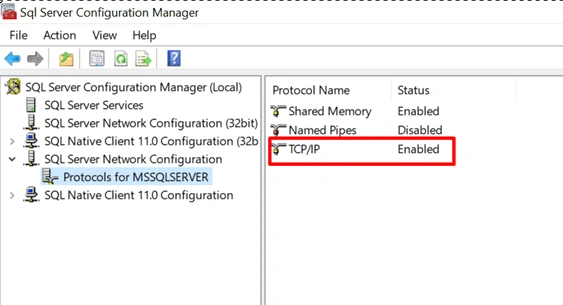
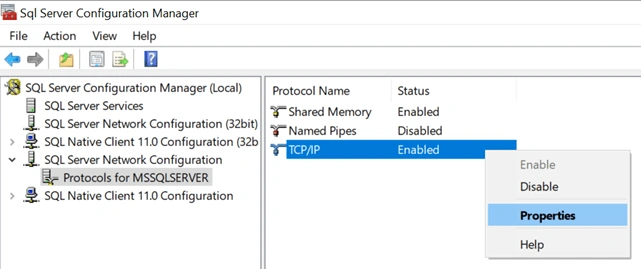
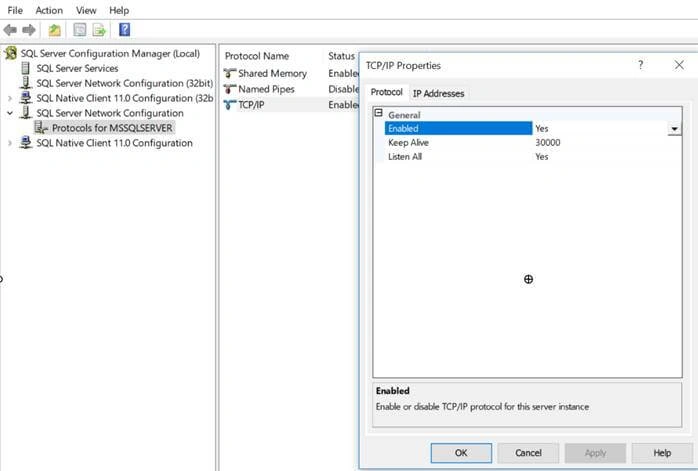
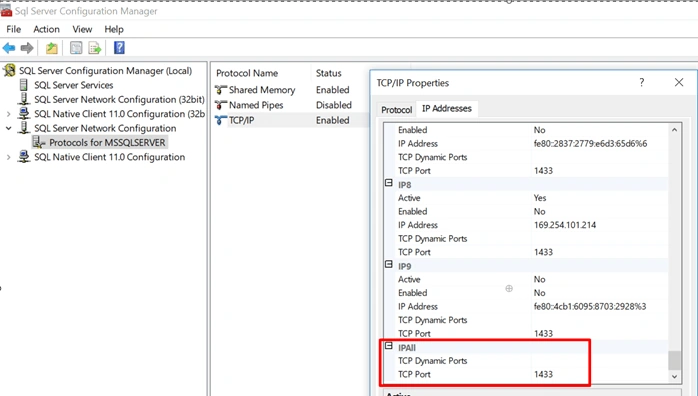
- The connection string mentioned in the JSON file points to the data source as local which the docker container does not understand. It needs proper IP addresses with port and SQL authentication. So, provide the relevant details i.e. Data Source as Ip address, port number and SQL authentication details as shown below.
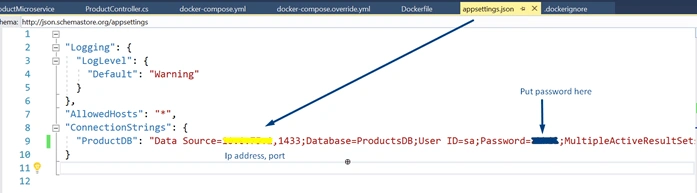
- Now again run the application with Docker as an option like done earlier.\
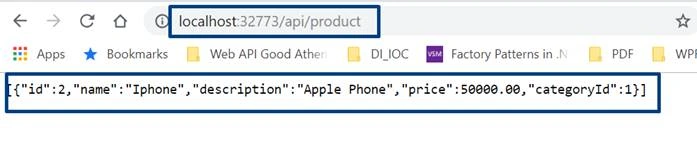
This time the response is received. - Test the same in the Postman.
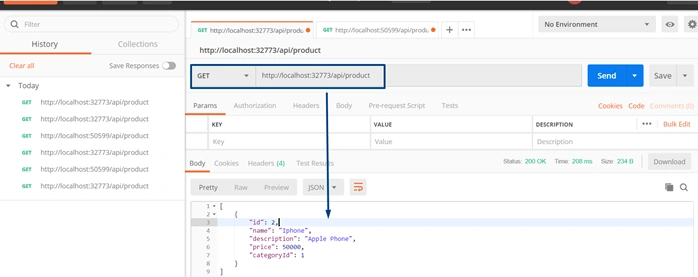
- Test again with IIS Express URL.
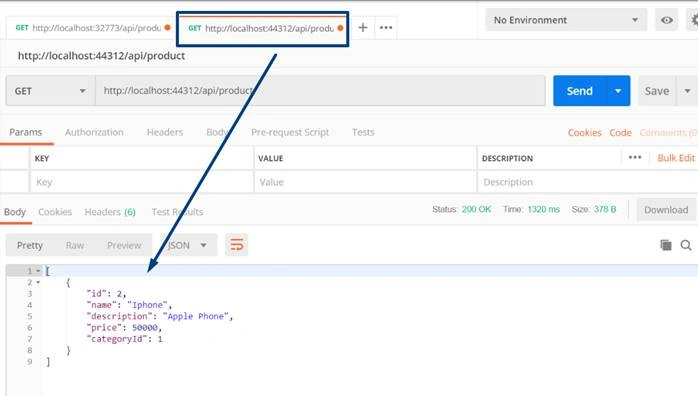
This proves that the microservice is running on two endpoints and on two operating systems independently locally deployed.
Conclusion
A microservice is a service built around a specific business capability, which can be independently deployed which is called bounded context. This article on microservices focused on what microservices are and their advantages over monolithic services architecture. The article in detail described to develop a microservice using ASP.NET Core and run it via IIS and Docker container. Likewise, the service can have multiple images and could be run on multiple containers at the same point in time.
Kiran KumarPosted Apr 3, 2025, 6:38 AM
Unable to download the zip file
Yogesh VedpathakPosted Dec 19, 2024, 12:21 PM
Nice Article
Mohd JavedPosted Nov 12, 2024, 3:44 AM
Hello akhil my api is showing not found on postman.
dany sebPosted Aug 25, 2024, 10:32 AM
Where microservices ?
Sandip G PatilPosted Dec 23, 2023, 6:33 PM
Nice article..
shailesh voraPosted Dec 20, 2023, 10:34 AM
Please remove the title of the microservice, The Article is good but it's for WEB API
Hamid KhanPosted Sep 27, 2023, 7:15 AM
Nice Article............
Arabinda RayPosted Sep 25, 2023, 2:35 PM
Thanks Akhil. I have been going through examples for last few days but the way you explain it I found the best. A good and knowledgeable teacher makes thing simple always. Thanks a lot. You saved my life. One suggestion, as the DOT NET CORE is evolving and now the stable version is 7.0.10, so it would be good for beginners/learners to get the code written on the latest version.
khizar hussainPosted Sep 25, 2023, 9:32 AM
Thanks for sharing, dear. Very valuable knowledge transfer
jubula samalPosted Sep 4, 2023, 11:11 AM
Excellent... great topic
dharmesh sharmaPosted Dec 12, 2022, 4:11 PM
There is any way to create microservice without docker and host in same server. client do not want to go on cloud but i don't want to create application again like monolithic. So client have one windows server only and want to host application. can you suggest something? thanks
milind panchalPosted Jun 24, 2022, 11:31 AM
As I understood each microservices are working independently with separate database for each. Here database is not included in microservice. Here database would be common for all microservices. Am I right ?Actually in practical scenario SQL tables having relations. So in this case how it can be manage with separate db for each microservice. How we can relate cross tables of each microservice.
Vishwakant TripathiPosted Apr 11, 2022, 11:35 AM
Akhil Mittal Thanks for sharing this knowledge on how to create a micro service. In the first diagram, it shows multiple components like Management, Service Discovery etc, how to setup those components, can you please provide an article on those parts also in details. Thank you so much.
Murat SuzenPosted Mar 24, 2022, 11:25 AM
Thank you.
Jose Luis Dunstan AravenaPosted Jan 5, 2022, 3:10 PM
I am following the example you indicate to the letter. However, I get an error in these lines where it indicates that there is an accessibility inconsistency. private readonly IProductRepository _productRepository; public ProductController(IProductRepository productRepository) { _productRepository = productRepository; } The interface must be declared public
Prasanth RPosted Dec 9, 2021, 9:35 AM
This is just web api example, not microservice. You have to add order service and show how it is connected through the API gateway. Also need to show what are the tables we need to maintain in orderdb.. etc
Shovon PramanikPosted Sep 23, 2021, 5:22 AM
Great Article...!!....I can do almost everything written in this article....!!.....Now I am feeling that I know a little bit of microservices....!!
Basavaraja KPosted Sep 21, 2021, 10:07 AM
Very useful Article, Thank you.
Muhammad FaisalPosted Sep 14, 2021, 5:11 AM
Believe me it's well elaborated and well concise of information...with microservices its also covered the docker topic ...well done
Aluh JohnsonPosted Sep 13, 2021, 8:17 PM
You have broken the hedge for me. I am glad i scroll to this...Thumbs up to you
Azeem HafeezPosted Aug 24, 2021, 9:38 AM
Love this article
James AntonioPosted Jul 20, 2021, 5:01 PM
Where did you get the connection string you added to the appsettings.json file?
Varun sharmaPosted Jun 20, 2021, 2:14 PM
This was really helpful to start Docker - Microservices journey. I followed the steps mentioned by you and managed to run it via IIS and Docker and Get; Delete methods are working fine. However getting error when calling POST/PUT method that is " The input was not valid'" . This error is coming in POSTMAN and it is not even hitting the particular action result. I am passing body as : { Name : "phone", Description : "motorola model", Price : 1899, CategoryId : 1 } .. please help
Rolando PunoPosted Jun 5, 2021, 6:07 AM
This is very helpful..
Tushar SambarePosted May 29, 2021, 6:48 PM
Everything is fine till database Update after migration. But not able to test with postman or either with Docker. Kindly suggest how to run it
Tushar SambarePosted May 29, 2021, 6:47 PM
Everything is fine till database Update after migration. But not able to test with postman or either with Docker
Shahzaib KhanPosted May 4, 2021, 5:17 AM
What is the difference between this microservice and an api?i am really confused how does it differentiate from an api?
Shyam JoshiPosted Apr 18, 2021, 12:34 PM
The main problem is IActionResult. This will make a sync call can force user to wait till response arrives.
Sandip G PatilPosted Apr 6, 2021, 11:50 AM
Nice article
Chu DuPosted Mar 27, 2021, 10:28 AM
Thank You so much!
Sunil RockPosted Mar 13, 2021, 4:16 AM
Public class ProductController : ControllerBase { private readonly IProductRepository _productRepository; public ProductController(IProductRepository productRepository) { _productRepository = productRepository; } }I got this Error -CS0051 C# Inconsistent accessibility: parameter type 'IProductRepository' is less accessible than method
Arun Kumar SinghPosted Jan 4, 2021, 12:53 PM
Its great it will be better if c# corner will add another section in learn for dot net core micro services
MJ EbrahimiPosted Sep 10, 2020, 3:33 PM
Good tutorial. For the record, this tutorial was added to this awesome repository. https://github.com/mjebrahimi/Awesome-Microservices-NetCore
Shaily VashisthaPosted Aug 16, 2020, 2:24 AM
Can you also explain, how to create a UI app and consume this web service instead of using POSTMAN
Hamid KhanPosted Jul 17, 2020, 12:06 PM
Good explanation..........................
sreenivasa kPosted Jul 17, 2020, 11:11 AM
Nice article and worth reading
Dinesh WaghPosted Jul 2, 2020, 2:05 AM
Very Good article
amit agarwalPosted Jun 4, 2020, 6:29 AM
This is not at all Microservices. Its just a plain CRUD Operation
Hamid KhanPosted Feb 3, 2020, 11:47 PM
Good article, Thanks for sharing...…..
pawan nepalPosted Oct 3, 2019, 10:04 PM
Hi Akhil, Thanks for sharing but I have a problem with the implementation of the API Gateway. You haven't discussed anything about how you are going to implement the API Gateway to actually route the requests into different microservices.
Nandlal UshirPosted Oct 2, 2019, 2:03 PM
Nice one. Thanks for sharing such a good tutorial.
Prakash TripathiPosted Sep 30, 2019, 8:29 AM
Hi Akhil. I found it a good article to understand the Microservice concept, develop Web API with EF Core and then deploy the api into docker. Any plans to add Microservice related features as SD, Gateway etc?
Dharmesh SharmaPosted Aug 12, 2019, 4:03 AM
Dear Akhil, This is Good and details but i didn't get any way to implement microservice in this artical to understand where we use our this web api to communicate to another microservice via docker or actual use of this webapi. plz explain.
MichaelPosted Jul 27, 2019, 7:39 AM
What makes it a microservice?
Gabriel Espirito SantoPosted May 8, 2019, 3:43 PM
Very nice !! Tks
Muyiwa TaiwoPosted Apr 15, 2019, 4:23 PM
Akhil, that was a wonderful write up and you just impacted a life in Africa. However, I have TWO questions - (i) Where can I copy the right connectionstring for the provider. For instance, i know that connection string for ORACLE provider will be different from MS SQL SERVER. I feel there should be an easy way to get the connectionstring (ii) Can you make a tutorial to create another another microservice in conjucntion with the one we did here and access their functionalities via API Gateway. I know I am asking for a lot but a lot of people are certainly waiting on you. Thanks for taking time to help a lot of people
Kashif RezaPosted Apr 1, 2019, 2:34 AM
Very useful post. Quick questionsWhere i can find following in attached sourcecode - API Gateway - Service Discovery - Management
erich brunnerPosted Mar 27, 2019, 2:57 PM
Thanks for that interesting post. I don't agree with that statement: "Microservices are deployed independently with their own database per service". I have several API Microservice and all access the same database(s). IMO there is no practical advantage to separate databases for each microservice, further you would have tovdeal with several connection strings, synchronizations, oprimistic concurrency situations,etc.
Sachin KulkarniPosted Mar 27, 2019, 12:03 AM
1. Did you try this on Windows 10 PC? 2. Could this work without docker compose orchestration as standalone docker container
Sachin KulkarniPosted Mar 27, 2019, 12:01 AM
Hi Akhil, great article. I am new to ASP.NET Core and docker on windows. I have 2 questions
Prasad KanaparthiPosted Mar 26, 2019, 11:53 PM
Nice one. It could have been better if you could have explained with examples for Service Discovery & API Gateway. The MicroService part is just like simple WebAPI with EF core.
JuanPosted Mar 26, 2019, 9:50 AM
Another great article. Gracias!
sanaullah sanaullahPosted Mar 26, 2019, 7:23 AM
Nice Article