

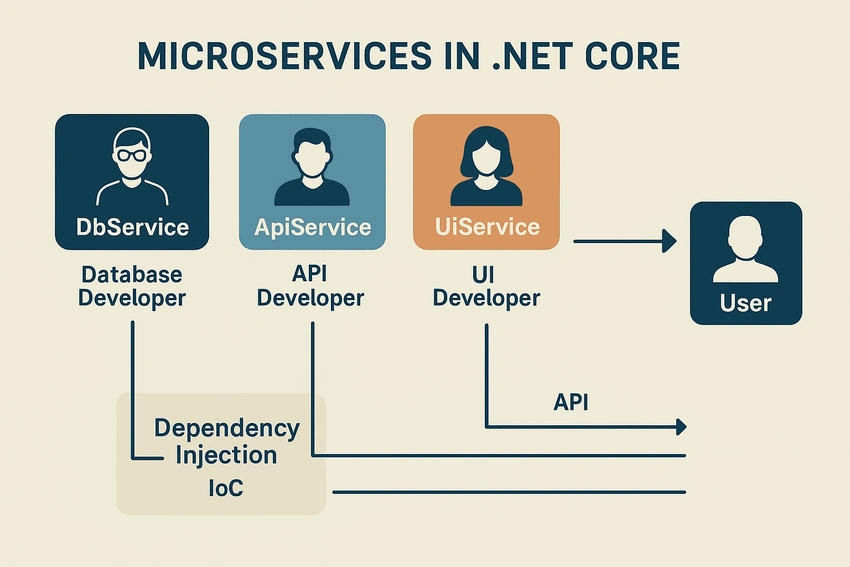
In today's software world, applications are no longer built as one big block (monolith) where everything - UI, logic, and database - is tightly connected. Instead, developers use Microservices Architecture, where an application is split into small, independent services that work together like a team.
Each service does one job well, and all services communicate to form a complete system.
What You'll Learn in This Article
What microservices are and why they are important
How to build microservices step by step in .NET Core
A very simple, practical example
How Dependency Injection (DI) helps in making microservices scalable and easy to maintain
What are Microservices?
Microservices are a way of building software where an application is split into many small, independent services.
Each service:
Does one job only (for example: handling users, processing payments, or managing products).
Developers can be developed, tested, and deployed separately.
How Microservices Communicate
Microservices need to talk to each other to work as a complete system. This communication usually happens in two main ways:
REST APIs (HTTP)
The most common approach.
Services send requests like
GET,POST,PUT, andDELETEusing JSON over HTTP.Easy to use, widely supported, and great for external integrations.
gRPC (Google Remote Procedure Call)
A faster, modern alternative.
Uses binary data instead of plain text, making communication quicker and more efficient.
Ideal for real-time communication or when services need to exchange data frequently.
👉 Imagine a project team: Think of Microservices Like a Team of Developers
Each developer has a specific role — one works on UI, another on the database, another on APIs.
They work independently, but when their work is combined, the full application is delivered.
If one developer is on leave (one service fails), the rest of the team can still continue progress.
Microservices work the same way:
Each service has a focused responsibility.
Services can be built, deployed, and fixed independently.
Together, they form a complete, reliable application.
Why Microservices Matter
Scalability: You can scale only the service that needs more power (e.g., payments) instead of the whole app.
Flexibility: Teams can use different technologies for different services if needed.
Faster Development: Small services are easier to build and improve.
Fault Isolation: If one service fails, it doesn't crash the whole system.
👉 In short:
Microservices = small, self-contained services working together as one big application.
How to Implement Microservices in .NET Core
Let's understand microservices with a developer team example.
Imagine you are building a project with three developers:
UI Developer Service – focuses only on user interface.
API Developer Service – manages data flow and backend APIs.
Database Developer Service – takes care of storing and retrieving information.
Each developer works independently, but their work is combined to deliver the full project. Similarly, in .NET Core:
Step 1. Create Independent Services
In .NET Core, each microservice is a separate project (for example,
UiService,ApiService, andDbService).Each project has its own controllers, models, and data access logic.
👉 Just like each developer has their own tasks and tools.
Step 2. Define Communication
The UI Service (like the frontend developer) makes calls to the API Service (backend developer).
The API Service then fetches data from the DB Service (database developer).
Communication can happen using REST APIs or gRPC.
👉 Just like developers talk to each other through daily standups or messages to keep the project moving.
Step 3. Independent Deployment
Each service can be built and deployed separately.
If the API Service is updated, you don't need to redeploy the UI or DB Service.
👉 Just like one developer can push changes to their part of the code without waiting for the whole team.
Step 4. Bringing It Together
When all services are up and running:
The UI Developer Service calls the API Developer Service.
The API Developer Service calls the Database Developer Service.
Together, they deliver the complete functionality to the end user.
👉 Exactly how three developers working independently ship one complete project. With this example, you see how microservices are like a team of developers, each focusing on one area, but collaborating through APIs to complete the application.
Microservices in .NET Core: A Developer Team Code Example
We will create three microservices:
DbService – Database developer
ApiService – API developer
UiService – UI developer
Each service is independent, communicates via HTTP APIs, and uses Dependency Injection (DI) where needed.
DbService – Database Developer
// DbService/Controllers/DatabaseController.cs
using Microsoft.AspNetCore.Mvc;
using System.Collections.Generic;

namespace DbService.Controllers
{
    [ApiController]
    [Route("api/[controller]")]
    public class DatabaseController : ControllerBase
    {
        // Simulated database: dictionary stores task info
        private static readonly Dictionary<int, string> data = new()
        {
            { 1, "Task 1" },
            { 2, "Task 2" },
            { 3, "Task 3" }
        };

        // GET api/database/1
        [HttpGet("{id}")]
        public IActionResult GetData(int id)
        {
            // Check if the requested task exists
            if (data.ContainsKey(id))
                return Ok(new { Id = id, Task = data[id] });

            // If task not found, return 404
            return NotFound("Task not found");
        }
    }
}
Comments / What is happening inside:
This service simulates a database.
Each task is stored in a dictionary.
When another service requests a task by ID, it returns the task or a 404.
Think of this as the Database Developer storing and providing information.
ApiService – API Developer
// ApiService/Controllers/TaskController.cs
using Microsoft.AspNetCore.Mvc;
using System.Net.Http;
using System.Text.Json;
using System.Threading.Tasks;

namespace ApiService.Controllers
{
    [ApiController]
    [Route("api/[controller]")]
    public class TaskController : ControllerBase
    {
        private readonly HttpClient _httpClient;

        // DI injects HttpClient so service can call DbService
        public TaskController(HttpClient httpClient)
        {
            _httpClient = httpClient;
        }

        // GET api/task/1
        [HttpGet("{id}")]
        public async Task<IActionResult> GetTask(int id)
        {
            // Call DbService to get task info
            var response = await _httpClient.GetAsync($"https://localhost:5001/api/database/{id}");

            // If DbService returns error, propagate 404
            if (!response.IsSuccessStatusCode)
                return NotFound("Task not found");

            // Read JSON response from DbService
            var json = await response.Content.ReadAsStringAsync();

            // Deserialize JSON into dynamic object
            var task = JsonSerializer.Deserialize<dynamic>(json);

            // Return to caller (UiService or client)
            return Ok(new { Message = "Fetched by API Service", Task = task });
        }
    }
}
Comments / What is happening inside:
This service simulates the API Developer.
It calls DbService using
HttpClient.Uses Dependency Injection to provide
HttpClient.Fetches task info and sends it back to the caller.
UiService – UI Developer
// UiService/Controllers/ViewController.cs
using Microsoft.AspNetCore.Mvc;
using System.Net.Http;
using System.Text.Json;
using System.Threading.Tasks;

namespace UiService.Controllers
{
    [ApiController]
    [Route("api/[controller]")]
    public class ViewController : ControllerBase
    {
        private readonly HttpClient _httpClient;

        // DI injects HttpClient so service can call ApiService
        public ViewController(HttpClient httpClient)
        {
            _httpClient = httpClient;
        }

        // GET api/view/1
        [HttpGet("{id}")]
        public async Task<IActionResult> ShowTask(int id)
        {
            // Call ApiService to get task info
            var response = await _httpClient.GetAsync($"https://localhost:5002/api/task/{id}");

            // If ApiService returns error, propagate 404
            if (!response.IsSuccessStatusCode)
                return NotFound("Task not found");

            // Read JSON response from ApiService
            var json = await response.Content.ReadAsStringAsync();

            // Deserialize JSON into dynamic object
            var task = JsonSerializer.Deserialize<dynamic>(json);

            // Return final result to user
            return Ok(new { Message = "UI Service showing task", Task = task });
        }
    }
}
Comments / What is happening inside:
This service simulates the UI Developer.
Calls ApiService to get data.
Uses Dependency Injection to get
HttpClient.Combines the result and shows it to the end user.
How the Flow Works (Developer Analogy)
| Service | Developer Role | Container Analogy |
|---|---|---|
| DbService | Database Developer | Workstation with all data ready |
| ApiService | API Developer | Workstation that asks DbService for data |
| UiService | UI Developer | Fetches data from ApiService |
Each service runs inside its own container, isolated but able to communicate with other services.
User calls UiService → wants to see Task 1
UiService calls ApiService → asks for Task 1
ApiService calls DbService → fetches Task 1 data
DbService returns data → ApiService → UiService → User
Like three developers working independently but collaborating through defined channels to deliver the project.
Containerization with Docker – Let Each Developer Work Independently
In a microservices setup, each service (UiService, ApiService, DbService) runs independently, like each developer in a team having their own workstation.
Containerization packages each service with everything it needs — code, runtime, and libraries — into a container, so it runs the same way everywhere, whether on your laptop, testing server, or production.
Why Containerization Matters
Independent Work: One service crashing doesn't affect others.
Consistency: Runs the same in development, testing, or production.
Easy Updates: Update or deploy one service independently.
Scalable: Run multiple copies of a service if needed.
Dockerfile Implementation for Each Service
DbService – Database Developer
# Build stage: setup and compile code
FROM mcr.microsoft.com/dotnet/sdk:7.0 AS build
WORKDIR /app

COPY *.csproj ./
RUN dotnet restore

COPY . ./
RUN dotnet publish -c Release -o out

# Runtime stage: ready-to-run service
FROM mcr.microsoft.com/dotnet/aspnet:7.0
WORKDIR /app
COPY --from=build /app/out .

EXPOSE 5001
ENTRYPOINT ["dotnet", "DbService.dll"]
What's happening:
Build stage: prepares the project, installs dependencies, compiles code (developer sets up workstation).
Runtime stage: moves built code to lightweight runtime, exposes port 5001, and starts service (ready-to-run workstation).
ApiService – API Developer
# Build stage
FROM mcr.microsoft.com/dotnet/sdk:7.0 AS build
WORKDIR /app

COPY *.csproj ./
RUN dotnet restore

COPY . ./
RUN dotnet publish -c Release -o out

# Runtime stage
FROM mcr.microsoft.com/dotnet/aspnet:7.0
WORKDIR /app
COPY --from=build /app/out .

EXPOSE 5002
ENTRYPOINT ["dotnet", "ApiService.dll"]
What's happening:
ApiService container includes code to call DbService and provide API responses.
Exposes port 5002 so UiService can request data.
Analogy: API Developer workstation, knows how to fetch data from Database Developer.
UiService – UI Developer
# Build stage
FROM mcr.microsoft.com/dotnet/sdk:7.0 AS build
WORKDIR /app

COPY *.csproj ./
RUN dotnet restore

COPY . ./
RUN dotnet publish -c Release -o out

# Runtime stage
FROM mcr.microsoft.com/dotnet/aspnet:7.0
WORKDIR /app
COPY --from=build /app/out .

EXPOSE 5003
ENTRYPOINT ["dotnet", "UiService.dll"]
What's happening:
UiService container calls ApiService to fetch data and display it.
Exposes port 5003 for user requests.
Analogy: UI Developer workstation presenting tasks to users.
Running All Services Together
# Build Docker images
docker build -t dbservice:1.0 ./DbService
docker build -t apiservice:1.0 ./ApiService
docker build -t uiservice:1.0 ./UiService

# Run containers
docker run -d -p 5001:5001 --name dbservice dbservice:1.0
docker run -d -p 5002:5002 --name apiservice apiservice:1.0
docker run -d -p 5003:5003 --name uiservice uiservice:1.0
Explanation:
Each service runs independently, like a developer at their own workstation.
Services communicate via ports, like developers sharing information.
Updating or restarting one service doesn't affect others.
Flow Recap (Developer Team Analogy)
User -> UiService: UI Developer gets the request.
UiService -> ApiService: UI Developer asks API Developer for data.
ApiService -> DbService: API Developer asks Database Developer for data.
DbService -> ApiService → UiService → User: Data flows back, UI Developer shows it to the user.
Key Takeaway
Containerization with Docker lets microservices run independently, stay isolated, and scale easily, while still collaborating — just like a team of developers delivering a complete project together.
Conclusion – Microservices with Developer Team Analogy
In this article, we explored how microservices in .NET Core help build scalable, maintainable, and resilient applications. By using a developer team analogy, we understood that:
Each microservice is like a developer with their own workstation, working independently but collaborating to deliver a complete application.
Dependency Injection (DI) provides each service with the tools it needs without hardcoding dependencies.
Services communicate with each other using APIs (REST or gRPC), ensuring smooth collaboration.
Docker containerization allows each service to run independently and consistently, making development, testing, and deployment easier.
Microservices architecture not only improves the scalability and flexibility of your applications but also reflects real-world enterprise practices, making it an essential skill for modern .NET developers.
Next Steps
Now that you've understood microservices in .NET Core, here's what you can focus on next to strengthen your skills:
API Integration & RESTful Services
Authentication & Authorization (JWT, OAuth2, RBAC, ABAC)
Asynchronous Programming & Multithreading (
async/await, Task)Unit Testing & Mocking (xUnit/NUnit)
Logging & Monitoring (Serilog, Application Insights)
Basic Cloud & Deployment (Azure/AWS, CI/CD pipelines)
Pro Tip: Combine coding practice with conceptual understanding, and use small projects (like your developer team example) to demonstrate your knowledge to others.
Thank you for reading my article! 🙏
I hope this helps you understand microservices in .NET Core, Dependency Injection, API communication, and Docker in a simple, practical way.
Join the conversation! Your thoughts help the community grow.