

Microsoft 365 Copilot is an AI-powered assistant integrated into the Microsoft 365 suite, which is designed to enhance productivity and collaboration. By leveraging advanced AI, Copilot helps users in daily day routine tasks such as writing, editing, summarizing, and more across applications like Word, Excel, Outlook, and Teams. This article provides a comprehensive overview of the architecture of Microsoft 365 Copilot, detailing its components and their mechanism workflow.
Core Components of Microsoft 365 Copilot
1. Large Language Models (LLMs)
The backbone of Copilot is a series of large language models, which are trained on extensive datasets to understand and generate human-like text. These models excel in Natural Language Understanding (NLP), Content Generation, and Task Automation. These models are based on architectures like GPT (Generative Pre-trained Transformer), designed to process and generate text based on learned patterns. Continuous fine-tuning and updates ensure their performance and relevance to user needs.
2. Microsoft Graph
Microsoft Graph serves as the data backbone for Copilot, providing a unified API endpoint that accesses a wealth of organizational and user-specific information. Key functions include.
- Data Retrieval
- Contextual Awareness
- Personalization Microsoft Graph ensures seamless data flow and contextual awareness, allowing Copilot to fetch relevant information from services like OneDrive, SharePoint, and user mailboxes.
3. User Context and Data Integration
Effective integration with user data and context is crucial for Copilot’s functionality. It processes the data for Contextual Data Analysis for relevant responses, Real-Time Data Access to fetch and process data in real-time to ensure accuracy and relevance, and Customization to customize AI behavior and responses according to their needs and preferences. By understanding specific user needs and patterns, Copilot offers more targeted suggestions, enhancing productivity.
4. Application Integration Layer
Copilot is embedded within various Microsoft 365 applications, providing contextual assistance across different platforms. This integration has,
- Application APIs: Utilizing APIs of applications like Word, Excel, Outlook, and Teams to interact with and manipulate data.
- User Interface Components: Embedding UI elements such as suggestion boxes and chat interfaces within applications.
- Cross-Application Coordination: Ensuring actions in one application are consistent with activities in other applications.
5. Security and Compliance
Given the sensitive nature of the data Copilot interacts with, security and compliance are paramount. Key aspects are,
- Data Privacy
- Secure Data Transmission
- Access Controls Microsoft's stringent security measures, including multi-factor authentication and regular security audits, safeguard user data and ensure compliance with industry standards.
How Does It Work?
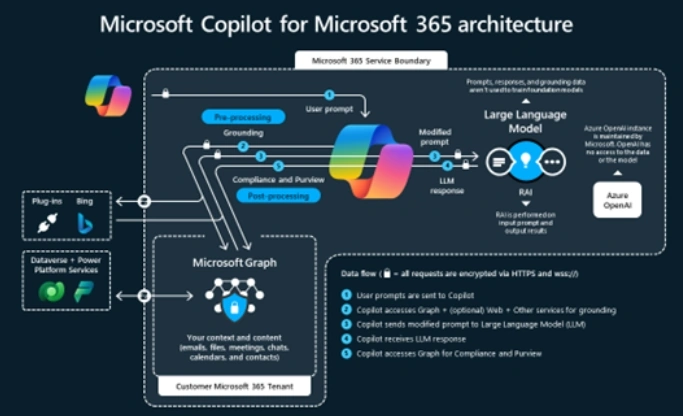
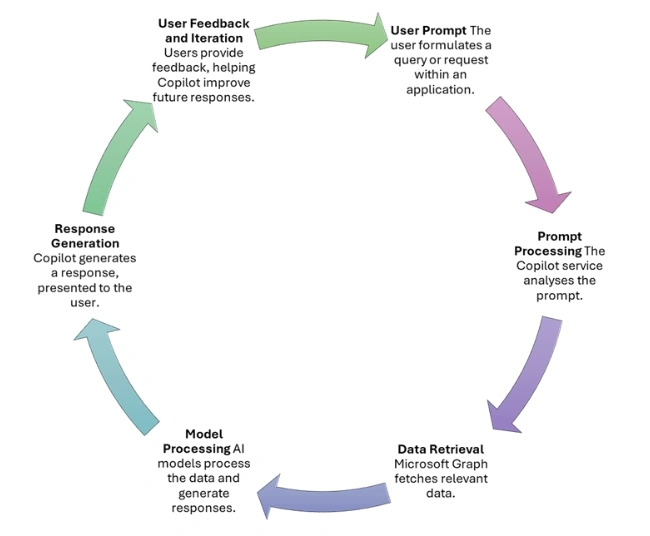
When a user interacts with Copilot, the following steps typically occur.
- User Prompt: The user formulates a query or request within an application.
- Prompt Processing: The Copilot service analyses the prompt.
- Data Retrieval: Microsoft Graph fetches relevant data.
- Model Processing: AI models process the data and generate responses.
- Response Generation: Copilot generates a response presented to the user.
- User Feedback and Iteration: Users provide feedback, helping Copilot improve future responses.
Real-World Applications and Future Prospects
Copilot enhances productivity in scenarios like email management, document creation, data analysis, and meeting coordination. As AI technology evolves, Copilot’s capabilities will expand, offering improved language models, broader integration, enhanced personalization, and adaptive learning.
Conclusion
The architecture of Microsoft 365 Copilot integrates AI technology, data connectivity, and application interoperability to provide intelligent, context-aware assistance. With robust security and compliance measures, Copilot enhances productivity and collaboration within the Microsoft 365 ecosystem, poised to become an indispensable tool for professionals worldwide.
Join the conversation! Your thoughts help the community grow.