Microsoft 365 Copilot vs Copilot Studio: Understanding Licensing, Agents, and Copilot Credits
Introduction
Artificial Intelligence (AI) is changing the way we work with business applications. Microsoft provides several AI-powered tools to help users improve productivity, automate repetitive tasks, and build intelligent solutions. Two important offerings in this area are Microsoft 365 Copilot and Microsoft Copilot Studio.
Although both products are related to Copilot, they serve different purposes. Microsoft 365 Copilot helps users perform everyday tasks within Microsoft 365 applications, while Copilot Studio enables organizations to create and publish custom AI agents for specific business requirements.
One common question developers and IT administrators ask is: Do we need a separate license for every user, or do we need shared capacity to run AI agents?
Understanding the licensing model is important because choosing the wrong option can increase costs or prevent users from accessing the features they need.
In this article, we will explore the differences between Microsoft 365 Copilot and Copilot Studio, explain user licenses and tenant capacity, understand Copilot Credits, and look at practical scenarios to help you choose the right approach.
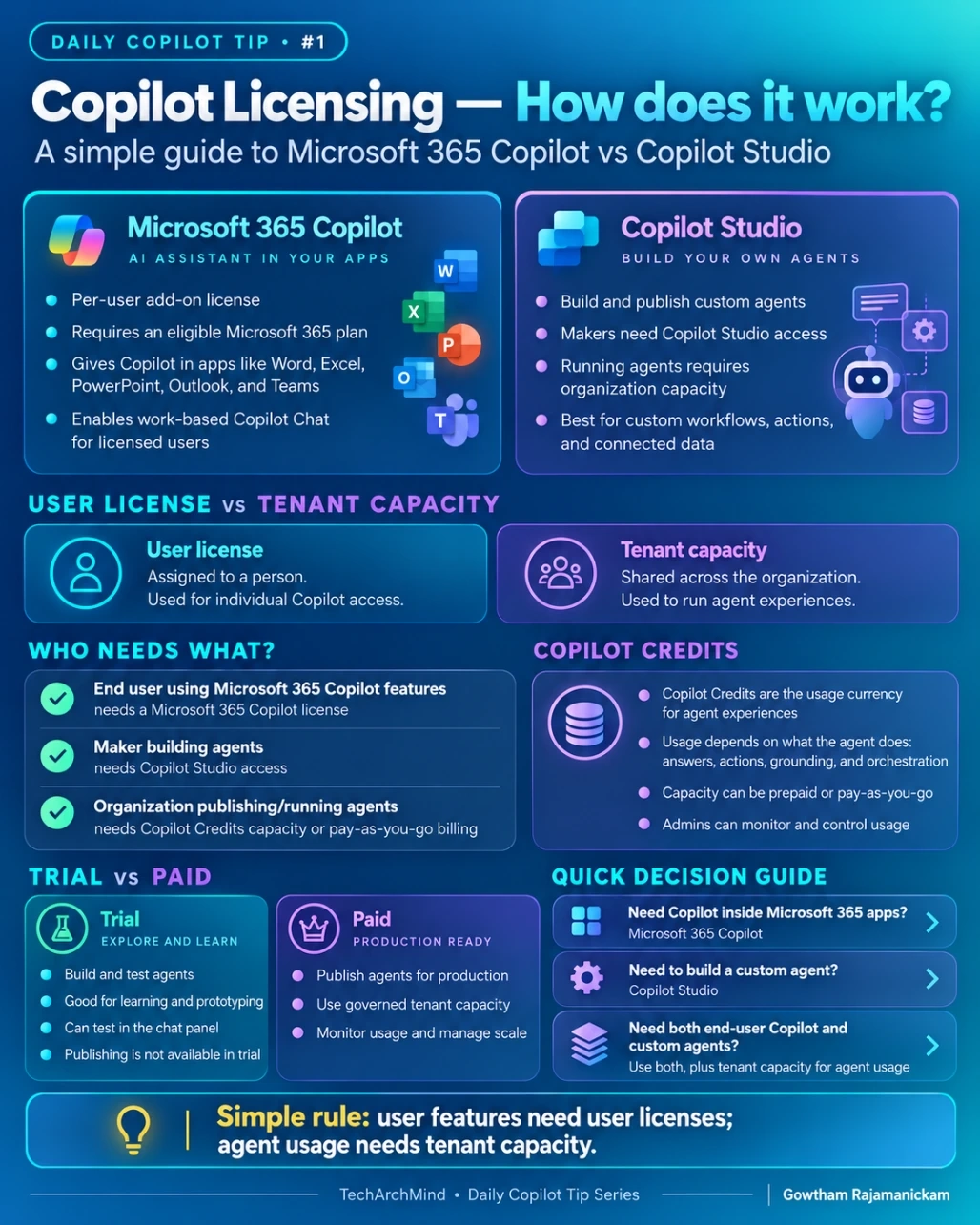
1. What Is Microsoft 365 Copilot?
Microsoft 365 Copilot is an AI-powered assistant that helps users work more efficiently within supported Microsoft 365 applications.
It can help users draft documents, summarize information, analyze data, prepare presentations, and understand conversations, depending on the application and available features.
For example:
Word: Draft a document or summarize a lengthy report.
Excel: Analyze data and identify useful insights.
PowerPoint: Help create presentation content.
Outlook: Summarize email conversations and assist with drafting replies.
Microsoft Teams: Summarize meetings and identify important discussion points.
How does Microsoft 365 Copilot licensing work?
Microsoft 365 Copilot licensing is generally associated with individual users. Each user who requires the licensed Copilot experience must have the appropriate license, along with an eligible Microsoft 365 subscription.
Consider an organization with 100 employees. If 25 employees need the licensed Microsoft 365 Copilot features, the organization would typically assign the required Copilot licenses to those 25 users rather than automatically licensing all 100 employees.
The actual subscription requirements depend on the organization's Microsoft 365 plan and the Copilot offering being purchased.
Key points:
Licensing is associated with individual users.
An eligible Microsoft 365 subscription is required.
Users can access the licensed Copilot features available to them.
The organization can assign licenses to the employees who need them.
Microsoft also offers Copilot Chat experiences with different entitlements, so it is important to distinguish Microsoft 365 Copilot licensing from access to Copilot Chat.
2. What Is Microsoft Copilot Studio?
Microsoft Copilot Studio is a platform for creating, configuring, and publishing custom AI agents.
Instead of helping only with general productivity tasks, an agent can be designed around a specific business process, knowledge source, or workflow.
For example, an organization might create:
An HR agent that answers employee policy questions.
A customer support agent that helps resolve common issues.
An IT support agent that guides employees through troubleshooting.
A sales agent that retrieves relevant product information.
A workflow agent that helps coordinate approved business operations.
Depending on the configuration, agents can use knowledge sources, connectors, and actions to retrieve information or perform tasks.
How does Copilot Studio licensing work?
Copilot Studio introduces two important licensing concepts:
1. User access for creating and managing agents
Users who create and manage agents need the appropriate Copilot Studio access or license for the capabilities they use.
These users are often called makers or agent authors.
2. Organizational capacity for agent usage
Running agents can consume organizational capacity, depending on the agent's features, how it is used, and the licensing arrangement.
For example, an agent that answers questions, retrieves information, and executes actions may consume Copilot Credits under the applicable billing model.
This means that giving a developer access to create an agent and providing sufficient capacity to operate that agent are two separate considerations.
Key points:
Makers need appropriate access to build and manage agents.
Published agents can be made available through supported channels.
Agent usage may consume Copilot Credits or other applicable entitlements.
Administrators need to monitor capacity, usage, and billing.
3. Microsoft 365 Copilot vs Copilot Studio
Although the products work together, their primary purposes are different.
Feature | Microsoft 365 Copilot | Copilot Studio |
|---|
Primary purpose | Improve individual productivity | Build custom AI agents |
Main audience | Business users | Developers, makers, and IT teams |
Typical usage | Drafting, summarizing, and analyzing information | Answering business questions and automating workflows |
Licensing consideration | User licensing | Maker access and applicable agent usage capacity |
Examples | Summarize a meeting or draft an email | Build an HR helpdesk agent |
Usage management | Manage assigned user licenses | Manage access, capacity, and usage |
Best suited for | Everyday work inside Microsoft 365 | Organization-specific AI experiences |
The simplest way to remember the difference is:
Microsoft 365 Copilot helps people do their work. Copilot Studio helps organizations build agents that perform specific tasks.
The two products can also be used together when an organization wants both personal productivity features and custom agents.
4. User License vs Tenant Capacity
One of the most important concepts in Copilot licensing is the difference between a user license and tenant capacity.
They are not interchangeable.
What is a user license?
A user license provides an individual with access to the features covered by that license.
For example, if an employee needs the licensed Microsoft 365 Copilot experience in Word and Teams, the organization must ensure that the employee has the required subscription and Copilot license.
The license is associated with the employee's account.
What is tenant capacity?
Tenant capacity refers to usage resources available to an organization for supported services.
In Copilot Studio, purchased Copilot Credits can be pooled at the organizational level and allocated to Power Platform environments as required.
For example, suppose a company has three departments:
Human Resources
Customer Support
Information Technology
Each department has its own AI agent. Depending on the licensing arrangement, the organization can manage its available capacity and allocate it to the environments where those agents operate.
This is different from assigning an individual Copilot license to each employee.
A simple comparison
User license | Tenant capacity |
|---|
Associated with an individual user | Managed for organizational usage |
Provides access to licensed features | Supports applicable agent usage |
Needed by users who require the covered capabilities | Must be sufficient for usage that consumes capacity |
Example: a licensed employee using Microsoft 365 Copilot | Example: credits allocated to an environment running a custom agent |
Remember: A user license determines access to specific features, while tenant capacity supports applicable consumption. The exact requirements depend on the product and usage scenario.
5. Who Needs What?
Let's look at three common business scenarios.
Scenario 1: An employee uses Microsoft 365 Copilot
Suppose an employee wants to summarize emails, draft documents, and analyze spreadsheets using the licensed Microsoft 365 Copilot experience.
The organization needs to provide the employee with the appropriate Microsoft 365 subscription and Copilot license.
A separate Copilot Studio deployment is not automatically required for these everyday tasks.
Scenario 2: A developer builds a custom AI agent
Suppose a developer wants to build an internal HR agent that answers questions using company policy documents.
The developer needs the appropriate Copilot Studio access to create and manage the agent.
The organization must also review the licensing and capacity requirements for publishing and running the agent.
A trial can be useful for development and testing, but trial capabilities and publishing restrictions should be checked before planning a production deployment.
Scenario 3: An organization publishes and runs agents
Suppose an organization creates several agents and makes them available to employees.
The organization must consider more than the maker's access. It must also verify the requirements for publishing, accessing, and running the agents.
Depending on the licensing model and the features used, the organization may need Copilot Studio capacity, pay-as-you-go billing, or other applicable entitlements.
Administrators should also establish usage monitoring and cost controls before deploying agents broadly.
6. What Are Copilot Credits?
Copilot Credits are a usage measurement used by Microsoft Copilot Studio for applicable agent capabilities.
They help measure the consumption associated with activities performed by an agent.
However, not every agent interaction necessarily consumes the same number of credits.
Consumption depends on the work performed, the features involved, and the applicable billing rules.
For example:
An agent may provide a straightforward answer.
Another agent may generate an answer using connected knowledge sources.
A more complex agent may execute actions or invoke workflows.
These activities can have different credit consumption rates.
How should organizations manage Copilot Credits?
Organizations should take the following steps:
Estimate usage: Understand how frequently users are expected to interact with each agent.
Review agent complexity: Identify the knowledge sources, actions, and workflows used by the agent.
Allocate capacity: Make the required capacity available to the appropriate Power Platform environments.
Monitor consumption: Review usage reports in the Power Platform admin center.
Control costs: Configure suitable capacity limits and billing arrangements.
For example, a small internal FAQ agent may have a different consumption profile from a customer support agent that performs multiple actions during a conversation.
Therefore, organizations should estimate actual usage rather than assume that every agent requires the same amount of capacity.
7. Trial vs Paid: What Is the Difference?
A trial is useful when a team wants to explore Copilot Studio before committing to a production deployment.
Trial environment
A trial can help makers:
Explore the development environment.
Create and configure agents.
Test conversations.
Validate an initial idea.
However, trial access is not equivalent to a production license. Microsoft documents restrictions on publishing agents with the Copilot Studio trial license.
Paid or production setup
A production deployment requires the appropriate licensing and configuration for the capabilities being used.
This may include:
Required maker licenses.
Organizational capacity or an applicable billing arrangement.
Environment configuration and security controls.
Monitoring and usage management.
Appropriate publishing and channel permissions.
The exact requirements vary by scenario. Organizations should verify the current licensing terms before moving an agent from testing to production.
8. Quick Decision Guide
Use the following scenarios to identify which product to investigate first.
Choose Microsoft 365 Copilot when:
Employees need AI assistance in supported Microsoft 365 applications.
Users want help drafting documents or summarizing emails.
Teams need assistance analyzing information and preparing presentations.
Choose Copilot Studio when:
You want to create an organization-specific AI agent.
You need an agent that uses business knowledge or supported connectors.
You want to automate tasks or implement a custom conversational experience.
Consider both when:
Employees need personal productivity assistance and custom business agents.
The organization wants to extend its Copilot experience with specialized agents.
You need to support both individual productivity and organization-wide workflows.
Before making a purchase, verify the required licenses, available entitlements, capacity model, and intended deployment channels.
9. Common Licensing Mistakes to Avoid
Understanding the products is only the first step. Organizations should also avoid several common mistakes.
Mistake 1: Assuming every employee needs the same license
Not every employee needs the same Copilot capabilities. Assign licenses according to actual business requirements and the applicable licensing terms.
Mistake 2: Assuming a maker license covers all agent usage
Access to create an agent and the capacity required to run it are separate considerations. Check both before deployment.
Mistake 3: Assuming a trial is production-ready
A trial is intended for evaluation and testing. Confirm the publishing, usage, and licensing requirements before planning a production release.
Mistake 4: Ignoring usage monitoring
Agents can consume resources differently depending on their design and workload. Monitor consumption and establish cost controls before scaling up.
Mistake 5: Relying on outdated licensing information
Microsoft's licensing options, eligible subscriptions, and billing models can change. Always consult the current Microsoft documentation before purchasing licenses or deploying agents.
Conclusion
Microsoft 365 Copilot and Copilot Studio serve different but complementary purposes.
Microsoft 365 Copilot focuses on helping individual users work more efficiently in supported Microsoft 365 applications. Copilot Studio focuses on enabling organizations to create and deploy custom AI agents for their business requirements.
When planning a Copilot implementation, it is important to distinguish between individual user access and the organizational capacity required for applicable agent usage. User licenses provide access to licensed capabilities, while Copilot Credits and other applicable capacity arrangements support consumption where required.
The right approach depends on what the organization wants to achieve, who needs access, how the agents will be used, and which licensing model applies.
The key takeaway is simple: choose Microsoft 365 Copilot for productivity, Copilot Studio for custom agents, and evaluate both licensing and usage capacity before deploying a solution.
References
For the latest licensing and technical details, refer to the official Microsoft documentation:
Microsoft Copilot licensing options
Copilot Studio licensing and access requirements
Copilot Studio billing and licensing
Manage Copilot Studio capacity and Copilot Credits
Note: Licensing requirements and product capabilities may change. Verify the current Microsoft licensing documentation for your specific subscription and deployment scenario before making purchasing decisions.


Join the conversation! Your thoughts help the community grow.