

Introduction
AI applications are moving beyond simple chat interfaces and evolving into agentic systems that can reason, use tools, maintain context, and execute multi-step workflows. Microsoft’s Agent Framework is designed to help developers build these systems using a consistent SDK and runtime for both .NET and Python. Microsoft describes it as a framework for building, orchestrating, and deploying AI agents and multi-agent workflows, with support for model clients, sessions, context providers, middleware, MCP clients, and workflows.
For C# developers, this matters because Agent Framework brings agent development into familiar .NET patterns while also integrating with the broader Microsoft AI stack. The .NET blog describes it as unifying agent creation, orchestration, tooling, hosting, and observability.
What Is Microsoft Agent Framework?
Microsoft Agent Framework is an open-source SDK and runtime for creating intelligent agents and multi-agent systems. It combines ideas from Semantic Kernel, AutoGen, and Microsoft.Extensions.AI into a more unified developer experience. Microsoft’s documentation highlights support for providers such as Azure AI Foundry, Azure OpenAI, OpenAI, Anthropic, and Ollama, along with workflow orchestration, state management, and external tool integration.
In practical terms, it helps you build applications where an agent can:
Accept a user request
Reason about the request
Invoke tools or APIs
Maintain session state
Collaborate with other agents
Execute multi-step workflows
Support checkpointing and human-in-the-loop patterns
Why Microsoft Agent Framework Matters for .NET Developers
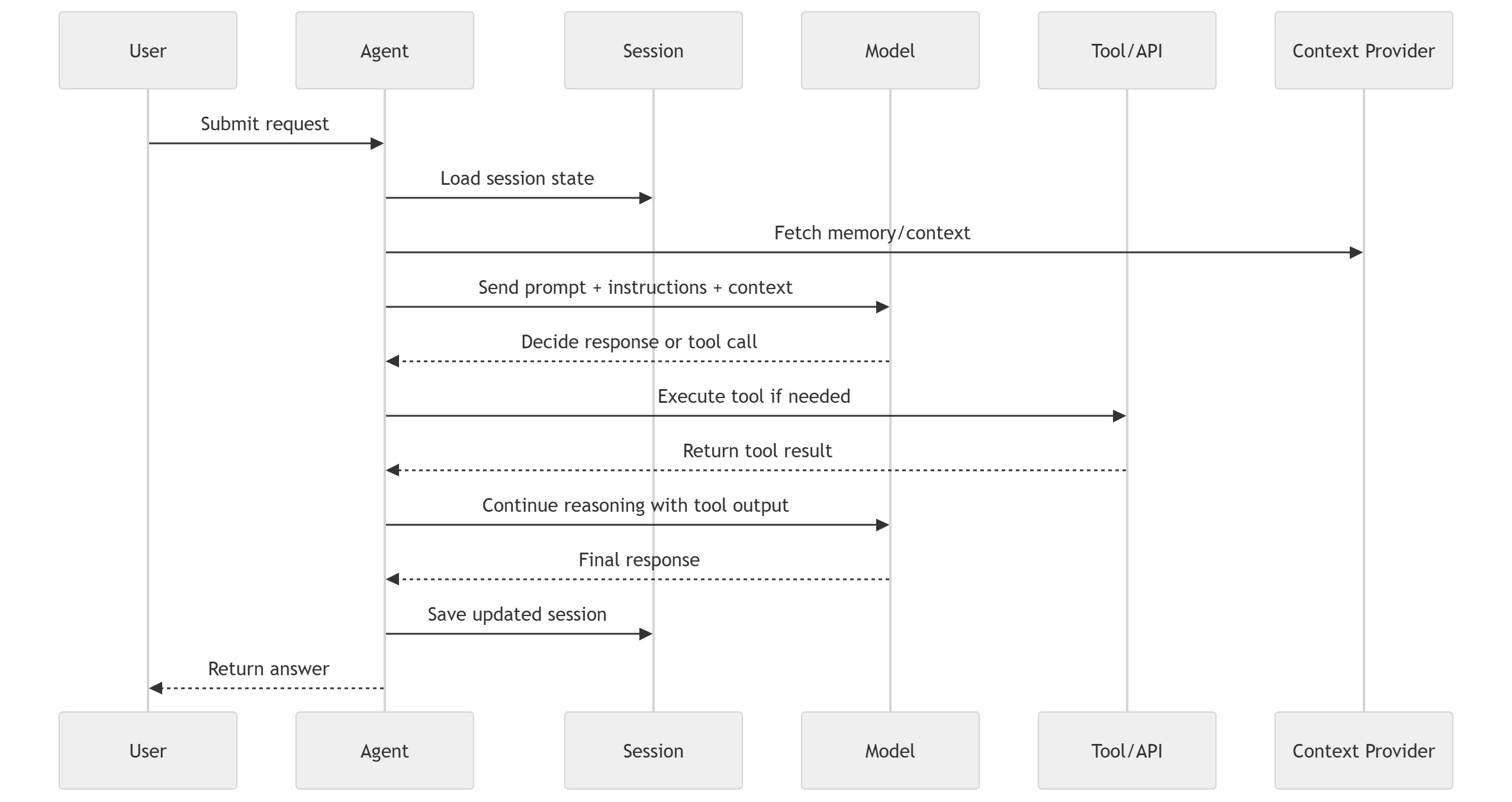
Traditional AI apps usually stop at prompt-in, response-out. Agent Framework extends that model by enabling tool use, memory, workflow orchestration, and structured execution loops. Microsoft Learn describes a runtime model that coordinates user interaction, model inference, and tool execution in a deterministic loop.
That means .NET teams can build more advanced systems such as:
Internal copilots
Workflow automation agents
Multi-agent business processes
Retrieval and analysis assistants
Human approval pipelines
Long-running AI tasks with checkpoints
Core Architecture of Microsoft Agent Framework
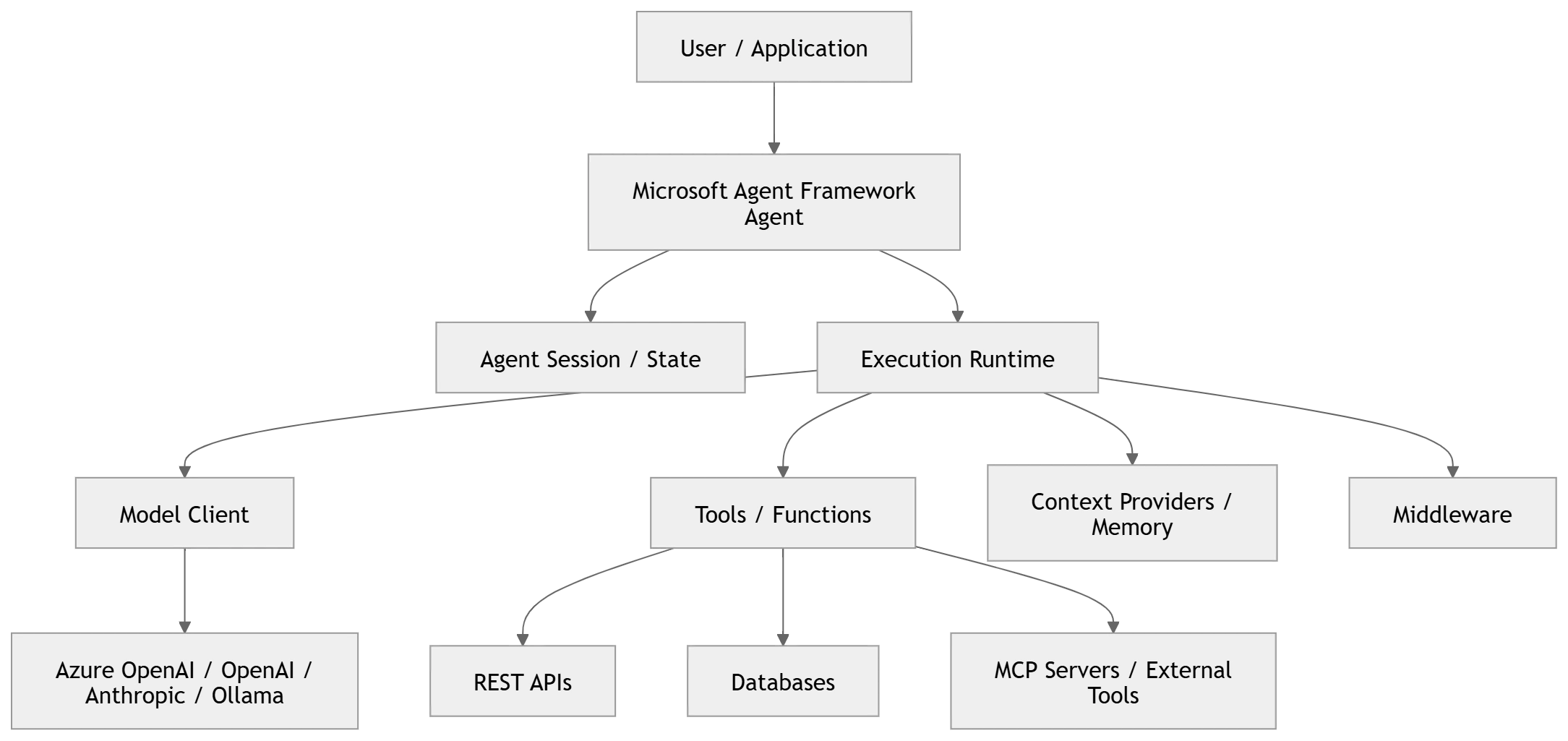
The architecture can be understood in five layers:
Client/Application Layer: Web app, API, console app, Teams bot, or background service
Agent Layer: The agent that receives instructions, manages execution, and coordinates responses
Runtime Layer: Session management, middleware, memory/context, execution loop
Tool/Integration Layer: Function tools, MCP clients, APIs, databases, search services, enterprise systems
Model Provider Layer: Azure OpenAI, OpenAI, Anthropic, Ollama, and others supported by the framework
High-Level Architecture
Key Building Blocks
1. Agent
An agent is the primary execution unit. Microsoft documentation notes that supported agent types derive from a common base and use a consistent interface, which makes higher-level orchestration easier.
2. Session
Sessions help maintain multi-turn conversational state. In the official getting started path, Microsoft explicitly introduces sessions when moving from single-turn invocation to multi-turn conversations.
3. Tools
Tools allow the agent to call functions or external capabilities. These can be internal business functions, HTTP APIs, search connectors, or MCP-enabled integrations.
4. Context Providers and Memory
Context providers inject relevant information into execution, enabling memory and persistent context. Microsoft Learn explicitly identifies context providers for agent memory as a core framework concept.
5. Middleware
Middleware can intercept and shape agent behavior during execution, which is valuable for logging, guardrails, approvals, policy enforcement, and telemetry.
6. Workflows
Workflows let you compose graph-based, type-safe, multi-step orchestrations with routing, checkpointing, and human-in-the-loop support.
Agent Execution Flow
Recent Updates in Microsoft Agent Framework
Microsoft Agent Framework has moved quickly over the past several months.
Microsoft announced the preview in October 2025 through the .NET blog and Microsoft Foundry blog.
Microsoft Learn now has a dedicated Agent Framework documentation hub, including overview, quick start, workflows, and agent types.
Microsoft Foundry announced that the framework reached Release Candidate in March 2026, describing it as a stable open-source foundation for single-agent and multi-agent systems on the path to GA.
The GitHub repository shows active releases, including recent 1.0.0 releases for the framework components, which signals rapid maturation of the platform.
Newer documentation emphasizes workflows, sessions, memory, hosting, MCP integration, and provider flexibility, showing that the framework is evolving well beyond a basic chat abstraction.
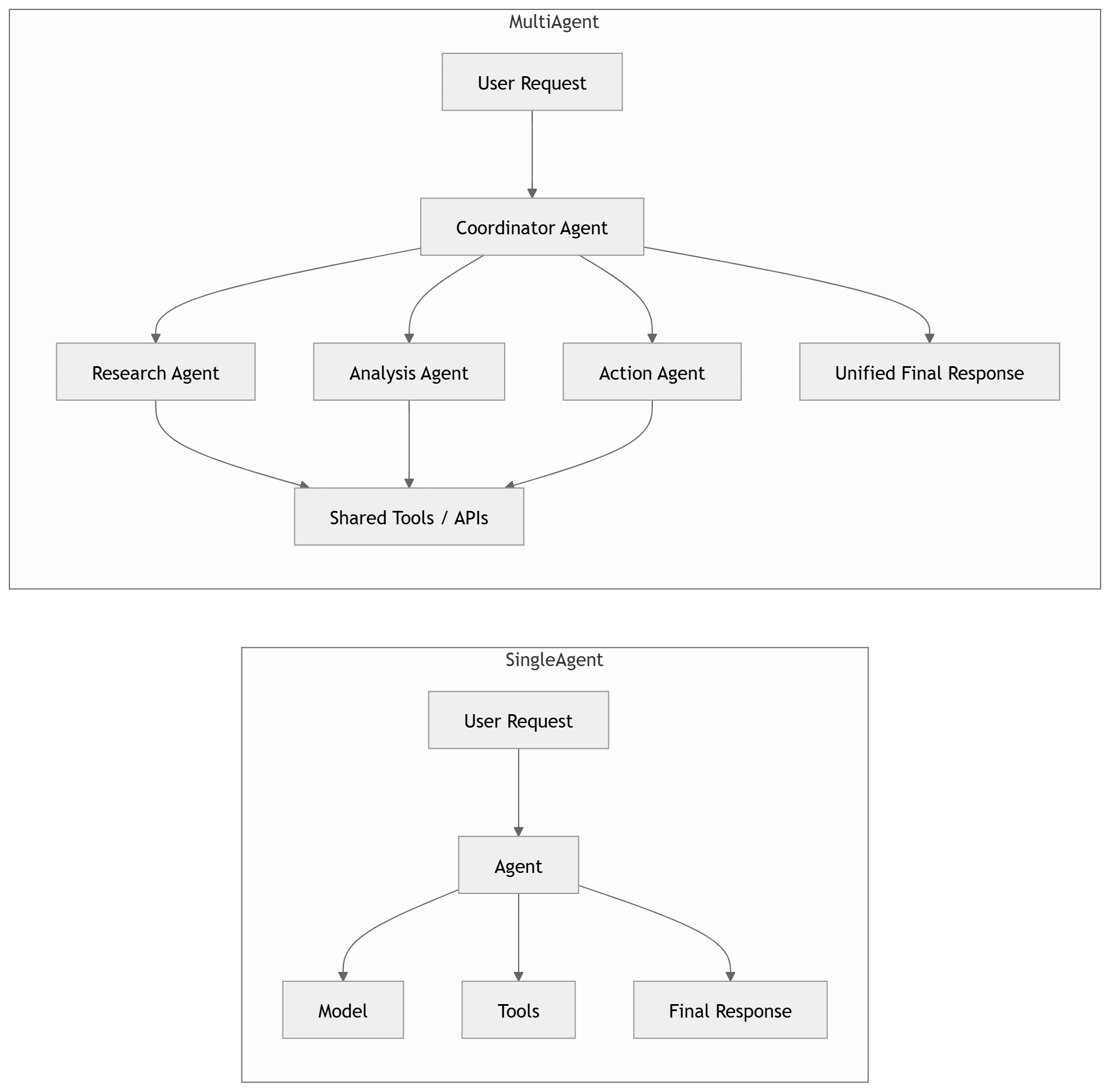
Single-Agent vs Multi-Agent Pattern
Where Microsoft Agent Framework Can Be Utilized
Enterprise Workflow Automation
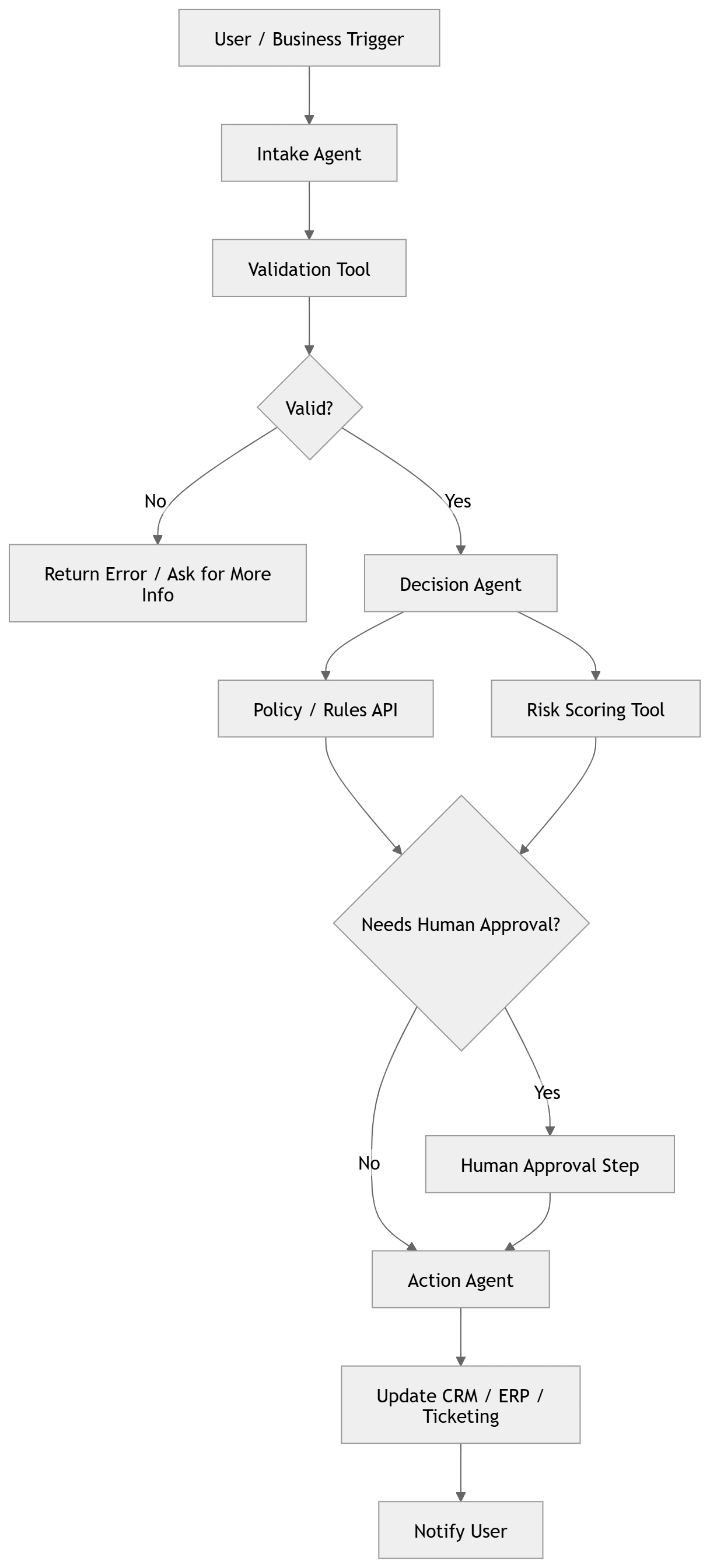
Agent Framework is a strong fit for business workflows where an agent must make decisions, call systems, and move through multiple steps. Examples include:
Claims intake and validation
Employee onboarding workflows
Ticket triage and routing
Policy and compliance checks
Finance approvals with human review
The workflow support in Agent Framework is particularly relevant here because Microsoft documents graph-based workflows with routing and checkpointing.
Internal Copilots
Organizations can build internal copilots that do more than answer questions. These copilots can:
Query internal systems
Summarize records
Trigger actions
Draft responses
Escalate cases to a human approver
Multi-Agent Decision Systems
One agent can act as a planner while others perform specialized tasks such as data retrieval, summarization, risk scoring, or action execution. That model aligns directly with Microsoft’s emphasis on multi-agent workflows.
AI-Powered Developer Tools
C# teams can use Agent Framework to create assistants that:
Inspect logs
Summarize pull requests
Suggest code fixes
Run tooling
Orchestrate CI/CD-related tasks
Customer and Operations Systems
It can also power service desk agents, operations assistants, and domain-specific digital workers in healthcare, benefits, HR, finance, and support.
Enterprise Workflow Example
Getting Started in C#
Microsoft’s .NET-facing examples show that the framework supports a straightforward entry point for creating and running agents. The GitHub repository’s .NET quickstart demonstrates creating an agent from a model client and invoking it with RunAsync.
A simplified sample looks like this:
var agent = new AzureOpenAIClient(new Uri(endpoint), new AzureCliCredential())
    .GetResponsesClient(deploymentName)
    .AsAIAgent(
        name: "SupportAgent",
        instructions: "You are a helpful enterprise support assistant."
    );

var result = await agent.RunAsync("Summarize the incident and suggest next steps.");
Console.WriteLine(result);
This style is attractive to .NET developers because it feels close to existing SDK usage patterns while still enabling agents, sessions, tools, and workflows.
When to Choose Agent Framework
Use Microsoft Agent Framework when your application needs one or more of the following:
Tool-using agents
Multi-turn context and sessions
Multi-agent coordination
Durable workflows
Human approval steps
Pluggable model providers
Structured orchestration in .NET
If your need is only basic prompting or simple chat, a lighter abstraction may be enough. But when your system starts needing reasoning + action + orchestration, Agent Framework becomes much more relevant. This is an inference based on the framework’s official feature set and documentation emphasis on workflows, sessions, tools, and runtime structure.
Conclusion
Microsoft Agent Framework is becoming an important part of the .NET AI landscape. It gives developers a way to move from isolated prompts to production-ready agentic systems with sessions, memory, tools, middleware, workflows, and multi-agent orchestration. Microsoft’s recent documentation updates, release candidate announcement, and active GitHub releases all point to a platform that is rapidly maturing for real-world use.
For C# developers, the biggest opportunity is this: you can now build AI agents using a framework that feels far more aligned with modern .NET engineering practices than ad hoc prompt wiring.
Key Takeaways
Microsoft Agent Framework is an open-source SDK/runtime for agentic AI in .NET and Python.
It supports agents, sessions, tools, memory, middleware, workflows, and MCP integrations.
It has progressed from preview in 2025 to Release Candidate in 2026.
It is well suited for enterprise copilots, workflow automation, and multi-agent systems.
Join the conversation! Your thoughts help the community grow.