

In this article, we will learn how to make our BookBot, using Node.js and REST APIs for providing additional information, like book descriptions and price for the book.
Use Case: Users always like to have more information, like the description and price for a selected book.
In my previous article for BookBot, we saw how we can get the list of books based on the topic entered in a chat. Now, I would like to explore the description and cost for a selected book.
Approach
- Assuming our BookBot is showing a list of books to the end user.
- While showing book titles, required additional information will be stored in an array.
- User will ask for additional info.
- BookBot will present five options to choose from, for which the user is willing to see the description and price.
- User will select an option.
- BookBot will display title, description and price for the selected book from the array.
Now, let’s start building this use case. For this, I will be starting with my earlier botserver.js, as explained in article three in the BookBot Series.
- Microsoft Bot Framework And Node.JS - Part One
- Microsoft Bot Framework And Node.JS - Part Two
- Microsoft Bot Framework And Node.JS - Part Three
REST API Output Structure.
For additional information, like description and pricing information, you should first know how the API is sending us the result in a JSON format. Refer to the below JSON which has been returned by the above REST API:
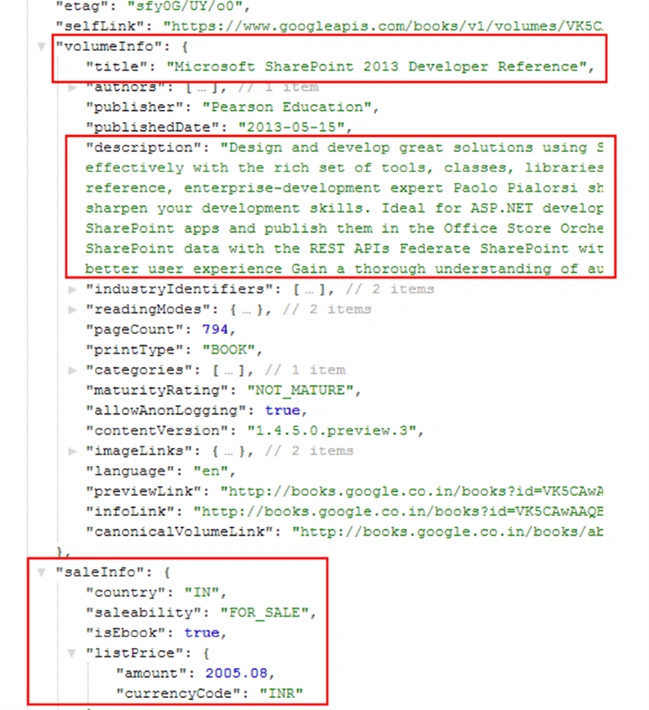
We will be capturing our data from the sections highlighted in red, and will add it to our array. This array will be used later to retrieve the required information.
Our updated botserver.js code implementation can be seen below,
- var builder = require('botbuilder');
- var https = require('https');
- var connector = new builder.ConsoleConnector().listen();
- var bot = new builder.UniversalBot(connector);
- var arr = [];
- function getBooksData(key) {
- https.get("https://www.googleapis.com/books/v1/volumes?q=" + key + "&maxResults=5", function(res) {
- var d = '';
- var i;
- arr = [];
- res.on('data', function(chunk) {
- d += chunk;
- });
- res.on('end', function() {
- var e = JSON.parse(d);
- for (i = 0; i < e.items.length; i++) {
- console.log(i + 1 + ":" + e.items[i].volumeInfo.title);
- arr.push({
- "description": e.items[i].volumeInfo.description,
- "title": e.items[i].volumeInfo.title,
- "saleability": e.items[i].saleInfo.saleability,
- "price": e.items[i].saleInfo.listPrice
- });
- }
- });
- });
- }
- var intents = new builder.IntentDialog();
- bot.dialog('/', intents);
- intents.matches(/^Hi/i, [
- function(session) {
- builder.Prompts.text(session, 'Hey, I am a BookBot. Welcome to Book Searching through Chat!.To start, which books you would like to search?');
- },
- function(session, results) {
- session.send('Here are books for topic - %s.', results.response);
- var b = [];
- getBooksData(results.response);
- },
- function(session) {
- builder.Prompts.text(session, 'which books');
- }
- ]);
- intents.matches(/^info?/i, [
- function(session) {
- builder.Prompts.choice(session, "Which book's info you need?", "1|2|3|4|5");
- },
- function(session, results) {
- var book = arr[results.response.entity - 1];
- if (book.saleability == 'FOR_SALE') {
- session.send('Title:' + book.title + " Price:" + book.price.amount + " " + book.price.currencyCode);
- } else {
- session.send('Title:' + book.title + " Price: NOT FOR SALE");
- }
- session.send('Description:' + book.description);
- }
- ]);
- intents.onDefault(builder.DialogAction.send('Hi there! How can I help you today?'));
Now, let’s run our BookBot.
Running a BookBot
Open a new Node.js command prompt and navigate to our bots folder, using command cd and run below command. Our botserver.js has run successfully and our conversation has begun with our bot through the command line channel.
User has entered ‘SharePoint’ on a command prompt.

Books are listed, as shown below:
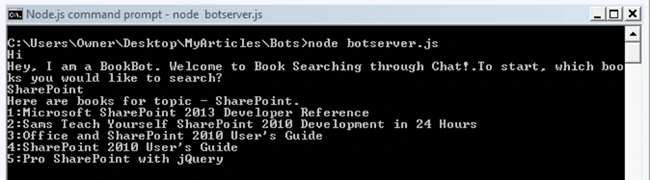
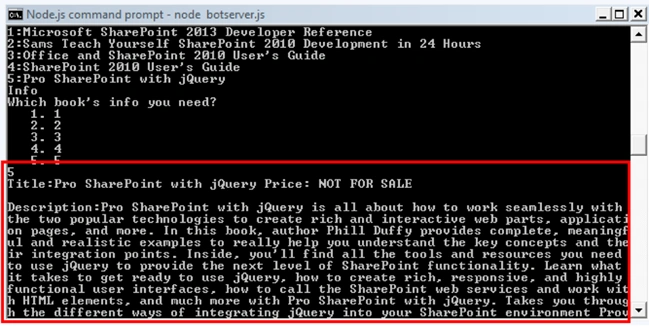
Now, our updated flow starts here. As an end user, I would like to know further details about Book 1. So, I am entering ‘Info’ as my intent. Once you enter ‘Info’ on command prompt and hit enter, the BookBot will present 5 options to choose from.
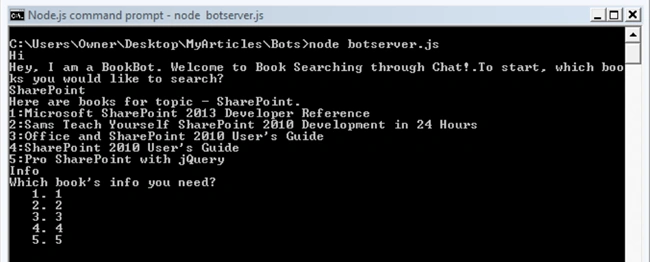
To show user prompts with choice options, the following intent has been used in our code implementation. When user enters ‘Info’, bot throws choices to choose from.
- intents.matches(/^info?/i, [
- function(session) {
- builder.Prompts.choice(session, "Which book's info you need?", "1|2|3|4|5");
- },
- function(session, results) {
- var book = arr[results.response.entity - 1];
- if (book.saleability == 'FOR_SALE') {
- session.send('Title:' + book.title + " Price:" + book.price.amount + " " + book.price.currencyCode);
- } else {
- session.send('Title:' + book.title " Price: NOT FOR SALE");
- }
- session.send('Description:' + book.description);
- }
- ]);
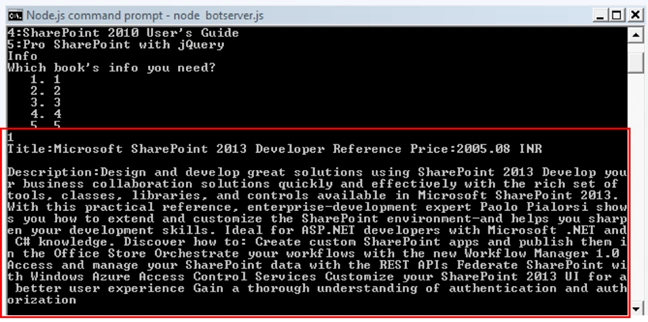
So, for the end user, the book’s additional information, like description and pricing, will be displayed, based on the choice entered by the user.
To see another book’s information, user will again enter ‘Info’ and the other choice, as shown below:
Vignesh ManiPosted Jul 27, 2016, 4:57 AM
Good one
kalu singh raoPosted Jul 27, 2016, 1:44 AM
Nice sharing
Mahesh ChandPosted Jul 26, 2016, 7:25 PM
Thank you, Madan. Love reading your articles on new innovative Bot tech.