

Introduction to Exchange DLP Conditions
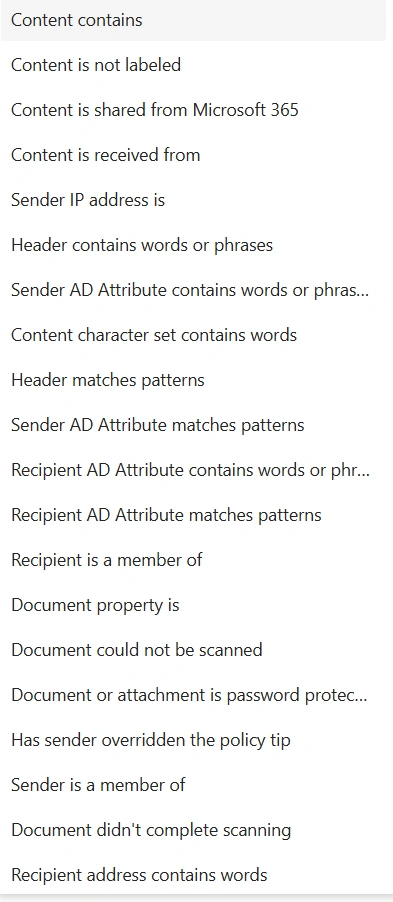
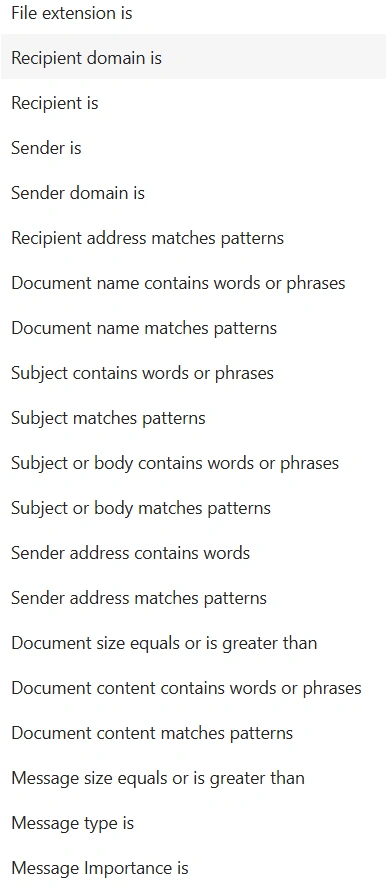
Microsoft Exchange Data Loss Prevention (DLP) policies rely on a comprehensive set of conditions to identify and protect sensitive information. These conditions allow administrators to detect, monitor, and prevent the unauthorized transmission of confidential data. Understanding these conditions is essential for creating effective DLP policies tailored to organizational security needs.
Message and Sender-Based Conditions
Sender-Related Conditions
Sender is – Identifies messages from specific individuals in your organization
Sender domain is – Matches messages originating from particular email domains
Sender address contains words – Scans sender email addresses for specific keywords
Sender address matches patterns – Uses regular expressions to identify sender address patterns
Sender IP address is – Filters messages based on originating IP addresses
Sender is a member of – Targets senders belonging to specific Active Directory groups
Sender AD Attribute contains words/phrase – Checks Active Directory attributes of the sender
Sender AD Attribute matches patterns – Uses pattern matching on sender AD attributes
Message Characteristics
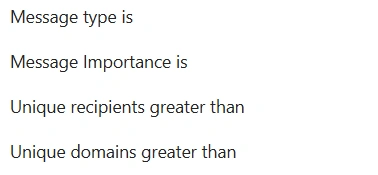
Message type is – Classifies messages by type (e.g., calendar, contact, email)
Message Importance is – Identifies messages marked with specific priority levels
Message size equals or is greater than – Filters messages based on total size thresholds
Has sender overridden the policy tip – Detects when users bypass DLP policy warnings
Recipient-Focused Conditions
Recipient Identification
Recipient is – Targets specific individuals as message recipients
Recipient domain is – Filters messages sent to particular email domains
Recipient address contains words – Scans recipient email addresses for keywords
Recipient address matches patterns – Uses pattern matching on recipient addresses
Recipient is a member of – Identifies recipients belonging to specific AD groups
Recipient Attributes
Recipient AD Attribute contains words/phrase – Examines Active Directory attributes of recipients
Recipient AD Attribute matches patterns – Applies pattern matching to recipient AD attributes
Unique recipients greater than – Detects messages sent to an unusual number of recipients
Unique domains greater than – Identifies messages sent to an unusual number of domains
Content and Document Conditions
Document Properties
File extension is – Identifies specific file types attached to messages
Document name contains words or phrases – Scans attachment filenames for keywords
Document name matches patterns – Uses pattern matching on attachment filenames
Document size equals or is greater than – Filters attachments based on file size
Document property is – Checks specific metadata properties of documents
Document content contains words or phrases – Performs content inspection within documents
Document content matches patterns – Uses pattern matching on document content
Document Processing Status
Document could not be scanned – Catches files that couldn't be processed by DLP scanners
Document or attachment is password protected – Identifies encrypted or protected files
Document didn't complete scanning – Flags files where scanning was interrupted
Header and Subject Conditions
Message Header Analysis
Header contains words or phrases – Searches email headers for specific text
Header matches patterns – Applies pattern matching to email header content
Subject and Body Content
Subject contains words or phrases – Scans email subject lines for keywords
Subject matches patterns – Uses pattern matching on subject lines
Subject or body contains words or phrases – Searches both subject and message body
Subject or body matches patterns – Applies pattern matching to subject and body
Condition Combinations
Effective DLP policies typically combine multiple conditions to create precise detection rules. For example, combining "Document content contains sensitive data" with "Recipient domain is external" can prevent confidential information from being sent outside the organization.
Introduction to Exchange DLP Actions
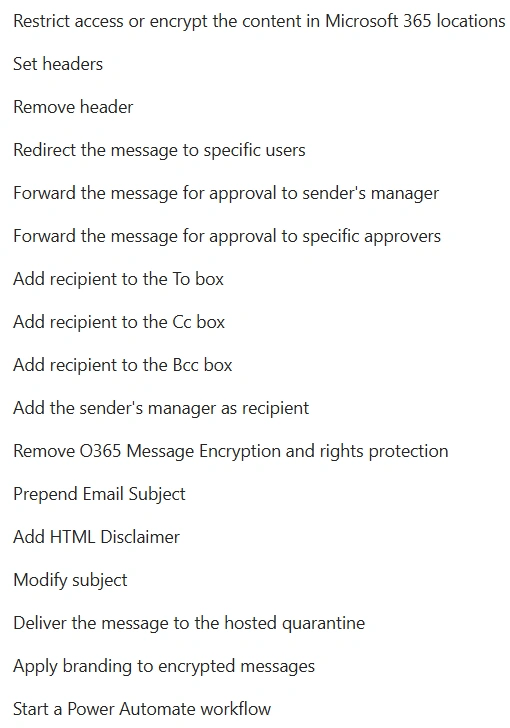
While conditions define what to look for in Microsoft Exchange DLP policies, actions determine what to do when a match is found. Actions are the enforcement and remediation components that protect sensitive data. They range from simple notifications and modifications to complete message blocking, encryption, and integration with external approval workflows. Properly configuring DLP actions is crucial for balancing security with business continuity.
Message Modification Actions
These actions alter the email itself, either by changing its content, recipients, or delivery path.
Header & Subject Modification
Set headers – Adds or modifies email headers (e.g., X-DLP-Policy-Matched, custom security tags) for tracking, routing, or external system integration.
Remove header – Strips specific headers from the email, often used to remove sensitive metadata or internal routing information before external delivery.
Prepend Email Subject – Adds a prefix (like [CONFIDENTIAL] or [EXTERNAL]) to the subject line to alert recipients of the email’s sensitivity.
Modify subject – Allows more complex changes to the subject line, not just prefixing (e.g., replacing parts of the subject).
Content & Branding
Add HTML Disclaimer – Appends a standardized legal disclaimer, confidentiality notice, or compliance statement to the bottom of the email body using HTML formatting.
Apply branding to encrypted messages – Customizes the appearance of the encryption portal with company logos, colors, and helpdesk information for a seamless user experience.
Recipient Management Actions
These actions control who receives the message or is involved in its approval.
Recipient Addressing
Add recipient to the To box – Includes additional primary recipients (e.g., a compliance officer or department mailbox) to ensure oversight.
Add recipient to the Cc box – Copies additional parties on the message for visibility without making them primary recipients.
Add recipient to the Bcc box – Blind copies recipients, useful for discreetly notifying security teams without alerting the original sender/recipient.
Add the sender's manager as recipient – Dynamically looks up and includes the sender's manager based on Azure AD/Active Directory data, useful for escalation and oversight.
Message Redirection & Quarantine
Redirect the message to specific users – Changes the message's destination entirely, sending it only to designated users (e.g., a secure review mailbox) instead of the intended recipients.
Deliver the message to the hosted quarantine – Holds the message in a secure, administrator-managed quarantine within Microsoft 365, where it can be reviewed, released, or deleted.
Security & Compliance Enforcement Actions
These are the core protective measures that directly prevent data loss.
Encryption & Access Control
Restrict access or encrypt the content in Microsoft 365 locations – A preventative action that blocks the sending of emails containing sensitive data unless they are encrypted using Microsoft Purview Message Encryption. It can also prevent sharing/uploading of sensitive files to SharePoint or OneDrive.
Remove O365 Message Encryption and rights protection – Strips existing encryption or Information Rights Management (IRM) protections from a message. This is typically used in secure internal workflows where encryption is not required after a message passes an approved gateway.
Approval Workflows
Forward the message for approval to sender's manager – Automatically routes the email to the sender's manager for review and explicit approval before it is delivered to the intended recipients.
Forward the message for approval to specific approvers – Sends the message to a defined set of individuals or a security group (e.g., "Data Security Approvers") for manual review and release.
Automation & Integration Actions
These actions connect DLP incidents to broader business processes.
Power Automate Integration
Start a Power Automate workflow – The most powerful and flexible integration action. When a DLP policy is triggered, it can automatically launch a custom Power Automate (formerly Microsoft Flow) workflow. This enables limitless automation scenarios.
Note on Built-in Templates: While Power Automate supports endless custom flows, Microsoft provides limited built-in templates for common DLP scenarios directly within the compliance center. The most commonly referenced built-in flow for DLP is "Notify sender's manager when a DLP policy matches", which automates the common task of manager notification without requiring custom flow design.
Conclusion
Microsoft Exchange DLP conditions provide a powerful, multi-layered approach to data protection. By understanding and properly configuring these conditions, organizations can create sophisticated policies that protect sensitive information while maintaining business workflow efficiency. Regular review and adjustment of these conditions ensure that DLP policies remain effective as organizational needs and threat landscapes evolve.
The comprehensive nature of these conditions allows for granular control over data movement, enabling organizations to meet compliance requirements and protect intellectual property without unnecessarily impeding legitimate business communication.
Exchange DLP actions transform detection into protection. By combining message modification, recipient management, encryption enforcement, and automated workflows, organizations can create a dynamic and responsive data security posture. The integration with Power Automate is particularly powerful, breaking down silos between compliance and operational teams and enabling truly intelligent, automated security processes. A well-designed DLP strategy uses these actions in graduated tiers from awareness and notification to enforced protection tailored to the sensitivity of the data and the risk of the user activity.
Join the conversation! Your thoughts help the community grow.