

In this article, we will discuss the basics of Microsoft Teams and will learn what Teams and Channels are.
Microsoft Teams
Microsoft Teams is a chat-based collaboration tool. When we log in to O365, under Apps, we will see “Teams” App as shown in below Figure 1
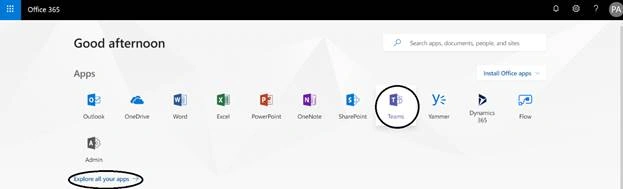
Figure 1: O365 - Apps – Teams
In case you don’t see the “Teams” app, please click on the “Explore all your apps - >” link at the bottom, as shown in the above Figure 1.
Web Client for Teams
- We could also directly browse Teams in the browser (Web Client) via URL - https://teams.microsoft.com where we need to log in with O365 credentials.
- The following browsers are supported by Teams. - IE 11, Microsoft Edge, Chrome (latest version plus previous two versions) and Firefox (latest version plus previous two versions).
- Opera and Safari browsers do not support Teams. When we try to open Teams in either of the browsers, we get the following page.
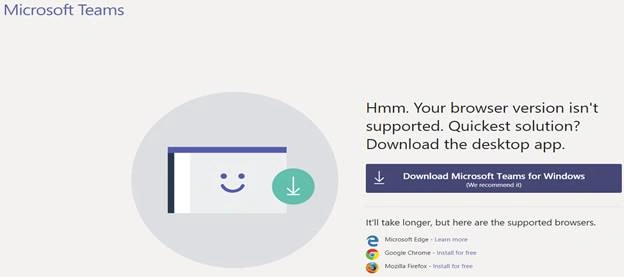 Figure 2:O365-Microsoft Teams: Browser Support
Desktop Client for Teams
- We can have desktop client application version also for Microsoft Teams, which we can download from here.
- This desktop client is available for Windows 7+ for both, 32 and 64 bit and for Mac OS, as shown in the below figure.
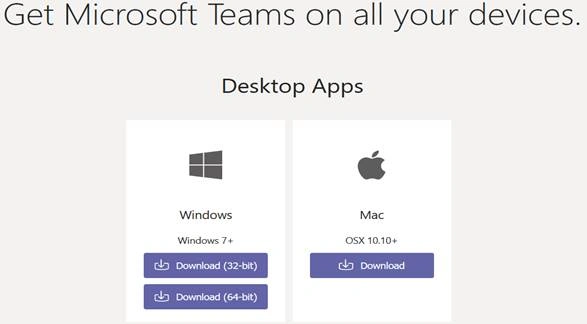
Figure 3: O365 - Microsoft Teams: DeskTop Apps availability
- For Windows desktop, the client requires .NET Framework 4.5 and later.
Mobile Client for Teams
We have Microsoft Teams mobile app also.
- Mobile apps are available for Android, iOS, and Windows Phone.
- Following are the supported mobile platforms.
- Android 4.4 and later
- iOS 10.0 or later
- Windows 10 Mobile
Teams
- Teams contains Members (Users), Channels, Apps, Settings etc.
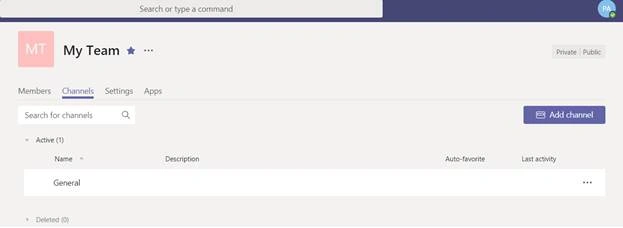
Figure 4:O365-Team
In this article, I am skipping discussing Settings and Apps option, I’ll discuss those in the next article. Here, now, we will discuss other Teams details and channels.
- Teams can be created either Private or Public – These are self-explanatory, as shown in the following figure.
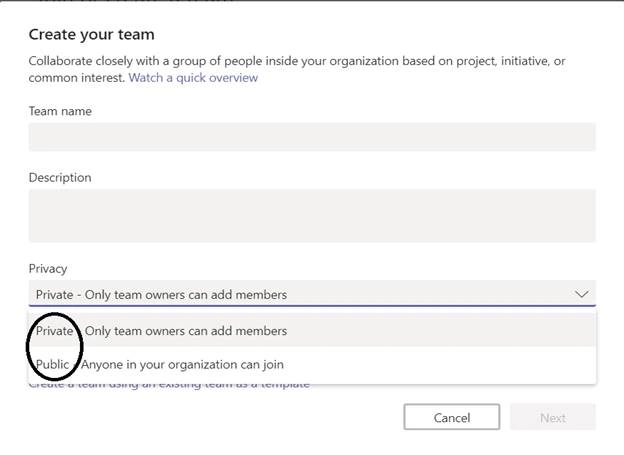 Figure 5: Office 365 - Microsoft Teams - Teams Privacy while creating teams
- By default, a tenant can have maximum 500000 Teams.
- Each team can have maximum 2500 members.
- A normal user can create up to 250 Teams.
- A global administrator can create unlimited number of Teams.
- When we create a Team, behind the scene, an Office 365 group is created.
- Because of Office 365 group services like Shared MailBox, Shared Calendar, Shared OneDrive for Business, Planner are available for all the members of the Team.
Channels
- Channels are the segments in the Team.
- Channels are created based on a specific topic to discuss.
- When a Team is created, by default, there is one channel – “General” created.

Figure 6: Office 365 - MS Teams - Default General channel created
- We can not remove this “General” channel or we can’t unfavorite it.
- All the team members have permissions to create the channel.
References
Hadshana KamalanathanPosted Jul 19, 2018, 7:12 AM
Nice Article
Herbert H Dupree IiPosted Jul 16, 2018, 12:32 AM
I just signed up for the free version, even though it's just me. However, the web app must check the browser string, because as the article said, Opera and Safari aren't supported. Opera is Chromium-based, so is Vivaldi, my daily driver browser. Don't really like to use the chrome extension that substitutes agent strings of different browsers, but may do so as a test. It would be nice to get paid to be end-user Quality Control as they seemed to overlook this.
Viknaraj ManogararajahPosted Jul 12, 2018, 7:10 PM
thanks for sharing...