

Introduction
Microsoft introduced Teams app to collaborate with existing employees in a team as well as external users to use team features like chat, sharing screen, meetings, channel file sharing, etc.
Who is a guest in Teams? Partners, vendors, suppliers or consultants; i.e., anyone who has no access to your organization's network but requires access to connect with the internal teams as a guest user.
Objective
This needs a valid email address like Gmail.com, Outlook.com, or any other partner accounts. The person joined as a guest gets full access to the authorized team and its channel resources. It avoids IT administrative overheads like maintenance of external account usernames, passwords, or account synchronization work. Partners / Vendors use their own identities and credentials so there is no need to utilize Azure AD.
Level of guest access in Microsoft Teams
- Azure Active Directory(AAD)
This controls the guest access at the directory, tenant, and application-level - Microsoft Teams
This controls the guest access in Microsoft Teams only. - Office 365 Groups
This controls the guest access in Office 365 Groups and Microsoft Teams both. - SharePoint Online and OneDrive for Business
This controls the guest access in SharePoint Online, OneDrive for Business, Office 365 Groups, and Microsoft Teams.
Below is the flow diagram for guest access authentication for above levels.
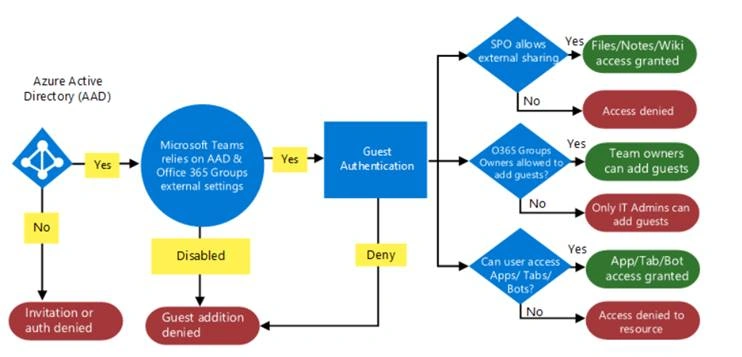
Features available for a guest account
Guest users have very limited access to Team resources. Check the below comparison to understand it more with team member access,
|
Teams Functionality
|
Guest
|
Member
|
|
Create a Channel (Team Owner control this setting)
|
Yes
|
Yes
|
|
Participate in a private chat
|
Yes
|
Yes
|
|
Participate in a channel conversation
|
Yes
|
Yes
|
|
Post, delete, and edit messages
|
Yes
|
Yes
|
|
Share a channel file
|
Yes
|
Yes
|
|
VOIP calling
|
Yes
|
Yes
|
|
Group calling
|
Yes
|
Yes
|
|
Core call controls supported (hold, mute, video on/off, screen sharing)
|
Yes
|
Yes
|
|
Transfer target
|
Yes
|
Yes
|
|
Can transfer a call
|
Yes
|
Yes
|
|
Can consultative transfer
|
Yes
|
Yes
|
|
Can add other users to a call via VOIP
|
Yes
|
Yes
|
|
Share a chat file
|
Yes
|
|
|
Add apps (tabs, bots, or connectors)
|
Yes
|
|
|
Create meetings or access schedules
|
Yes
|
|
|
Access OneDrive for Business storage
|
Yes
|
|
|
Create tenant-wide and teams/channels guest access policies
|
Yes
|
|
|
Invite a user outside the Office 365 tenant's domain
(Team owners control this setting.) |
Yes
|
|
|
Create a team
|
Yes
|
|
|
Discover and join a public team
|
Yes
|
|
|
View organization chart
|
Yes
|
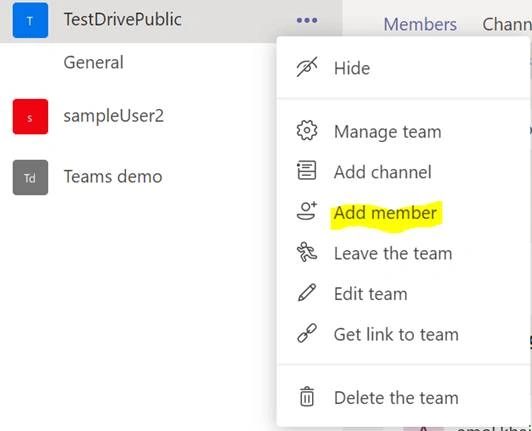
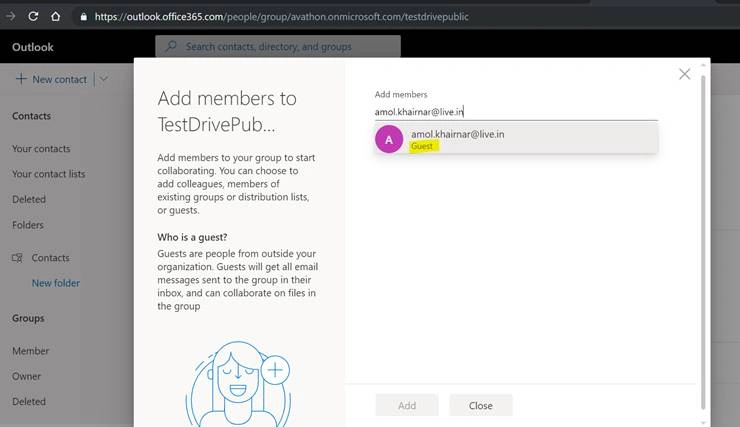
Join the conversation! Your thoughts help the community grow.