

This article is exclusively about the Windows Phone OS version history and the list of features available on it.
List of Windows Phone Versions
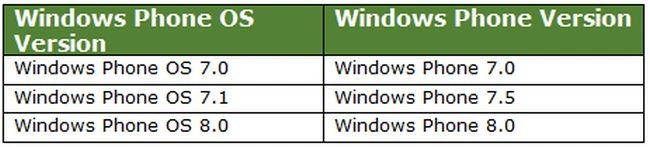
This table describes the list of Windows Phone OS versions and their release number.
List of Windows Phone SDK and their support for Windows Phone App Development:
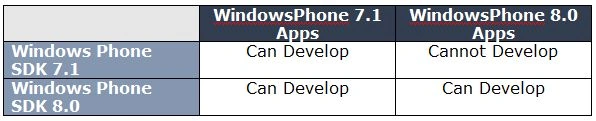
Note: You can use the Windows Phone 7.1 App feature in Windows Phone 8.0 App, whereas you cannot use the Windows Phone 8.0 App feature in Windows Phone 7.1 App.
Features that are available/not available:
- You can upgrade the application that targets Windows Phone OS 7.1 to OS 8.0.
- You cannot add a reference that targets Windows Phone 8 in a Windows Phone 7 project.
OK. How to target my app in Windows Phone 7 and Windows Phone 8?
There are a few shortcut ways to make your app to run in both WP7 and WP8.
1. Create a Windows Phone OS 7.1 app that runs in both Windows Phone 7.1 and Windows Phone 8
In order to do this, ensure that you should not use any of the Windows Phone 8 controls or features that make your app fail to run in a Windows Phone OS 8 targeted device. Do use the common controls and features that are applicable to both OS (7.1 and 8).
2. Create Windows Phone 7.1 project and Windows Phone 8 project individually
In order to do this, create the WP7.1 and WP8 projects separately. The cons of this is that you must update both projects for changes. Hence, this is not professionally recommended.
3. To use "Upgrade to Windows Phone 8.0" option
- In order to do this, create a Windows Phone 7.1 project using WP8 SDK. Name the Solution as MyAppVersion. Rename the project name from MyAppVersion to MyAppVersion71.
- In File Explorer, create a copy of the project in the same solution folder and rename it to MyAppVersion80. Now add this project to MyAppVersion Solution.
So now you will be having as seen in the following image. - Now right-click on the MyAppVersion80 and select "Upgrade to Windows Phone 8.0". This will upgrade the project from Windows Phone 7.1 app to Windows Phone 8.0 app.
- Now define a conditional compilation symbol using the #define directive in your code or the Build page of the Project Designer.
- For Instance, define "WP8" in the Windows Phone 8 project and use like "#if WP8 {...} #endif" to isolate the source code to use the Windows Phone 8 related features.
- Ensure that both projects share the same source code and resources.
Features available in Windows Phone OS 7.1 and Windows Phone OS 8.0:
The following are the most important features that are available in the Windows Phone.
| Windows Phone OS 7.1 Features | Windows Phone OS 8.0 Features |
|
CDMA Support, Deeper FacebookIntegration |
All features in Windows Phone OS 7.1 |
|
Messaging and social integration |
Support for WXGA (1280×720, 1280×768) resolutions, 1080p screen resolution support |
|
Search/Bing |
Support for MicroSD cards, IE10 |
|
SkyDrive, Microsoft Lync, To-Do, Office 365 |
Simplified porting of Windows Store apps to Windows Phone 8 |
|
Video Sharing via MMS, Facebook, SkyDrive and email |
Nokia map technology |
|
Integration to People Hub and Twitter |
Native 128-bit Bitlocker encryption, Secure Boot |
|
Pin any album to Start |
In-app purchases |
|
Deeper Multimedia Support |
Possibility to take screenshots |
|
Camera Enhancement |
Kids corner, Rooms, Live Apps |
|
Multiplayer Games Support |
Google accounts. Windows Phone 8 now supports the CardDAV and CalDAV protocols that allow people to sync Google contacts and calendar information when they get new phones |
|
IE9, Increased Security |
Global Screen Rotation lock menu item. |
|
Support for 16 new languages |
New Driving Mode feature to ignore calls and texts |
|
Hidden WiFi network support |
Access Point menu item to set-up MMSand Internet Sharing |
|
East Asian handwriting recognition |
|
|
Internet sharing |
|
|
Third-party application multi-taskingand fast application switching |
|
|
Silverlight + XNA support in the sameapplication screen |
|
|
New sensor API combines compass, gyroscope and accelerometer |
|
|
LTE support |
|
|
Location awareness icon |
|
For more features related information please refer to http://en.wikipedia.org/wiki/Windows_Phone_version_history
Mohhaumed Safiq SAPosted Oct 4, 2013, 6:42 AM
Thanks Sadesh. :)
Mohhaumed Safiq SAPosted Oct 4, 2013, 6:41 AM
Thanks Dinesh for your Support.
Dinesh BeniwalPosted Oct 4, 2013, 6:22 AM
Good Start, Welcome to the C# Corner.
Sadeshkumar PeriyasamyPosted Oct 4, 2013, 5:57 AM
Great work :) Keep posting :)