

Introduction
I would like to share the procedure for migrating applications to .Net 4.5 from .Net 2.0/3.0/3.5. I used various web resources to collect the following information and tried to summarize it so it is easy to understand.
So let’s start with the problem statement.
We have an application developed in .Net 2.0/3.0 and we are using .Net 4.5 to run this application. What will happen?
Answer: It shows an error
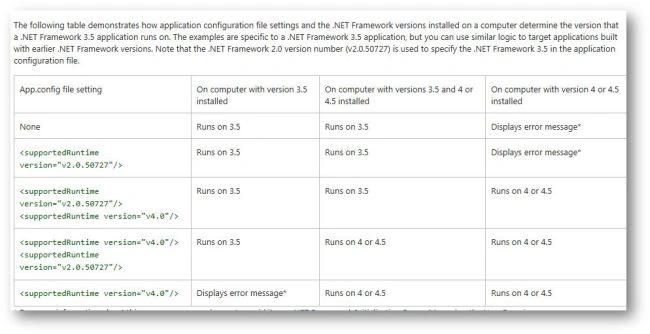
By default, an app runs on the version of the .Net Framework that it was built for. If that version is not present and the app configuration file does not define supported versions then a .Net Framework initialization error may occur. In this case, the attempt to run the app will fail.
Explanation
It depends upon the CLR for the .Net framework we are using.
Problem Statement
- .Net Framework 2.0, 3.0, and 3.5 include CLR 2.0
- .Net Framework 4, 4.5, and 4.5.1 include CLR 4.0
- CLR 3.0 does not exist
- An application developed in .Net 2.0 or 3.0 can run in a 3.5 framework because the target CLR is the same
But an application developed in .Net 3.0 will not run in a 4.5 framework because now the target framework is different (CLR 4)
Solution
To configure your application to run on .Net Framework 4 or 4.5:
- Create a text file that has the same name as your application, and add the file extension .config. For example, if your application is named abc.exe then your application configuration file must be named abc.exe.config.
- Add the <supportedRuntime> element as follows to the application configuration file:
- <configuration>
- <startup>
- <supportedRuntime version="version"/>
- </startup>
- </configuration>
- .Net Framework 1.0: "v1.0.3705"
- .Net Framework 1.1: "v1.1.4322"
- .Net Framework 2.0, 3.0, and 3.5: "v2.0.50727"
- .Net Framework 4 and 4.5 (including point releases such as 4.5.1): "v4.0"
Something about Backward compatibility
Backward compatibility means that an app that was developed for a specific version of a platform will run on later versions of that platform. The .Net Framework tries to maximize backward compatibility: Source code written for one version of the .Net Framework should compile on later versions of the .Net Framework, and binaries that run on one version of the .Net Framework should behave identically on later versions of the .Net Framework
The .Net Framework 4.5 and its point releases are backward-compatible with apps that were built with earlier versions of the .Net Framework. In other words, apps and components built with previous versions will work without modification on the .Net Framework 4.5. However, by default, apps run on the version of the Common Language Runtime for which they were developed, so you may need to provide a configuration file to enable your app to run on the .Net Framework 4.5. For more information
- Note that the .Net Framework 4.5 is not supported on Windows XP.
- .Net 4.5 comes automatically with Windows 8
- .Net 3.5 sp1 comes automatically with Windows 7 sp1
Migration Guide to the .NET Framework 4.5
This article contains basic information about the migration of .Net applications to the latest version.
Snehal SomaniPosted Sep 23, 2020, 12:27 AM
Hi, i developed the application .net v3.5, for migration if i followed same steps what you mentioned in above . Is it works in production server?
chandrashekar vsPosted Nov 30, 2018, 2:09 AM
Hi, i developed the application .net v3.5, for migration if i followed same steps what you mentioned in above . Is it works in production server?