

When new technologies are introduced one of the biggest business challenges faces is migrating the current projects to new technologies with least effort. I am sure scratch development is not always a preferred option from business investment point of view. One of the new technologies which is talked most is 'LINQ'. This article will focus on how we can convert simple existing .NET classes in to LINQ enabled classes.
LINQ is a uniform programming language which basically takes the old .NET classes to a much improvised level. It brings down the complexity of the business classes by using LINQ queries. In this article we will touch base how can we leverage and migrate our old .NET classes to make them LINQ enabled. LINQ has much more benefits than what I just talked in case you are not aware of basics you can read the basics from http://www.c-sharpcorner.com/UploadFile/shivprasadk/654654607132009040318AM/6546546.aspx?ArticleID=e51427a9-7f26-4db9-8b84-f6a3a6a698a6
Here's my small gift for all my .NET friends , a complete 400 pages FAQ Ebook which covers various .NET technologies like Azure , WCF , WWF , Silverlight , WPF , SharePoint and lot more http://www.questpond.com/SampleDotNetInterviewQuestionBook.zip
Disclaimer: - Do not blast me....
The conclusion which I have drawn here is based on a project which was migrated. The project had hardly 15 classes and they where well written. I am really not sure how this will work for projects having huge number of classes. I will be working on this migration project for more 6 months so any more challenges or issues I will be updating in this article.
So please do your home work before you start implementing.
Simple .NET class
So here's a simple .NET customer class which basically has 3 properties Id , CustomerName and Customercode. We will look in to how we can migrate this .NET class in to LINQ class without touching the core logic.
public class clsCustomer
{
private int _intCustomerId;
private string _strCustomerName;
private string _strCustomerCode;
public int CustomerId
{
set
{
_intCustomerId = value;
}
get
{
return _intCustomerId;
}
}
public string CustomerName
{
set
{
_strCustomerName = value;
}
get
{
return _strCustomerName;
}
}
public string CustomerCode
{
set
{
_strCustomerCode = value;
}
get
{
return _strCustomerCode;
}
}
}
The core of the approach: - XML mapping
LINQ had provided attribute based XML mapping. So you can have your pure .NET classes and you can define the LINQ mapping in a XML file. LINQ engine can then read the mapping from a XML file and apply the same to your simple .NET classes.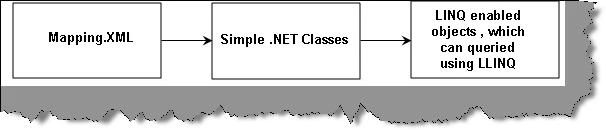
The XML file
Below is my XML file where I have define my mappings of table columns with class properties, database names, table name and class types.
<?xml version="1.0" encoding="utf-8"?>
<Database Name="TstServer" xmlns="http://schemas.microsoft.com/linqtosql/mapping/2007">
<Table Name="dbo.Customer" Member="WebAppMappingXML.clsCustomer">
<Type Name="WebAppMappingXML.clsCustomer">
<Column Name="CustomerId" Member="CustomerId" />
<Column Name="CustomerName" Member="CustomerName" />
<Column Name="CustomerCode" Member="CustomerCode" />
</Type>
</Table>
</Database>
To bind the XML mapping with the simple .NET class we need to first create the XMLMappingSource object as shown in the below code snippet.
XmlMappingSource xms = XmlMappingSource.FromUrl(physicalPath + "Mapping.xml");
We need to pass the XMLMappingSource object to the datacontext class shown in the below code snippet.
DataContext objContext = new DataContext(strConn, xms);
Finally we can get the table and loop through the entity objects.
Join the conversation! Your thoughts help the community grow.