

Description
This is a simple game written in C# in which user presses Up, Down, Left, Right arrow keys to play this game.
The objective of this game is to arrange 1 to 15 numbers in ascending order where the numbers in grid are in random.
User will have 10 minutes of time to complete this game.
If user wins the game he gets displayed in how many moves he completed the game.
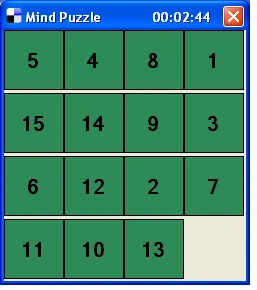
Step By Step
Step 1: Generating random values & Creating Labels on the form.
public void createlabels()
{
    int i = 0; int val;
    for (int j = 0; j < ROW_COUNT; j++)
    for (int k = 0; k < COLUMN_COUNT; k++)
    {
        val = gridVal[j, k];
        label[i] = new Label();
        label[i].Font = new Font("Microsoft Sans Serif",   15F, FontStyle.Bold, GraphicsUnit.Point, ((byte)(0)));
        label[i].Width = 60;
        label[i].Height = 60;
        label[i].Left = k * 60;
        label[i].Top = j * 63;
        label[i].Tag = 0;
        label[i].TextAlign = System.Drawing.ContentAlignment.MiddleCenter;
        if (i != 15)
        {
            label[i].BackColor = Color.SeaGreen;
            label[i].BorderStyle = BorderStyle.FixedSingle;
            label[i].Text = val.ToString();
        }
        else
        {
            label[i].BackColor = Color.Transparent;
            label[i].BorderStyle = BorderStyle.None;
            label[i].Text = "";
            label[i].Visible = false;
            z = i;
        }
        this.Controls.Add(label[i]);
        i++;
    }
}
Step 2: This is to handle KeyDown event handlers.
private void Key_Down(object sender, KeyEventArgs e)
{
    switch (e.KeyCode)
    {
        case Keys.Left:
            {
                moveLeft();
                keyCount++;
            }
            break;
        case Keys.Right:
           {
                moveRight();
                keyCount++;
            }
            break;
        case Keys.Up:
            {
                moveUp();
               keyCount++;
            }
            break;
        case Keys.Down:
            {
                moveDown();
                keyCount++;
            }
            break;
        default:
            System.Console.Beep();
            break;
    }
    if (check())
    {
        timerThread.Abort();
        gameStr = string.Format("You took {0} moves to arrange numbers", keyCount);
        MessageBox.Show(gameStr, "Game Over!");
        Application.Exit();
    }
}
Step 3: Creating the thread to display time.
timerThread = new Thread(new ThreadStart(timerFunc));
timerThread.IsBackground = true;
timerThread.Start();
private void timerFunc()
{
    string str;
    for (min = 0; min < 10; min++)
    {
        for (int sec = 0; sec < 60; sec++)
        {
            str = string.Format("Mind Puzzle       00:0{0}:{1} ", min, sec);
            this.Text = str;
            Thread.Sleep(1000);
        }
    }
    if (min == 10)
    {
        this.Enabled = false;
        MessageBox.Show("Better Luck next time ", "You Lose the Game!");
        Application.Exit();
    }
}
Step 4: Checking the grid values whether they arranged in ascending order or not.
private bool check()
{
    checkVal = new int[4, 4] {
                                {1, 2, 3, 4},
                                {5, 6, 7, 8},
                                {9, 10, 11, 12},
                                {13, 14, 15, 0},
                             };
    for (int i = 0; i < 4; i++)
    {
        for (int j = 0; j < 4; j++)
        {
            if (gridVal[i, j] != checkVal[i, j])
                return false;
        }
    }
    return true;
}
Manu SlackerfanPosted Jan 12, 2016, 7:26 AM
Thank you
Danh DoanPosted Dec 3, 2014, 8:56 AM
just random for number in the grid is not enough.
Sazid MauhammadPosted Feb 26, 2013, 3:45 AM
nice one
Renaldho HanochPosted Dec 13, 2012, 11:43 PM
Thnks dude, this is very helpful
sz stephPosted Nov 3, 2012, 1:30 PM
is this made in c# 2008 or c#2010?
Omar MabroukPosted Feb 9, 2012, 3:44 PM
I need explaining the code in detail(the job of each each function) pleaze
Ebenezer Pramod KumarPosted Dec 20, 2011, 6:43 AM
Do you work for Valtech?
oneweek reignPosted Jul 15, 2011, 4:24 AM
how to get score in puzzle game if it finish it, and when the moves is lesser it have a more score but if the moves is greater the score is low... can you help me
Anis MujkanovicPosted Apr 10, 2011, 1:35 PM
Many Thanks
nhung tuyetPosted Feb 21, 2011, 3:06 AM
hope you will have good many program
nhung tuyetPosted Feb 21, 2011, 3:05 AM
thank you!
JOSAFAT SILVAPosted May 28, 2010, 11:48 AM
that is terrific thanx