

In order to work with jQuery, you should be aware of the basics of JavaScript, HTML and CSS. Before I start this tutorial, I assume that you are familiar with HTML, CSS and jQuery. I also assume that you know what jQuery is and how to use it in your pages.
Where to download?
jQuery scripting file can be downloaded from jQuery Official website:
Chapter 1
In this chapter I will show you how you can create interactive game using jQuery, HTML 5 and CSS3 through step by step approch. It consists three major parts.
- Creating HTML elements
- Styling with CSS
- Scripting with JQuery
Process flow diagram
The following figure defines the entire process flow diagram:

Figure 1: Process flow diagram
Part 1: HTML
Before I start this tutorial, I assume that you are familiar with HTML, CSS and jQuery. I also assume that you understand what jQuery is and how to use it in your pages.
Use basic HTML code to create the HTML elements. The following is the HTML code I have used in this tutorial.
- <!doctype html>
- <html lang="en">
- <head>
- <meta charset="utf-8">
- </head>
- <body <form>
- <img src="Images/bulb_mind_brain_svg-256.png" alt="hi" style="width:256px;height:256px;">
- <br>
- <br>
- <div style="text-align:center;">
- <div id="scr">YOUR SCORE : </div>
- <div id="output">00</div>
- </div>
- <br>
- <br>
- <br>
- <input type="button" class="styled-button-2" id="btnShowSimple" value="START" />
- <input type="button" class="styled-button-2" id="btnShowModal" value="RESTART" />
- <br />
- <br />
- <div id="output"></div>
- <div id="overlay" class="web_dialog_overlay"></div>
- <div id="dialog" class="web_dialog">
- <table style="width: 100%; border: 0px;" cellpadding="3" cellspacing="0">
- <tr>
- <td class="web_dialog_title"></td>
- <td class="web_dialog_title align_right">
- <a href="#" id="btnClose">Close</a>
- </td>
- </tr>
- <td> </td>
- <td> </td>
- <tr>
- <td style="text-align: center" ;>
- Time Left <b id="countdown"></b> seconds
- <img src="Images/Alarm.png" alt="Timer" style="width:48px;height:48px;">
- </td>
- </tr>
- <tr>
- <td> </td>
- </tr>
- <tr>
- <td colspan="2" style="padding-left: 15px;">
- </td>
- </tr>
- <tr>
- <td> </td>
- <td> </td>
- </tr>
- <tr>
- <td colspan="2" style="padding-left: 15px;">
- <div id="shuffle">
- <div class="cell"></div>
- <div class="cell"></div>
- <div class="cell"></div>
- <div class="cell"></div>
- <div class="cell"></div>
- <div class="cell"></div>
- <div class="cell"></div>
- <div class="cell"></div>
- <div class="cell"></div>
- <div class="cell"></div>
- <div class="cell"></div>
- <div class="cell"></div>
- <div class="cell"></div>
- <div class="cell"></div>
- <div class="cell"></div>
- <div class="cell"></div>
- <div class="cell"></div>
- <div class="cell"></div>
- <div class="cell"></div>
- <div class="cell"></div>
- <div class="cell"></div>
- <div class="cell"></div>
- <div class="cell"></div>
- <div class="cell"></div>
- <div class="cell"></div>
- <div class="cell"></div>
- <div class="cell"></div>
- <div class="cell"></div>
- <div class="cell"></div>
- <div class="cell"></div>
- <div class="cell"></div>
- <div class="cell"></div>
- <div class="cell"></div>
- <div class="cell"></div>
- <div class="cell"></div>
- <div class="cell"></div>
- <div class="cell"></div>
- <div class="cell"></div>
- <div class="cell"></div>
- <div class="cell"></div>
- <div class="cell"></div>
- <div class="cell"></div>
- <div class="cell"></div>
- <div class="cell"></div>
- <div class="cell"></div>
- <div class="cell"></div>
- <div class="cell"></div>
- <div class="cell"></div>
- <div class="cell"></div>
- <div class="cell"></div>
- <div class="cell"></div>
- <div class="cell"></div>
- <div class="cell"></div>
- <div class="cell"></div>
- <div class="cell"></div>
- <div class="cell"></div>
- <div class="cell"></div>
- <div class="cell"></div>
- <div class="cell"></div>
- <div class="cell"></div>
- <div class="cell"></div>
- <div class="cell"></div>
- <div class="cell"></div>
- <div class="cell"></div>
- <div class="cell"></div>
- <div class="cell"></div>
- <div class="cell"></div>
- <div class="cell"></div>
- <div class="cell"></div>
- <div class="cell"></div>
- <div class="cell"></div>
- <div class="cell"></div>
- <div class="cell"></div>
- <div class="cell"></div>
- <div class="cell"></div>
- <div class="cell"></div>
- <div class="cell"></div>
- <div class="cell"></div>
- <div class="cell"></div>
- <div class="cell"></div>
- <div class="cell"></div>
- <div class="cell"></div>
- <div class="cell"></div>
- <div class="cell"></div>
- <div class="cell"></div>
- <div class="cell"></div>
- <div class="cell"></div>
- <div class="cell"></div>
- <div class="cell"></div>
- <div class="cell"></div>
- <div class="cell"></div>
- <div class="cell"></div>
- <div class="cell"></div>
- <div class="cell"></div>
- <div class="cell"></div>
- <div class="cell"></div>
- <div class="cell"></div>
- <div class="cell"></div>
- <div class="cell"></div>
- <div class="cell"></div>
- </div>
- </td>
- </tr>
- <tr>
- <td> </td>
- <td> </td>
- </tr>
- <tr>
- <td colspan="2" style="text-align: center;">
- <input id="btnSubmit" class="styled-button-3" type="button" value="Exit" />
- </td>
- </tr>
- </table>
- </div>
- </form>
- </body </html>
Part 2: CSS
Now I am moving to the second part. The second part process defines CSS code to make the look and feel for all the HTML elements we used before in the HTML part. The following is the CSS code I have used in this tutorial.
- <style type="text/css">
- html {
- text-align: center;
- }
- #scr,
- #output {
- display: inline;
- font-size: xx-large
- }
- body {
- background-color: Aqua;
- }
- .styled-button-2 {
- -webkit-box-shadow: rgba(0, 0, 0, 0.2) 0 1px 0 0;
- -moz-box-shadow: rgba(0, 0, 0, 0.2) 0 1px 0 0;
- box-shadow: rgba(0, 0, 0, 0.2) 0 1px 0 0;
- border-bottom-color: #333;
- border: 5px solid GreenYellow;
- background-color: Aqua;
- border-radius: 10px;
- -moz-border-radius: 10px;
- -webkit-border-radius: 10px;
- color: #333;
- font-family: 'Verdana', Arial, sans-serif;
- font-size: 14px;
- text-shadow: #b2e2f5 0 1px 0;
- padding: 10px
- }
- .styled-button-3 {
- -webkit-box-shadow: rgba(0, 0, 0, 0.2) 0 1px 0 0;
- -moz-box-shadow: rgba(0, 0, 0, 0.2) 0 1px 0 0;
- box-shadow: rgba(0, 0, 0, 0.2) 0 1px 0 0;
- border-bottom-color: #333;
- border: 1px solid #61c4ea;
- background-color: Cyan;
- border-radius: 5px;
- -moz-border-radius: 5px;
- -webkit-border-radius: 5px;
- color: #333;
- font-family: 'Verdana', Arial, sans-serif;
- font-size: 14px;
- text-shadow: #b2e2f5 0 1px 0;
- padding: 5px
- }
- #shuffle > div {
- float: left;
- line-height: 30px;
- width: 30px;
- height: 30px;
- background-color: SpringGreen;
- border-radius: 4px;
- margin: 3px;
- }
- #shuffle {
- background-color: HoneyDew;
- max-width: 360px;
- line-height: 30px height: 360px;
- float: left;
- padding: 5px;
- max-width: 360px;
- }
- .highlight {
- opacity: 0.7;
- filter: alpha(opacity=5);
- background-color: #7FFF00;
- }
- .web_dialog_overlay {
- position: fixed;
- top: 0;
- right: 0;
- bottom: 0;
- left: 0;
- height: 100%;
- width: 100%;
- margin: 0;
- padding: 0;
- background: #000000;
- opacity: .15;
- filter: alpha(opacity=15);
- -moz-opacity: .15;
- z-index: 101;
- display: none;
- }
- .web_dialog {
- display: none;
- position: fixed;
- width: 390px;
- height: 600px;
- top: 15%;
- left: 50%;
- margin-left: -190px;
- margin-top: -100px;
- background-color: MediumSpringGreen;
- border: 5px solid Turquoise;
- padding: 0px;
- z-index: 102;
- font-family: Verdana;
- font-size: 10pt;
- }
- .web_dialog_title {
- border-bottom: solid 5px Turquoise;
- background-color: Turquoise;
- padding: 5px;
- color: White;
- font-weight: bold;
- }
- .web_dialog_title a {
- color: White;
- text-decoration: none;
- }
- .align_right {
- text-align: right;
- }
- </style>
Part 3: JQuery Scripting
Now I am moving to the third part. This is the final important jQuery scripting code that makes the HTML element functionalities, effects and animations. The following is the jQuery scripting code I have used in this tutorial.
The first step in the jQuery scripting part is to include the required jQuery library reference in the head element of your page.
- <script src="http://code.jquery.com/jquery-1.10.2.js"></script>
- The following is the complete JQuery and JavaScript code I used in this tutorial.
- <script src="http://code.jquery.com/jquery-1.10.2.js"></script>
- <script src="http://code.jquery.com/ui/1.10.4/jquery-ui.js"></script>
- <script type="text/javascript">
- $(document).ready(function()
- {
- var $divs = $('.cell').removeClass('highlight');
- rnd = Math.floor(Math.random() * $divs.length);
- $divs.eq(rnd).addClass('highlight');
- var seconds;
- $("#btnShowSimple").click(function(e)
- {
- $("#output").html("00");
- function countdown()
- {
- seconds = 60;
- function tick()
- {
- var counter = document.getElementById('countdown');
- seconds--;
- counter.innerHTML = "0:" + (seconds < 10 ? "0" : "") + String(seconds);
- if (seconds > 0)
- {
- setTimeout(tick, 1000);
- } else
- {
- alert("Game over");
- HideDialog();
- }
- }
- tick();
- }
- countdown();
- ShowDialog(true);
- e.preventDefault();
- });
- $("#btnShowModal").click(function(e)
- {
- function countdown()
- {
- seconds = 60;
- function tick()
- {
- var counter = document.getElementById('countdown');
- seconds--;
- counter.innerHTML = "0:" + (seconds < 10 ? "0" : "") + String(seconds);
- if (seconds > 0)
- {
- setTimeout(tick, 1000);
- } else
- {
- alert("Game over");
- HideDialog();
- }
- }
- tick();
- }
- countdown();
- ShowDialog(true);
- e.preventDefault();
- });
- $("#btnClose").click(function(e)
- {
- HideDialog();
- location.reload();
- e.preventDefault();
- });
- $("#btnSubmit").click(function(e)
- {
- ShowDialog(false);
- location.reload();
- e.preventDefault();
- });
- $("#shuffle div").hover(function() {
- $(this).css('cursor', 'pointer');
- }, function() {
- $(this).css('cursor', 'auto');
- });
- $('.cell').click(function(e)
- {
- function get_random_color() {
- var letters = '0123456789ABCDEF'.split('');
- var color = '#';
- for (var i = 0; i < 6; i++)
- {
- color += letters[Math.round(Math.random() * 15)];
- }
- return color;
- }
- var className = $(this).attr('class');
- if (className == "cell highlight")
- {
- $('#output').html(function(i, val) {
- return val * 1 + 1
- });
- }
- $('.cell').css("background-color", get_random_color());
- var rnd;
- function highlight()
- {
- var $divs = $('.cell').removeClass('highlight');
- rnd = Math.floor(Math.random() * $divs.length);
- $divs.eq(rnd).addClass('highlight');
- }
- highlight();
- });
- });
- function ShowDialog(modal)
- {
- $("#overlay").show();
- $("#dialog").fadeIn(300);
- if (modal)
- {
- $("#overlay").unbind("click");
- } else
- {
- $("#overlay").click(function(e)
- {
- HideDialog();
- });
- }
- }
- function HideDialog()
- {
- $("#overlay").hide();
- $("#dialog").fadeOut(300);
- }
- </script>
Complete code
The following are the complete HTML, CSS and jQuery scripting codes I used in this tutorial.
- <!doctype html>
- <html lang="en">
- <head>
- <meta charset="utf-8">
- <style type="text/css">
- html {
- text-align: center;
- }
- #scr,
- #output {
- display: inline;
- font-size: xx-large
- }
- body {
- background-color: Aqua;
- }
- .styled-button-2 {
- -webkit-box-shadow: rgba(0, 0, 0, 0.2) 0 1px 0 0;
- -moz-box-shadow: rgba(0, 0, 0, 0.2) 0 1px 0 0;
- box-shadow: rgba(0, 0, 0, 0.2) 0 1px 0 0;
- border-bottom-color: #333;
- border: 5px solid GreenYellow;
- background-color: Aqua;
- border-radius: 10px;
- -moz-border-radius: 10px;
- -webkit-border-radius: 10px;
- color: #333;
- font-family: 'Verdana', Arial, sans-serif;
- font-size: 14px;
- text-shadow: #b2e2f5 0 1px 0;
- padding: 10px
- }
- .styled-button-3 {
- -webkit-box-shadow: rgba(0, 0, 0, 0.2) 0 1px 0 0;
- -moz-box-shadow: rgba(0, 0, 0, 0.2) 0 1px 0 0;
- box-shadow: rgba(0, 0, 0, 0.2) 0 1px 0 0;
- border-bottom-color: #333;
- border: 1px solid #61c4ea;
- background-color: Cyan;
- border-radius: 5px;
- -moz-border-radius: 5px;
- -webkit-border-radius: 5px;
- color: #333;
- font-family: 'Verdana', Arial, sans-serif;
- font-size: 14px;
- text-shadow: #b2e2f5 0 1px 0;
- padding: 5px
- }
- #shuffle > div {
- float: left;
- line-height: 30px;
- width: 30px;
- height: 30px;
- background-color: SpringGreen;
- border-radius: 4px;
- margin: 3px;
- }
- #shuffle {
- background-color: HoneyDew;
- max-width: 360px;
- line-height: 30px height: 360px;
- float: left;
- padding: 5px;
- max-width: 360px;
- }
- .highlight {
- opacity: 0.7;
- filter: alpha(opacity=5);
- background-color: #7FFF00;
- }
- .web_dialog_overlay {
- position: fixed;
- top: 0;
- right: 0;
- bottom: 0;
- left: 0;
- height: 100%;
- width: 100%;
- margin: 0;
- padding: 0;
- background: #000000;
- opacity: .15;
- filter: alpha(opacity=15);
- -moz-opacity: .15;
- z-index: 101;
- display: none;
- }
- .web_dialog {
- display: none;
- position: fixed;
- width: 390px;
- height: 600px;
- top: 15%;
- left: 50%;
- margin-left: -190px;
- margin-top: -100px;
- background-color: MediumSpringGreen;
- border: 5px solid Turquoise;
- padding: 0px;
- z-index: 102;
- font-family: Verdana;
- font-size: 10pt;
- }
- .web_dialog_title {
- border-bottom: solid 5px Turquoise;
- background-color: Turquoise;
- padding: 5px;
- color: White;
- font-weight: bold;
- }
- .web_dialog_title a {
- color: White;
- text-decoration: none;
- }
- .align_right {
- text-align: right;
- }
- </style>
- <link href="http://code.jquery.com/ui/1.10.4/themes/ui-lightness/jquery-ui.css" rel="stylesheet">
- <script src="http://code.jquery.com/jquery-1.10.2.js"></script>
- <script src="http://code.jquery.com/ui/1.10.4/jquery-ui.js"></script>
- <script type="text/javascript">
- $(document).ready(function()
- {
- var $divs = $('.cell').removeClass('highlight');
- rnd = Math.floor(Math.random() * $divs.length);
- $divs.eq(rnd).addClass('highlight');
- var seconds;
- $("#btnShowSimple").click(function(e)
- {
- $("#output").html("00");
- function countdown()
- {
- seconds = 60;
- function tick()
- {
- var counter = document.getElementById('countdown');
- seconds--;
- counter.innerHTML = "0:" + (seconds < 10 ? "0" : "") + String(seconds);
- if (seconds > 0)
- {
- setTimeout(tick, 1000);
- } else
- {
- alert("Game over");
- HideDialog();
- }
- }
- tick();
- }
- countdown();
- ShowDialog(true);
- e.preventDefault();
- });
- $("#btnShowModal").click(function(e)
- {
- function countdown()
- {
- seconds = 60;
- function tick()
- {
- var counter = document.getElementById('countdown');
- seconds--;
- counter.innerHTML = "0:" + (seconds < 10 ? "0" : "") + String(seconds);
- if (seconds > 0)
- {
- setTimeout(tick, 1000);
- } else
- {
- alert("Game over");
- HideDialog();
- }
- }
- tick();
- }
- countdown();
- ShowDialog(true);
- e.preventDefault();
- });
- $("#btnClose").click(function(e)
- {
- HideDialog();
- location.reload();
- e.preventDefault();
- });
- $("#btnSubmit").click(function(e)
- {
- ShowDialog(false);
- location.reload();
- e.preventDefault();
- });
- $("#shuffle div").hover(function() {
- $(this).css('cursor', 'pointer');
- }, function() {
- $(this).css('cursor', 'auto');
- });
- $('.cell').click(function(e)
- {
- function get_random_color() {
- var letters = '0123456789ABCDEF'.split('');
- var color = '#';
- for (var i = 0; i < 6; i++)
- {
- color += letters[Math.round(Math.random() * 15)];
- }
- return color;
- }
- var className = $(this).attr('class');
- if (className == "cell highlight")
- {
- $('#output').html(function(i, val) {
- return val * 1 + 1
- });
- }
- $('.cell').css("background-color", get_random_color());
- var rnd;
- function highlight()
- {
- var $divs = $('.cell').removeClass('highlight');
- rnd = Math.floor(Math.random() * $divs.length);
- $divs.eq(rnd).addClass('highlight');
- }
- highlight();
- });
- });
- function ShowDialog(modal)
- {
- $("#overlay").show();
- $("#dialog").fadeIn(300);
- if (modal)
- {
- $("#overlay").unbind("click");
- } else
- {
- $("#overlay").click(function(e)
- {
- HideDialog();
- });
- }
- }
- function HideDialog()
- {
- $("#overlay").hide();
- $("#dialog").fadeOut(300);
- }
- </script>
- </head>
- <body <form>
- <img src="Images/bulb_mind_brain_svg-256.png" alt="hi" style="width:256px;height:256px;">
- <br>
- <br>
- <div style="text-align:center;">
- <div id="scr">YOUR SCORE : </div>
- <div id="output">00</div>
- </div>
- <br>
- <br>
- <br>
- <input type="button" class="styled-button-2" id="btnShowSimple" value="START" />
- <input type="button" class="styled-button-2" id="btnShowModal" value="RESTART" />
- <br />
- <br />
- <div id="output"></div>
- <div id="overlay" class="web_dialog_overlay"></div>
- <div id="dialog" class="web_dialog">
- <table style="width: 100%; border: 0px;" cellpadding="3" cellspacing="0">
- <tr>
- <td class="web_dialog_title"></td>
- <td class="web_dialog_title align_right">
- <a href="#" id="btnClose">Close</a>
- </td>
- </tr>
- <td> </td>
- <td> </td>
- <tr>
- <td style="text-align: center" ;>
- Time Left <b id="countdown"></b> seconds
- <img src="Images/Alarm.png" alt="Timer" style="width:48px;height:48px;">
- </td>
- </tr>
- <tr>
- <td> </td>
- </tr>
- <tr>
- <td colspan="2" style="padding-left: 15px;">
- </td>
- </tr>
- <tr>
- <td> </td>
- <td> </td>
- </tr>
- <tr>
- <td colspan="2" style="padding-left: 15px;">
- <div id="shuffle">
- <div class="cell"></div>
- <div class="cell"></div>
- <div class="cell"></div>
- <div class="cell"></div>
- <div class="cell"></div>
- <div class="cell"></div>
- <div class="cell"></div>
- <div class="cell"></div>
- <div class="cell"></div>
- <div class="cell"></div>
- <div class="cell"></div>
- <div class="cell"></div>
- <div class="cell"></div>
- <div class="cell"></div>
- <div class="cell"></div>
- <div class="cell"></div>
- <div class="cell"></div>
- <div class="cell"></div>
- <div class="cell"></div>
- <div class="cell"></div>
- <div class="cell"></div>
- <div class="cell"></div>
- <div class="cell"></div>
- <div class="cell"></div>
- <div class="cell"></div>
- <div class="cell"></div>
- <div class="cell"></div>
- <div class="cell"></div>
- <div class="cell"></div>
- <div class="cell"></div>
- <div class="cell"></div>
- <div class="cell"></div>
- <div class="cell"></div>
- <div class="cell"></div>
- <div class="cell"></div>
- <div class="cell"></div>
- <div class="cell"></div>
- <div class="cell"></div>
- <div class="cell"></div>
- <div class="cell"></div>
- <div class="cell"></div>
- <div class="cell"></div>
- <div class="cell"></div>
- <div class="cell"></div>
- <div class="cell"></div>
- <div class="cell"></div>
- <div class="cell"></div>
- <div class="cell"></div>
- <div class="cell"></div>
- <div class="cell"></div>
- <div class="cell"></div>
- <div class="cell"></div>
- <div class="cell"></div>
- <div class="cell"></div>
- <div class="cell"></div>
- <div class="cell"></div>
- <div class="cell"></div>
- <div class="cell"></div>
- <div class="cell"></div>
- <div class="cell"></div>
- <div class="cell"></div>
- <div class="cell"></div>
- <div class="cell"></div>
- <div class="cell"></div>
- <div class="cell"></div>
- <div class="cell"></div>
- <div class="cell"></div>
- <div class="cell"></div>
- <div class="cell"></div>
- <div class="cell"></div>
- <div class="cell"></div>
- <div class="cell"></div>
- <div class="cell"></div>
- <div class="cell"></div>
- <div class="cell"></div>
- <div class="cell"></div>
- <div class="cell"></div>
- <div class="cell"></div>
- <div class="cell"></div>
- <div class="cell"></div>
- <div class="cell"></div>
- <div class="cell"></div>
- <div class="cell"></div>
- <div class="cell"></div>
- <div class="cell"></div>
- <div class="cell"></div>
- <div class="cell"></div>
- <div class="cell"></div>
- <div class="cell"></div>
- <div class="cell"></div>
- <div class="cell"></div>
- <div class="cell"></div>
- <div class="cell"></div>
- <div class="cell"></div>
- <div class="cell"></div>
- <div class="cell"></div>
- <div class="cell"></div>
- <div class="cell"></div>
- <div class="cell"></div>
- <div class="cell"></div>
- </div>
- </td>
- </tr>
- <tr>
- <td> </td>
- <td> </td>
- </tr>
- <tr>
- <td colspan="2" style="text-align: center;">
- <input id="btnSubmit" class="styled-button-3" type="button" value="Exit" />
- </td>
- </tr>
- </table>
- </div>
- </form>
- </body </html>
This simple puzzle game will test the quality of your color vision. You need to identify one tile which is not the same color with the other tiles.
1. Open the HTML file in your web browser.
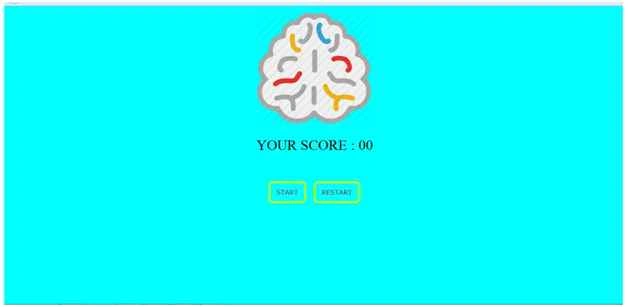
Figure 2: Mind Tickling Riddles Game Main Page
2. Start the game
3. You need to identify one tile which is not the same color with the other tiles.
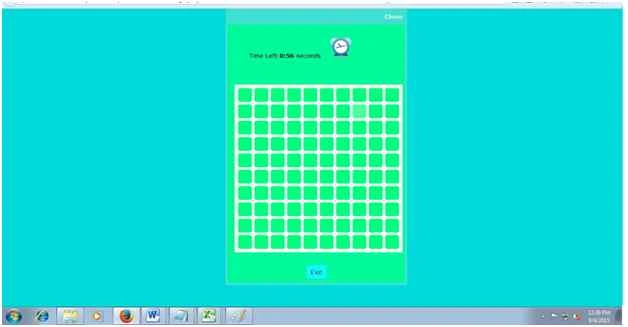
Figure 3: Mind Tickling Riddles Color Tiles
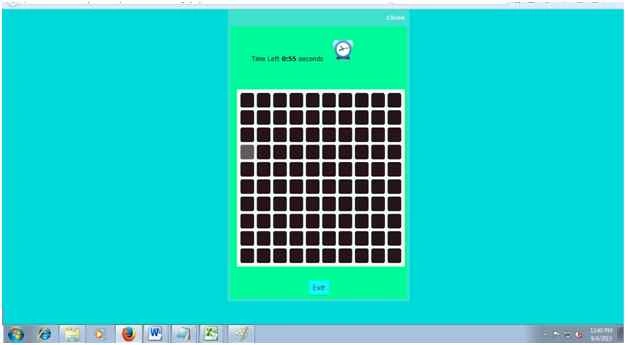
Figure 4: Mind Tickling Riddles Color Tiles
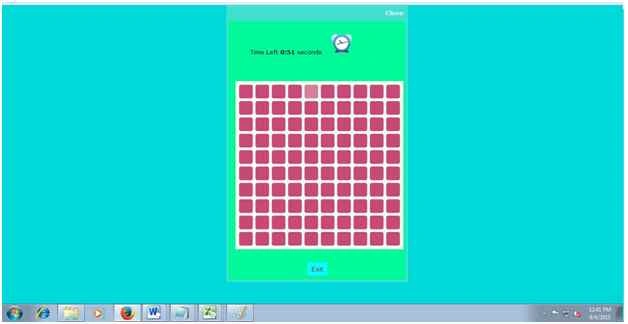
Figure 5: Mind Tickling Riddles Color Tiles
Figure 6: Mind Tickling Riddles Color Tiles
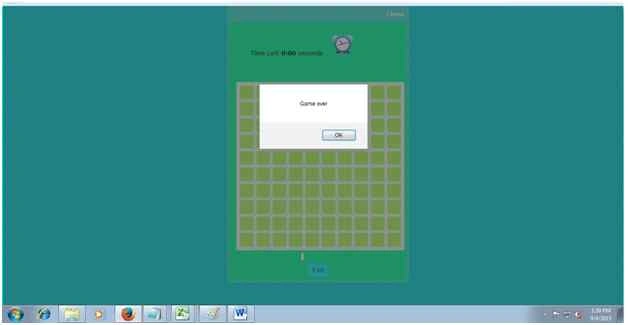
Figure 7: Game over alert
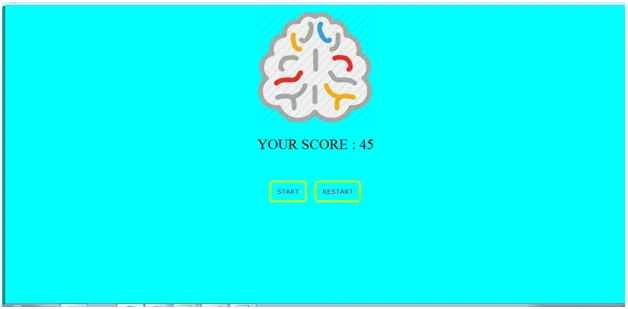
Figure 8: Score board
Conclusion
I hope you liked this useful article. It will be useful for jQuery beginners and developers. Please provide your valuable feedback and suggestions.
Live demo
Game Link: Jsfiddle
References
Prasanna MuraliPosted May 20, 2016, 11:24 AM
Nice one....
Sr KarthigaPosted Feb 26, 2016, 9:39 AM
good one
Sr KarthigaPosted Feb 26, 2016, 9:39 AM
nice explanation
Gowtham RajamanickamPosted Jan 5, 2016, 7:27 AM
Good article
Karthikeyan KPosted Sep 10, 2015, 11:34 AM
Thank you Sumedh sir...
Sumedh WaghrePosted Sep 10, 2015, 11:10 AM
great article as usual
Santhakumar MunuswamyPosted Sep 5, 2015, 4:03 AM
Keep it up Karthik
Santhakumar MunuswamyPosted Sep 5, 2015, 4:03 AM
Good work. Thanks for sharing us
Mohammed IbrahimPosted Sep 4, 2015, 5:27 PM
Nice
Shridhar SharmaPosted Sep 4, 2015, 2:49 PM
Very impressive one
Pankaj Kumar ChoudharyPosted Sep 4, 2015, 2:09 PM
Great Article Sir...........
Sumit JoshiPosted Sep 4, 2015, 11:43 AM
nice .
Amol SarkatePosted Sep 4, 2015, 10:36 AM
excellent
Rajeesh MenothPosted Sep 4, 2015, 9:49 AM
Good One Karthikeyan K ..Good Article :)
Upendra Pratap ShahiPosted Sep 4, 2015, 8:57 AM
good one dear..
Ashutosh PathakPosted Sep 4, 2015, 8:41 AM
Fantastic Man....