

Every time a new ASP.NET Core API project starts, the same conversation happens. Someone says, “Let’s use Minimal APIs, they’re modern and clean.” Someone else says, “Controllers are proven, let’s stay with them.” Ten minutes later nobody has changed their mind, and the meeting is over.
I’ve seen this play out more than once, and the odd part is that both people are usually right. So instead of picking a side, this article looks at what each approach does, where each one helps, and how to choose when the API has to run in production for years.
No heavy theory. Let’s keep it practical.
First, What Are We Actually Comparing?
Both Minimal APIs and Controllers do the same basic job. A request comes in from a browser or mobile app, and your code needs to:
- Find the right method for that URL
- Read the data from the request
- Check whether the user is allowed in
- Call your business logic
- Send back a proper response
Think of a restaurant. The waiter takes your order, passes it to the kitchen, and brings the food back. The waiter doesn’t cook. Minimal APIs and Controllers are two ways of training that waiter. The kitchen (your business logic) stays the same either way.
Controllers are the older, class-based style from ASP.NET MVC. You create a class, add methods (actions), and decorate them with attributes like [HttpGet] and [Authorize].
Minimal APIs came in .NET 6. You map a URL straight to a method, with far less ceremony and no controller class.
The Same API, Written Both Ways
Here’s a small Orders API: create an order and fetch an order.
Minimal API version:
public static class OrderEndpoints
{
public static IEndpointRouteBuilder MapOrderEndpoints(
this IEndpointRouteBuilder app)
{
var group = app.MapGroup("/api/v1/orders")
.WithTags("Orders")
.RequireAuthorization();

group.MapPost("/", CreateOrder);
group.MapGet("/{id:guid}", GetOrder);

return app;
}

private static async Task<IResult> CreateOrder(
CreateOrderRequest request,
IOrderService orderService,
CancellationToken ct)
{
var orderId = await orderService.CreateAsync(request, ct);
return TypedResults.Created(
$"/api/v1/orders/{orderId}", new { id = orderId });
}

private static async Task<IResult> GetOrder(
Guid id,
IOrderService orderService,
CancellationToken ct)
{
var order = await orderService.GetAsync(id, ct);
return order is null
? TypedResults.NotFound()
: TypedResults.Ok(order);
}
}
And in Program.cs, it’s just one line:
app.MapOrderEndpoints();Controller version:
[ApiController]
[Route("api/v1/orders")]
[Authorize]
public class OrdersController : ControllerBase
{
private readonly IOrderService _orderService;

public OrdersController(IOrderService orderService)
{
_orderService = orderService;
}

[HttpPost]
public async Task<IActionResult> Create(
CreateOrderRequest request, CancellationToken ct)
{
var orderId = await _orderService.CreateAsync(request, ct);
return CreatedAtAction(
nameof(Get), new { id = orderId }, new { id = orderId });
}

[HttpGet("{id:guid}")]
public async Task<IActionResult> Get(Guid id, CancellationToken ct)
{
var order = await _orderService.GetAsync(id, ct);
return order is null ? NotFound() : Ok(order);
}
}
Both give the exact same URLs, the same security and the same response. The difference is mostly how the code is arranged. Controllers use a class with a constructor and attributes. Minimal APIs use a mapping with dependencies passed straight into the method.
Notice that neither one contains business logic. Both just call IOrderService. That matters more than anything else in this article, and I’ll come back to it.
Two Myths That Cause Most of the Arguments
Myth 1: “Minimal APIs are only for small projects”
This comes from tutorials where everything sits inside Program.cs. That’s fine for a demo, but nobody should build a production system like that.
The example above shows the fix. You can group endpoints by feature, put each group in its own file, and keep Program.cs tiny. Route groups (MapGroup) let you apply authorization, tags and versioned URLs to a whole set of endpoints at once.
Minimal APIs support authentication, authorization, validation, OpenAPI, rate limiting and versioning. The framework isn’t the limit. Your folder structure is.
Myth 2: “Controllers are old and outdated”
Controllers aren’t going anywhere. Microsoft still supports and improves them, and a huge number of production systems run on them. If your team knows them well, that familiarity has real value.
A controller can also turn into a mess. I’ve seen controllers with 25 actions and eight injected services, all doing different jobs. Using controllers doesn’t automatically give you a clean design.
Comparing Them on Real Production Concerns
Here’s how they compare on the things that actually come up after launch.
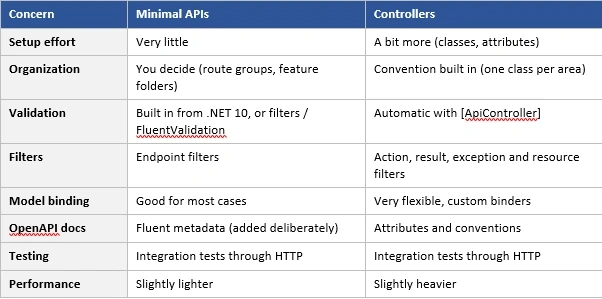
Let me comment on a few of these, because the table hides some nuance.
Validation
Controllers with [ApiController] have long returned a 400 Bad Request automatically when the request is invalid. Minimal APIs used to need extra work for this, usually an endpoint filter or FluentValidation.
That has changed. In .NET 10 you can switch on built-in validation:
builder.Services.AddValidation();After that, data annotation attributes like [Required] and [MaxLength] on your request models work with Minimal APIs too. If you’re on an older version, endpoint filters still do the job well.
Filters
Controllers have a rich filter system, which is handy if you’ve built a lot around it. Minimal APIs have endpoint filters, which handle the common cases like logging, validation and timing. Unless you use advanced MVC filters heavily, endpoint filters are enough.
OpenAPI documentation
Both support it. With Minimal APIs, though, you describe the possible responses yourself:
group.MapPost("/", CreateOrder)
.WithSummary("Creates a new order")
.Produces(StatusCodes.Status201Created)
.ProducesValidationProblem();
It’s easy to forget this on a busy day, and then your API docs are half empty. The framework doesn’t force the habit, so the team has to.
Performance
Yes, Minimal APIs have less overhead. In a real business API, though, that overhead is rarely your problem. Slow database queries, chatty external calls and missing caching cost far more time than the choice of endpoint style. Please don’t rewrite a working controller project just to save a few microseconds. Measure first.
Testing
The testing story is nearly the same. The best approach for both is integration tests using WebApplicationFactory, which run your real pipeline (routing, authorization, validation, serialization) and not just the method in isolation.
What Really Decides Whether Your API Stays Healthy
Here’s the part that matters most. Whichever style you pick, a production API stays maintainable when these things are true:
1. Endpoints stay thin. An endpoint or action should only translate the HTTP request into a call to your application layer and translate the result back. If you see database queries or business rules inside a controller action or a Minimal API handler, that’s the real problem, not the style.
2. Error handling is centralized. Don’t write try/catch in every endpoint. Use one exception handler and return consistent Problem Details responses. This works the same in both styles:
builder.Services.AddProblemDetails();
// ...
app.UseExceptionHandler();
3. Security lives at the right level. Use RequireAuthorization (or [Authorize]) to say who may call this endpoint. Then check inside your business logic whether the user may touch this specific record. Role checks alone won’t stop one customer from reading another customer’s order.
4. You return response models, not database entities. Exposing entities directly leaks internal fields and ties your API contract to your database. This one bites teams regardless of style.
Does Your Team Matter? Honestly, Yes
Technical features aside, people matter.
If you have a big team that already knows MVC well, controllers give everyone the same map: where to put things, which attribute to use, how filters behave. That consistency can be worth more than saving a few lines of code.
If you have a smaller team, or you organize code by feature (all the files for “Create Order” in one folder), Minimal APIs often feel more natural. You can open one folder and see the endpoint, request, validator and handler together.
Can You Use Both in One Project?
Yes, and it’s more common than people think. ASP.NET Core lets you register both:
builder.Services.AddControllers();
var app = builder.Build();

app.MapControllers(); // existing controllers
app.MapHealthChecks("/health"); // lightweight endpoints
app.MapOrderEndpoints(); // new feature in Minimal API style
This is a nice way to move a big legacy project gradually. New features go in Minimal APIs, and old controllers stay until there’s a reason to touch them.
The warning is to set a rule. Decide which style is used for what, and write it down. Without that, new developers won’t know where to put a new endpoint, and you end up with a confusing mix.
So, Which One Should You Choose?
Here’s my rule of thumb.
Go with Minimal APIs when:
- You’re starting a new project
- You like organizing code by feature
- You want less boilerplate and explicit configuration
- Your team is comfortable setting its own conventions
Go with Controllers when:
- You already have a working controller-based system
- Your team relies on MVC conventions, filters or custom model binders
- You need features like OData
- A rewrite would add risk and no real benefit
Use both when:
- You’re migrating gradually, or
- Different parts of the system genuinely need different things, and you have a clear rule for it
Notice that “small project vs large project” isn’t on that list. Size doesn’t decide this. Your structure, your team and your existing code do.
Common Mistakes to Avoid
- Putting every Minimal API route inside Program.cs. Use route groups and extension methods.
- Assuming controllers give you good structure for free. A fat controller is still a fat controller.
- Writing business logic inside endpoints. Both styles should only call your application layer.
- Choosing based on boilerplate alone. Fewer lines don’t mean easier maintenance.
- Skipping OpenAPI metadata in Minimal APIs. Add it as you go, not at the end.
- Mixing both styles without a rule. Decide up front what goes where.
- Rewriting a healthy API because another style is trending. If it’s tested, readable and fast enough, leave it.
Wrapping Up
Minimal APIs and Controllers aren’t a “modern vs outdated” choice, and they aren’t a “beginner vs professional” choice either. They’re two ways to build the same front door for your application.
Minimal APIs give you a lighter, feature-focused style. Controllers give you mature conventions and more built-in extensibility. Either can run a serious production system, and either can turn into a mess if the code behind it is a mess.
So pick the one that fits your team and your project, keep your endpoints thin, centralize validation and error handling, and test through the real HTTP pipeline. Do that, and the choice of endpoint style will matter much less than the arguments about it suggest.
If you’ve moved a project from one style to the other, or you’re stuck choosing for a new one, drop a comment. I’d like to hear what worked for you.
Join the conversation! Your thoughts help the community grow.