

Introduction
In this article, we will learn how to validate the mobile number in ReactJS application.
Prerequisites
- Basic knowledge of ReactJS
- Visual Studio Code
- Node and NPM installed
- Bootstrap
Create a React.js Project
Let's create a new React project by using the following command.
npx create-react-app numvalidation
Add Bootstrap (Optional)
Install bootstrap using the following command.
npm install bootstrap
Now, open the index.js file and add import Bootstrap.
import 'bootstrap/dist/css/bootstrap.min.css';
Now go to the src folder and create a new component, 'Mobilenumbervalidation.js'. Add the following code to this component.
import React from 'react';

class Mobilenumbervalidation extends React.Component {
    constructor() {
        super();
        this.state = {
            input: {},
            errors: {}
        };

        this.handleChange = this.handleChange.bind(this);
        this.handleSubmit = this.handleSubmit.bind(this);
    }

    handleChange(event) {
        let input = this.state.input;
        input[event.target.name] = event.target.value;

        this.setState({
            input
        });
    }
    handleSubmit(event) {
        event.preventDefault();
        if (this.validate()) {
            console.log(this.state);
            let input = {};
            input["Mobilenumber"] = "";
            this.setState({ input: input });
            alert('Mobile Numver submited Successfully');
        }
    }
    validate() {
        let input = this.state.input;
        let errors = {};
        let isValid = true;
        if (!input["Mobilenumber"]) {
            isValid = false;
            errors["Mobilenumber"] = "Please enter your Mobile Number.";
        }

        if (typeof input["Mobilenumber"] !== "undefined") {

            var pattern = new RegExp(/^([+]?[\s0-9]+)?(\d{3}|[(]?[0-9]+[)])?([-]?[\s]?[0-9])+$/i);
            if (!pattern.test(input["Mobilenumber"])) {
                isValid = false;
                errors["Mobilenumber"] = "Please Enter Number Only";
            } else if (input["Mobilenumber"].length != 10) {
                isValid = false;
                errors["Mobilenumber"] = "Please enter valid  Mobile Number.";
            }
        }


        this.setState({
            errors: errors
        });

        return isValid;
    }

    render() {
        return (
            <div className='container'>
                <div class="row " className="header">
                    <div class="col-sm-12 btn btn-info">
                        How to create a Signature pad in ReactJS Application
                    </div>
                </div>
                <form onSubmit={this.handleSubmit}>
                    <div class="row form-group">
                        <div class="col-sm-4">
                            <label class="control-label col-sm-4" for="Mobilenumber">Mobile Number:</label>
                        </div>
                        <div class="col-sm-8">
                            <input
                                type="text"
                                name="Mobilenumber"
                                value={this.state.input.Mobilenumber}
                                onChange={this.handleChange}
                                class="form-control"
                                placeholder="Enter Mobile Number"
                                id="email" />
                        </div>
                        <div className="text-danger mrgnbtn">{this.state.errors.Mobilenumber}</div>
                    </div>

                    <input type="submit" value="Submit" class="btn btn-info mrgnbtn" />
                </form>
            </div>
        );
    }
}

export default Mobilenumbervalidation;
Open app.css file and add the following CSS.
.mrgnbtn{
  margin-top: 10px;
  margin-left: 622px;
}
.header{
  margin: 20px;
}
Add a reference of this component in an app.js file.
import logo from './logo.svg';
import './App.css';
import Mobilenumbervalidation from './Mobilenumbervalidation';
function App() {
  return (
    <div className="App">
      <Mobilenumbervalidation/>
    </div>
  );
}
export default App;
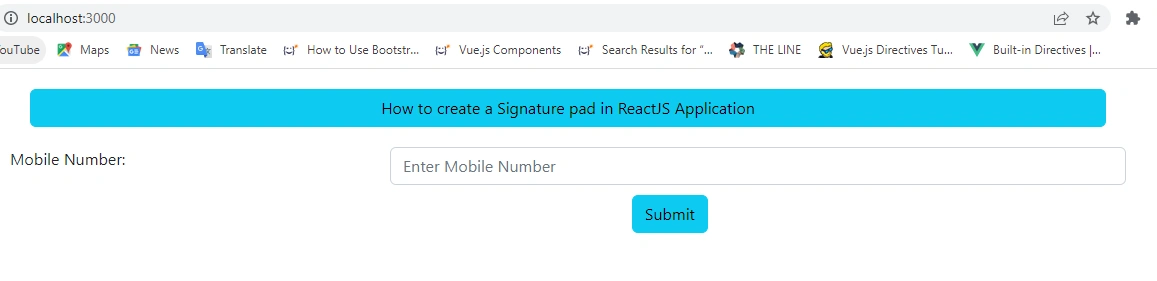
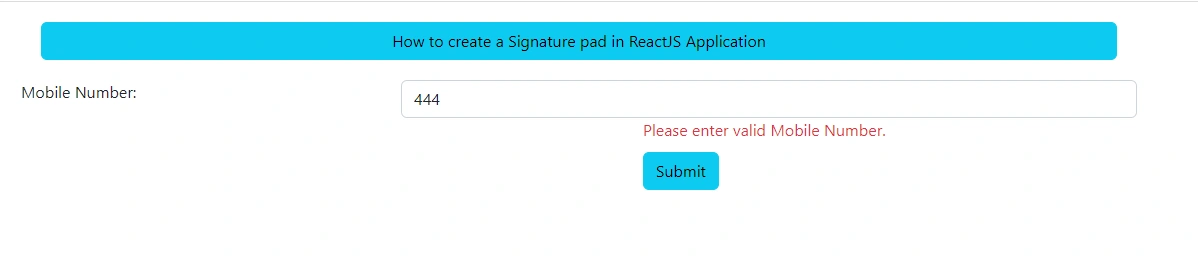
Now, run the project by using the 'npm start' command, and check the result.
Summary
In this article, we learned how to validate the mobile number in ReactJS application.
Join the conversation! Your thoughts help the community grow.