

Introduction
In this article, we learn steps to implement 10-digit mobile number validation in the angular app using the angular phone number validation pattern. Here we validate mobile numbers in Angular with reactive forms. Reactive forms offer a model-driven path for managing form inputs whose values change over time. It explains the steps to create and update an essential form control for 10-digit mobile number validation in Angular. Here, we create a simple dynamic form where you can use a mobile number validation pattern under the angular application’s component.
Note. Before going through this session, please visit my previous article related to Angular applications as mentioned below.
Step 1. Import Reactive Forms Module
Here we import the reactive forms module, open src/app/app.module.ts, and update the code in the file.
import { NgModule } from '@angular/core';
import { BrowserModule } from '@angular/platform-browser';
import { AppComponent } from './app.component';
import { FormsModule, ReactiveFormsModule } from '@angular/forms';

@NgModule({
  declarations: [AppComponent],
  imports: [BrowserModule, FormsModule, ReactiveFormsModule],
  providers: [],
  bootstrap: [AppComponent],
})
export class AppModule {}
Step 2. Update TypeScript Template
Here, we import FormBuilder, FormGroup, and Validators from ‘@angular/forms’, then define the form using FormGroup use the mobile number pattern using the regex, and bind it to the submit method. Add code in src/app/app.component.ts file.
import { Component } from '@angular/core';
import { FormBuilder, FormGroup, Validators } from '@angular/forms';

@Component({
  selector: 'app-root',
  templateUrl: './app.component.html',
  styleUrls: ['./app.component.css']
})
export class AppComponent {
  public myForm: FormGroup;

  constructor(private formBuilder: FormBuilder) {
    this.myForm = formBuilder.group({
      mob: ['', [Validators.required, Validators.pattern("^((\\+91-?)|0)?[0-9]{10}$")]]
    });
  }

  get m() {
    return this.myForm.controls;
  }

  onSubmit() {
    console.log(this.myForm.value);
  }
}
The mobile number validation logic is configured here.
this.myForm = this.formBuilder.group({
  mob: ['', [Validators.required, Validators.pattern("^((\\+91-?)|0)?[0-9]{10}$")]]
});
Step 3. Update HTML File
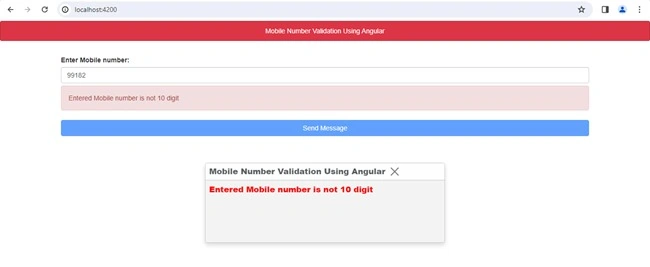
Here, we create a form using form Group and ngSubmit directives and define the phone number input field using the form control name directive. Also, define the inline phone number validation with the required 10-digit mobile number validation message. Add code in the src/app/app.component.html file.
<div class="card bg-danger text-white">
  <div class="card-body text-center">
    Mobile Number Validation Using Angular
  </div>
  </div>
  <div class="container mt-5">
    <form [formGroup]="myForm" (ngSubmit)="onSubmit()" novalidate>
      <div class="form-group">
        <label>Enter Mobile number: </label>
        <input type="text" formControlName="mob" class="form-control mb-2">
        <div *ngIf="m.mob.touched && m.mob.invalid" class="alert alert-danger">
          <div *ngIf="m.mob.errors?.required">Please enter mobile number</div>
          <div *ngIf="m.mob.errors?.pattern">Entered Mobile number is not 10 digit</div>
        </div>
        <div class="toast show"
        style="position:fixed;
               top: 70%;
               left: 50%;
               width:30em;
               height:10em;
               margin-top: -9em; /*set to a negative number 1/2 of your height*/
               margin-left: -15em; /*set to a negative number 1/2 of your width*/
               border: 1px solid #ccc;
               background-color: #f3f3f3;
               color: red;
               font-weight:900;
               font-size:larger;"
               *ngIf="m.mob.touched && m.mob.invalid">
               <div class="toast-header">
                Mobile Number Validation Using Angular
                <button type="button" class="btn-close" data-bs-dismiss="toast"></button>
              </div>
          <div class="toast-body" *ngIf="m.mob.errors?.required">Please enter mobile number</div>
          <div class="toast-body" *ngIf="m.mob.errors?.pattern">Entered Mobile number is not 10 digit</div>
        </div>
      </div>
      <div class="d-grid mt-3">
        <button class="btn btn-primary" [disabled]="!myForm.valid" type="submit">Send Message</button>
      </div>
    </form>
  </div>
Join the conversation! Your thoughts help the community grow.