
Introduction : Modal Popups are commonly seen in desktop applications. The Modal Popup Extender allow pages to display content to the user in a modal manner which prevents the user from interacting from with the rest of the page.
Modal Popup Extender Control properties.
- DropShadow.
- CancelControl ID.
- Ok Control ID.
- TargetControl ID.
A GridView displays the value of a data source in a table where each column represents a field and each row represents a record.
Step : 1 Open Visual Studio->File option->New.
- Select WebSite->ASP.NET Web Site.
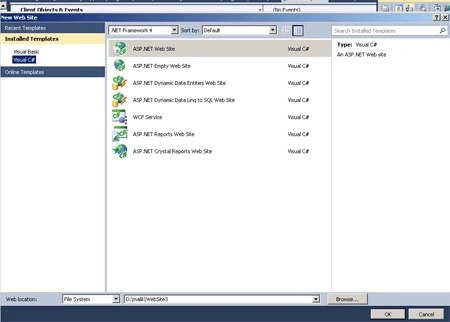
Step : 2 Go to Solution Explorer->Right Click.
- Select Add New Item->Web Form.
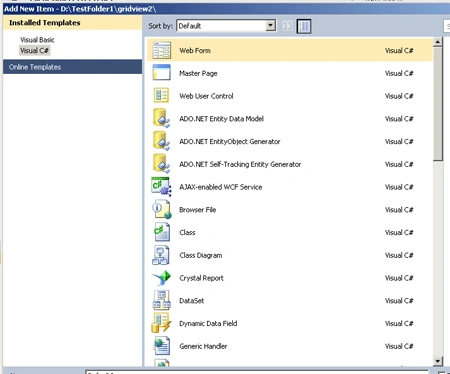
Step : 3 Go to Design option->Double Click.
- Drag a control in Toolbox.
- ScriptManager control, SqlDataSource, GridView, ImageButton, ModalPopupExtender, Panel.
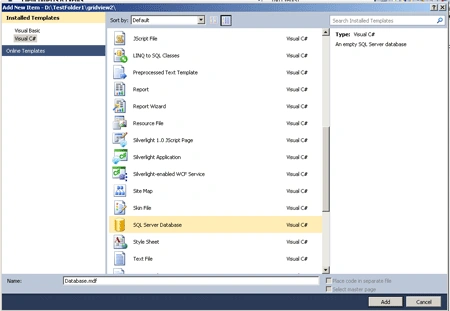
Step : 4 Now Solution Explorer->Right click.
- Select Add New Item->SQL Server Database.
- Server Explorer->Table->Add New Table.
- Make a Connectivity with SQL Server.
Step : 5 Now write the following code.
Code :
<title>
grid view</title>
</head>
<body>ImageButton
<form
id="form1"
runat="server">
<div>
<br
/>
<br />
<br
/>
<br
/>
<asp:ImageButton
ID="ImageButton1"
runat="server"
ImageUrl =
"~/Water lilies.jpg"
onclick="ImageButton1_Click"
Height="122px"
Width="134px"
/>
<br
/>
<asp:GridView
ID="GridView1"
runat="server"
AutoGenerateColumns =
"False" DataSourceID
= "SqlDataSource1"
CellPadding
= "2"
GridLines ="None"
>
<Columns>
<asp:BoundField
DataField =
"Fname" HeaderText
= "Fname"
SortExpression =
"Fname" />
<asp:BoundField
DataField =
"Lname" HeaderText
= "Lname"
SortExpression =
"Lname" />
<asp:BoundField
DataField="Email_id"
HeaderText="Email_id"
SortExpression="Email_id"
/>
<asp:BoundField
DataField="Mobile no"
HeaderText="Mobile no"
SortExpression="Mobile
no" />
<asp:BoundField
DataField="Address"
HeaderText="Address"
SortExpression="Address"
/>
</Columns>
</asp:GridView>
<br
/>
<asp:SqlDataSource
ID="SqlDataSource1"
runat="server"
ConnectionString="<%$
ConnectionStrings:EmployeeConnectionString %>"
SelectCommand="SELECT
* FROM [student3]"></asp:SqlDataSource>
<asp:Panel
ID="Panel1"
runat="server"
Style =
"display:none;">
<table>
<caption>
<td
colspan="2">
<asp:Label
ID="lbl"
runat="server"
ForeColor="White">age:</asp:Label>
<asp:TextBox
ID="TextBox1"
runat="server"></asp:TextBox>
</td>
</caption>
<tr>
<td
align="left">
<asp:Button
ID="btn" runat="server"
Text="submit"
OnClick="btn_Click"
/>
</td>
<td
align="right">
</td>
</tr>
</table>
</asp:Panel>
</div>
</form>
</body>
</html>
Step : 6 Go to Design option
and double click in ImageButton.
- Write the following code.
Code :
public
partial class
data : System.Web.UI.Page
{
protected void
Page_Load(object sender,
EventArgs e)
{
btn.OnClientClick = String.Format("functionPostback('{0}','{1}')", btn.ID,
"");
}
protected void
btn_Click(object sender,
EventArgs e)
{
btn.OnClientClick = String.Format("functionPostback('{0}','{1}')",
btn.UniqueID, "");
}
protected
void ImageButton1_Click(object
sender, ImageClickEventArgs e)
{
GridViewRow row = ((GridViewRow)((ImageButton)sender).NamingContainer);
AjaxControlToolkit.ModalPopupExtender
mpe =
(AjaxControlToolkit.ModalPopupExtender)row.FindControl("mpe");
TextBox1.Text = "";
mpe.Show();
}
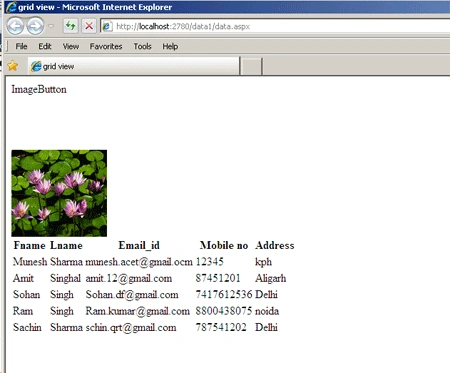
Step : 7 Press F5 and
run.
Upamanyu Roy ChoudhuryPosted Feb 21, 2013, 12:13 AM
good one
gopinath ChandrasekaranPosted Nov 9, 2011, 1:06 AM
great article..good......
gopinath ChandrasekaranPosted Nov 9, 2011, 1:06 AM
tt